
Ask a few designers how the UX design process works, and you’ll likely get slightly different answers.
Some teams follow structured frameworks. Others adapt their workflow depending on the product, timeline, or available research. This flexibility allows teams to adjust their approach and make the right decisions at the right time.
Still, most successful product teams rely on a similar set of UX steps to guide their work. In this article, we’ll take a closer look at what the design process looks like and walk through the steps designers follow when building digital products.
What is the UX design process?
The UX design process is a structured approach to designing products that solve real problems for real users. It typically involves a series of steps that help teams understand users, explore solutions, and validate ideas before building them.
Although different teams organize the UX process in different ways, most approaches include a similar set of activities: researching users, defining problems, generating ideas, designing solutions, and testing them with real people.
These stages don’t always happen in a strict order. In many projects, teams move back and forth between them as they learn more about the product and its users.
Why does the UX design process exist?
Because building digital products involves a lot of uncertainty, teams make dozens of decisions about features, interfaces, and user flows, often without knowing exactly how people will respond. The UX design process helps reduce that uncertainty.
The UX process exists for three main reasons:
- Reduce product risk.
- Align cross-functional teams.
- Connect user value with business value.
Throughout the process, teams gather valuable insights from users through research, testing, and feedback. These insights help validate the core idea behind a product and ensure the team is building the right solution with the right features.
The 3 most common UX process models
While the UX process follows similar principles across teams, there isn’t a single universal framework. Among the many approaches, three models appear most often: Design Thinking, the Linear UX process, and the Double Diamond model.
Design thinking
One of the most widely used frameworks in UX is Design Thinking. In simple words, it’s a human-centered approach to problem solving that focuses on understanding users first and designing solutions around their real needs.
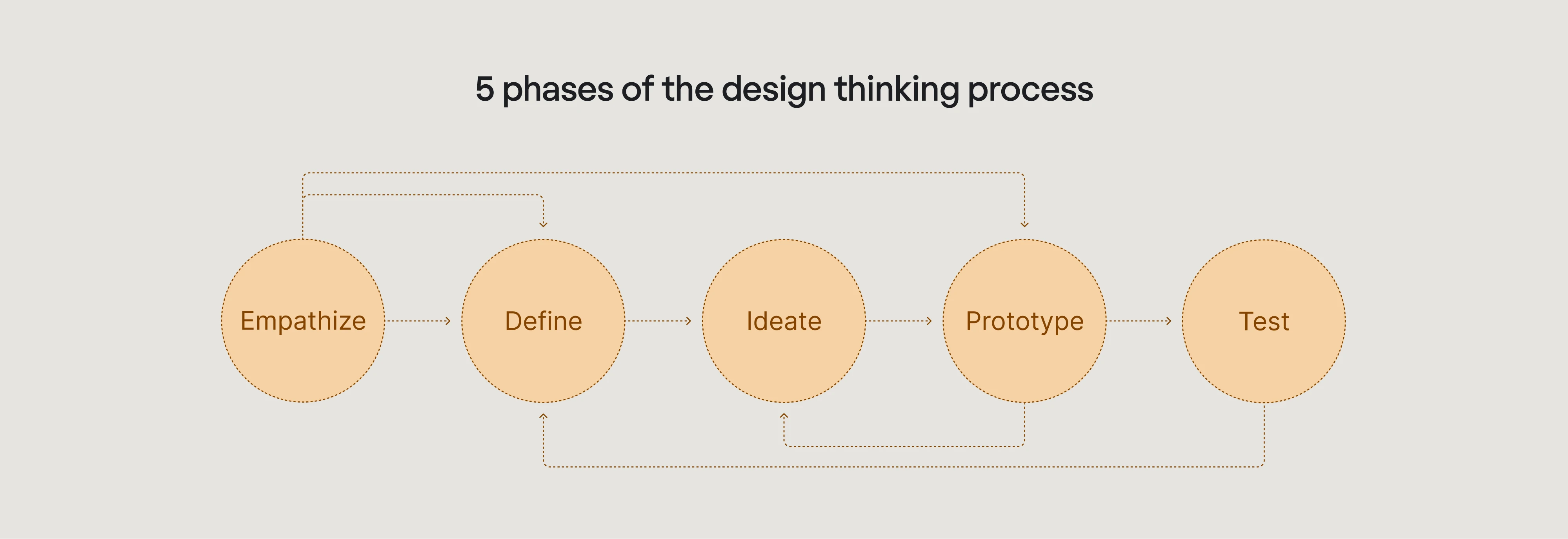
The Design Thinking model usually includes five stages:
- Explore;
- Define;
- Ideate;
- Prototype;
- Test.
At Eleken, Design Thinking is the foundation of our approach to designing SaaS products. Through user research, rapid prototyping, and iterative testing, we help teams discover the right solutions before investing heavily in development.
A good example is our case with PayUp, a financial startup that wanted to scale quickly. To support that goal, our designer worked in fast iterations using the Design Thinking framework. Moving through the five stages, and often returning to earlier ones, we delivered a solution that met both user and business needs.
Linear UX
Another way to organize the UX design is the Linear UX model. Unlike Design Thinking, which encourages constant iteration, this approach structures the work as a clear sequence of steps that teams follow from start to finish.
This model is often used in projects where requirements are well defined, and the team needs a predictable workflow. Each phase builds on the previous one, helping teams move from understanding the problem to delivering the final product.
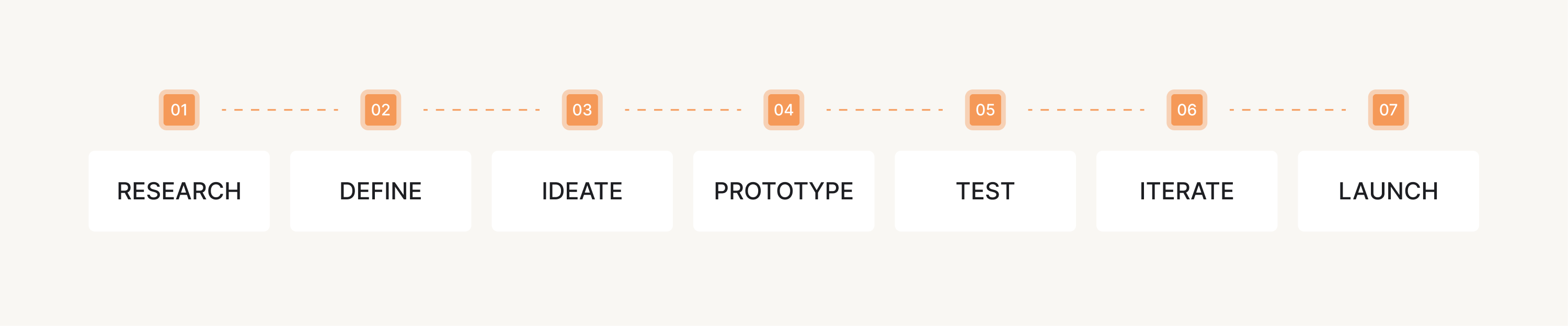
A typical linear UX process includes several stages:
- Research;
- Define;
- Ideate;
- Prototype;
- Test;
- Iterate;
- Launch.
This process works well for structured environments because it provides clear milestones. However, in modern product teams, it’s often combined with iterative practices, allowing designers to revisit earlier stages when new insights appear.
Double Diamond
Many teams structure their design work using the Double Diamond model, a framework introduced by the UK Design Council. This model visualizes the design process as two phases of exploration followed by two phases of focus.
In simple terms, teams first expand their understanding of the problem, then narrow it down to the most important insights and priorities. After that, they explore possible solutions and finally refine the best one.
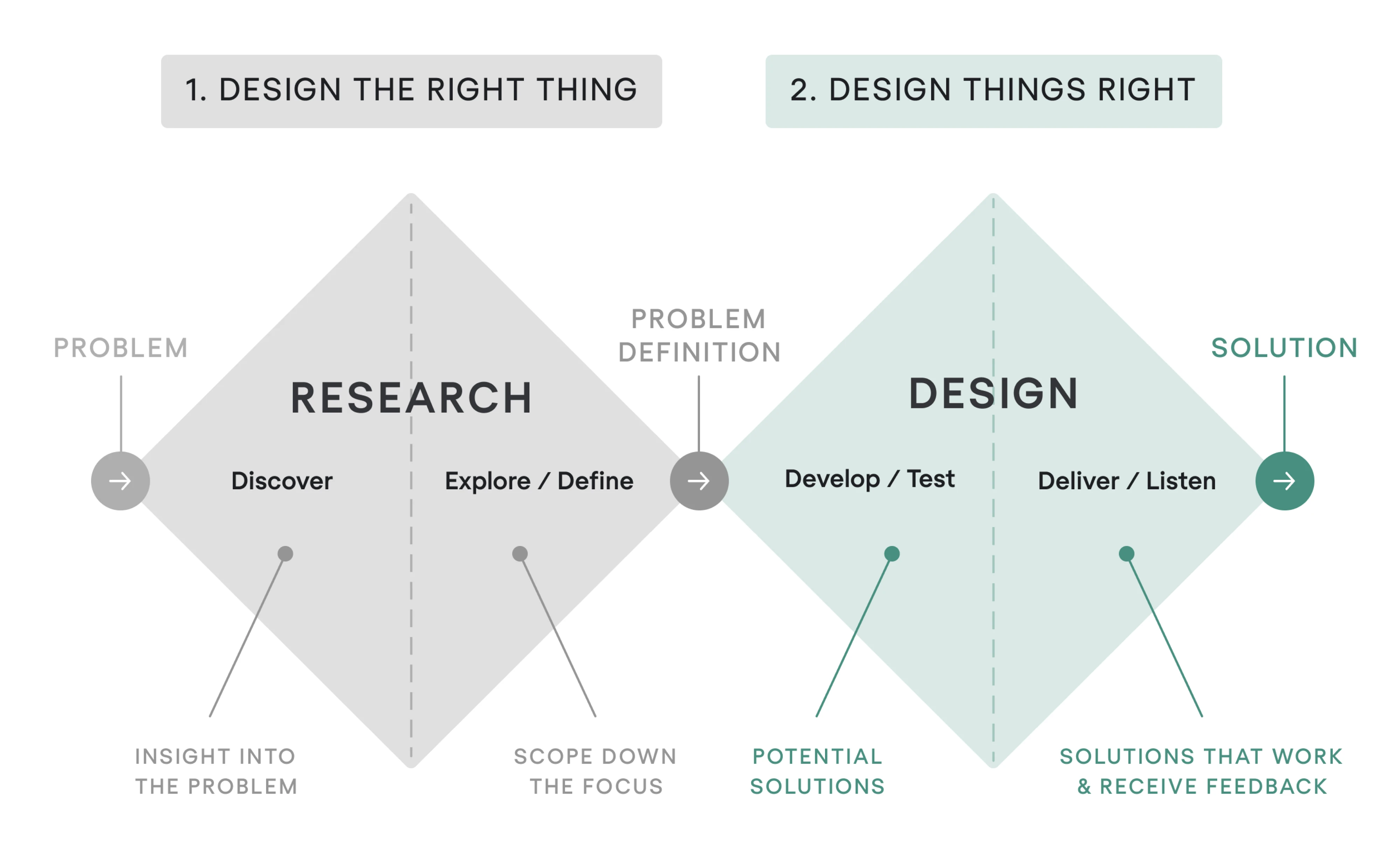
The model consists of four key stages:
- Discover;
- Define;
- Develop;
- Deliver.
Considering that different projects have different requirements, we at Eleken used this framework when collaborating with Cylynx, a graph intelligence platform. Their product existed only as a limited demo, and our challenge was understanding how users work with graph data and what situations they encounter when analyzing it.
Using the Double Diamond approach, our designer first explored the problem space through research and discovery, then synthesized insights to shape a clearer product direction. This process helped us design an MVP with improved usability.
The step-by-step UX design process
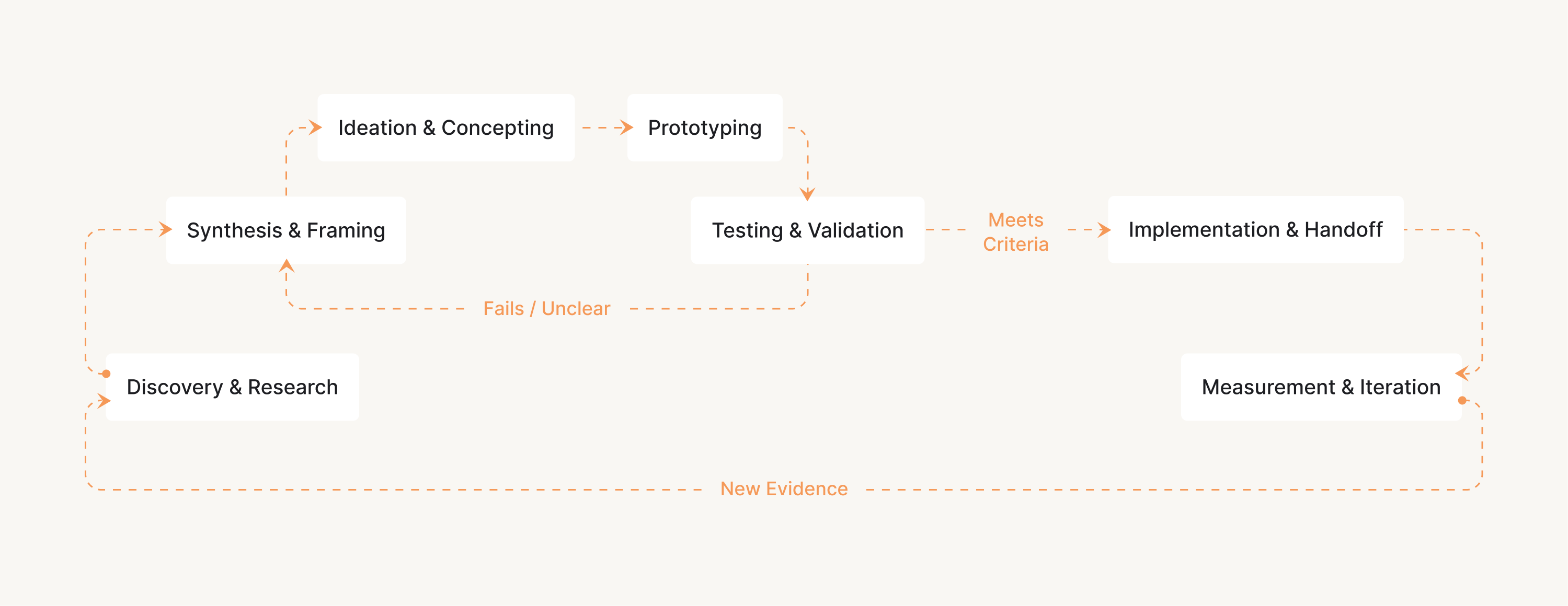
Although UX design is often described as an iterative process, most projects still follow a logical sequence of steps. In this section, we’ll walk through the standard stages and explain what typically happens at each of them.
Step 1 — Define the problem
The first step in the UX design process is to clearly define the problem the product is meant to solve for its users. Before thinking about features or visual design, teams need to understand what users are trying to achieve.
Designers work with product managers and stakeholders to clarify the product’s purpose and identify the user needs. Without this step, teams risk designing features that look impressive but fail to solve a meaningful problem.
To define the problem, UX designers typically focus on several key questions:
- Who are the target users?
- What task are they trying to accomplish?
- What obstacles prevent them from achieving it easily?
- What outcome would represent a successful solution?
Another useful practice is identifying the core user's job. For this, designers look at the real-life situation users are in and the outcome they’re trying to achieve. This perspective helps teams stay focused on solving the right problem.
Step 2 — Conduct UX research
Once the problem is clearly defined, the next step is to gather evidence about the people the product is designed for. UX research helps teams understand how users behave, what they need, and where existing solutions fall short.
Designers typically combine several research methods depending on the project scope and available resources. Some of the most common approaches include:
- UX audit.
- User interviews.
- Heuristic evaluation.
- Surveys and questionnaires.
- Analytics and product data analysis.
- Competitive analysis.
- Contextual inquiry.
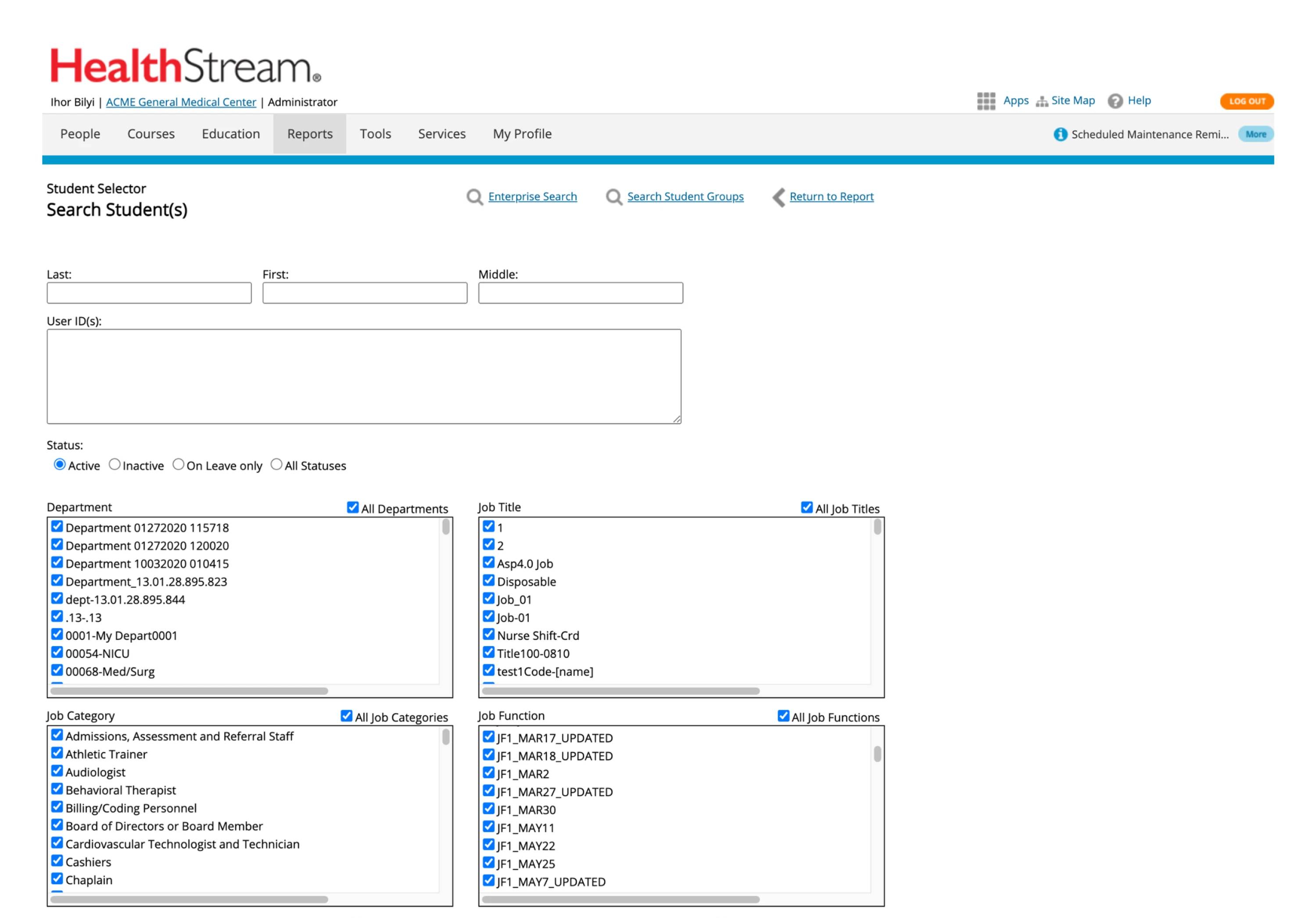
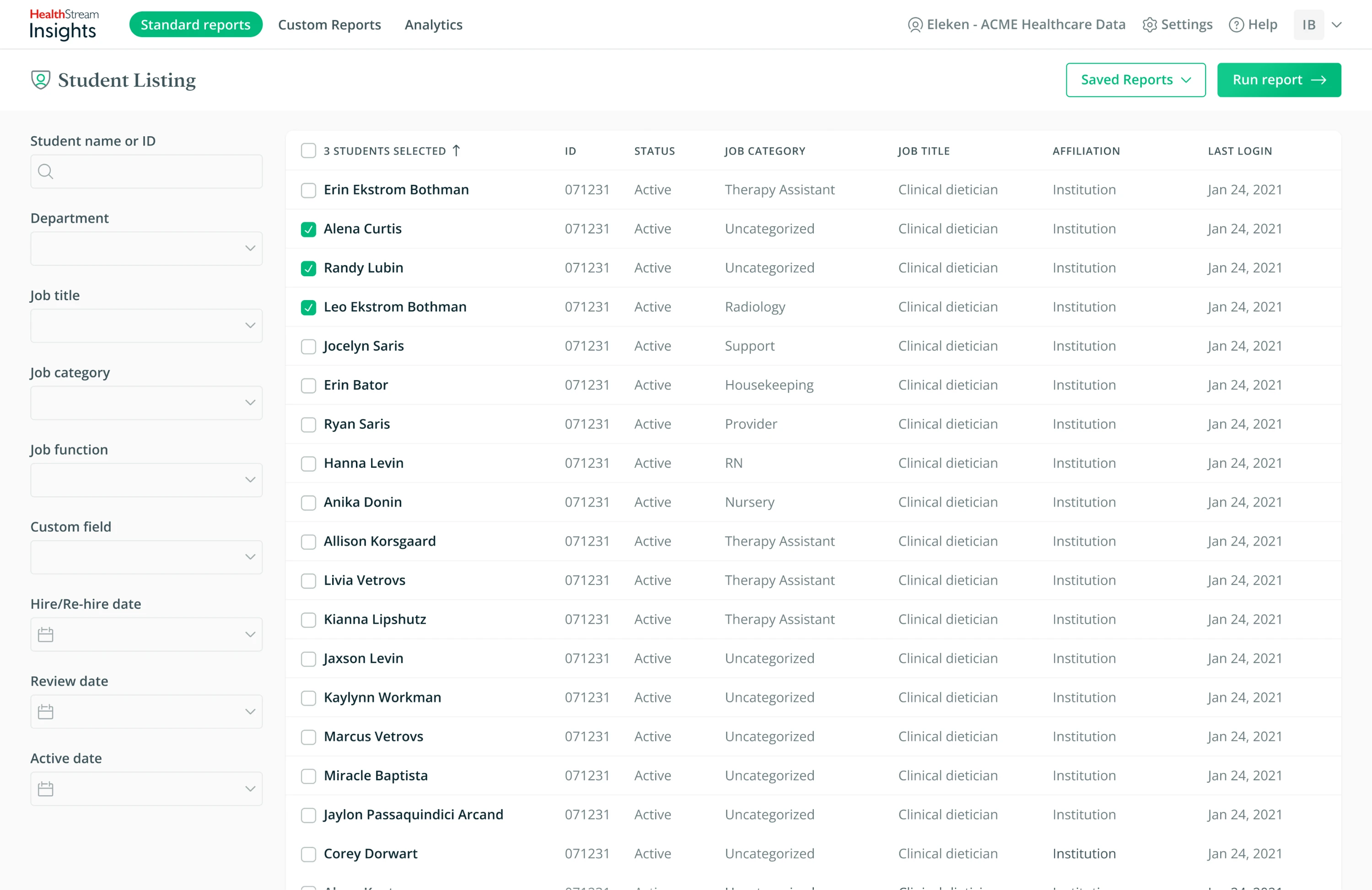
For example, when our team at Eleken worked on HealthStream Insights, a reporting tool used in healthcare administration, the client initially believed their system required a complete redesign with highly customizable features.
After conducting research, we discovered that most users preferred standardized reports with limited customization. Based on these insights, our designer redesigned the user flow and created a prototype. Later usability testing confirmed that the updated reporting experience worked well for real users.
Step 3 — Synthesize research insights
After research, designers usually end up with a large amount of information: interview notes, survey results, analytics data, and usability observations. The goal of the next step is to synthesize these findings and turn them into clear insights.
Research synthesis helps teams identify patterns in user behavior, uncover recurring problems, and understand what matters most to their users. Without this step, research data often remains scattered and difficult to apply.
To organize research findings, designers typically use several techniques:
- Affinity mapping — Grouping insights into patterns.
- User personas — Defining key user types.
- User journey maps — Visualizing the user experience.
- Opportunity mapping — Finding areas for improvement.
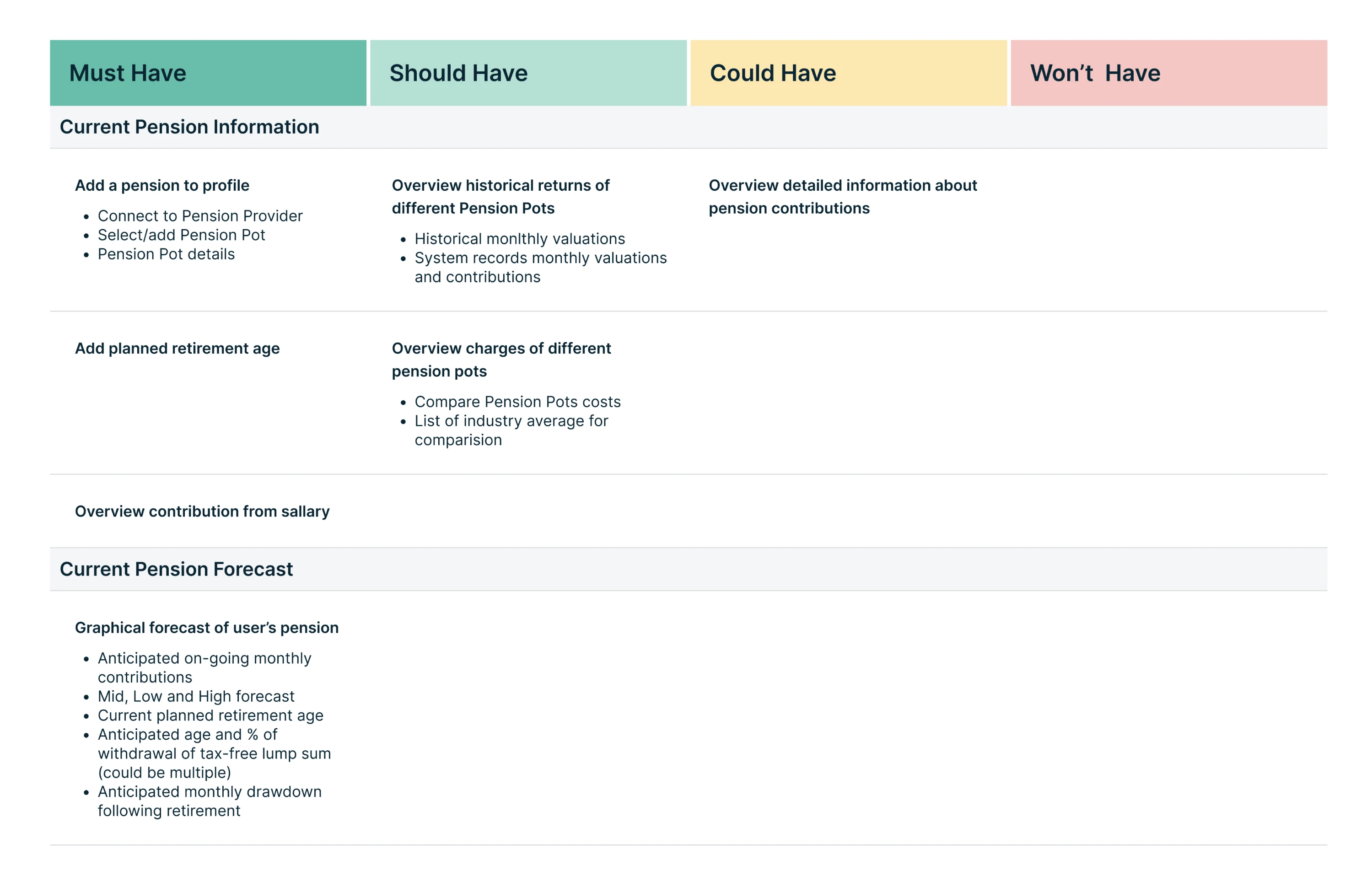
Another important outcome of this stage is prioritizing problems. Not every insight discovered during research will require immediate action, so teams evaluate which issues have the biggest impact on user experience and business goals.
The same goes for features. Once designers understand user needs and pain points, they need to determine which features will help solve those problems. At this stage, teams prioritize the functionality that delivers the most value.
At Eleken, we applied this while working on Prift, a finance platform. The goal was to design an MVP that would deliver real value to users. To do this, our designer compiled a list of potential features and prioritized them using the MoSCoW method.
Step 4 — Ideate potential solutions
With a clearly defined problem and solid research insights, the next step is to explore possible ways to solve it. The goal of the ideation stage is to generate a range of ideas that could effectively address users’ needs and expectations.
During ideation, designers deliberately explore different directions before narrowing them down to the most promising ones. This helps teams avoid settling on the first idea that comes to mind and encourages thoughtful design solutions.
Design teams often use these ideation techniques to generate ideas:
- Brainstorming sessions.
- Sketching and concept exploration.
- Crazy 8s.
- Design workshops.
- Storyboarding.
- How Might We (HMW) questions.
At Eleken, we often use brainstorming to explore multiple ideas and evaluate which concepts could best address user needs. In some cases, we also present several design concepts to help clients choose the most promising direction.
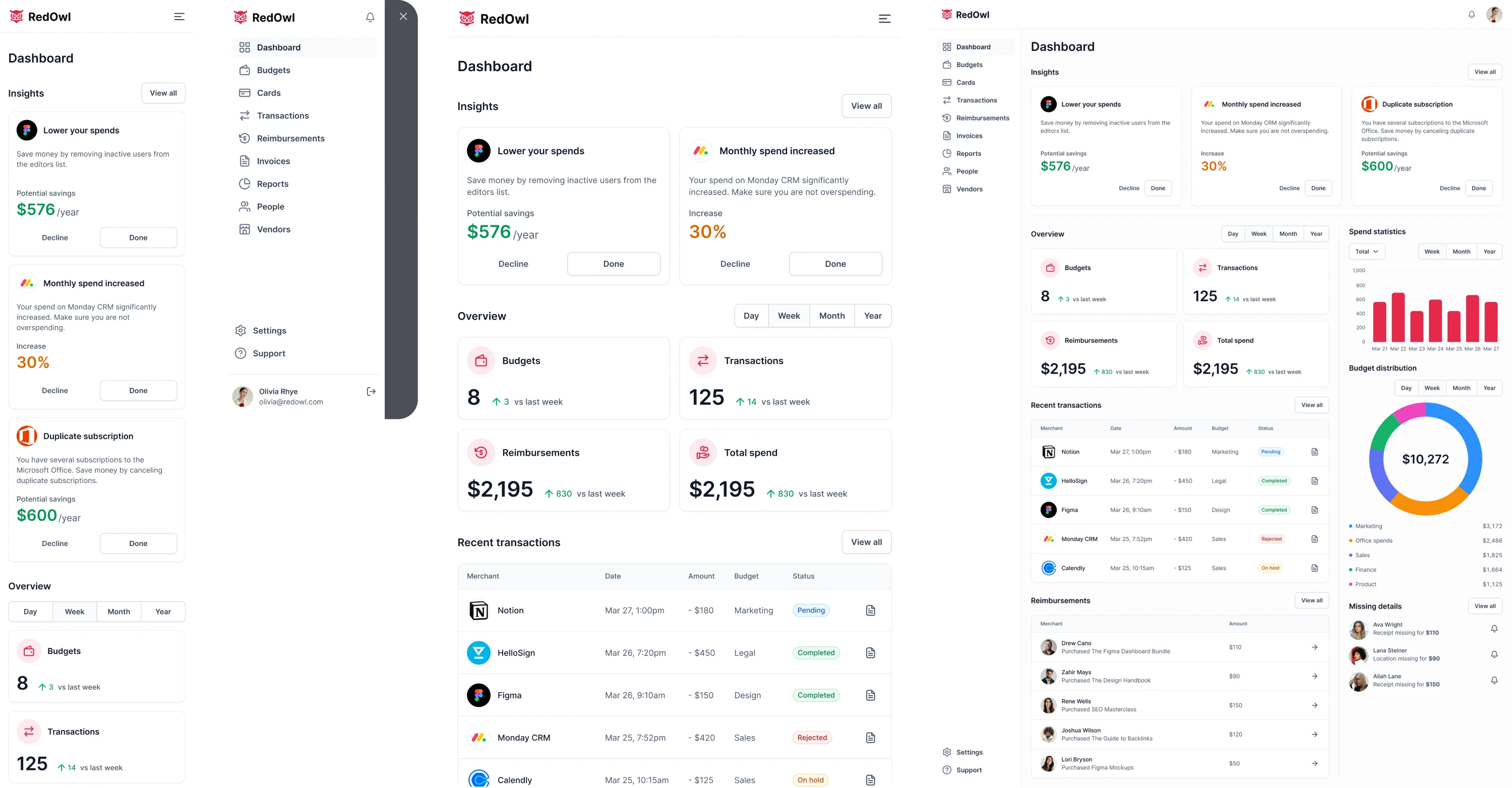
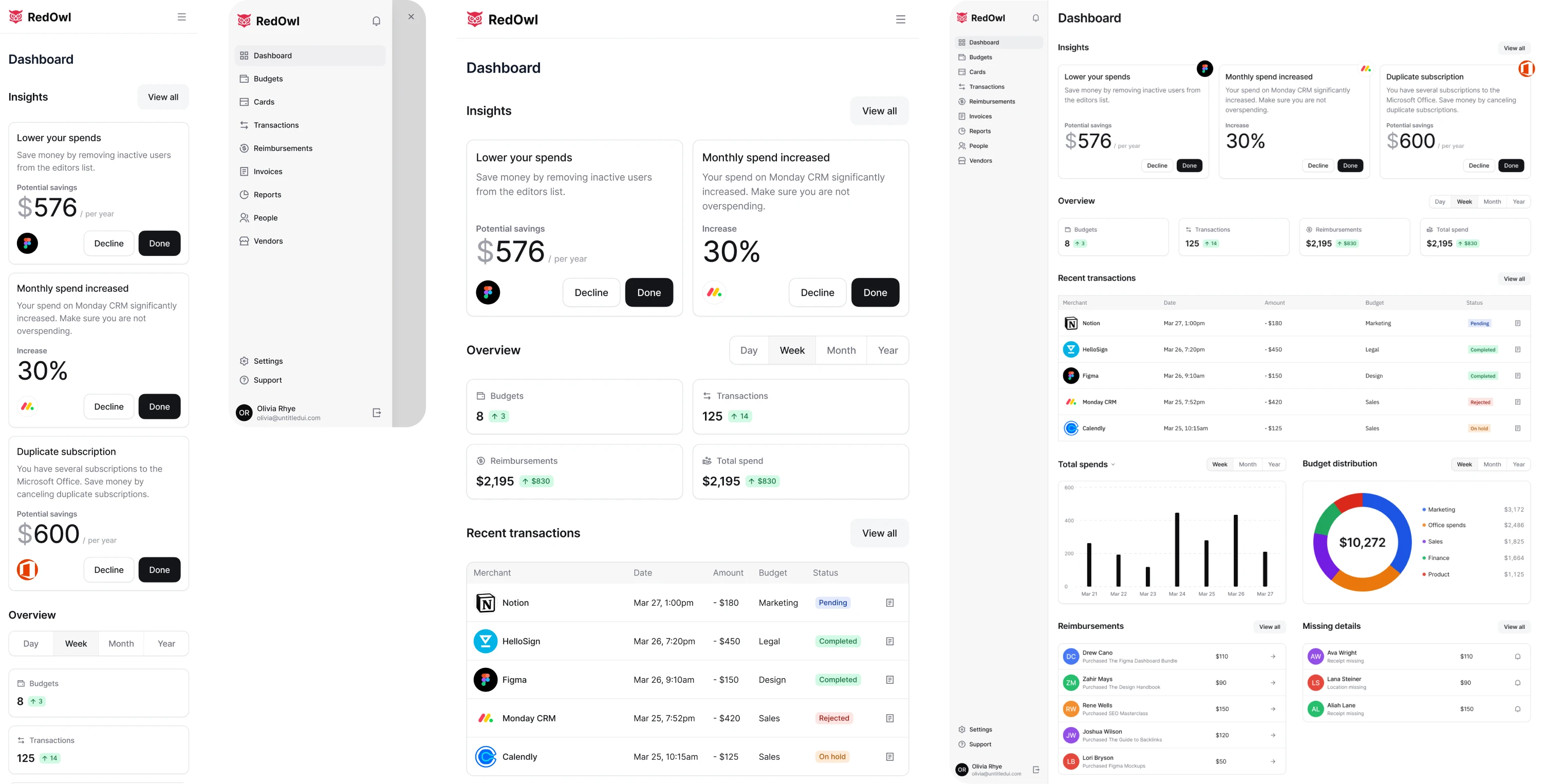
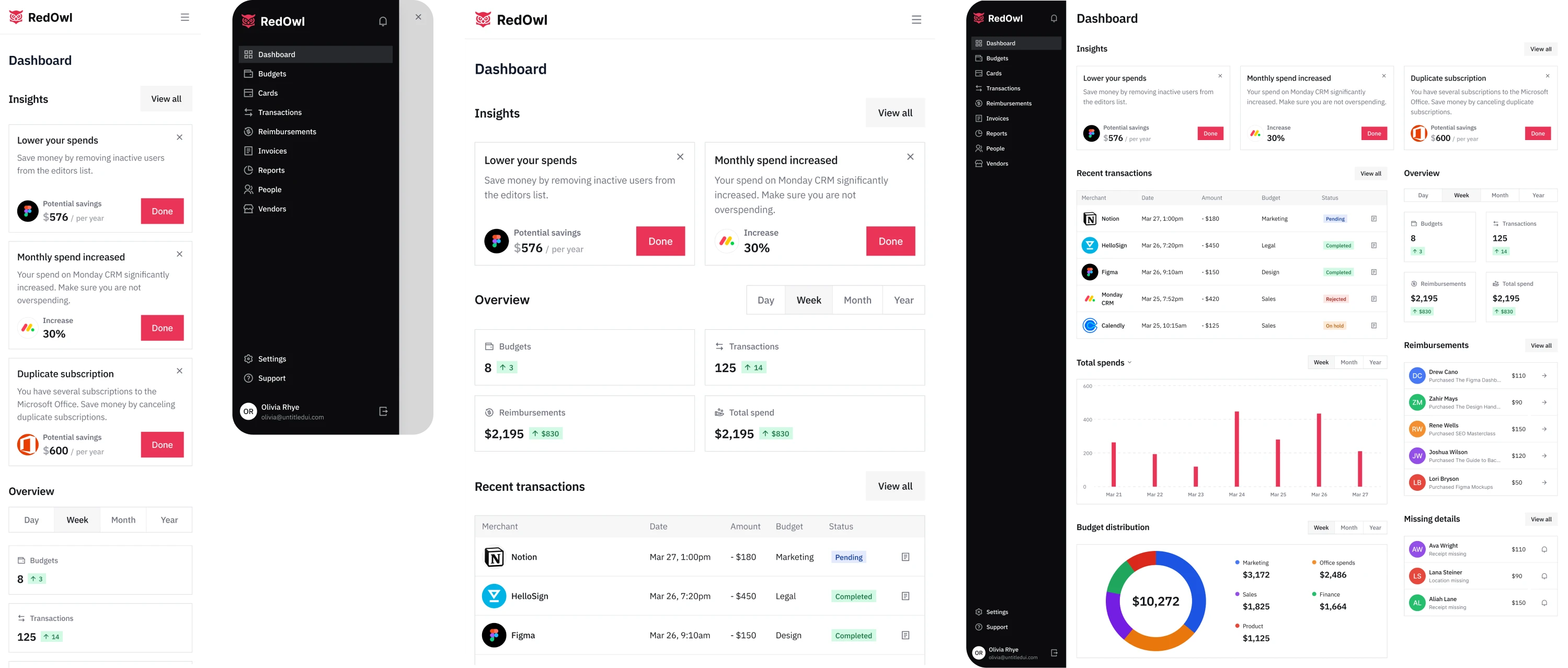
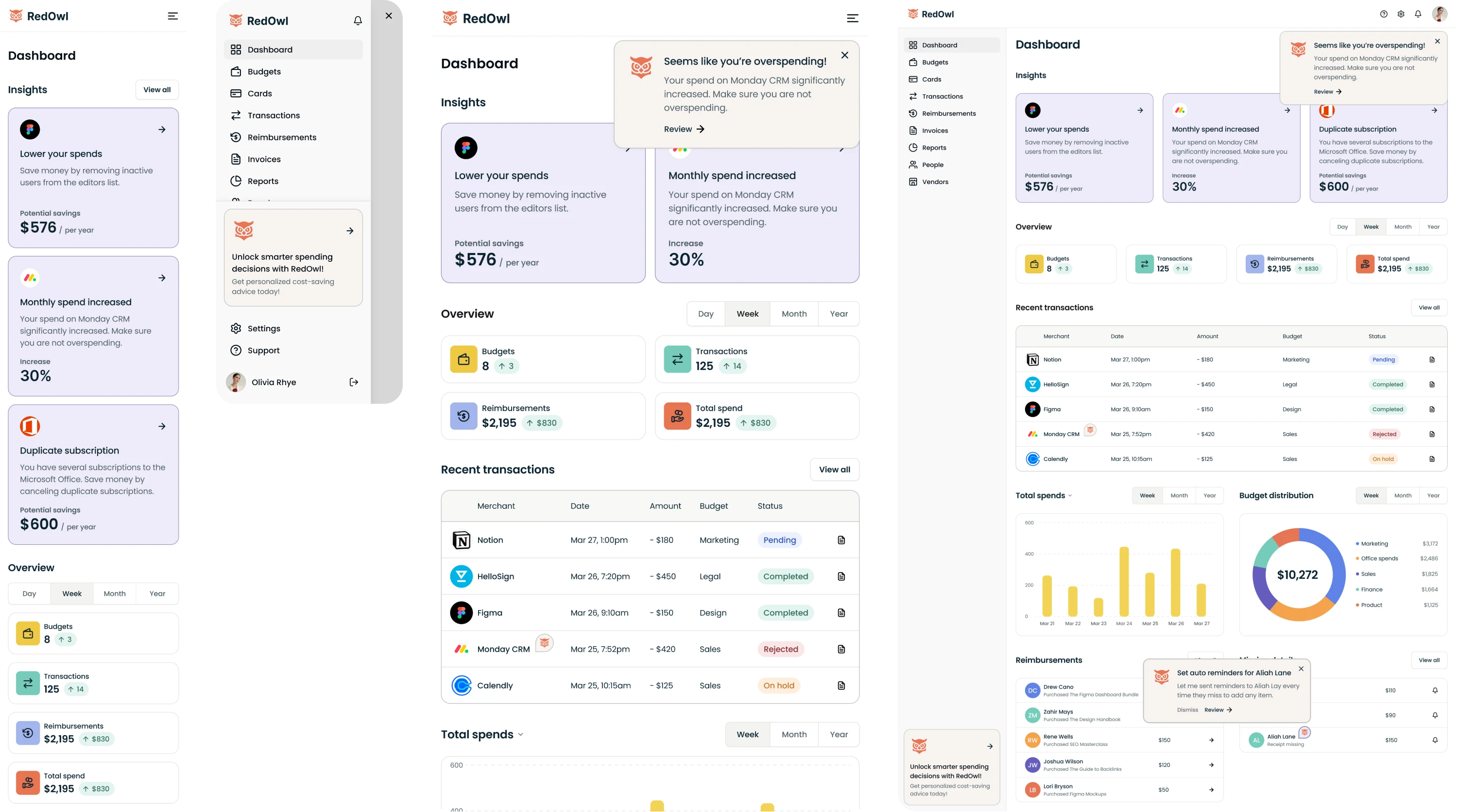
For example, when working on RedOwl, our team created four interface concepts with different approaches to the product’s design. This allowed the client to compare solutions and select the direction that best aligned with their goals.
Step 5 — Create wireframes and prototypes
The most interesting part of the UI/UX design process is turning ideas into visual structures. This is where abstract concepts evolve into wireframes and prototypes that demonstrate how the product will actually work.
Wireframing helps designers define the structure and hierarchy of the interface before investing time in visual polish. These screens focus only on layout, navigation, and how users move through the product.
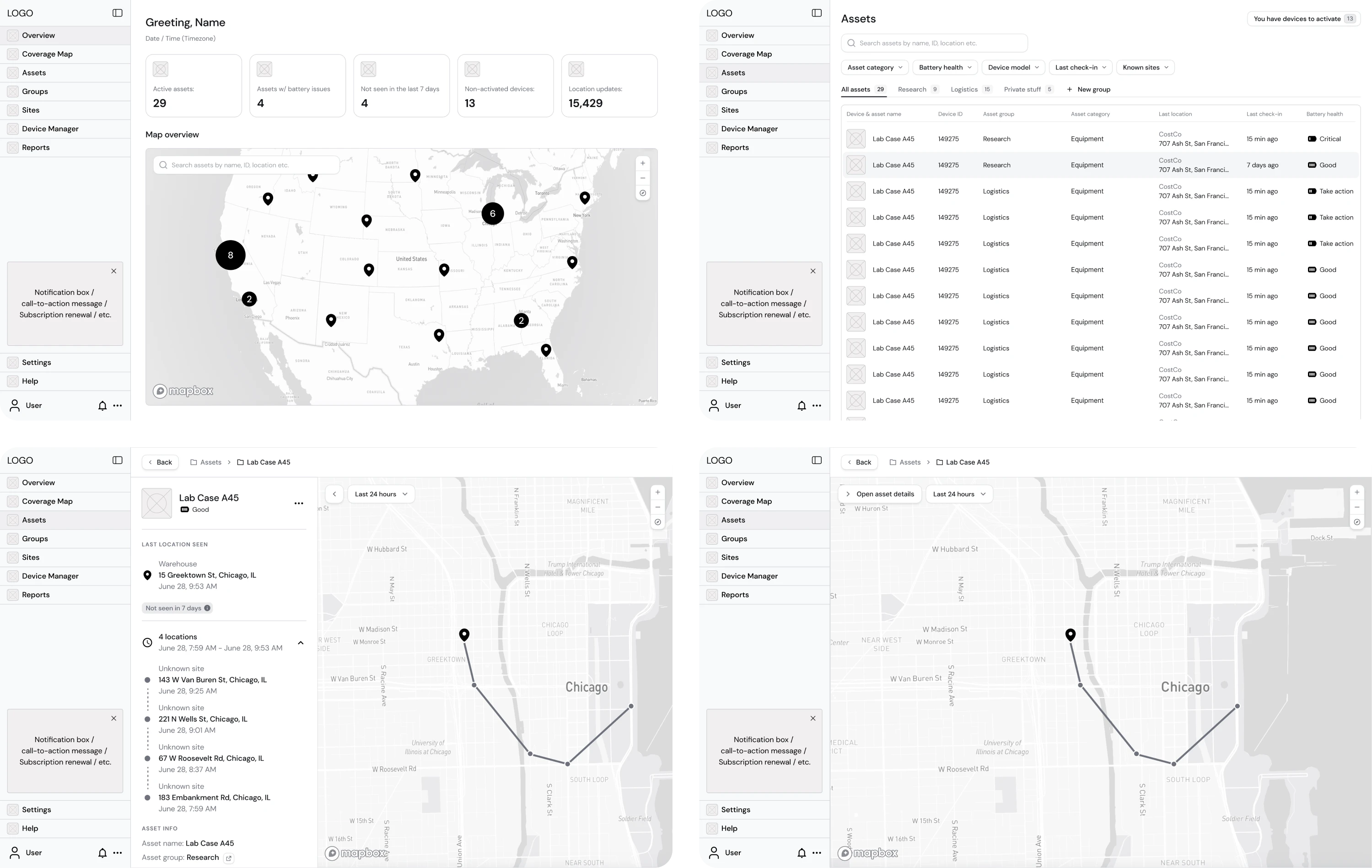
When working with Hubble Network, we followed the same approach. The company was building Smartpin, a geospatial platform, and we had a detailed Product Requirements Document (PRD). From there, our designer started by creating wireframes that stripped the interface down to its essential elements.
Once the core structure is clear, designers often build prototypes to simulate how the product will function. They allow team members to interact with the product before development, helping validate ideas and detect usability issues early.
Prototypes can vary in fidelity depending on the project stage:
- Low-fidelity prototypes.
- Mid-fidelity prototypes.
- High-fidelity prototypes.
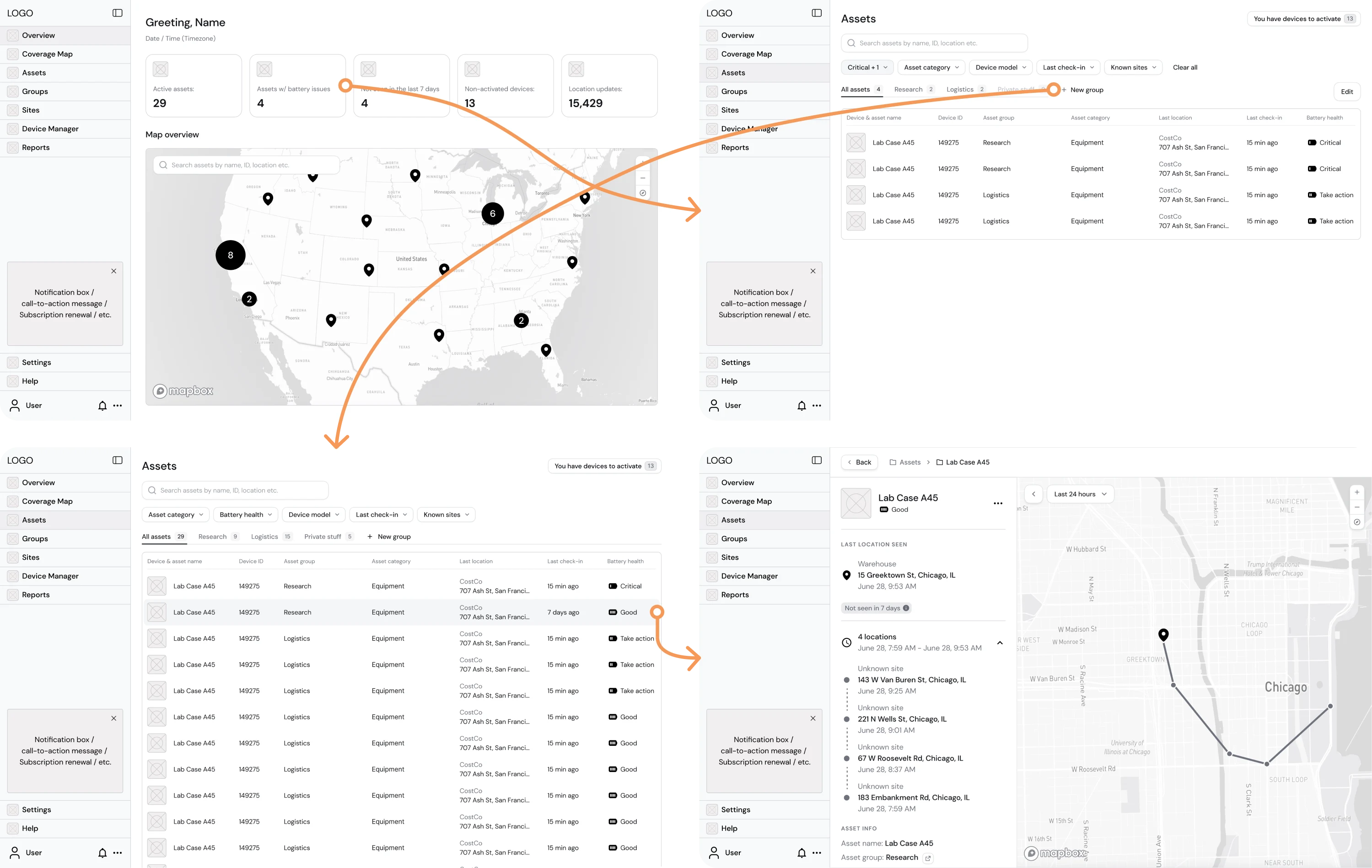
Returning to the Smartpin example, once the wireframes were approved, our designers built a clickable mid-fidelity prototype to validate the product’s user flows. This prototype helped refine the experience and supported the launch of a design that ultimately helped the company secure $70M in Series B funding.
Step 6 — Validate design with users
Even the most carefully designed interfaces can contain friction points that are difficult to notice from the designer’s perspective. That’s why many UX teams include a dedicated testing stage in the user experience design process.
User validation helps teams understand whether the product actually works the way people expect it to. By observing how users interact with the interface, designers can identify usability issues, confusing flows, or unexpected behaviors.
Teams often rely on several methods to validate their solutions:
- Usability testing.
- Moderated testing.
- Unmoderated testing.
- A/B testing.
- Guerrilla testing.
An example of the importance of this stage comes from our work with Panjaya, an AI-powered dubbing platform. The company had already raised $9.5M in funding, and the team wanted to ensure the UX could support its growing functionality.
After refining a major part of the platform, our designer proposed conducting user testing to uncover hidden friction points. The client supported the idea and connected us with internal translators who agreed to participate in the sessions.
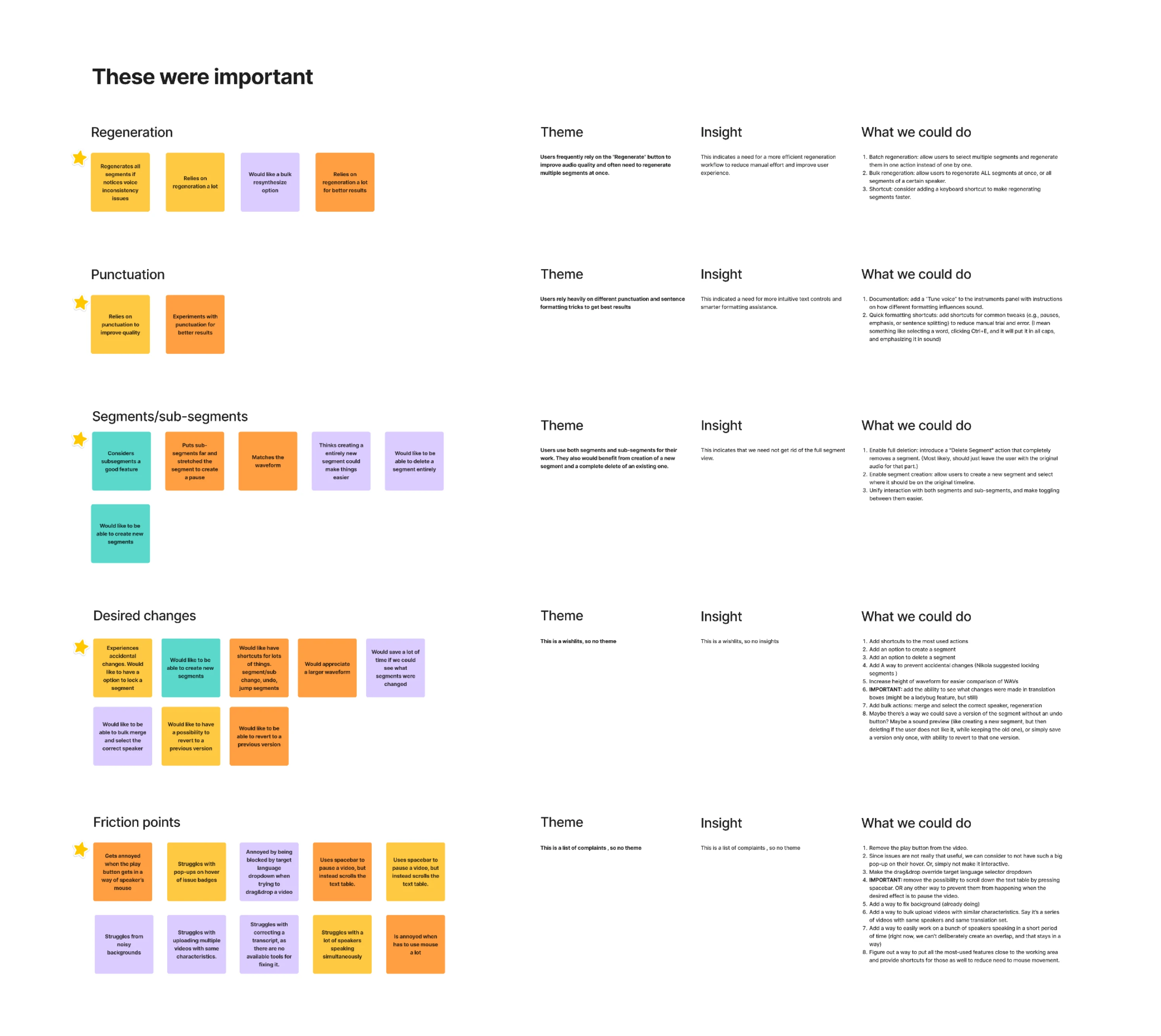
Over the course of two weeks, we scheduled usability sessions, interviewed participants, and analyzed the results. The research revealed numerous seemingly small issues that helped us improve the overall usability of the platform.
Step 7 — Collaborate with developers
Design and development are not separate phases but collaborative processes. Many design decisions — such as interactions, animations, or edge cases — often require discussion with engineers to determine the best technical implementation.
One of the designer's key responsibilities at this stage is to work closely with developers. Designers need to ensure that the product is implemented as intended and that the user experience remains consistent throughout development.
For a smooth developer handoff, designers typically provide:
- Design specifications.
- Design systems or UI libraries.
- Interactive prototypes.
- Documentation of edge cases.
Modern design tools help streamline this process by allowing developers to inspect design elements, export assets, and review interaction details. If you want to learn more about specific platforms, check out our article on UX design tools.
However, collaboration does not end with handing over files. Designers often stay involved during development to answer questions, clarify interactions, and ensure that the final product stays aligned with the original UX vision.
Step 8 — Launch and iterate
Once development is complete, the product is ready to be released to real users. Sometimes clients want to improve the product independently after launch. However, in many cases, designers remain involved and provide long-term support.
When users start interacting with the product, designers gain access to valuable feedback that wasn’t always visible during earlier UX phases. Real usage often reveals new behaviors, unexpected edge cases, or opportunities to improve.
After launch, teams monitor several feedback sources:
- Product analytics.
- User feedback and support tickets.
- Customer interviews.
- Session recordings and heatmaps.
- Feature usage metrics.
- Product reviews.
It’s worth noting that modern digital products rarely remain static. Instead, designers continuously refine the experience by releasing updates, improving workflows, and introducing new features based on user feedback and product data.
In practice, teams often move back and forth between the UX design stages we’ve covered. Insights from testing may send designers back to research or ideation, making the UX process a continuous cycle rather than a strict sequence.
How long does the UX design process take?
One of the most common questions teams ask is how long the design process actually takes. The answer depends on several factors, including the complexity of the product, the scope of the project, and the amount of research required.
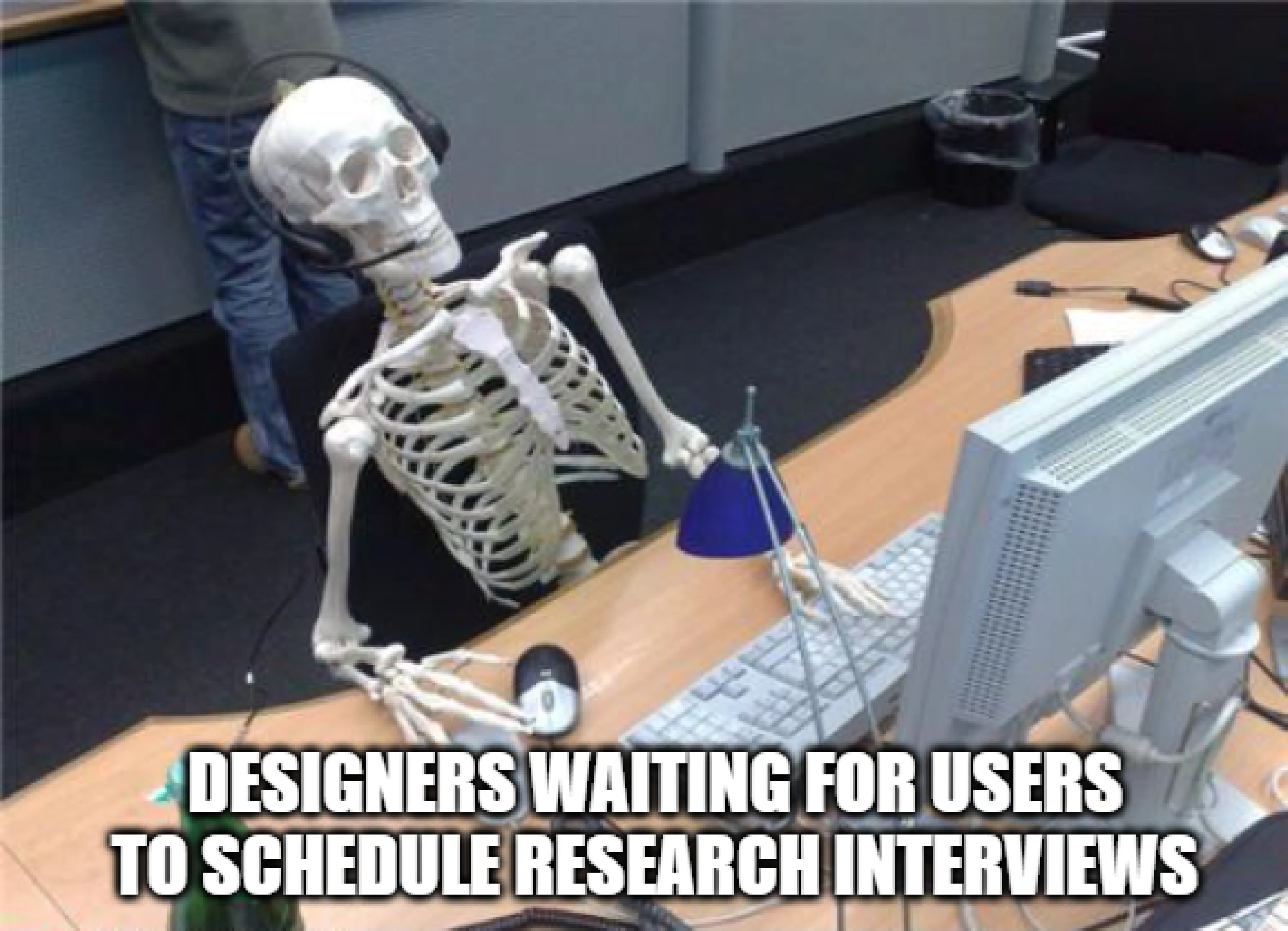
A good thing to remember is that UX design timelines vary significantly from project to project. Designing a small feature may take only a few days, while building the experience for a complex SaaS platform can take several months.
Here are factors that influence the duration of the process:
- Product complexity.
- Project scope.
- Team size and collaboration.
- User research availability.
- Iteration cycles.
The table below shows approximate timelines for different types of UX projects.
At Eleken, we’ve seen how timelines can vary. For example, our designers completed complex redesign projects like My Video Spot and Alture Funds in just two months. At the same time, some collaborations extend much longer.
In other cases, client teams work with our designers part-time over an extended period, continuously improving the product and designing new features.
Is it possible to cut corners in the process?
In reality, teams don’t always have the time or resources to follow every stage of the UX design process in full detail. Tight deadlines, limited budgets, or fast-moving startups often require designers to adapt the process and work more efficiently.
But cutting corners doesn’t mean skipping critical thinking. Experienced designers focus on simplifying the process while still making informed design decisions.
Here are several ways designers can speed up the UX process:
- Use existing research when possible.
If you’re working on an existing product, teams might already have some information in analytics, support tickets, or previous research reports. Reviewing this data can reveal patterns in user behavior and highlight pain points.
- Run quick user interviews.
Even short conversations with a few users can uncover important insights about how people interact with the product. Speaking with several users often reveals recurring frustrations and helps validate key assumptions.
- Test early with low-fidelity prototypes.
Simple sketches or wireframes are often enough to evaluate whether a product concept works. Testing early can help you catch usability problems and improve the overall flow before investing time in detailed visual design.
- Focus on the most critical features.
Not every feature needs to be included in the first version of a product. Together with the client, designers can prioritize core functionality for the upcoming release to deliver value faster and learn from real user behavior.
The key idea is not to remove stages entirely but to adapt them to the project’s needs. Even when the process is simplified, designers still need to understand the problem, validate solutions, and learn from users.
A final word
The key takeaway is that every project is different. Some teams move quickly, while others spend more time researching and iterating. What matters most is maintaining a clear understanding of the user and making design decisions based on insights.
At Eleken, this structured approach is the foundation of how we design SaaS products. Our designers combine research, rapid prototyping, and continuous collaboration to deliver thoughtful UX solutions, even within tight timelines.
If you're looking for a design partner who can help turn complex product ideas into clear and intuitive user experiences, feel free to contact us.