

Search for AI agentic design patterns, and you'll quickly run into a problem: everyone seems to mean something different.
One guide explains how AI agents plan, use tools, and collaborate. Another focuses on prompts, chat interfaces, and human oversight. Others discuss RAG, model architecture, infrastructure, or traditional software design principles. They're all talking about AI design patterns—just at different layers of the product.
That ambiguity makes sense. AI product design is still in an experimental phase. As Eleken's design director Maksym Chervynskyi puts it, the AI era resembles the Flash era: the barrier is moving from “Can I build this?” to “Can I imagine this?” Teams are experimenting rapidly, and the reusable practical design patterns behind successful products are only beginning to crystallize.
That's why another long list of patterns isn't particularly helpful. Product teams first need a map of what kinds of patterns exist, which layer they're working on, and which patterns address the specific challenges their product faces.
This guide provides that map, then goes deeper into the two layers product teams encounter most directly: agentic AI design patterns that determine how AI behaves under the hood, and AI UX patterns that determine how people interact with, understand, and control that behavior. Most importantly, we'll connect the two—because in generative AI applications, they're two sides of the same feature.
What are AI design patterns?
AI design patterns are reusable solutions to recurring problems in AI products. Like traditional software design patterns, they give teams proven structures to work from—but adapt those structures to the uncertainty and non-deterministic behavior of AI systems.
What makes the term slightly confusing is its breadth. AI design patterns don't describe just one part of an AI product. They can refer to how the system behaves behind the scenes, how users interact with it, how models access knowledge, or how AI connects to the broader application.
These layers often work together, but agentic and AI UX patterns are especially important from a product perspective, so we'll focus mainly on those two. AI agent design patterns shape what the system does behind the scenes, while AI UX patterns shape how users experience, understand, and control that behavior.
And the distinction isn't purely technical. The choices made at one layer affect what needs to happen at the other. This is part of the new paradigm of AI product design: teams have to consider system behavior and user interaction together rather than treating them as completely separate decisions. Later, we'll look at why separating them can lead to problems
Why do design patterns matter even more with AI?
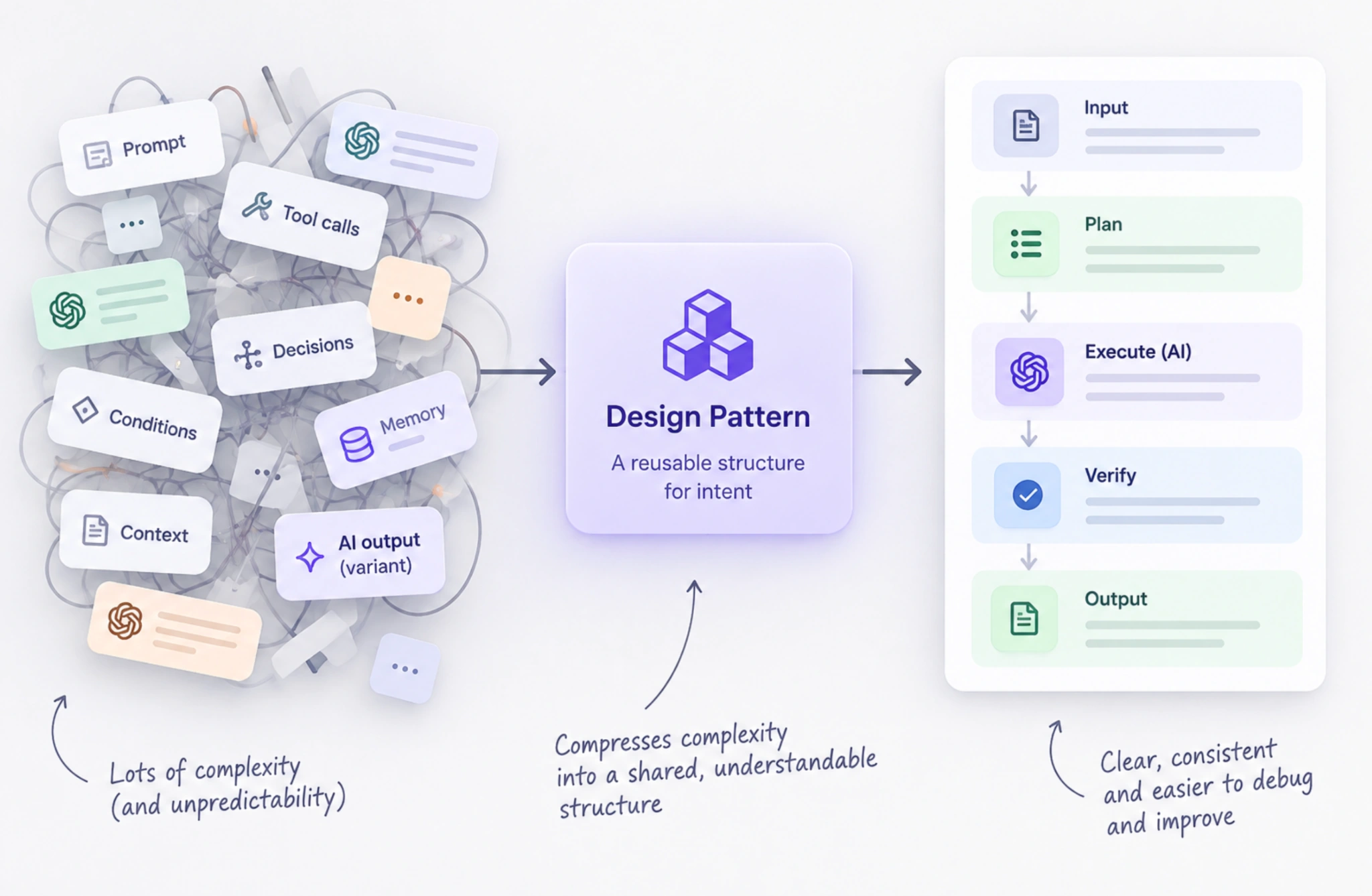
AI systems are unpredictable by nature. The same input can produce different outputs, unlike more deterministic workflows where the same rules tend to produce predictable results. That makes clear structures especially valuable. Design patterns act as compression for intent: they give teams shared ways to structure behavior, making AI systems easier to understand, review, debug, and improve.
Patterns can also serve as sources of correctness. Predictable structures help designers, developers, and AI agents recognize what should happen and where something has gone wrong—much like established conventions help a new team member understand an unfamiliar product. This becomes especially important in agentic systems, where AI may make decisions and take actions rather than simply generate a response.
But patterns aren't rules to follow blindly. Adding planning, reflection, or multiple agents before they're necessary increases cost and complexity. The better principle is simple: start with the simplest pattern that works, then add complexity only when the problem demands it.
Agentic AI design patterns: what happens under the hood
Agentic AI design patterns define how AI agents reason, use tools, organize tasks, and coordinate with other agents. They become particularly useful for complex tasks that require more than generating a response in a single step. The key is not to reach for the most sophisticated architecture first, but to start simple and introduce additional complexity only when the task requires it.
Single agent + ReAct
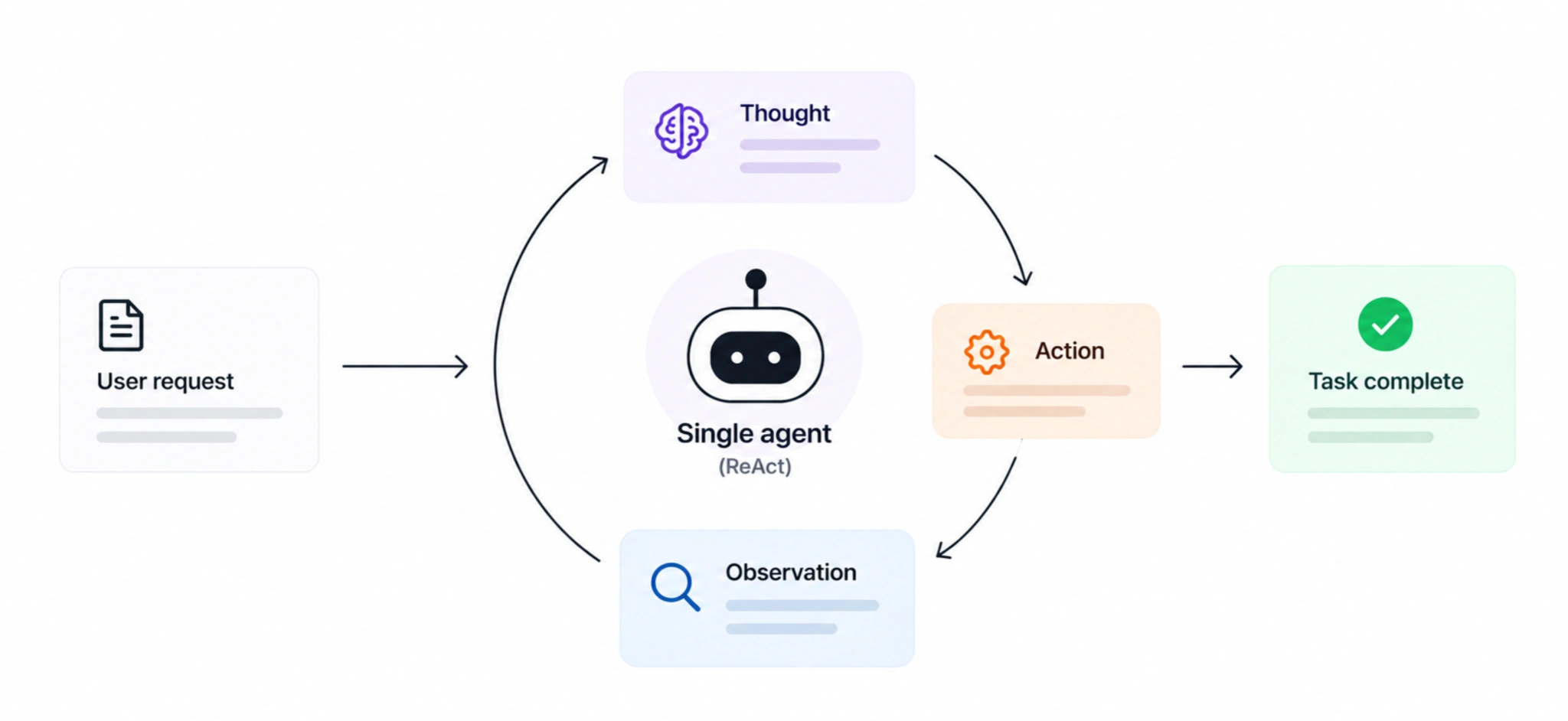
ReAct follows a Thought → Action → Observation loop: the agent reasons about what to do, takes an action, observes the result, and continues until the task is complete. It's a strong default when a single model can handle the workflow without complex coordination.
Reflection
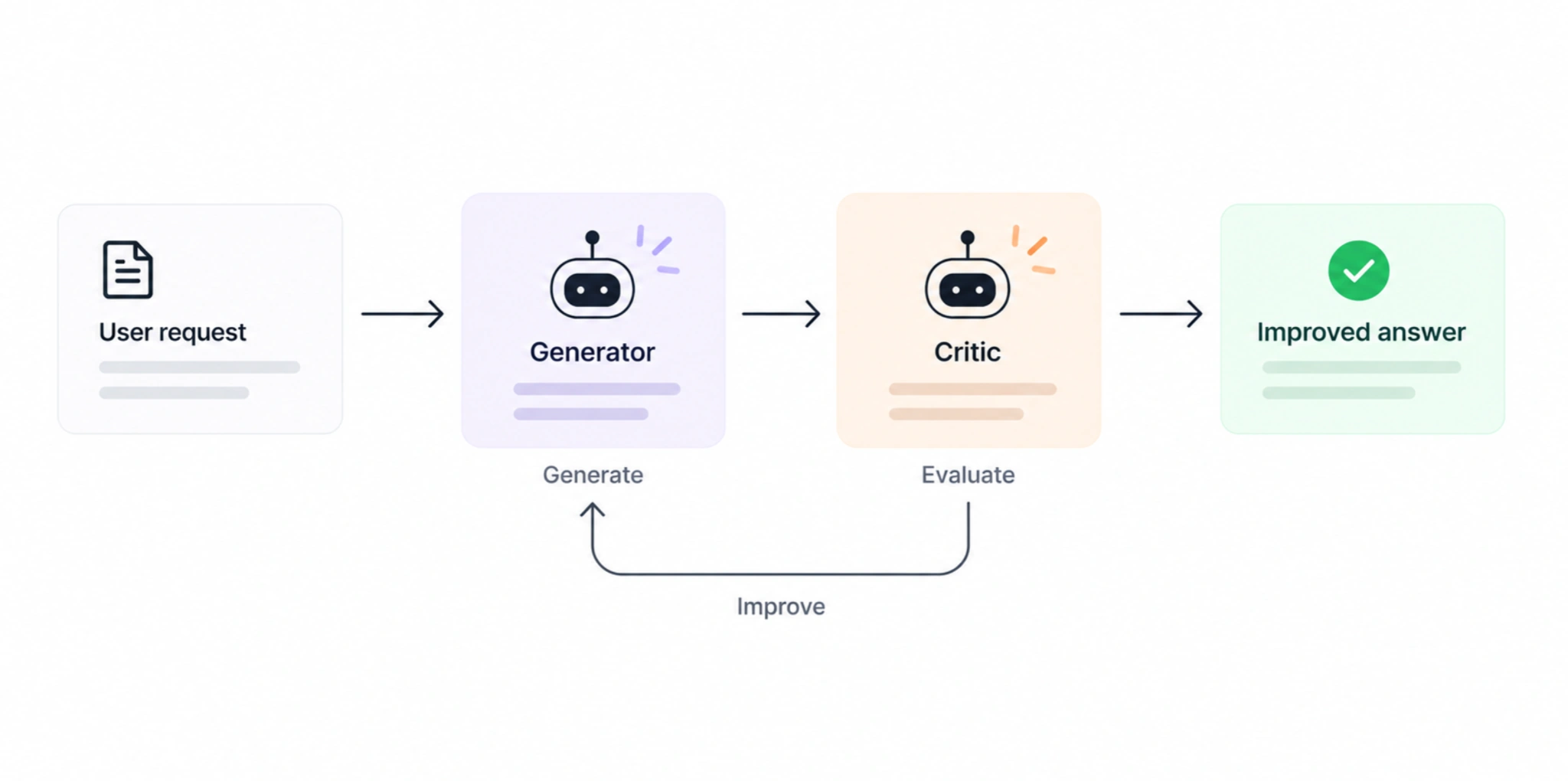
Reflection adds self-review. One component generates an answer while another critiques it, creating a generate → evaluate → improve loop. Keeping the critic independent helps make that review more meaningful and can improve output quality when the first response isn't reliable enough.
Tool use
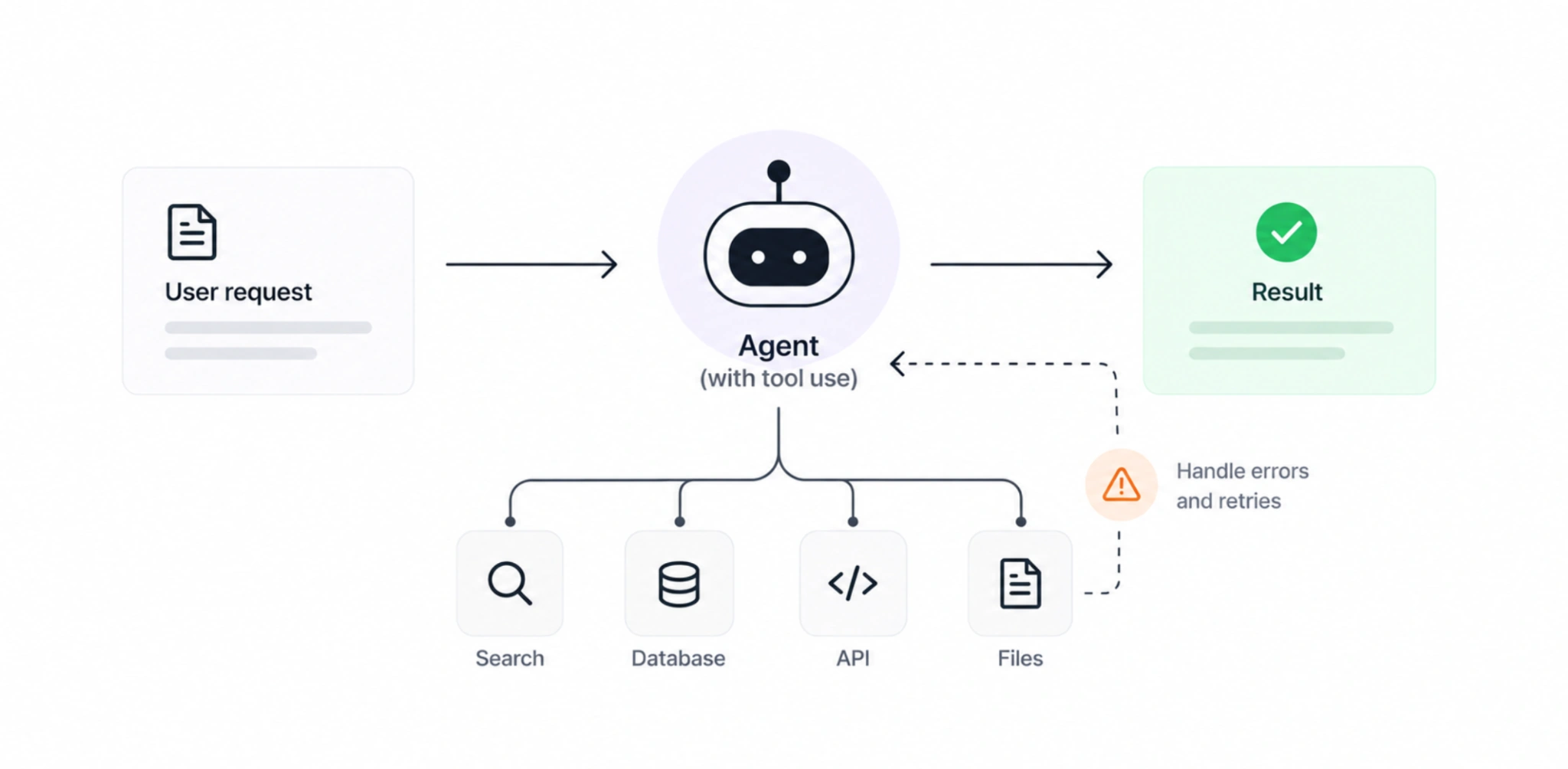
Tool use allows an agent to move beyond generating answers and interact with external tools, systems, data sources, or APIs. Reliable schemas and failure handling become especially important because the AI's actions can now affect downstream processes.
Planning
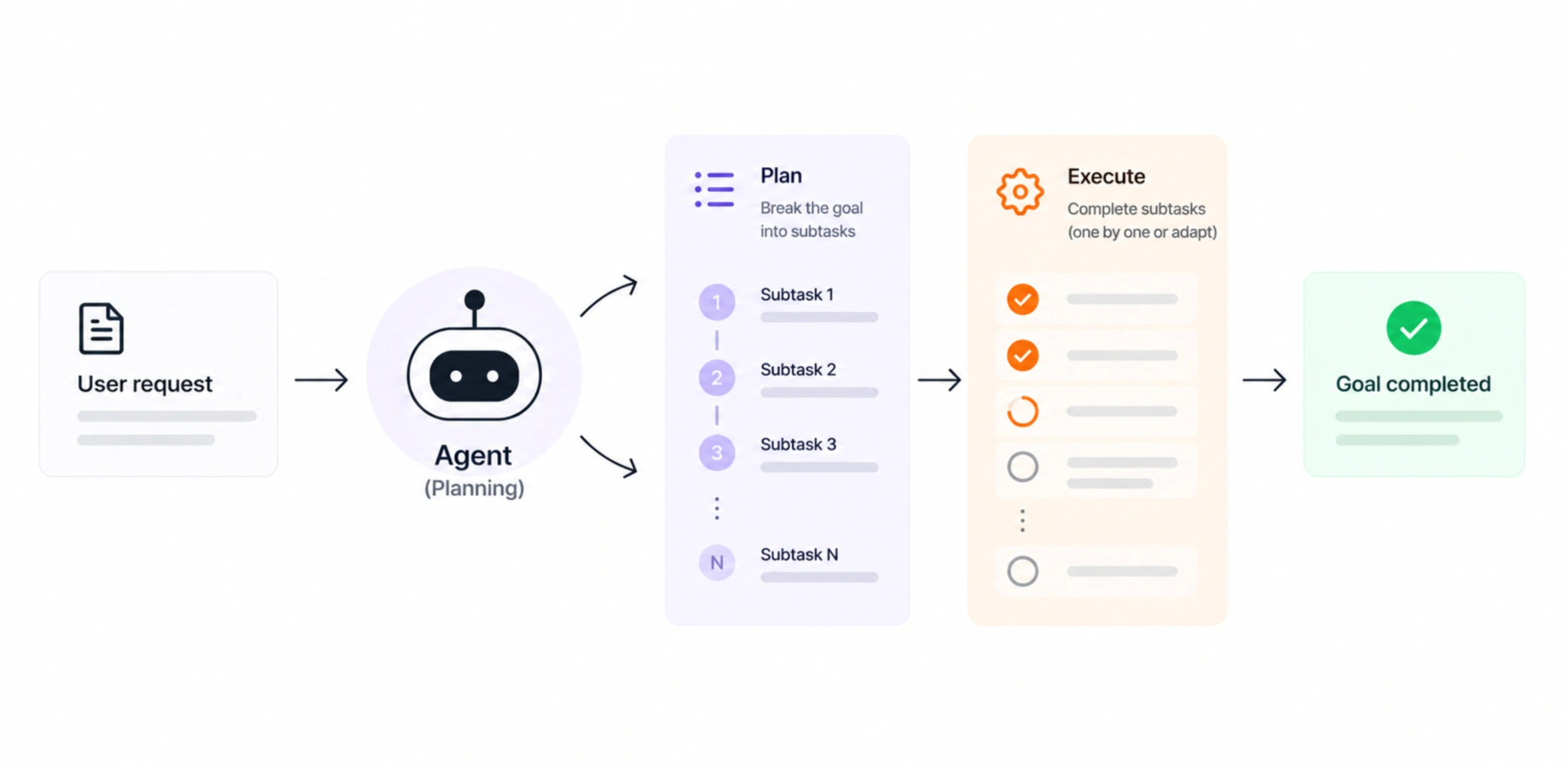
Planning helps agents break complex problems into manageable subtasks. It can follow a fixed plan-and-execute structure or adapt the plan as new information appears. This allows the system to reason through different stages of a task rather than trying to reach the entire solution at once. The added cost and latency make it most useful when coordination is genuinely necessary.
Multi-agent systems
When one agent isn't enough, specialized agents can divide the work:
How these agents run depends on the problem: some workflows benefit from a predefined sequence, while others require more dynamic orchestration as agents delegate work or respond to new information.
But more agents don't automatically mean better AI. More complex orchestration only makes sense when the task actually requires it. If a single agent can handle the workflow reliably, adding extra agents, critique steps, or coordination can create unnecessary complexity, cost, and latency. The practical lesson: add orchestration because the task demands it, not because the architecture looks more advanced.
Scalable AI system design patterns: what users actually experience
Architecture determines what AI can do. AI UX design patterns determine whether users can understand, guide, and trust it. And increasingly, that doesn't mean putting a chatbot everywhere. Designing for AI adoption means meeting users in workflows they already understand instead of asking them to adapt their workflow to AI. This AI-second approach keeps the existing experience at the center, with intelligence stepping in where it can genuinely help rather than becoming the entire interface.
Input: help users tell AI what they need
AI for design patterns is only as useful as the direction users can give it. Yet an empty prompt box often leaves people wondering what to ask, how much context to provide, and what kind of input the system can actually work with. Good input patterns reduce that uncertainty. Instead of expecting users to formulate the perfect prompt from scratch, the interface can provide suggestions, structure the request, or let users add context through other formats such as files and images.
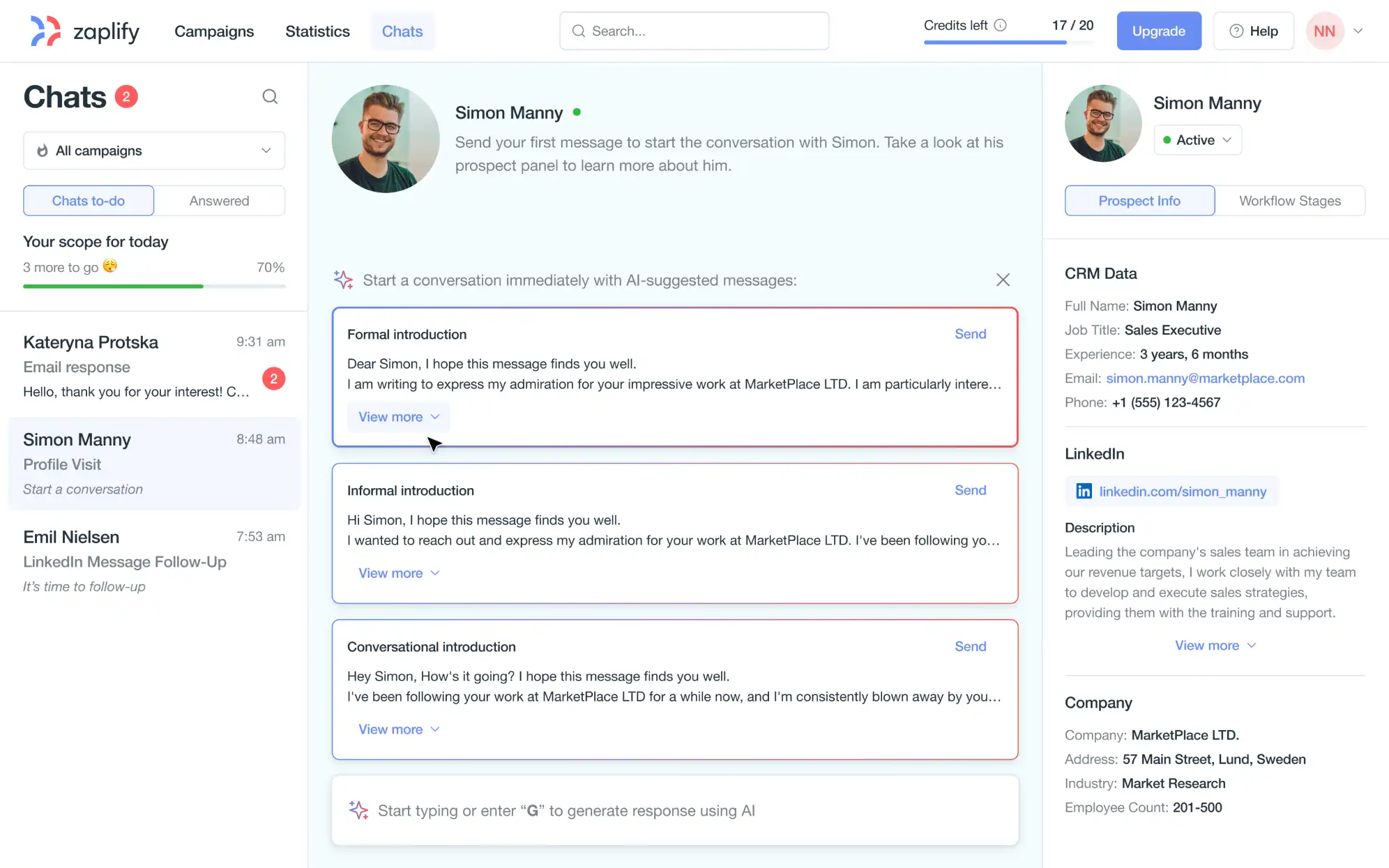
We faced this challenge when designing Zaplify, an AI-powered sales platform. Starting a message from a blank canvas can be difficult, especially when users have to personalize outreach repeatedly. Our designers introduced AI-suggested messages directly into the workflow, giving users a useful starting point that they could review and adapt rather than requiring them to compose every message themselves.
The same principle took a different form in Frontend AI, a tool for generating interfaces with AI. Here, our designers created a dedicated prompt input area where users could type or paste their instructions and provide additional visual context through images. Because the output quality of the generated frontend depends heavily on what the AI receives, making those inputs clear and accessible became an important part of the generation experience.
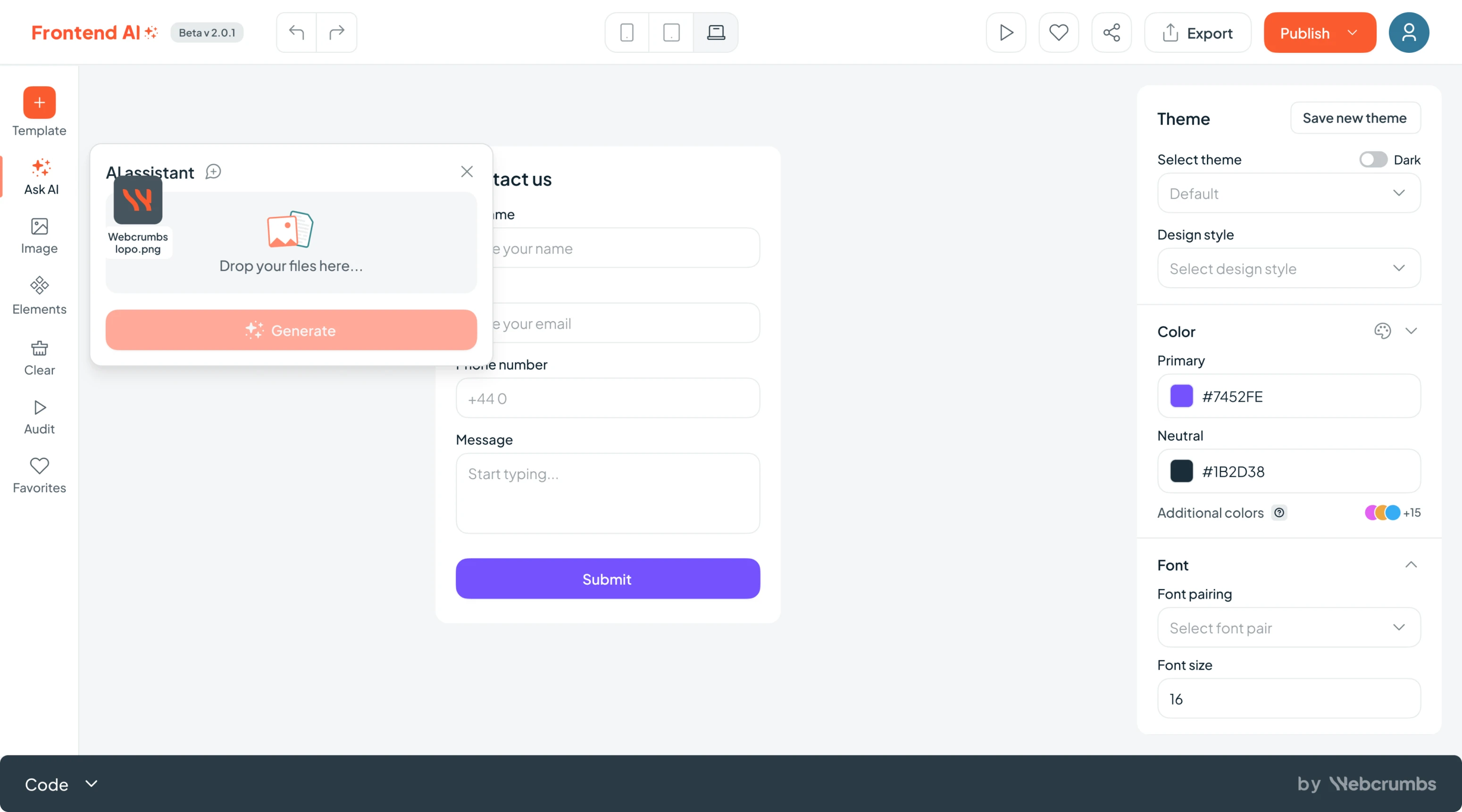
Both examples solve the same underlying UX problem in different ways: don't make users figure out how to communicate with AI on their own. Give them enough structure and context to turn an intention into an input the system can work with.
Wayfinding: explain what AI can do
Adding an AI feature doesn't guarantee that people will use it. Unlike familiar interface elements, users may not immediately understand what the AI can do, when they should use it, or what kind of result to expect. Wayfinding patterns make those capabilities more visible and understandable, using elements such as contextual guidance, clear entry points, examples, and progressive explanations rather than leaving users to discover the feature by trial and error.
This was an important consideration when our designers worked on Modia, an AI-powered content creation platform. The product offered useful AI capabilities, but those capabilities could easily go unnoticed if users weren't shown how and when to use them. Eleken introduced guided tooltips to explain unfamiliar functionality within the workflow and designed a predictable prompt window that gave users a clear, consistent place to interact with the AI native UX design. We also made it possible to add files through drag-and-drop, making the types of context users could provide more apparent.
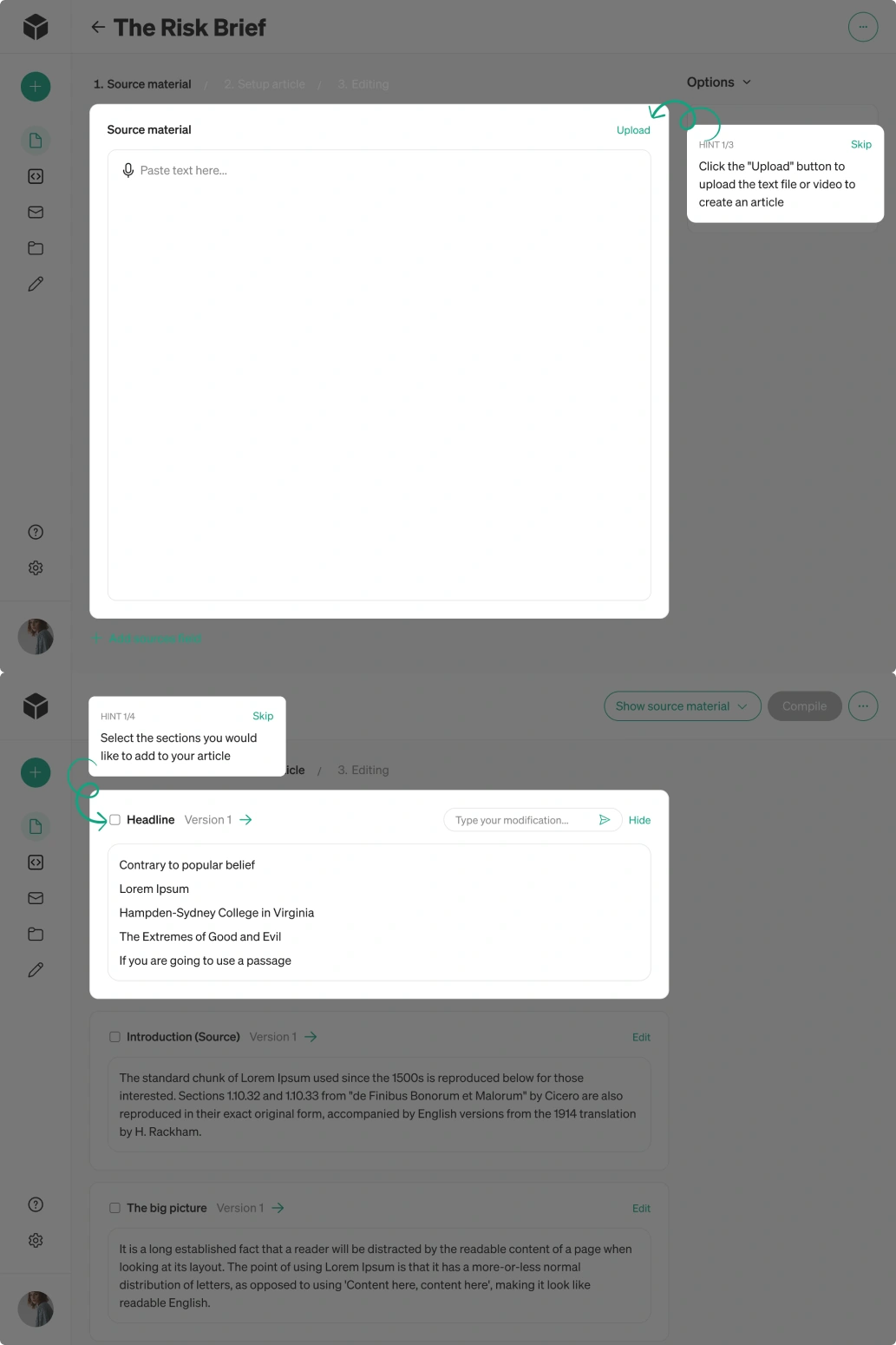
The goal wasn't simply to make AI features discoverable. It was to reduce the learning required to use it. Good wayfinding helps users understand where AI fits into their task, discover relevant capabilities at the right moment, and move from “What am I supposed to do here?” to actually getting value from the feature.
Output: surface intelligence proactively
Good AI UX isn't only about responding when users ask a question. AI can also help by identifying relevant information, prioritizing it, and bringing it forward when users need it. This is especially valuable in data-heavy products, where the challenge is often not a lack of information but figuring out what deserves attention and what to do next.
We applied this principle when designing Avid, an AI-powered fundraising platform. Its AI engine could generate recommendations based on large amounts of donor data, but simply making those insights available wasn't enough. Our designers created custom cards that turned AI-generated recommendations into digestible, actionable information, so users could understand important opportunities without digging through dashboards or interpreting raw data themselves.
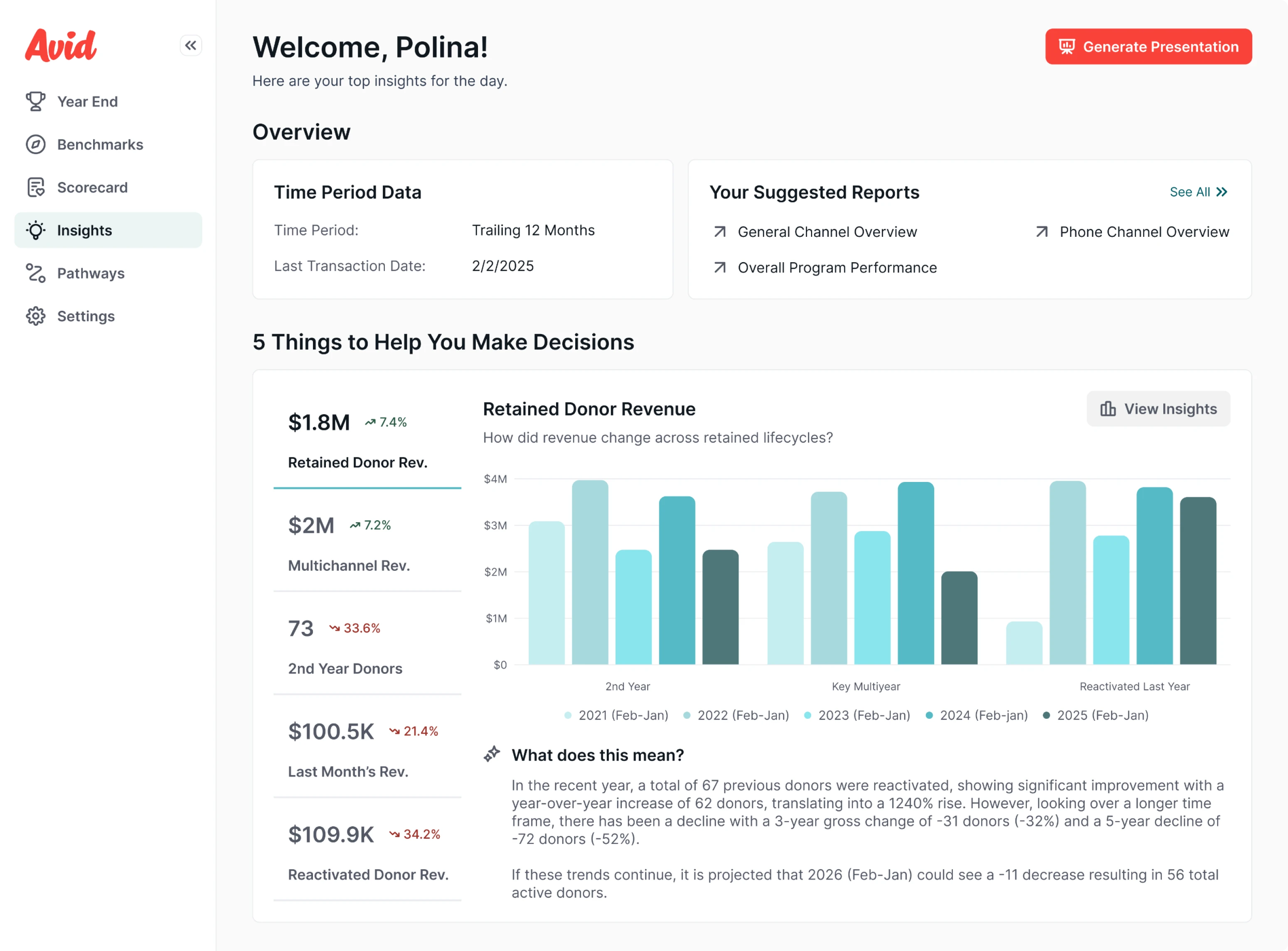
We took this further with Playbook, which proactively recommends next actions based on what the system knows. Instead of requiring users to search for an insight first and then decide how to respond, the interface brings relevant guidance directly into their workflow.
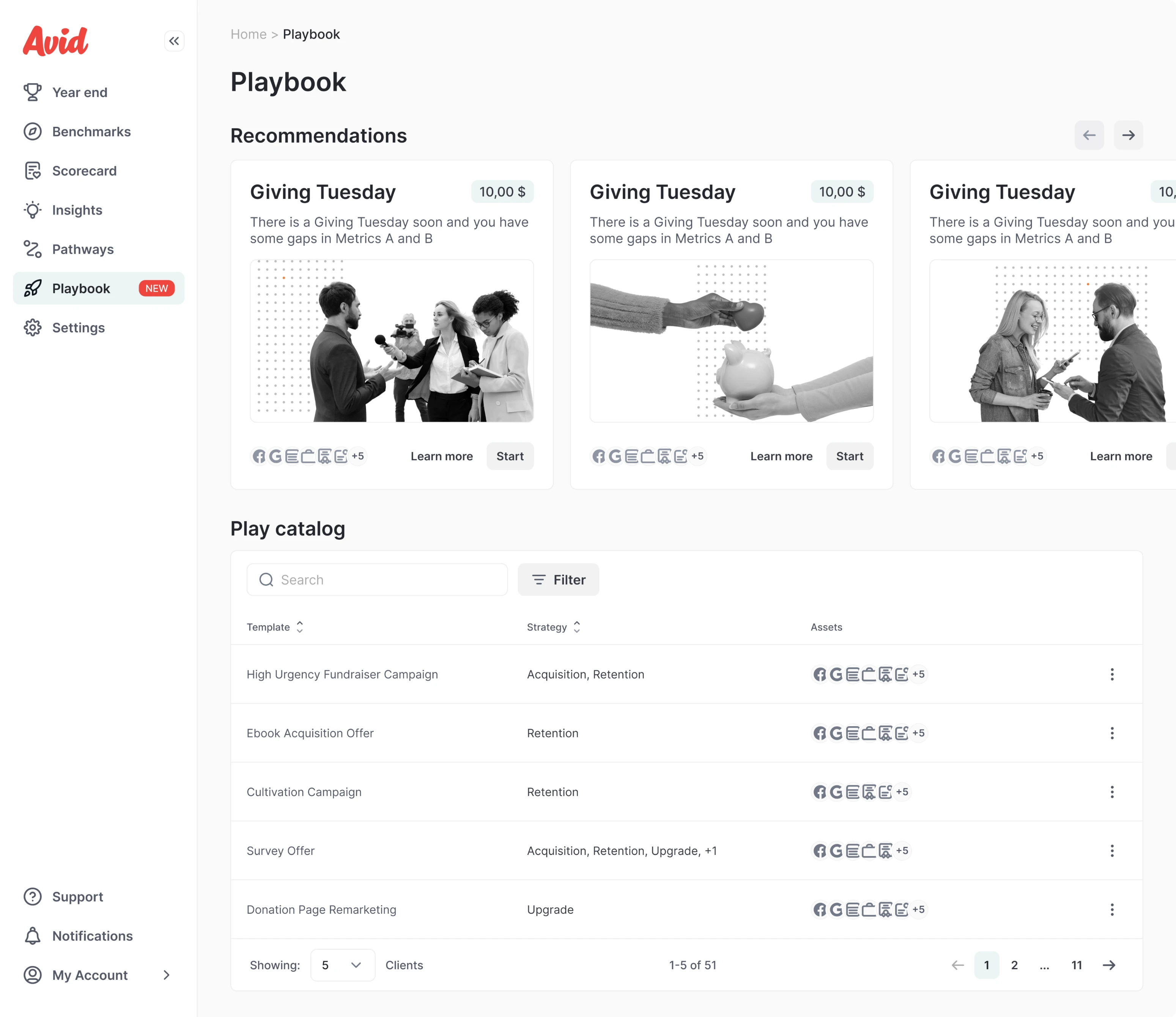
This is the value of proactive output patterns: AI doesn't just wait for a prompt. It helps users notice what matters and decide what to do next, reducing the effort between having data and acting on it. In real world products, how the final output is surfaced can matter just as much as the intelligence used to generate it.
Refinement: let users shape the result
AI-generated output rarely needs to be treated as final. A first generation may be close to what the user wants but still require changes to its content, structure, or details. Refinement patterns give users a way to evaluate the result and steer it toward what they actually need, rather than forcing them to accept the output or start again from scratch. The experience becomes a process of iterative refinement: generate → inspect → refine.
We designed for this kind of control in Siena, an AI-powered customer service platform. Our designers introduced a playground where users could preview and test AI behavior before putting it into practice. Instead of configuring the AI and hoping it would behave as expected, users could run tests, inspect the results, and make adjustments in a controlled environment. This made experimentation part of the interface and gave users more confidence in what the AI would eventually produce.
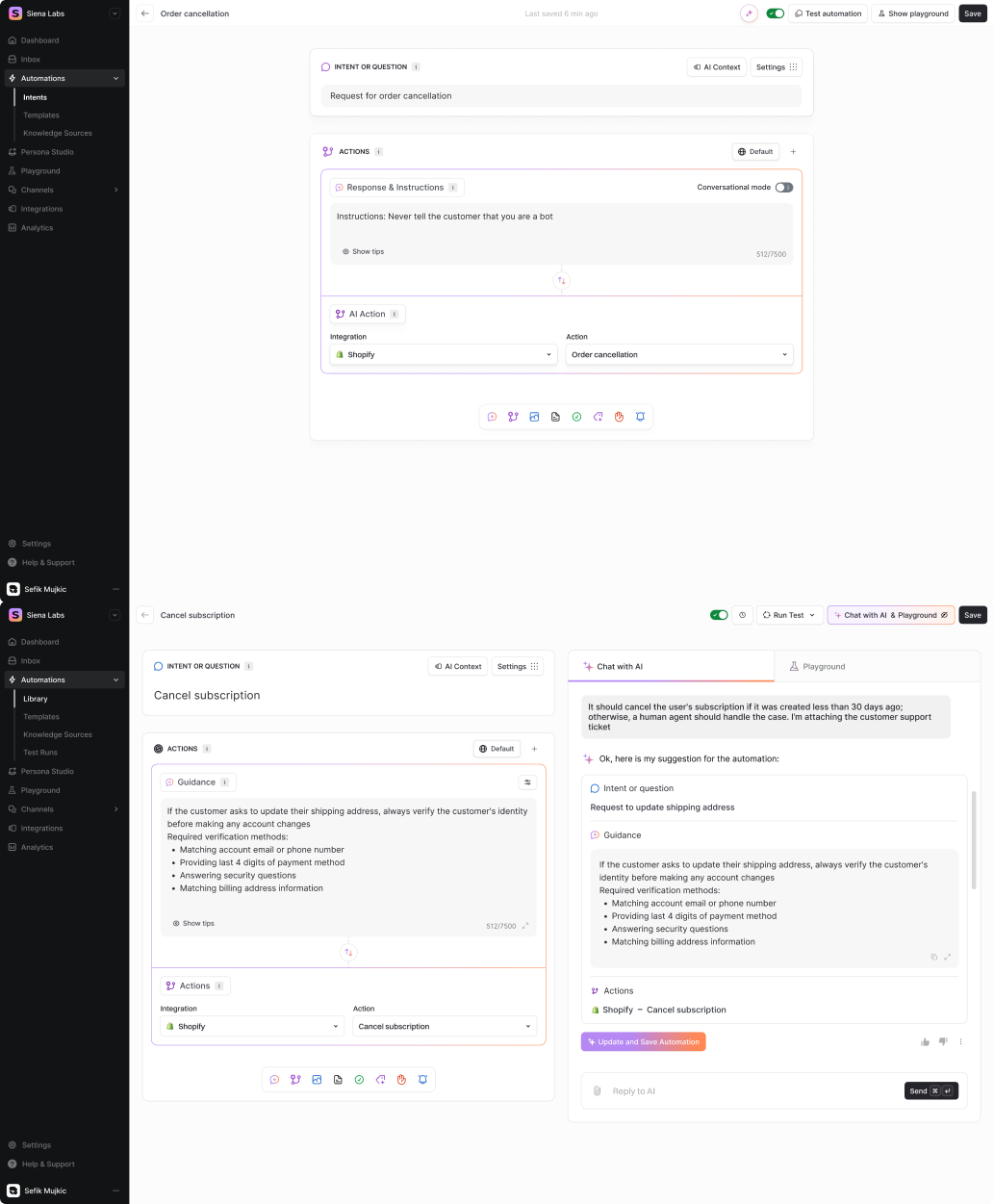
A similar principle appears in Frontend AI, but here refinement happens directly on generated interfaces. After creating a frontend from a prompt, users aren't locked into the first result. Eleken designed the experience so they could fine-tune the generated output and continue shaping it before exporting the final version.
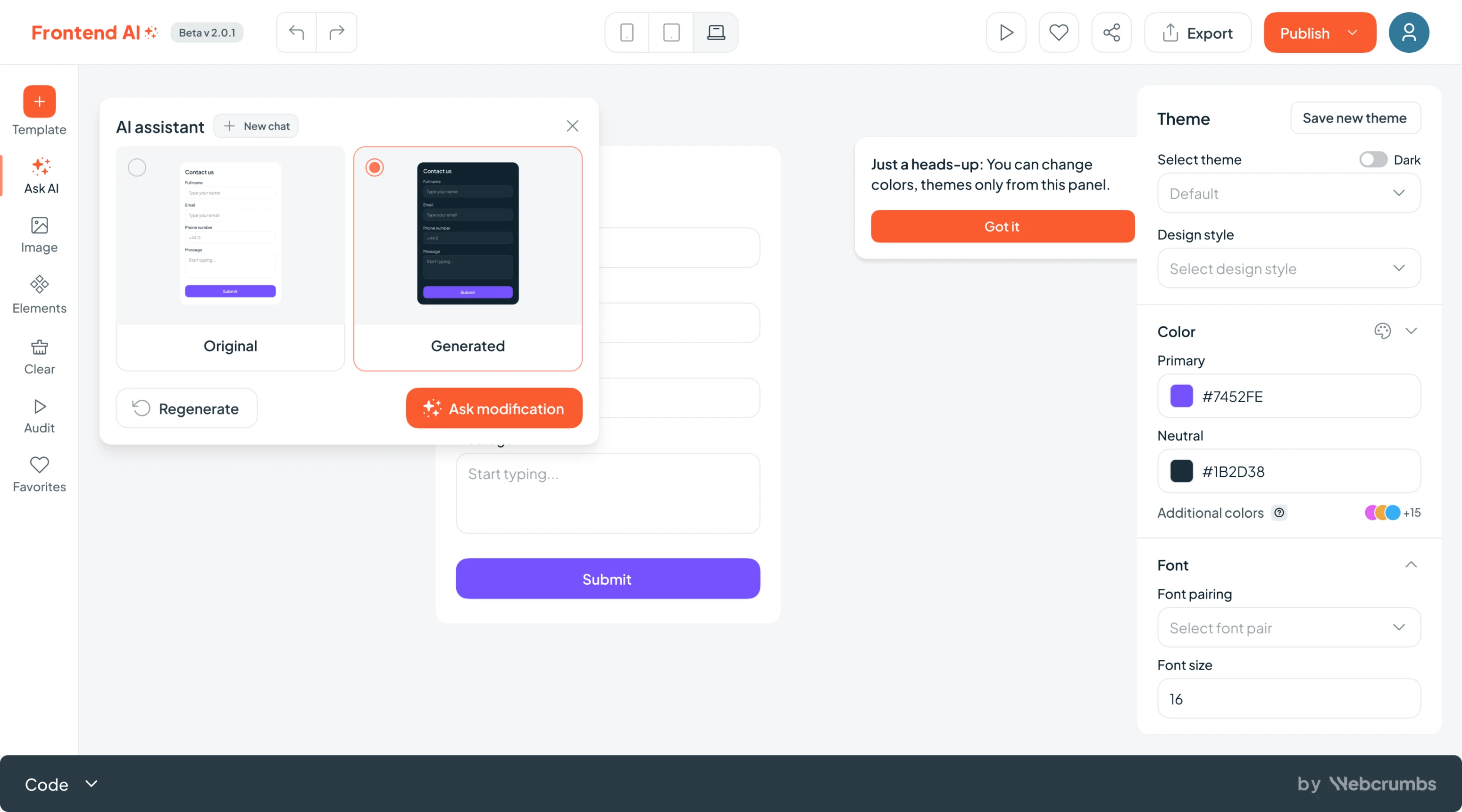
The key idea is to treat generation as a starting point rather than an endpoint. Effective refinement patterns keep users involved after AI produces something, giving them enough visibility and control to turn an approximate result into one that actually fits their needs.
Governors and trust: make AI verifiable
The more consequential an AI-generated answer or action is, the less reasonable it is to expect users to simply trust it. Good AI UX gives people ways to understand where an answer came from, check whether it is accurate, and intervene when something doesn't look right. Even when systems are designed to produce highly accurate results, these governor and trust patterns keep human judgment in the workflow rather than hiding AI reasoning behind a seemingly authoritative output.
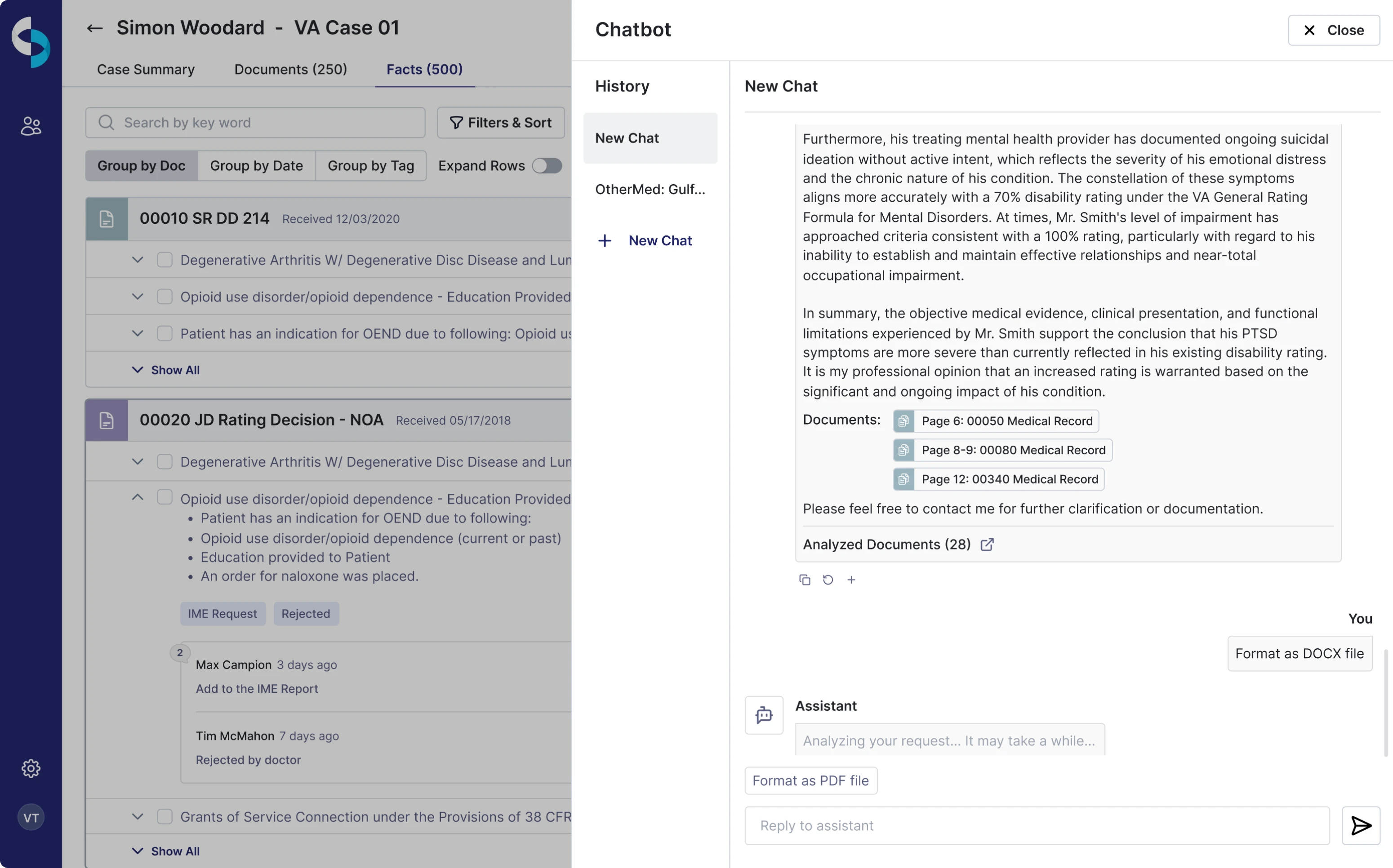
We addressed this challenge when designing CaseScribe, an AI assistant that works with large sets of case documents. When users ask case-level questions, receiving an answer alone isn't enough—they need to know whether they can rely on it. Our designers made AI responses traceable back to the source documents, allowing users to verify information against the underlying evidence instead of taking the system at its word.
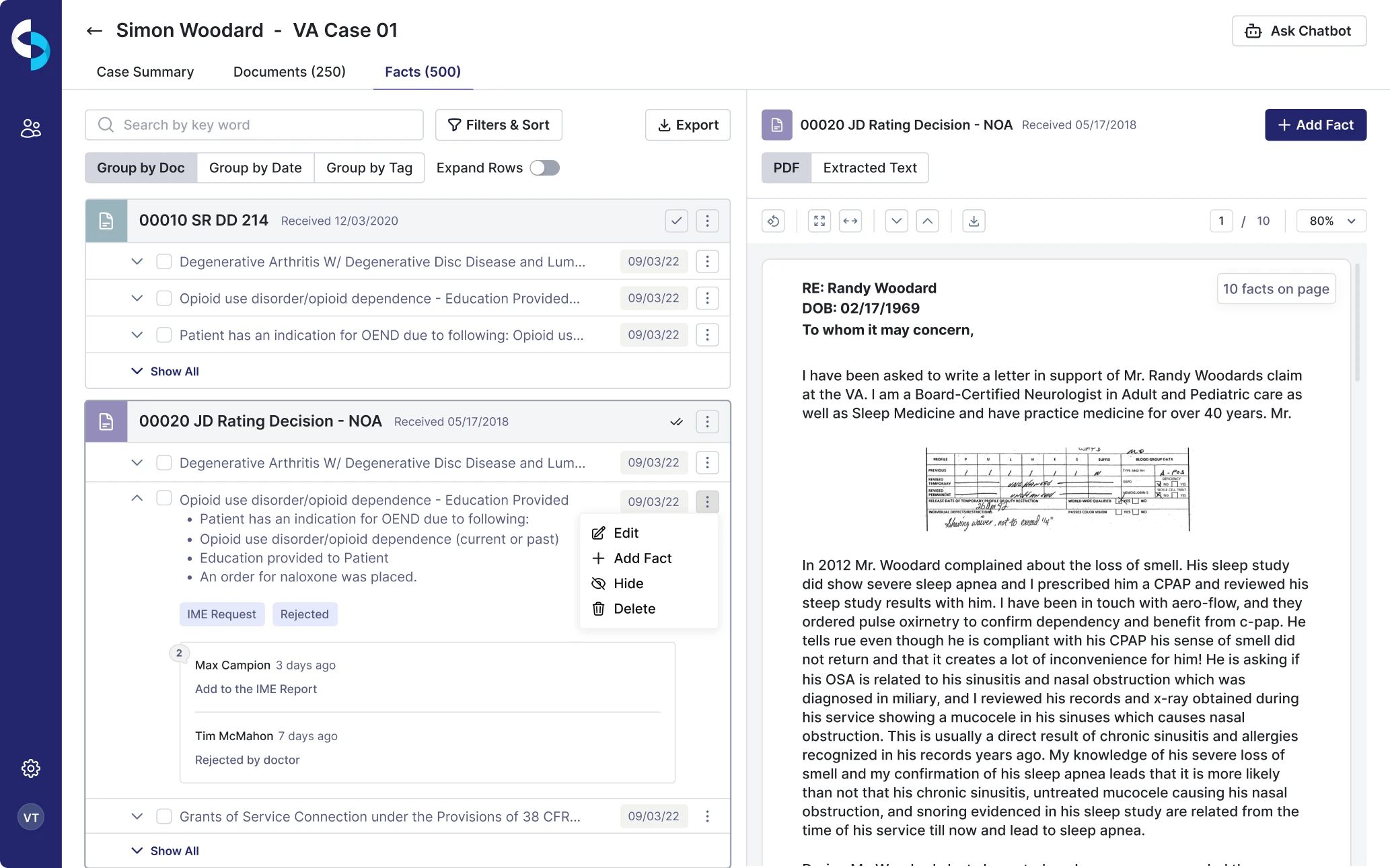
We also added processing feedback, so users could see what was happening while the AI analyzed their materials rather than being left with an unexplained waiting state.
Trust and verification also shaped our work on Siena. Here, Eleken incorporated AI chat interface design patterns with inline rating and verification mechanisms that let users evaluate AI results as part of the workflow. This creates a clearer relationship between automation and human oversight: AI can do more of the work, while users retain the ability to review and validate what it produces.
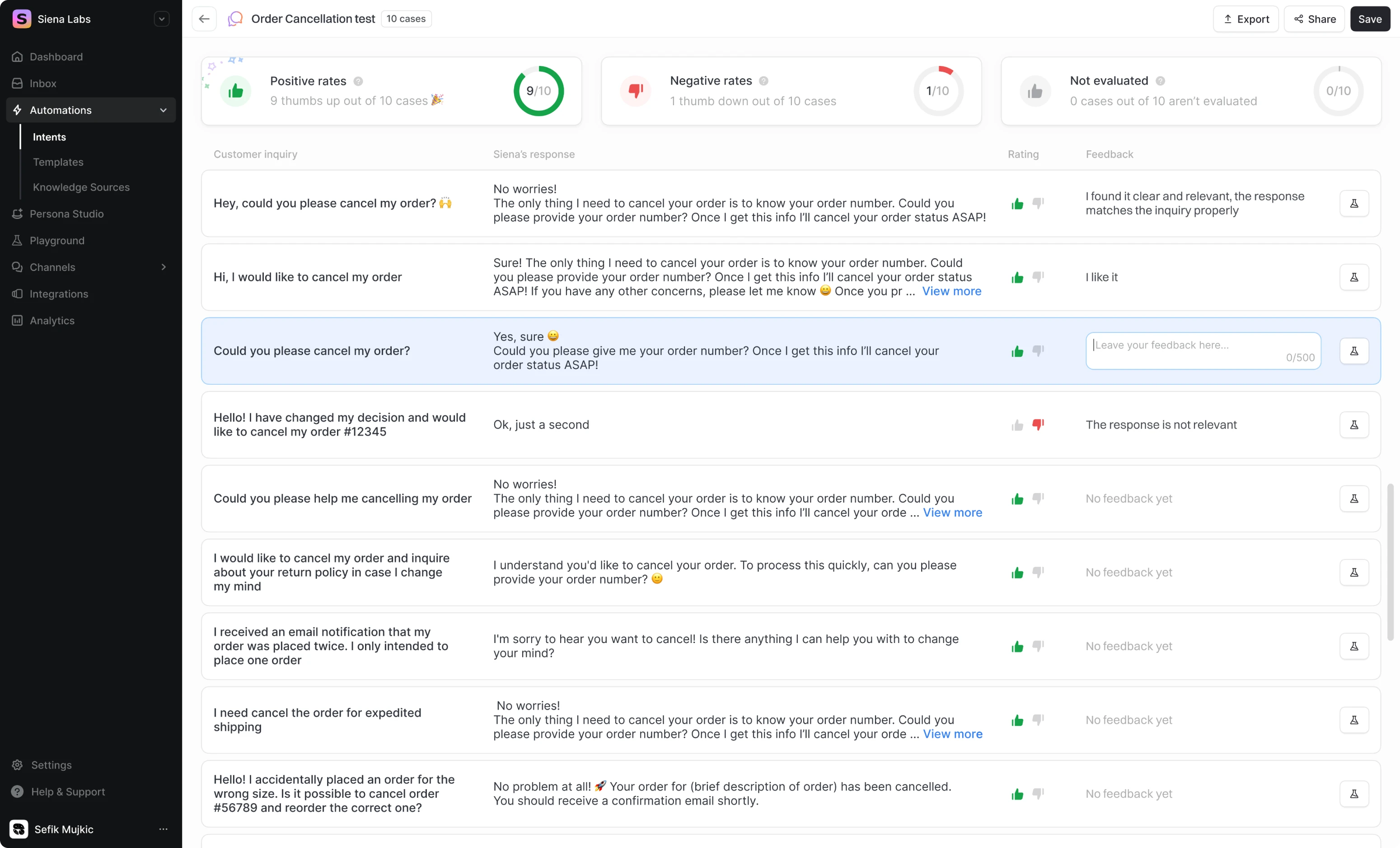
The broader principle is that trust shouldn't depend on making AI appear more certain than it is. Interfaces can build stronger trust by exposing evidence, communicating system status, and creating clear opportunities for human review—so users can decide when an AI output is reliable enough to act on.
Demystification: make complex AI understandable
AI products often rely on sophisticated technology behind the scenes, but users shouldn't have to understand that complexity to get value from it. Demystification patterns translate technical processes into familiar concepts, clear steps, and understandable feedback, helping users focus on what they want to accomplish rather than how the underlying AI or ML system works.
This was particularly important when Eleken redesigned Stradigi AI's Kepler, a low-code AI platform that helps businesses use machine learning to work with their data—from identifying patterns and anomalies to making predictions. The platform had grown increasingly complex over time and was filled with technical terminology, making it difficult for business users without an ML background to navigate.
Our designers first studied the underlying ML logic, analyzed more than 20 competing AI products, spoke with data specialists, and interviewed existing users. We then simplified the core workflow without stripping away the platform's capabilities. One particularly important decision was separating the experience for technical and business users: data engineers could access training data, errors, statistics, and model controls, while business users could simply upload their data and work with the resulting insights without needing to understand the details of model training.
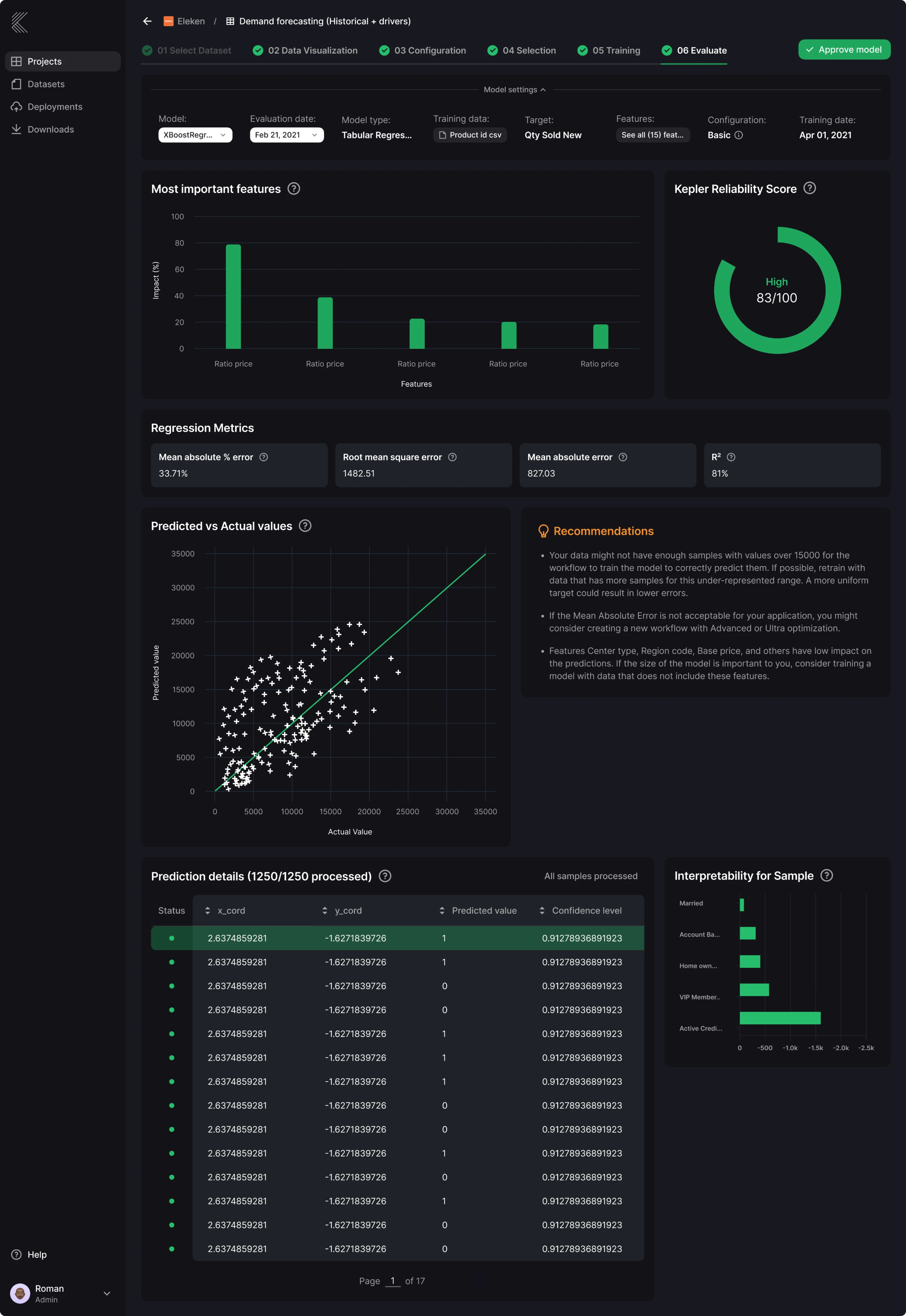
That's the essence of demystification: don't make the interface as complex as the technology behind it. One of the key benefits of this approach is that the product can preserve sophisticated capabilities and custom logic behind the scenes without exposing all that complexity to every user. Expose the depth users need for their role, while abstracting the technical machinery they don't need to complete their task. In Kepler's case, that meant preserving sophisticated ML capabilities while making them approachable enough for people without technical expertise to evaluate, experiment with, and use their data.
How do you choose the right AI design pattern?
Choosing AI agent architecture design patterns starts with the problem you're trying to solve, not with the most sophisticated architecture available.
First, identify which layer of the product needs a pattern. If the challenge is about how the AI reasons, uses tools, or coordinates tasks behind the scenes, you're making an architecture decision. If the challenge is about how users provide input, review results, refine outputs, or stay in control, you're dealing with an interaction design pattern. Many AI features need decisions at both layers.
From there, look at what the task actually requires. A relatively straightforward task may work perfectly well with a single agent, while a workflow involving several dependent steps may benefit from planning. If the AI needs information beyond what it already knows, it may require retrieval augmented generation (RAG) or tool use. And when outputs carry greater uncertainty or consequences, patterns for verification and human oversight become more important.
A few common needs can help narrow the choice:
But matching the problem to a pattern is only part of the decision. You also need to consider the trade-offs the pattern introduces. More orchestration can improve capability, but it can also increase latency, cost, and system complexity. Greater autonomy can reduce manual effort, but it usually creates a stronger need for visibility, verification, and user control.
That makes the simplest pattern that reliably meets the product requirement a useful starting point. How well a pattern works depends on the problem it is solving: a more sophisticated architecture isn't necessarily better if a simpler one can produce a reliable final answer. Don't build a multi-agent system when one agent can handle the task, and don't add layers of AI controls when the level of uncertainty doesn't justify them. Complexity should solve a specific problem rather than become a goal in itself.
Where generative AI design patterns are heading
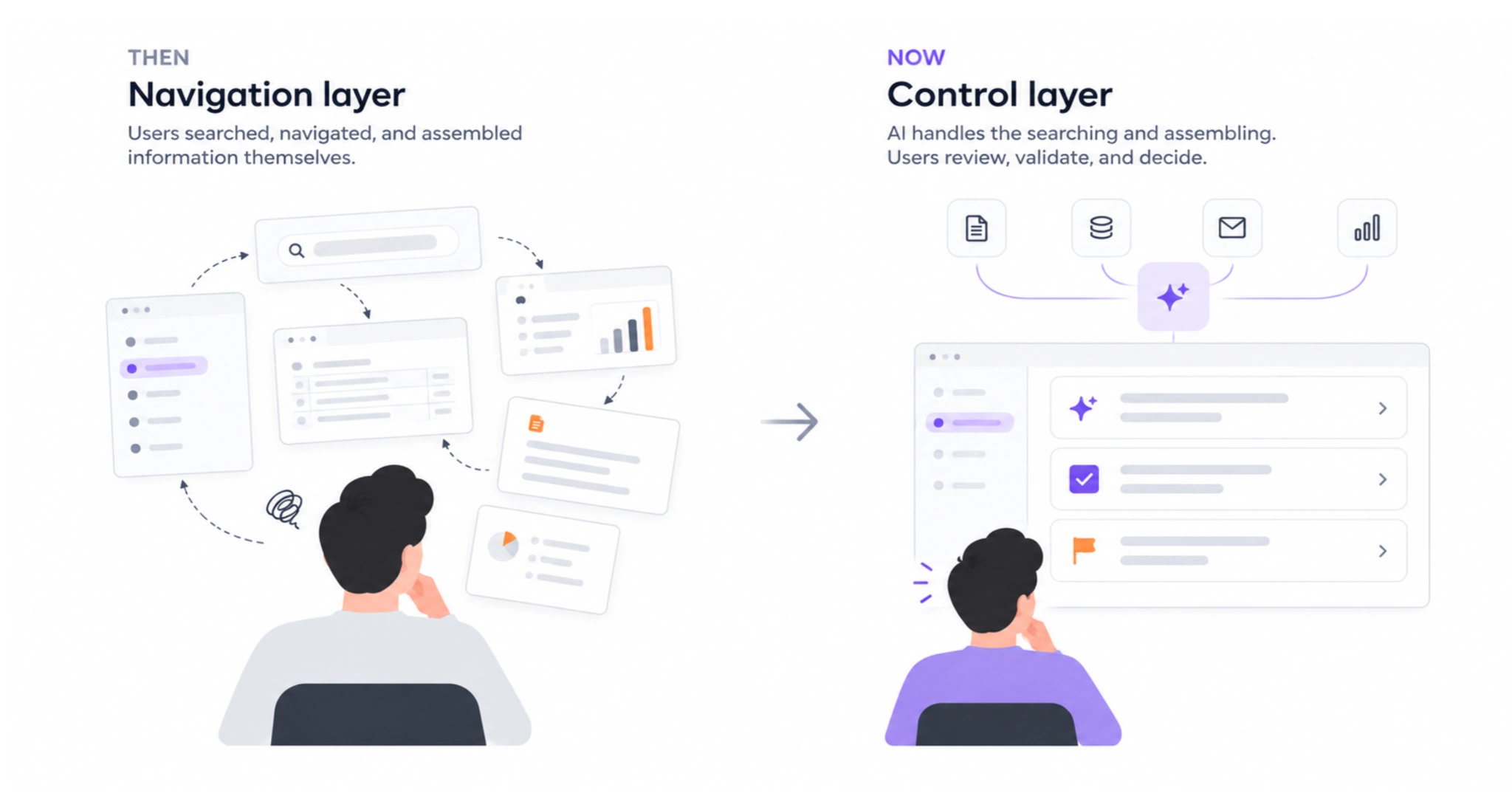
AI in UX design is changing not only what software can do, but also how people interact with it throughout their workday. As Eleken’s design director Maksym Chervynskyi describes it, software is moving from a point users visit to a line running through their workday. Instead of constantly searching for information, navigating between tools, and assembling everything themselves, users increasingly review, validate, and make decisions based on what AI has already prepared for them.
As that relationship changes, the role of the interface changes with it. If agentic AI systems handle more of the searching, assembling, and executing behind the scenes, the interface becomes less about helping users navigate to the right place and more about helping them understand and control what the system is doing. That's why patterns built around visibility, verification, feedback, and human intervention become more important as AI systems gain autonomy.
This shift also changes what designers need to solve for. The question is no longer only “How should people move through this product?” It increasingly becomes “How should people and AI work together safely, clearly, and effectively?” As that collaboration becomes a bigger part of everyday software and generative AI applications, the AI design patterns that support it are likely to become fundamental conventions of SaaS product design.
AI design patterns are a map, not a recipe
There isn't one universal set of AI design patterns. The key is knowing which layer you're working on: agentic patterns shape how AI behaves under the hood, while UX patterns determine how people understand, guide, and control that behavior. The strongest AI products align both.
And more complexity isn't necessarily better. Start with the simplest pattern that solves the problem, then add agents, planning, refinement, or additional controls only when there's a clear reason to do so.
As AI interfaces increasingly become control layers, designing for trust, visibility, and human judgment will matter as much as designing the intelligence itself. That's the challenge Eleken has already tackled across products like Siena, CaseScribe, Modia, Avid, and Zaplify. If you're figuring out how AI should work inside your own SaaS product, Eleken can help turn those patterns into an interface people can actually understand and use.


.webp)
.webp)
.webp)
.webp)