


Gartner says that by 2026, 40% of B2B apps will use task-focused AI agents, up from under 5% in 2025. At Eleken, a UI/UX design agency specializing in SaaS, we've observed this shift firsthand. Most of our recent work involves designing AI-powered apps or integrating AI into SaaS platforms. But will AI SaaS eventually replace most cloud products? Exploring the future of AI's role in SaaS can provide valuable insights into its transformative potential.
This guide offers a step-by-step approach to help you learn how to integrate AI into an app. Combining practical strategies and insights from real-world projects like Contingent and Siena, this guide equips you with actionable knowledge to deliver impactful results.
What is AI integration and key benefits for SaaS applications
AI integration refers to embedding artificial intelligence capabilities into software systems to solve specific challenges or enhance functionality. For SaaS applications, learning how to integrate AI effectively means leveraging its power to deliver smarter, more responsive features and improved user experiences.
Key benefits for SaaS applications
- Automation of repetitive tasks: Reduces manual workload, allowing users to focus on strategic initiatives.
- Enhanced user personalization: Adapts experiences to individual preferences, increasing engagement.
- Streamlined workflows: Optimizes processes for better efficiency and reduced friction in operations.
These benefits demonstrate the transformative potential of understanding how to integrate AI-powered features into SaaS, turning ordinary applications into innovative, user-centric solutions.
Step-by-step guide: Integrating AI into SaaS applications
So, how do you approach AI technologies integration?
Step 1: Define the AI use case
The first step in learning AI implementation into your product is identifying the specific problem it will solve or the opportunity it will enhance. This requires focusing on two key aspects before you start integrating AI:
Evaluating user challenges:
- Identify pain points in the user journey, such as repetitive tasks, decision-making bottlenecks, or delays in accessing actionable insights.
- Pinpoint inefficiencies in workflows where automation could make a measurable difference.
Aligning with business goals:
- Clarify what you want the AI components to achieve, such as improving user retention, reducing churn, or unlocking new revenue streams.
- Ensure the chosen AI use case complements your SaaS product’s core value proposition, rather than raising abstract concerns about will AI replace SaaS instead of strengthening it.
- Balancing these perspectives ensures that your AI solution delivers meaningful value.
Defining a use case is a fundamental step in understanding how to integrate AI without overcomplicating your application and serves as a practical foundation for how to design integrations that scale with your product.
Real-world examples
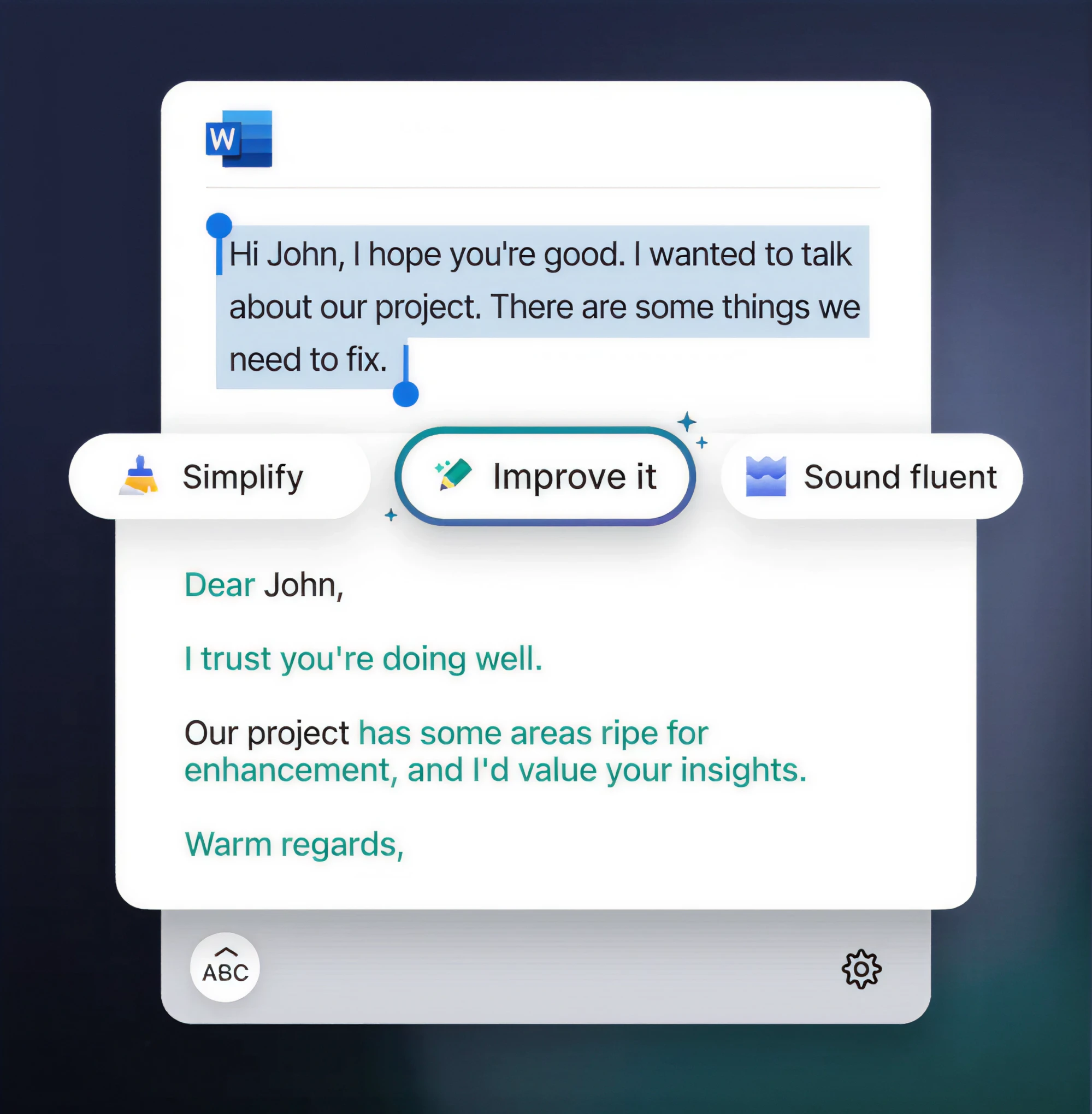
- Content generation: Grammarly uses AI-powered natural language processing (NLP) to offer grammar corrections, tone analysis, and rephrased suggestions in real time. By automating the editing process, it provides users with polished, professional content effortlessly.
- Smart dashboards: Tableau showcases how to integrate AI into analytics by automatically generating visual insights, identifying trends, and predicting outcomes based on historical data. This simplifies decision-making for businesses without requiring a dedicated analytics team.

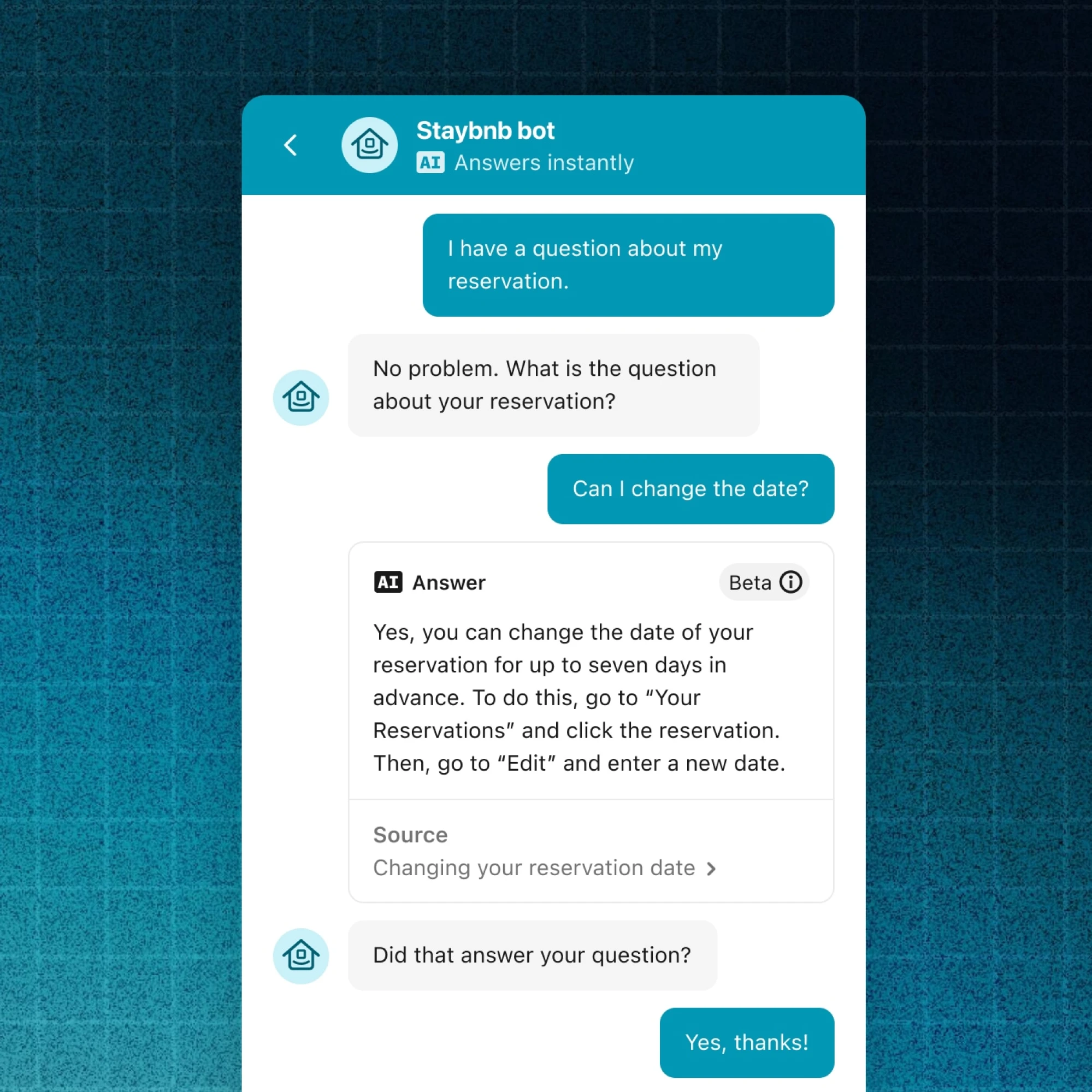
- Automated customer support: Intercom integrates AI chatbots to handle thousands of inquiries simultaneously. These chatbots answer FAQs, assist in onboarding, and escalate complex cases to human agents. This approach combines scalability with a high-quality customer experience.
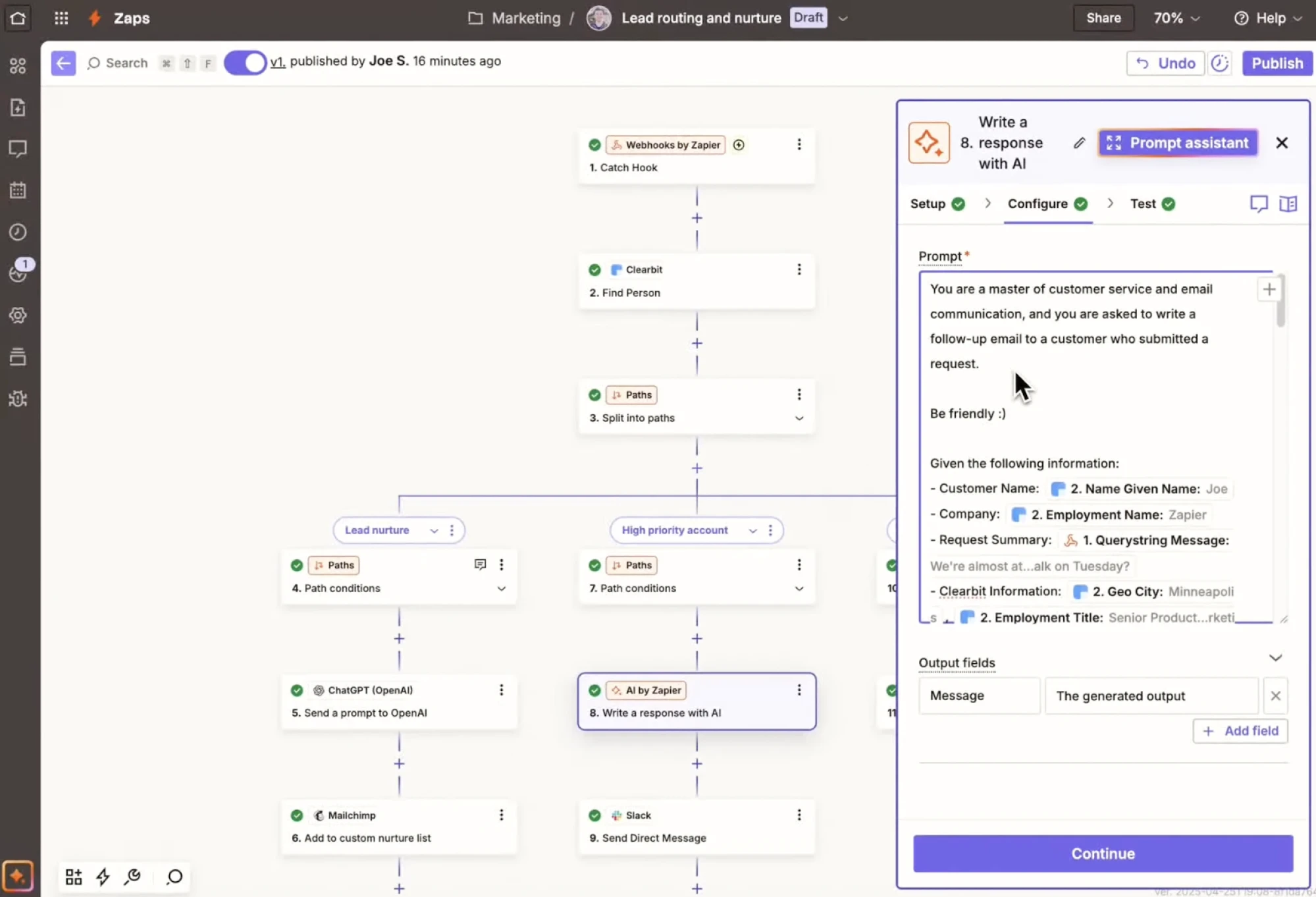
- AI automation: Zapier lets users build intelligent workflows and agents across thousands of apps.
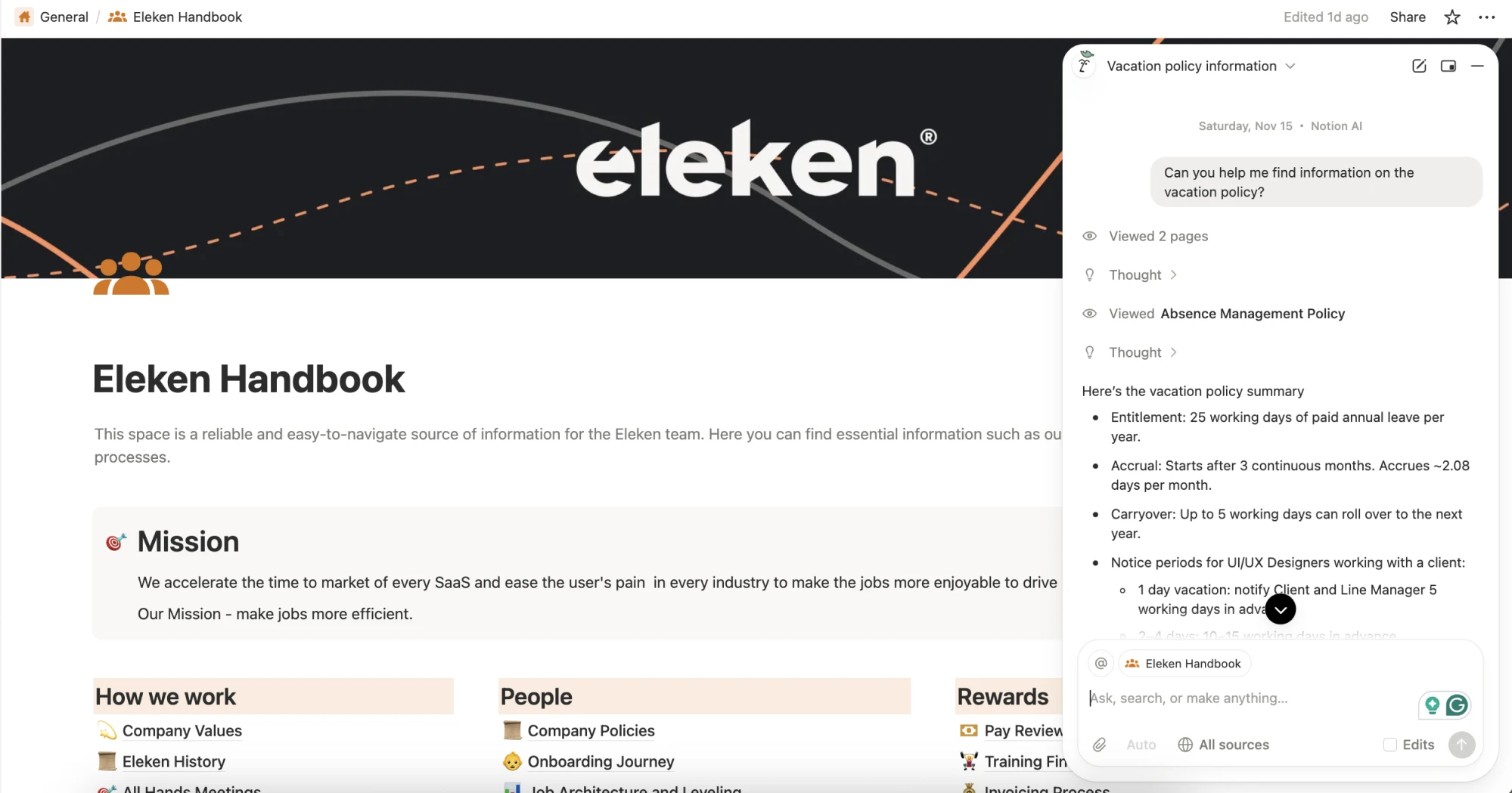
- Natural language processing: Notion AI automatically summarizes documents, extracts action items, rewrites content, and translates text.
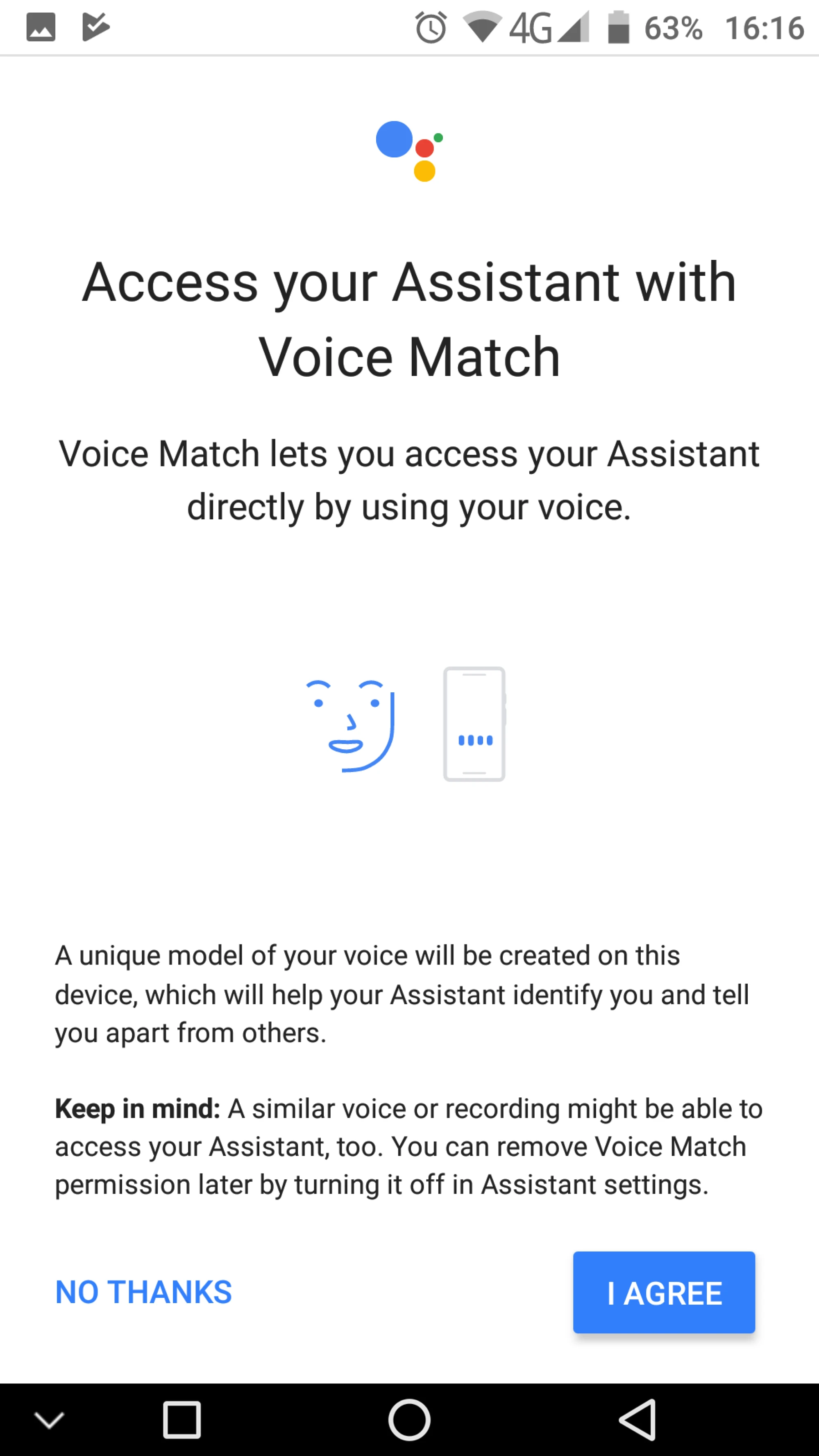
- Voice recognition: Google Assistant lets users activate it by voice and uses “Voice Match” to recognize individual voices.
- Image recognition: Google Lens uses AI to analyze what your camera sees and extracts meaningful information — objects, text, scenes.

Starting with one focused AI use case allows you to create a high-impact feature that resonates deeply with users and sets the stage for future innovation.
Step 2: Build an AI strategy with UX in mind
Integrating AI functionalities into your SaaS application is a strategic process that requires balancing innovation with usability, which directly impacts the responsibilities of an AI product manager role. To help you understand how to integrate AI, let's look at the steps using a real-life example of Contingent, a SaaS application designed by Eleken with AI integration in mind. Originally, Contingent allowed companies to set environmental goals and generate policies from templates. Through a phased approach, we transformed its workflow into a dynamic, user-centered AI experience, grounded in UI/UX design for AI based products. Here's how you can follow a similar path:
Key steps to building an effective AI strategy
#1. Understand the user workflow
Begin by mapping how users interact with your application. Identify inefficiencies or bottlenecks where AI could make a meaningful impact — this is where AI for better UX ensures automation supports users instead of disrupting them. For Contingent, the original workflow was streamlined into a clearer structure:
Step 1: Users define their goals.
Step 2: The app generates editable policies tailored to those goals.
This refinement clarified how AI could assist with personalization and efficiency.
#2. Adopt a phased rollout
Gradually incorporating AI functionalities ensures smoother user adoption and allows for continuous refinement. For Contingent, this looked like this:
Phase 1: AI-assisted editor for refining policies directly, with features like text highlighting for rephrasing or clarification.

Phase 2: Chat-based interaction, enabling users to dictate goals, upload files, and receive AI-generated policies conversationally.

Phase 3: AI-generated avatars simulating a video-call experience, guiding users through policy creation in real-time.

#3. Provide interaction flexibility
Accommodate diverse user preferences with multiple interaction options:
- Structured forms: A clear, step-by-step approach for task completion.
- Conversational interfaces: Dynamic and accessible workflows through chat.
- Additional possibilities: Voice-activated commands, gamified interactions, or predictive recommendations for an engaging user experience, with AI transparency ensuring users understand when and how AI influences these interactions.
#4. Design for scalability with modular components
To ensure your application can grow alongside user demand, design AI features as modular blocks. Contingent’s phases were developed independently, allowing seamless upgrades without disrupting the system’s core functionality, a common requirement for AI in SaaS products operating in evolving business environments.
By building an AI strategy with UX in mind, you can integrate AI in a way that enhances usability and ensures adoption. Contingent’s phased approach shows how to integrate AI features strategically while keeping users at the center of the experience.
Step 3: Prototype, test, and iterate
Once you've defined your AI use case and built a strategy, the next critical step in learning how to integrate AI is prototyping, testing, and iterating. This process ensures your AI app is functional, user-friendly, and aligned with real-world expectations.
As Eleken designer Nazar points out:
“The main challenge is to make SaaS users trust AI, because it's business. Mistakes are not acceptable, especially when users delegate their control to the software.”
Building trust requires meticulous testing and incorporating feedback at every stage.
#1. Start with a prototype
Develop a simplified version of your AI feature to test its core functionality.
For example, Contingent's prototype featured an AI-assisted editor where users could highlight text and request specific adjustments. This early version demonstrated the potential value of AI tasks without overcomplicating the design.
#2. Collect feedback on AI outputs
Gathering actionable feedback is critical for refining AI performance and usability. Consider these methods:
- Interactive testing tools: Siena’s Test Runs feature allowed users to test how its AI assistant responded to different customer inquiries. Users reviewed inquiry-response pairs, left comments, and suggested improvements, enabling the assistant to align with real-world needs.
- Embedded feedback options: Include features like “Rate this response” or comment fields in your app to allow users to assess AI outputs directly.
- A/B testing: Test variations of AI responses to determine which performs best in real scenarios.
For a deeper dive into leveraging conversational AI, check out our post on ChatGPT for UX research to learn how it’s transforming user testing and feedback processes.

#3. Iterate based on feedback
Refine your AI features continuously to meet user expectations. For Contingent, early feedback on the editor phase informed the development of more dynamic interfaces, such as conversational workflows and AI avatars.
Step 4: Test for scalability and address edge cases
To ensure your AI features are reliable and user-friendly, it’s essential to test for scalability and prepare for edge cases. This step ensures that your AI system can handle real-world demands, even under unexpected conditions. Thorough testing is a critical part of learning how to integrate AI effectively.
#1. Stress-testing the system
Scalability is crucial in SaaS, where user demand can fluctuate dramatically. Stress-testing helps identify how your AI performs under heavy load:
- Simulate high user volume: Evaluate how the AI responds when multiple users interact with it simultaneously. This reveals potential bottlenecks in server performance or response times.
- Test complex data loads: Push the AI to process large or intricate datasets. This ensures it can manage the computational demands of real-world applications, like generating predictive analytics or running multi-step workflows.
#2. Simulating edge cases
Edge-case testing helps refine how your AI responds to unpredictable or non-standard inputs:
- For chatbots: Assess how the system reacts to incomplete, ambiguous, or nonsensical queries. For example, simulate typos, slang, or repeated commands to test its adaptability.
- For analytics tools: Feed the AI with irregular data patterns to evaluate whether it produces meaningful results or flags the data for review.
#3. Plan for incremental scaling
Design your infrastructure to grow seamlessly alongside user demand:
- Cloud services with auto-scaling: Platforms like AWS or Google Cloud provide dynamic scaling capabilities, ensuring consistent performance as user activity increases.
- Modular components: Build AI features as independent modules so they can be optimized or upgraded without disrupting the system.
#4. Incorporate continuous feedback loops
Scalability isn’t just about managing technical demands—it’s also about evolving your AI based on user needs:
- Monitor key metrics like user satisfaction, error rates, and response times to identify areas for improvement.
- Regularly update your AI models to incorporate the latest advancements or address emerging user requirements.
Testing for edge cases and scalability ensures your AI can handle real-world demands. Regularly reviewing performance metrics and identifying gaps in usability are critical steps. Discover how AI in UX audits is reshaping this process by providing actionable insights for continuous improvement.
Step 5: Deployment and ongoing optimization
The final step in learning how to integrate AI into your SaaS application is deploying the AI feature and committing to its continuous improvement. A thoughtful rollout minimizes risks, ensures user adoption, and maintains the AI’s relevance over time.
#1. Gradual rollout
Introducing AI features incrementally helps manage user expectations and address potential issues early:
- Beta releases: Start with a small group of users to gather detailed feedback and refine the feature before full-scale deployment.
- Monitor interactions: Analyze user engagement to identify pain points or unexpected behaviors.
- Example: Contingent initially launched its AI-assisted editor to a limited audience. This approach allowed the team to address usability concerns and refine the interface before expanding access.
#2. User education and support
AI features often involve new workflows, so providing clear guidance is essential for successful adoption:
- Interactive tutorials: Walk users through how to interact with the AI, whether it’s highlighting text, using chat interfaces, or customizing settings.
- Help resources: Create accessible FAQs, instructional videos, and support documentation to assist users in navigating the new feature. Educating users builds confidence and trust, which are crucial for long-term success, particularly if your SaaS works with sensitive data.
#3. Continuous monitoring and feedback loops
Deployment marks the beginning of an iterative improvement process. Regularly evaluate the AI’s performance and refine it based on insights:
- Track performance metrics: Monitor response times, accuracy rates, and user satisfaction scores to assess effectiveness.
- Incorporate user feedback: Features like Siena’s Test Runs, which allowed users to review and refine AI responses, are excellent tools for maintaining alignment with user expectations.

#4. Stay ahead with updates
AI technology evolves rapidly, and keeping your features up-to-date ensures they remain effective:
- Update algorithms and AI models to leverage advancements in machine learning.
- Expand the AI’s capabilities based on user needs, such as adding support for new languages or improving accuracy in specific scenarios.
Deploying AI features thoughtfully and optimizing them continuously ensures they deliver lasting value to users. By combining gradual rollouts, user education, and consistent updates, your SaaS application will maintain its competitive edge.
Challenges and how to overcome them
Integrating AI into SaaS applications offers transformative benefits, but it also introduces unique challenges. Addressing these obstacles is essential for delivering reliable, user-friendly AI features. Here’s how to overcome the most common hurdles when learning how to integrate AI:
Data quality and quantity
AI systems depend on clean, diverse, and sufficient data for accurate training and performance. Poor-quality data can lead to biased or unreliable outputs.
How to overcome:
- Data preparation: Clean and preprocess your datasets to remove errors and inconsistencies.
- Data augmentation: Use synthetic data generation or external data sources to fill gaps in your training data.
These practices are especially important when working with generative AI in design, where model outputs directly shape user-facing experiences.
Balancing AI performance with user experience
Even the most advanced AI features can fail if they overwhelm or confuse users. Striking the right balance between automation and usability is crucial, particularly in products that rely on conversational UI, where interaction quality directly affects adoption.
How to Overcome:
- Design-first approach: Prioritize simplicity and transparency in how users interact with AI features.
- Contextual training: As seen with Siena’s Test Runs, train AI models on real-world scenarios to reduce errors and fine-tune relevance.
Well-implemented chatbot UI examples show how constrained, context-aware responses can prevent cognitive overload.
Building user trust
As Eleken designer Nazar noted, trust is the cornerstone of successful AI integration in SaaS:
“The main challenge is to make SaaS users trust AI, because it’s business. Mistakes are not acceptable, especially when users delegate their control to the software.”
How to Overcome:
- Transparency: Clearly explain how the AI works and what it does with user data.
- Control options: Allow users to override or adjust AI outputs for added confidence.
- Error handling: Ensure the AI gracefully manages mistakes and provides clear recovery options.
Ethical and security considerations
AI can raise concerns around fairness, bias, and data privacy. Users are unlikely to adopt systems they perceive as unsafe or unjust.
How to Overcome:
- Bias audits: Regularly evaluate machine learning models for unintended biases and address them proactively.
- Data security measures: Use encryption and strict access controls to protect sensitive information.
- Compliance: Stay updated on relevant regulations, such as GDPR or HIPAA, to ensure legal adherence.
Addressing these challenges thoughtfully will help your AI features gain user trust and operate effectively. By focusing on high-quality data, user experience, transparency, and ethical considerations, you can overcome obstacles and deliver reliable AI-powered solutions.
Insights from a UI/UX design agency
At Eleken, we’ve designed AI-driven SaaS products across industries like customer support, data analytics, geospatial intelligence, and sales automation. Founded in 2015, we' ve got over 200 SaaS projects behind us — many of them AI tools centered on data, or automation — we’ve learned what it takes to integrate AI in a way that feels intuitive, trustworthy, and genuinely useful for end users.
Our subscription-based model pairs companies with a dedicated product designer backed by senior oversight. This setup lets us move quickly, iterate often, and test AI concepts early — whether it’s conversational assistants, automated workflows, or predictive insights. Drawing from our work with clients like Contingent and Siena, here’s what we’ve learned about integrating AI effectively while maintaining user trust.
Our experience in integrating AI into SaaS apps
- Contingent: We developed a phased AI strategy, starting with an AI-assisted editor and progressing to advanced features like conversational AI and virtual assistants. This approach balanced innovation with gradual user adoption, making the app more interactive and scalable.
- Siena: For this customer support assistant, we focused on training the AI to respond accurately to user-specific contexts. Siena’s Test Runs allowed clients to test various customer inquiries and refine responses, ensuring the assistant performed well in real-world scenarios.
Why design matters in AI integration
AI integration isn't just a technical challenge — it's a design challenge. Poorly designed AI features can confuse users and erode trust. Simplifying complexity is essential to make AI feel intuitive and approachable. For more insights, read our guide on AI in UX Design to see how real-world cases demonstrate the impact of thoughtful design.
- Simplifying complexity: Good design hides the technical intricacies of AI, presenting features in a way that feels natural and intuitive. Interactive tutorials or clear workflows can help introduce AI capabilities effectively.
- Balancing control and automation: Design ensures users can collaborate with AI rather than feel controlled by it. For example, providing options to adjust or override AI outputs builds trust and confidence.
Lessons learned
Here are some key takeaways from our AI integration projects:
- Iterative development works best: Starting small, gathering feedback, and refining the AI model gradually helps it evolve in alignment with user needs.
- Trust is critical: As Nazar emphasized, building user trust is essential. Features like Siena's Test Runs and transparent AI explanations help ensure users feel confident in the system.
- Flexibility is key: Offering diverse interaction modes—such as chat, voice, or visual interfaces—caters to different user preferences, increasing adoption and satisfaction.
Combining technical innovation with user-focused design is essential for integrating AI technologies into SaaS applications. By prioritizing usability and trust, you can create AI features that drive value and adoption while maintaining user confidence.
Want to integrate AI into your product?
Integrating AI algorithms into your SaaS application can revolutionize user engagement, unlocking new levels of efficiency, personalization, and automation. But learning how to do it requires more than just technology — it demands thoughtful strategy, user-focused design, and a commitment to continuous improvement. This is where AI in UX research becomes critical, helping teams validate assumptions, understand user trust boundaries, and identify where AI genuinely adds value instead of noise.
Here's a quick summary of the key steps to implement AI into your app
- Define the AI use case.
- Build an AI strategy with UX in mind.
- Prototype, test, and iterate.
- Test for scalability and address edge cases.
- Deploy and optimize continuously.
Eleken's real-world experience with Contingent and Siena demonstrates the importance of combining technical innovation with design-first thinking. Whether you're training an AI assistant, refining workflows, or scaling new features, the key to success lies in building trust and delivering value through intuitive, reliable solutions.
How Eleken can help with your AI integration
If you're exploring or expanding AI capabilities in your SaaS product, Eleken can support you with a design process tailored for complex, data-driven applications. Here’s what working with us looks like:
What we offer
- UI/UX design for AI features: conversational assistants, AI workflows, predictive analytics, data-heavy interfaces, and more.

- Full product design: from discovery and user research to wireframes, prototypes, and final UI.
- Product redesign: improving outdated experiences, reducing friction, and preparing your product for AI expansion.


- UX audits: identifying usability issues and opportunities to integrate AI effectively.
- Design handoff & ongoing support: ensuring seamless implementation and continuous iteration.
How our model works
- Monthly subscription: a flat rate of $6,599/month for a dedicated product designer.
- Independent but supported designers: every designer works autonomously but has senior oversight from a lead.
- Fast start & quick iteration: begin with a no-commitment trial, get 1–2 screens designed, and evaluate our fit.
- Flexible, iterative workflow: ideal for teams building and refining AI features that evolve quickly.
Why teams choose Eleken
- Specialization in AI, data, and complex B2B SaaS.
- Top 1% designers: vetted for design quality, critical thinking, and clear communication.
- Consistent results: clients have reduced churn, improved activation, unlocked product-market fit, and raised funding (e.g., Datawisp, Aampe, Floret).
- Design with accessibility, clarity, and user trust in mind — essential for AI-driven experiences.
Ready to take the next step? Share your ideas or challenges with Eleken, and let's work together to create scalable, user-friendly artificial intelligence solutions for your SaaS application.





.webp)

.webp)

.webp)
.webp)
