.webp)


We constantly see that SaaS teams start building before they’re sure they’re building the right thing. The onboarding flow gets shaped around what feels obvious, the dashboard grows one feature at a time, and the cracks only appear later through low activation, support tickets, and weak trial-to-paid conversion.
By then, fixing it is expensive. The teams that come to Eleken at this stage, more often than not, need a full redesign or even a rethink of the product vision itself.
The product discovery process is what catches that mistake before it reaches the code. In this guide, we’ll walk you through how to run it, covering when you need discovery, what to ask your users, which frameworks keep you oriented, and how to turn what you learn into screens people can actually get through.
What is the product discovery process?
Product discovery is the process of finding, validating, and prioritizing real user problems before your team commits a single line of code to a solution. It starts with a question about customer needs, and it doesn’t spend engineering time until there’s evidence worth spending it on.
At its core, the product discovery process answers three questions about any problem you’re weighing:
- Is the problem worth solving?
- Will the solution work?
- Is it better than the alternatives?
Marty Cagan frames the same territory as four risks every product idea carries: value (will people use or buy it?), usability (can they figure out how?), feasibility (can you build it with what you have?), and business viability (does it fit your business, legal, and revenue model?).
The mindset underneath all of it is simple: discovery is about learning. The goal is validating ideas and assumptions to find out what’s wrong before a sprint begins.
That’s also the reason many product management teams skip it. Pausing to question the problem can feel like the opposite of progress, especially under pressure to show movement.

Lots of PMs accrue time to ship and bloated releases/iteration processes because they didn't think to pause and see if they were solving the right problem because they were busy trying hacks to move metrics.

The downside of skipping discovery doesn’t take long to appear.
What skipping discovery costs SaaS teams
When a team builds without discovery, the first cost is wasted work. Skipping straight to design and the product development process usually buys a few weeks of momentum before the rework starts, and then you pay for the same screens twice.
The larger cost hides inside features that technically work but don’t earn their keep. Pendo’s analysis of anonymized product usage data found that roughly 80% of features in the average software product are rarely or never used. Discovery is what tells you which fraction actually matters before you build the rest.
When the problem itself was never validated, the damage runs deeper than a few idle features. Building for a user you assumed instead of studied tends to surface as:
- weak activation, because the first-run experience solves a problem people don’t really have;
- shaky retention, because there was never a strong reason to come back;
- pricing and positioning that never land, because they’re aimed at a need that isn’t quite real.
This is the most expensive failure mode of all. CB Insights’ analysis of startup post-mortems found that 42% failed because there was no market need. Nearly all of those teams could have learned that before writing a line of code, simply by asking.
We see a version of this constantly with products that started life as internal tools. They were built to get a job done, so the moment they’re pointed at the market, the gaps show. Discovery is what forces that rethink before launch.
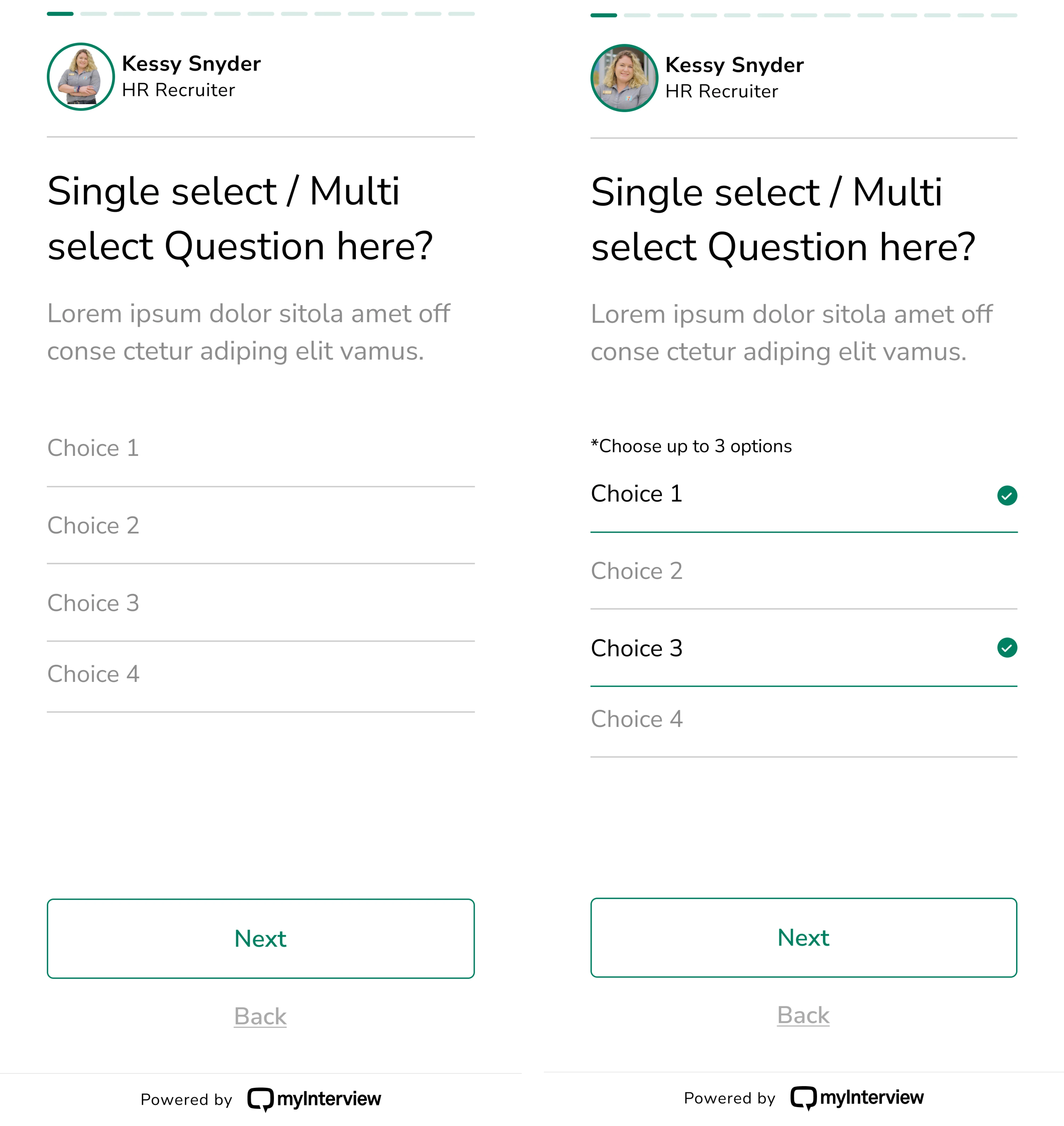
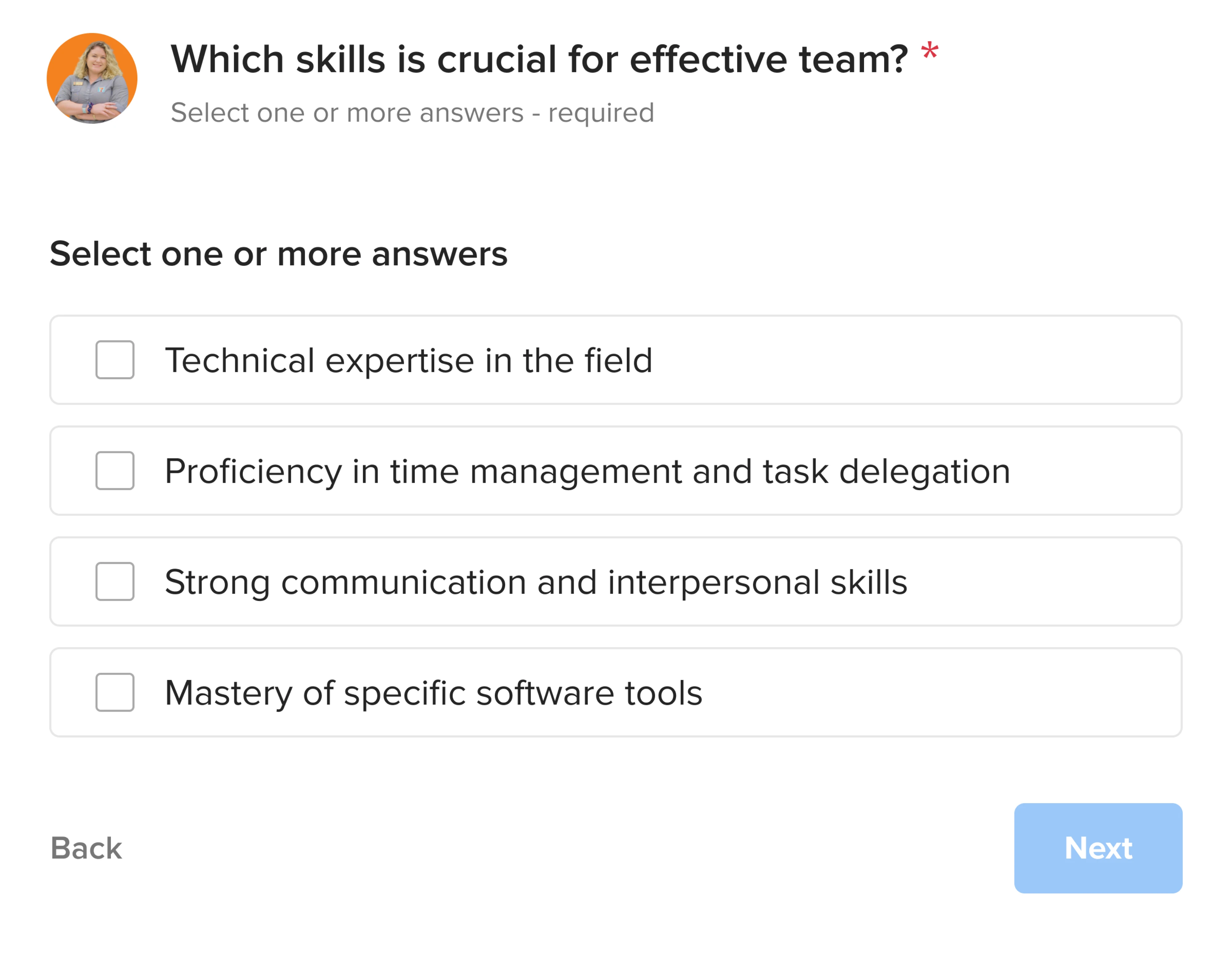
myInterview shows how late that signal can otherwise arrive. Their video interviewing platform was working well enough to serve over 5,000 companies, yet more than 90% of candidates were dropping out mid-interview.
Primarily, we wanted to improve the candidate experience, as we noticed a significant drop-off rate (more than 90% within the interview flow).

Working on the project, we found that the cause was the candidate flow: multi-select inputs that didn’t look selectable, unclear click targets, a “3 options max” rule that appeared only after you’d already tapped. None of it was obvious from the inside. It took a close look at the real experience to see it, and more budget spent to fix it.
That’s exactly the kind of expensive, invisible problem discovery exists to catch early.
Frameworks to orient your discovery process
Frameworks won’t do discovery for you, but they keep you oriented while you do it. Each one is strongest for a particular situation, and most product teams end up borrowing from several. Here are the ones worth knowing before we get into the actual steps.
Double Diamond
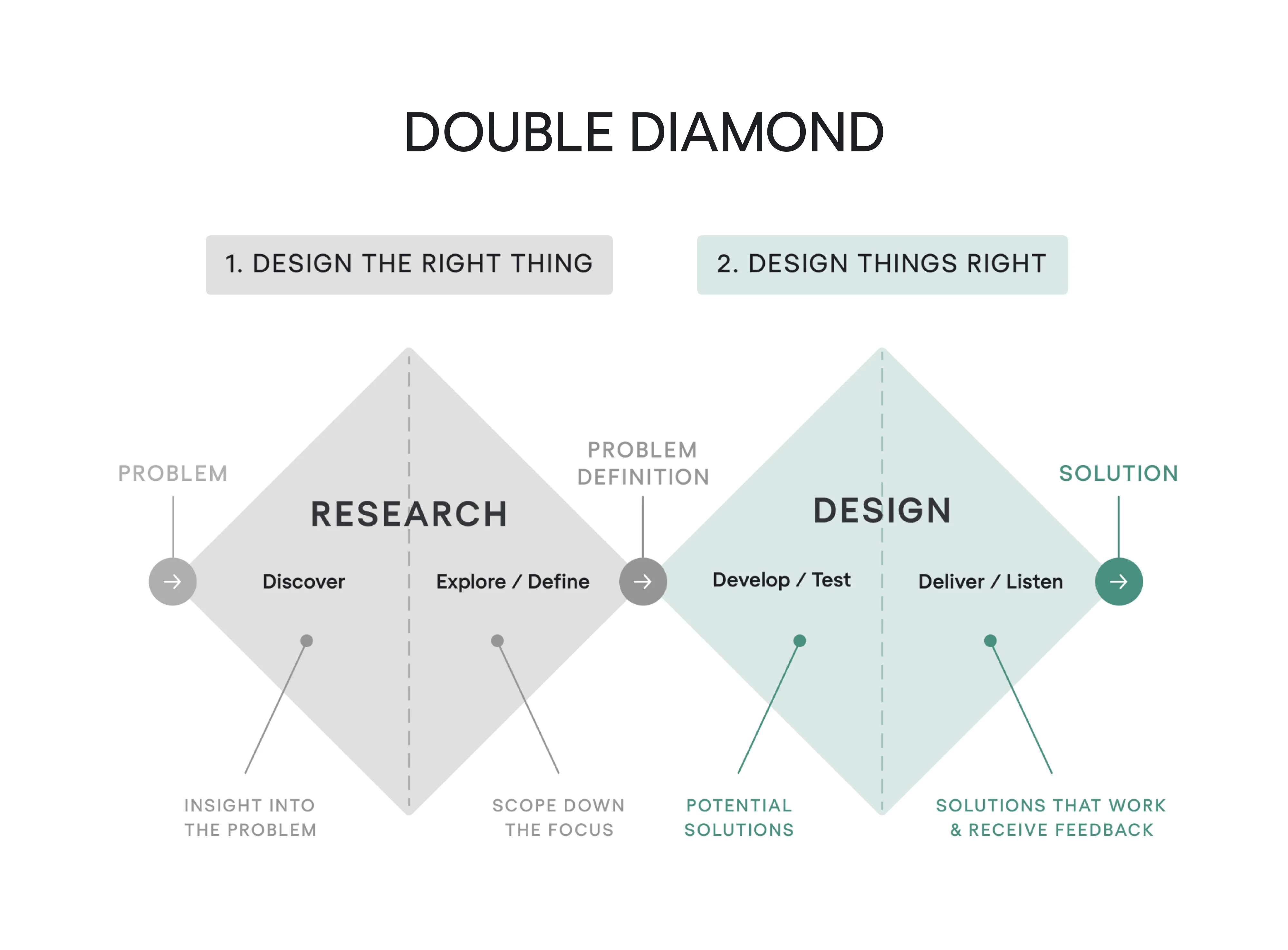
The Double Diamond (from the British Design Council) splits the work into four phases across two diamonds: Discover and Define to land on the right problem, then Develop and Deliver to land on the right solution.
In our experience, that’s played out for Cylynx, a no-code graph-visualization platform. They came to us with a working demo but only a rough sense of when real users would reach for a tool this specialized.
Our designer used the Double Diamond to widen first — a UX audit of the demo plus competitor analysis — then converge on a defined direction, restructuring a confusing four-tab graph editor into three clear tabs and designing the flows needed to turn the demo into a minimum viable product (MVP) people could subscribe to.
Dual-Track Agile
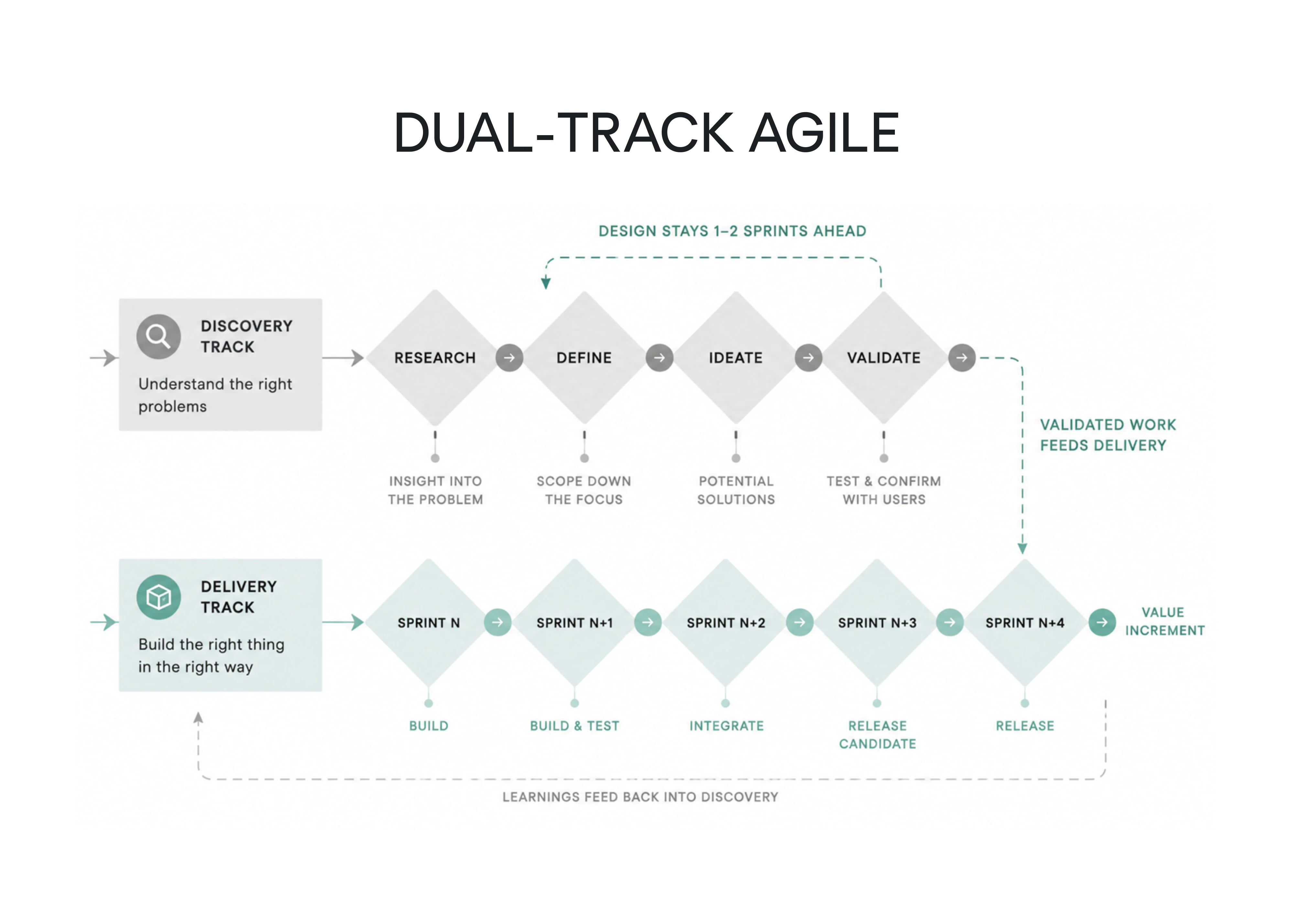
Here, discovery and delivery run as two parallel tracks: the discovery track produces validated problems and solutions, and the delivery track ships and tests them. It’s the product discovery process in agile for teams that are already building and can’t stop to “do discovery” as a separate phase.
Design Sprint
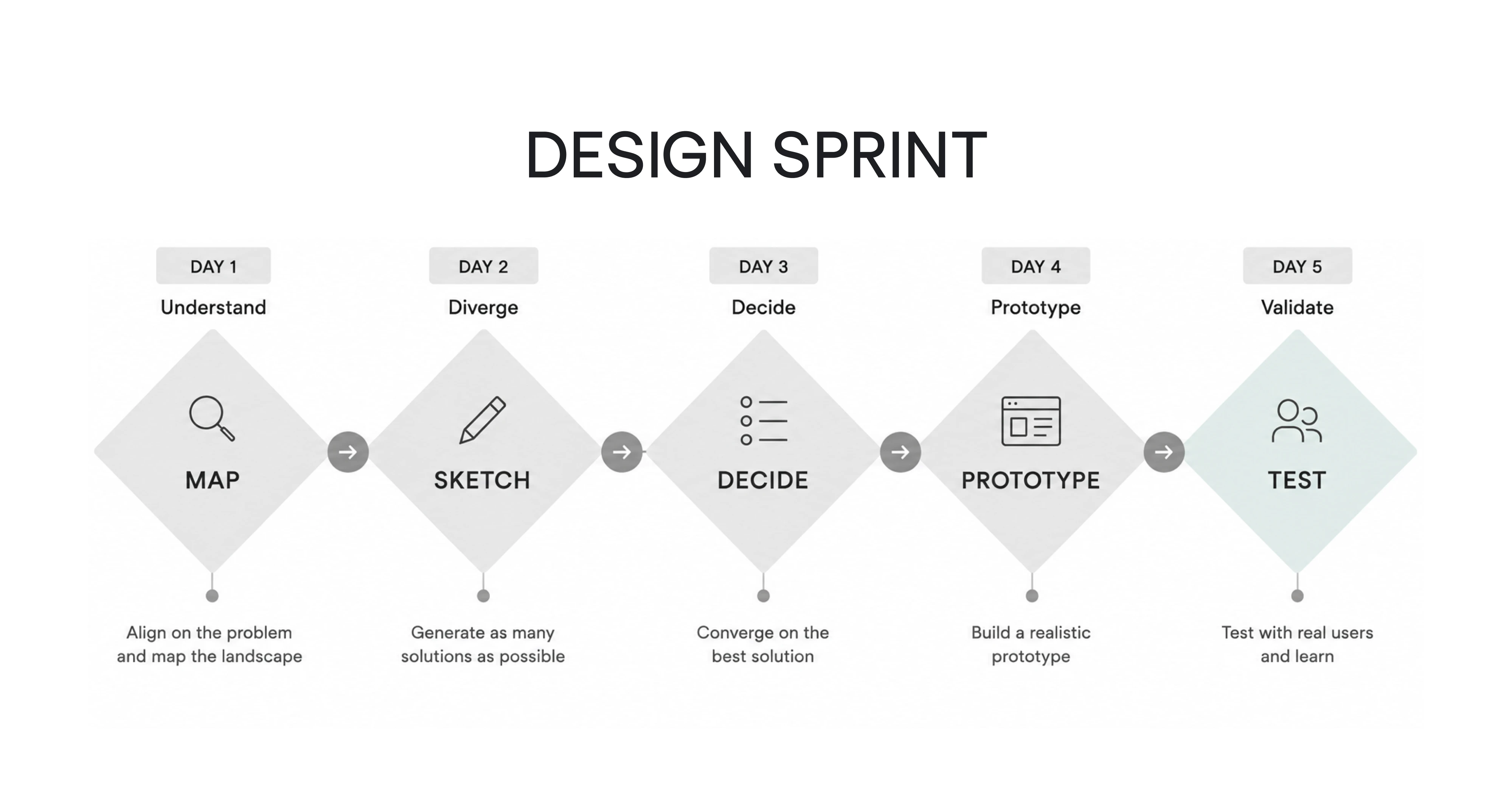
Jake Knapp’s five-day format — map, sketch, decide, prototype, test — compresses months of circular debate into a single tested prototype by Friday. Save it for high-stakes flow decisions where committing to the wrong direction would be expensive to unwind, like reworking a signup or a core workflow.
Jobs to Be Done (JTBD)
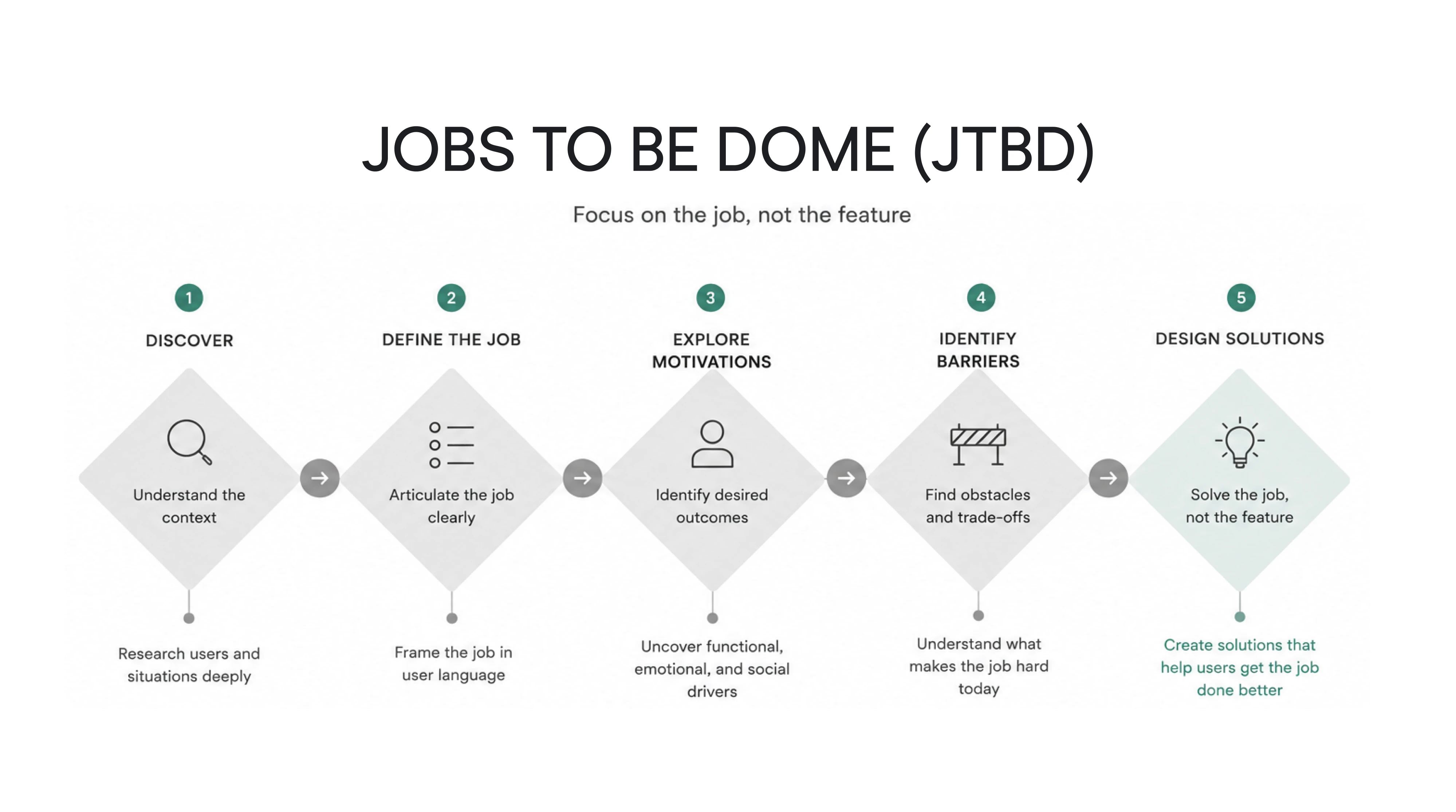
JTBD reframes motivation around the job a user is “hiring” your product to do, rather than the feature they happen to be asking for. It’s the antidote to a product roadmap built from literal feature requests — when someone asks for a Slack integration, JTBD pushes you to find the job underneath it.
RICE and ICE scoring
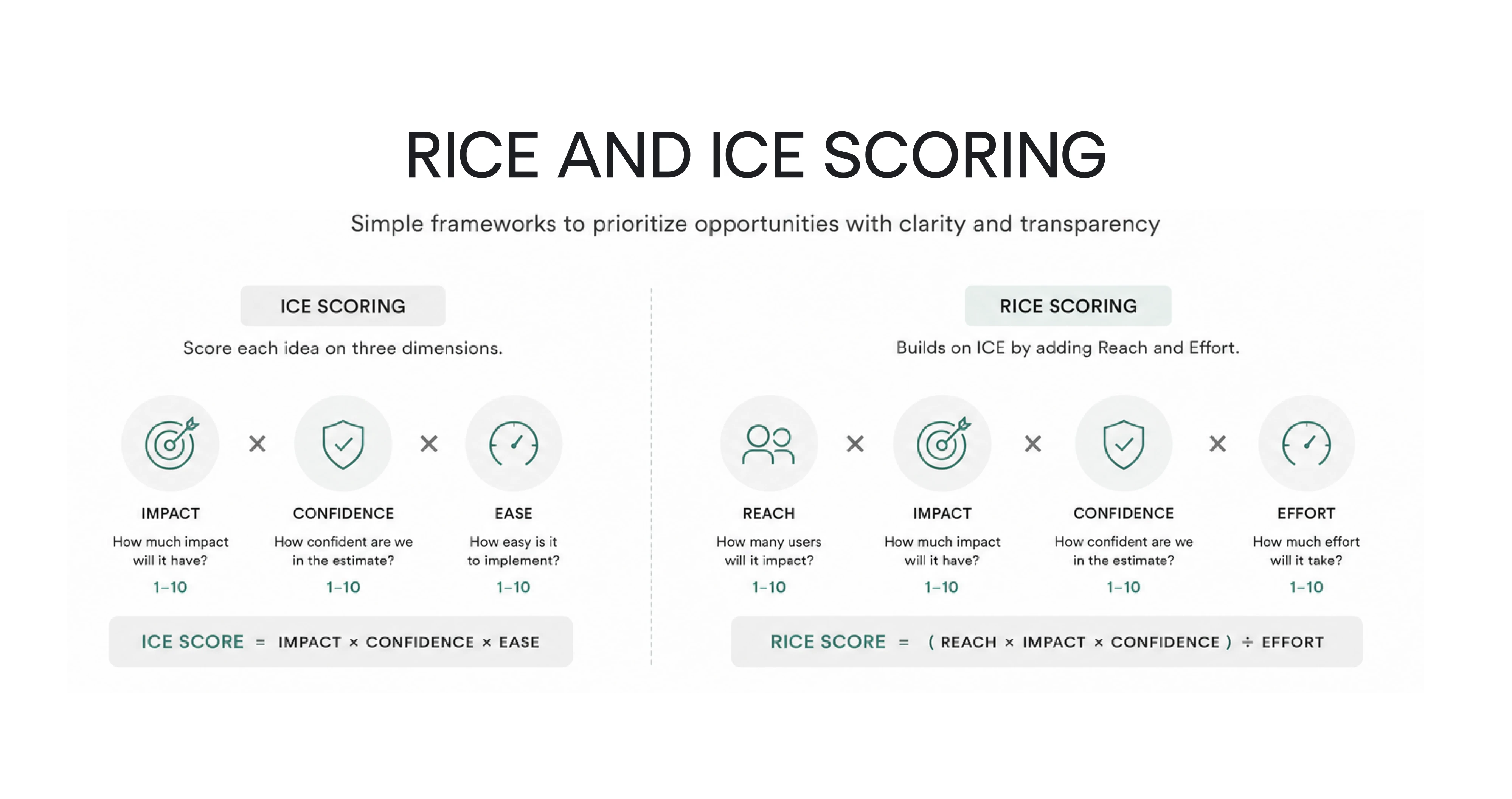
Once you have a list of opportunities, these keep prioritization honest with numbers. ICE scores each idea on Impact × Confidence × Ease. RICE adds Reach and divides by Effort. Neither is precise science, but both force the assumptions out into the open where the team can argue about them.
More on this you can read in our guide to feature prioritization.
Lean Startup
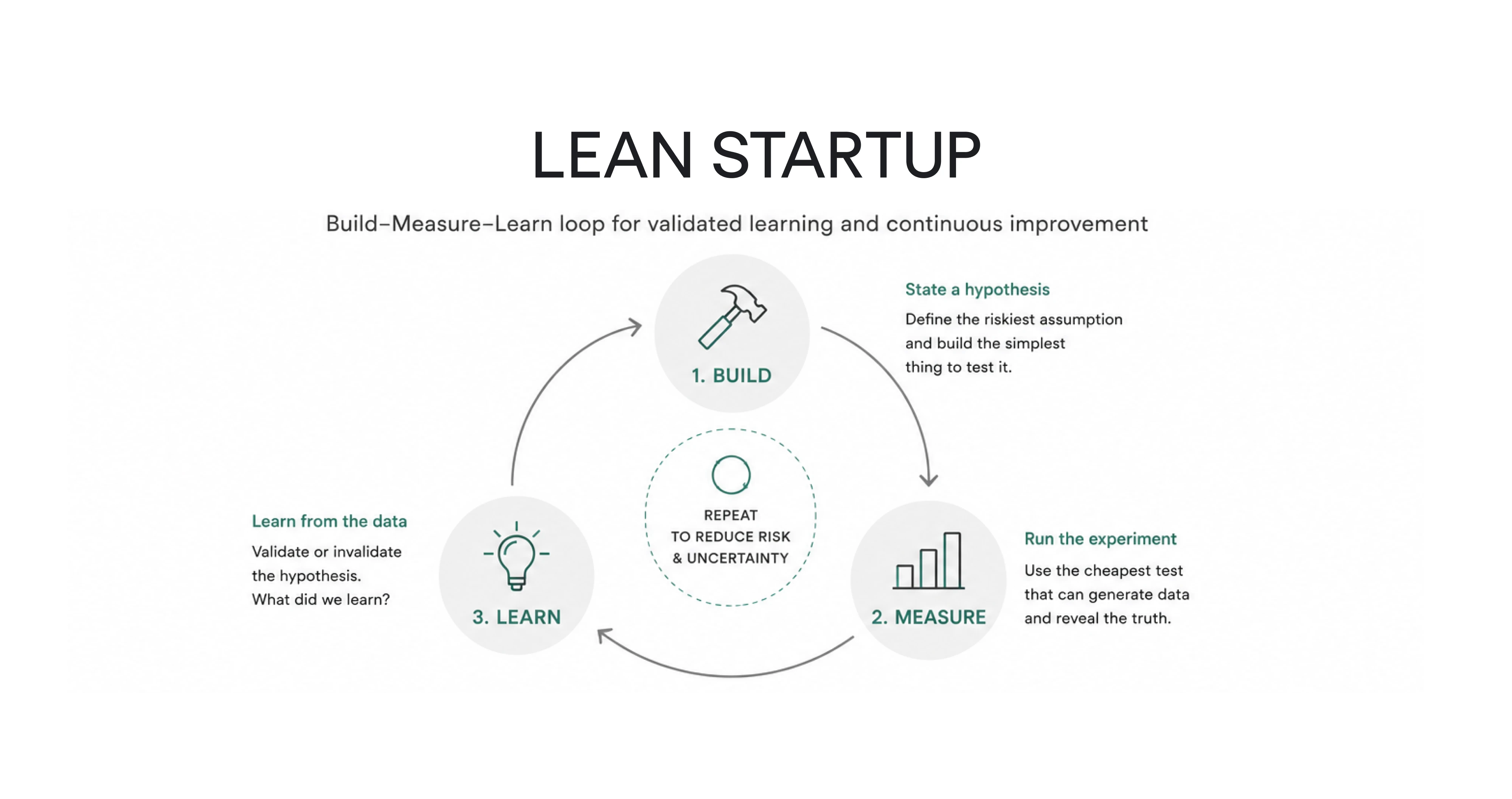
Eric Ries’s build–measure–learn loop turns discovery into a series of small experiments: state a hypothesis, run the cheapest test that could disprove it, learn, repeat. Its real value is discipline — it stops discovery from sliding into an endless research phase with no decisions attached.
No single one of these is mandatory, and stacking all of them is its own kind of procrastination. The right move is to adapt.
PM and design need to work and plan together and be open to navigating discovery together rather than following a single set process
The product discovery process, step by step
Here’s what discovery looks like in practice: you frame a problem, talk to users, make sense of what they said, shape a few ideas, and test them. Teams often move back and forth between these steps, but they make a good place to start.
Step 1: Frame the right problem
Discovery starts with a problem. The most common misstep is to open with “we should add X” when the real work is naming the challenge underneath it.
.webp)
Good problems sit at the altitude of broad SaaS goals, like launching a new product, unlocking growth, lifting activation, or paying down technical debt. “Reduce drop-off in the setup flow,” “get more trial users to their first real outcome,” or “help people navigate a dashboard that’s grown unwieldy” are all worth discovering against.
Once you have a candidate problem, write it down as a structured statement and pressure-test it against three questions: How painful is it? How often does it happen? What’s the value of solving it? A problem that’s acute, frequent, and valuable earns real discovery (one that fails all three probably doesn’t).
Then dig past the symptom to the cause. The 5 Whys method (asking "why?" until you hit something root-level) keeps you from designing for surface complaints. The “Slack integration” request, questioned a few times, might turn out to be a notification gap or a collaboration breakdown that a very different solution would serve better.
The mindset that makes this work is curiosity:
It's very easy to fall into the trap of 'validating.' Don't validate — seek to understand. Understand the problem, understand the feedback.
Getting the frame right pays off directly. When Datawisp came to us, the easy move would have been to pile features onto their no-code analytics tool. But the problem was that the product was powerful, yet it felt complicated.
Framing it as “make this feel easy,” not “build more,” set the direction for the entire redesign. As a result, user feedback shifted from “this looks complicated” to “this looks easy,” and that clarity helped Datawisp close a $3.6M seed round.
User feedback of our software has changed from "this looks complicated" to "this looks easy", and our software progressed from a prototype, to actual, real, usable software.
Step 2: Research your users
With the problem framed, user research is how you trade assumptions for evidence. It works best in two layers: qualitative methods tell you why users behave the way they do, and quantitative methods tell you what they do and where it breaks.
- The qualitative side means conducting customer interviews, focus groups, contextual observation, and empathy mapping.
- The quantitative side includes analyzing product analytics, funnels, survey responses, user segments, and session recordings.
Interviews carry most of the weight. Keep them one-on-one and 30 minutes to two hours, across a sample of 10-40 people spread over your key user subgroups. Ask one question at a time, follow with “why,” and avoid closed or future-tense questions.
Who you talk to matters as much as how. The freshest, most honest signal comes from users who recently finished onboarding, just cancelled, or just contacted support, while their experience is still raw and specific.
It’s good to be an active listener and let users talk, but don’t let them take the conversation too far off-topic.
Session recordings then catch the moments of hesitation, the rage clicks, the silent drop-offs where someone quietly gives up. For a SaaS product, a few flows are worth watching closely:
- signing up and reaching the first screen
- inviting teammates
- configuring the workspace
- completing the first core action
- hitting a paywall
One source teams overlook is their own sales and support people, who hear the friction and the “how do I…” questions. In our experience, that internal knowledge often delivers valuable insights into bottlenecks and churn points nobody had measured yet.
Finally, run competitor analysis and market research in parallel, evaluating three to five direct and indirect competitors. It won’t tell you what to build, but studying existing solutions surfaces the conventions users already expect and the market trends shaping them, feeding directly into your information-architecture decisions.
Step 3: Turn research into UX artifacts
Raw user insights are just a pile of notes until you shape them into something the team can act on. That’s what artifacts do. They turn what you heard into a shared picture of the problem. A handful earn their place in most SaaS discovery:
- User personas distill interviews into representative archetypes of your target audience. In SaaS, the useful version maps each persona to a use case and a pricing tier. This keeps the roadmap and packaging tied to real people.
- Customer journey maps trace the experience end to end and surface friction across the entire journey, including activation, empty states, feature discovery, collaboration moments, and upgrade paths.
- User flow diagrams compare the current flow with the ideal flow for a key task. The gap between them shows where redesign should begin and where your app fights the user’s workflow.
- The Opportunity Solution Tree (Teresa Torres) connects a desired outcome with the opportunities that could move it and the potential solutions beneath each. It keeps ideation anchored to an outcome.
- The Value Proposition Canvas (Strategyzer) lines up discovered pain points and jobs-to-be-done with what the product offers. This makes it useful for pressure-testing positioning and UX.
You don’t need all of them every time. Pick the ones that fit the question you’re trying to answer. The right artifact often makes the problem much easier to understand.
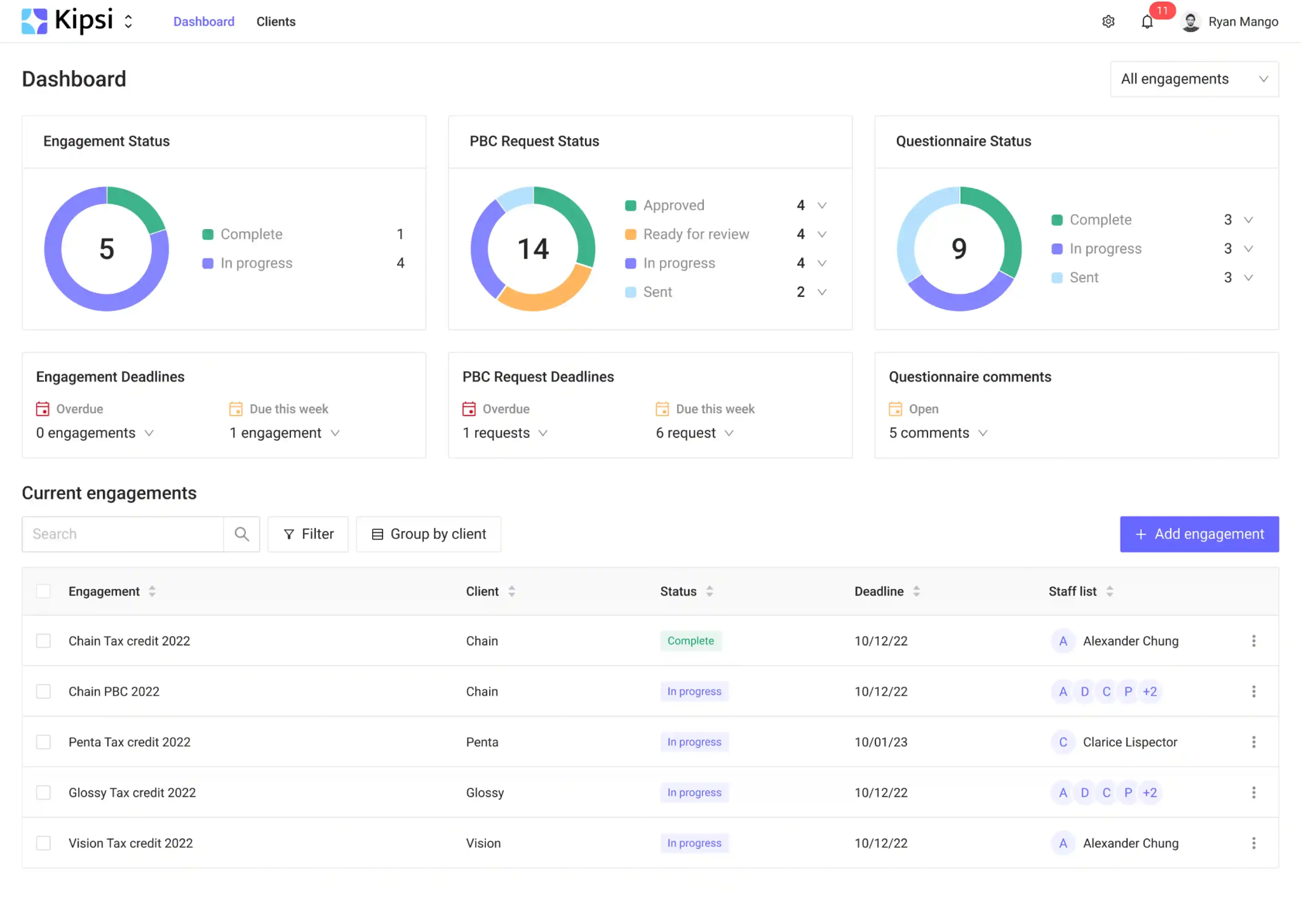
Kipsi shows how directly the artifacts pay off. The R&D tax-credit platform came to us with early mockups where sections lived in isolation, you could add a project but not clearly view or edit it, and the navigation mislabeled which page you were on.
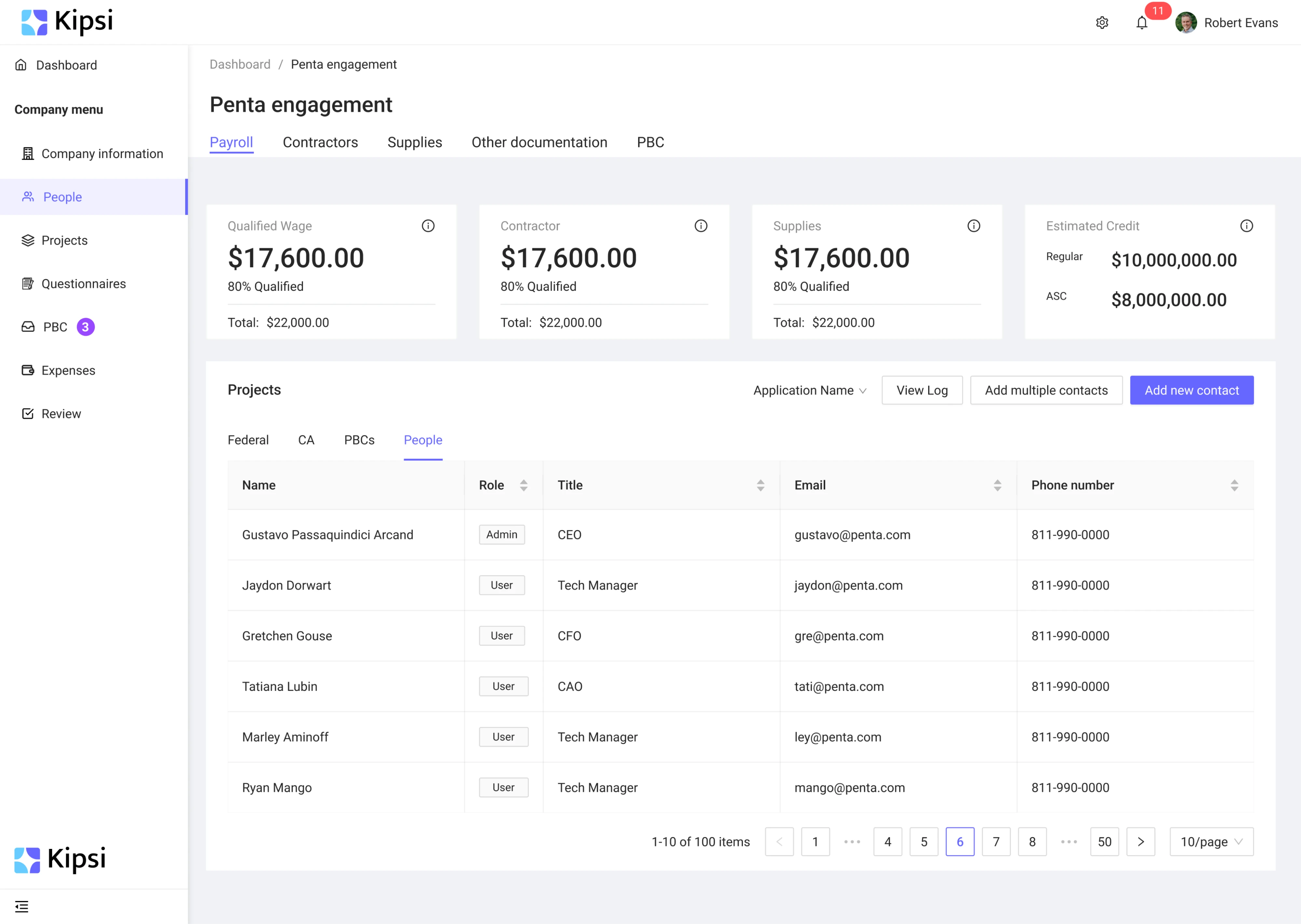
Before reworking screens, our designer studied the product to map those frictions, then rebuilt the underlying structure with a clear two-level navigation, consistent empty-state patterns, and separate workspaces for firms and their clients.
Those artifacts (not the visual polish) are what untangled the product enough to win its first users and reach product-market fit.
Step 4: Generate and prioritize solution ideas
Ideation is where you turn everything into directions worth prototyping. Start by reframing the problem as “How Might We” questions: a drop-off at the setup step becomes “How might we get a new user to their first result without leaving the flow?”
The phrasing should be broad enough to invite several answers, but narrow enough that the answers are actually buildable.
From there, open the option space before you close it. Brainstorming, mind mapping, storyboarding, and Crazy 8s (the sprint exercise where you sketch eight ideas in eight minutes) all exist to get quantity on the table before you judge quality.
You best bet at the ideation stage would be one or more angels that understands your space and believe in you.
Then narrow deliberately. Break the broad problem into smaller, flow-level opportunities and decide where to start. And when you move to actual UI, resist committing to a single path. At Eleken, we always sketch a few genuinely different options for a flow first, so the final decision gets made against alternatives.
Two more habits keep ideation grounded.
- Build on established patterns. Design systems and familiar UI conventions carry hard-won learning, and leaning on them frees your effort for the parts that are actually new.
- Treat prototyping as discovery. As a prototype gains detail, the work quietly shifts from exploring the problem to refining the solution, which is the handoff into the next step.
Floret is a compact example of this stage under real pressure. The foodtech startup had two months to get from concept to a working MVP and raise its round, so ideation had to be fast and disciplined.
For each interface, our team presented several design options and walked the client through the trade-offs. When redesigning their promotional calendar, we prioritized which data earned space and cut the rest to lower the cognitive load.
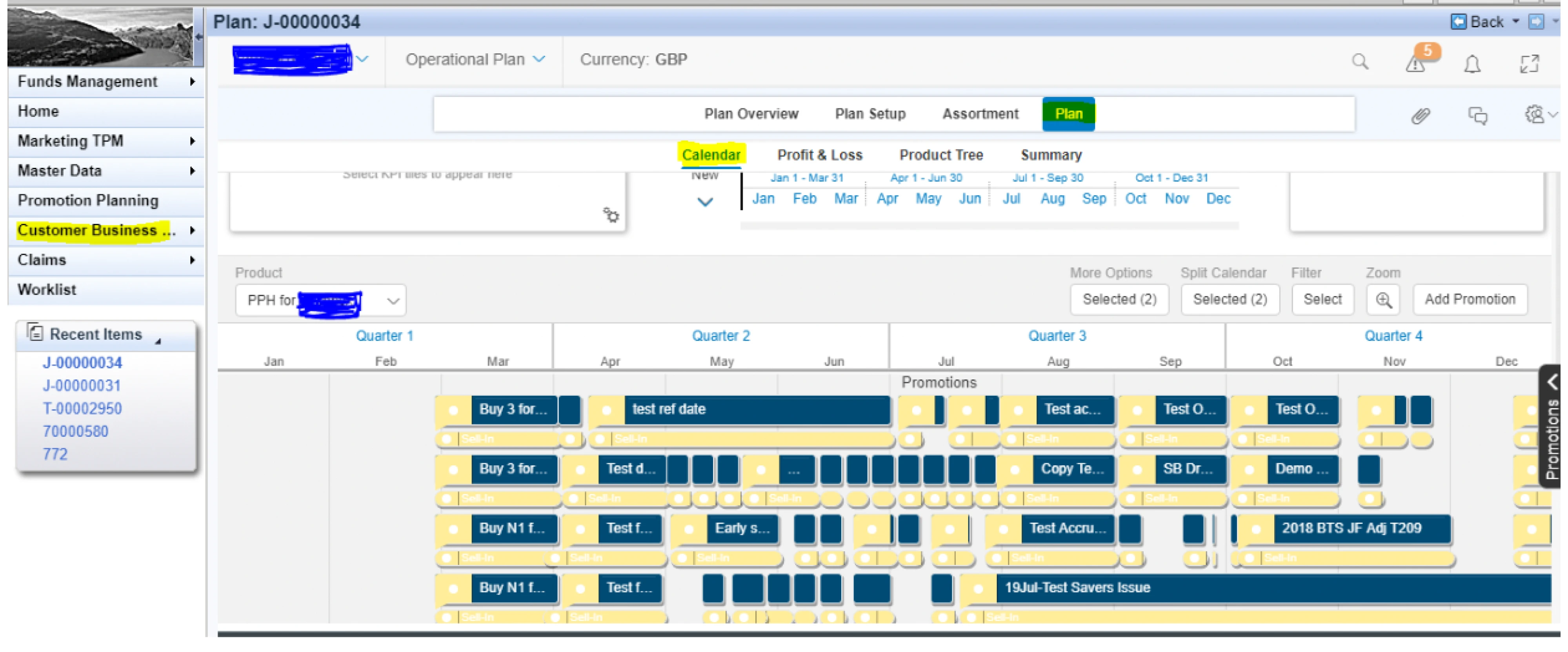
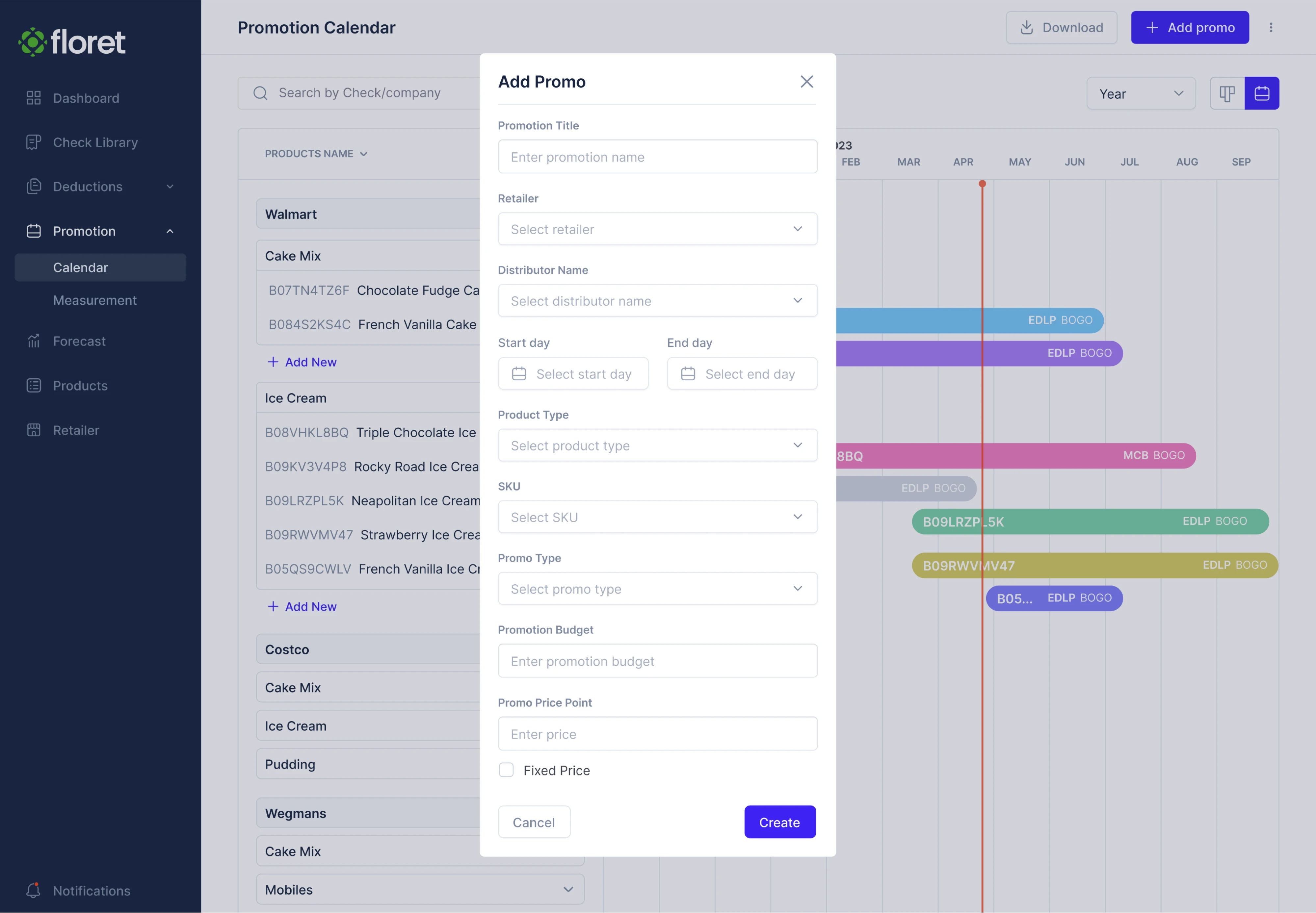
The MVP that resulted helped Floret raise $2.3M, with investors calling it “really beautiful as for something in an early stage.”
Eleken helped us go from concept to reality. For each interface that we were attempting to build, Eleken presented different design options and helped us to understand the positives and negatives of the approach.
Step 5: Prototype and test
The point of prototyping is to be wrong cheaply. You can start with sketches, move to wireframes, then to clickable prototypes in Figma, and only then toward an MVP. Each rung costs more to produce, so you want the risky assumptions tested at the sketch and wireframe stage, while changing your mind is still free.
Then put those prototypes in front of real users with moderated testing, unmoderated tools, A/B tests, beta releases, or surveys. Whatever the method, measure flow completion rate, time on task, and error rate, which are far more reliable than “did you like it?”, because people are polite and memory is unreliable.
What people say and what they do are very different.
The discipline that makes testing honest is deciding what counts as pass or fail. Set the bar in advance. For instance, if more than one user trips on the same step, that step gets fixed before anything moves forward.
And keep the focus on what matters most. Can users sign up and reach the first core outcome without friction? That’s the flow discovery exists to protect.
This maps to how our own process at Eleken runs. We move from wireframes to two or three UI directions to interactive Figma prototypes, with iteration built into the sequence before any final screens get produced. Testing is what’s woven through.
Zaplify (now AndSend) shows what that looks like at full tilt. Having dropped its sales team to bet on product-led growth, the company needed onboarding and core flows that could activate users with no human in the loop. So they brought us in.
We started by interviewing sales reps and watching user sessions, which surfaced five concrete blockers:
- Message paralysis.
- Setup friction.
- Up-front permission requests that broke trust.
- Contextless prospecting.
- No clear next step.
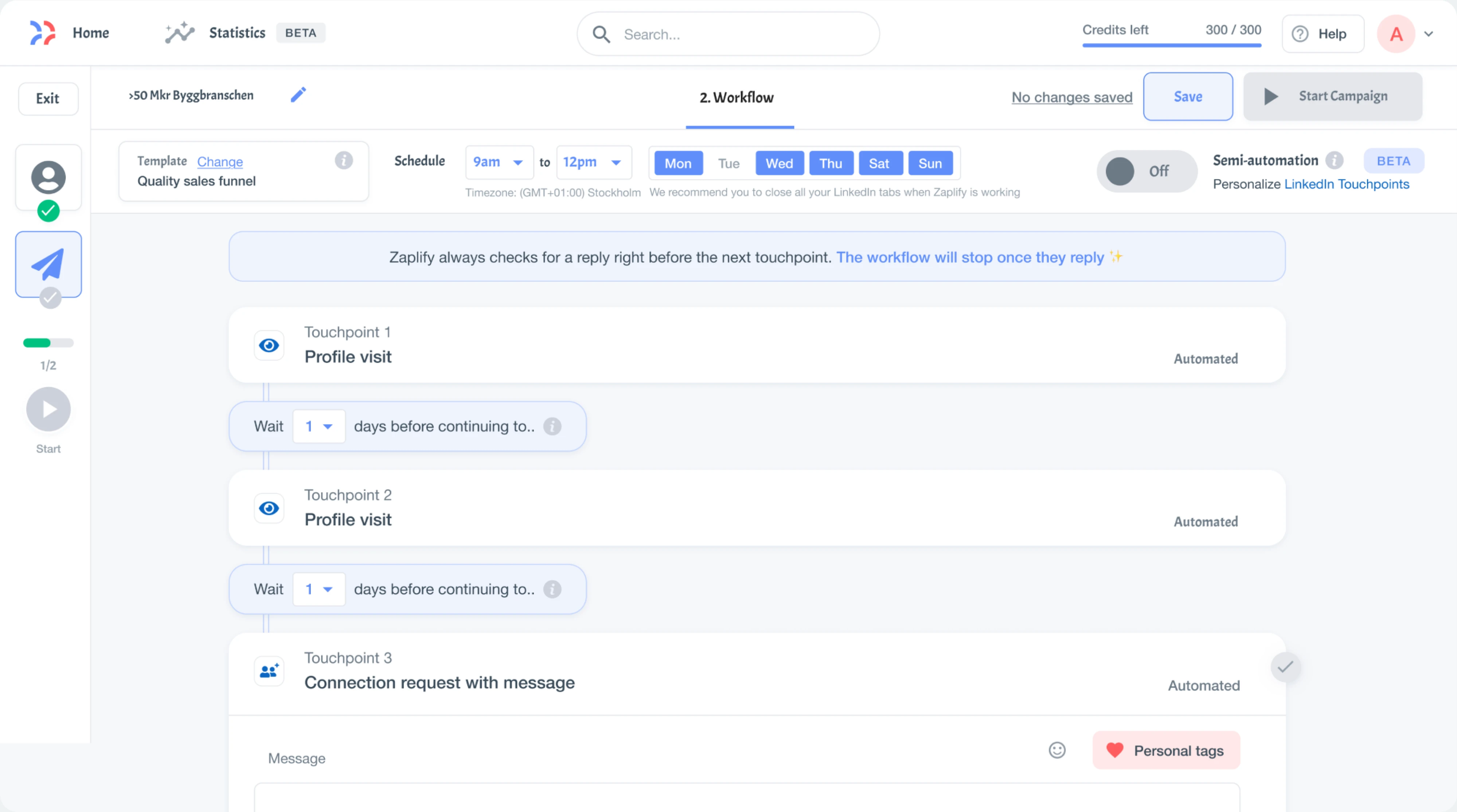
From there, our team set up a rapid product discovery process. Each Thursday we scoped a new UX experiment, and each Friday we reviewed live data on it. With that test-and-iterate rhythm, we lifted activation from 20–25% to nearly 40%, with more users reaching their “aha” moment on their own.
Who owns discovery, and how to keep it continuous
Discovery isn’t the product manager’s private job, and it isn’t design’s either. It works best as a shared effort across cross-functional teams, with product framing the problems, design and UX research running the studies, data grounding decisions, and leadership keeping the work tied to strategy.
When one function hoards it, the findings never quite reach the people who need them.
The bigger shift is treating discovery as a habit. Teresa Torres’s idea of continuous process is exactly this — small, frequent conversations and customer feedback woven into every week, instead of a big research push that happens once a quarter and then gets shelved. It keeps the team calibrated to reality as it changes.
It's not a "one or the other" scenario, you're doing both. For me, continuous discovery is about "scouting", keeping a finger on the pulse of customers, throwing 20 ideas at the wall every week and seeing what sticks.
Making that stick takes a little structure. A few things keep continuous discovery from quietly slipping off the calendar:
- Book the time. Discovery has to be a standing weekly commitment, not something you get to once a quarter when the roadmap allows.
dedicate a time on a weekly basis. you discovery has to be continuous and not quarterly or half yearly
- Connect the outputs to decisions. What you learn should feed straight into backlog prioritization and OKRs.
- Let evidence beat rank. The point of sharing findings widely is to replace the HiPPO — the highest-paid person’s opinion — with something better.
- Run design ahead of delivery. Keeping design a sprint or two in front of development gives discovery findings time to shape what gets built.
Do this consistently, and discovery stops being a thing you start and becomes a thing you maintain, a steady signal that keeps every one of those five product discovery process steps pointed at the right problem.
Key takeaway
Everything in this guide points back to the idea that discovery is what makes shipping the product worthwhile. The teams that struggle are the ones who move fast in a direction nobody checked. Getting the problem right is what turns speed into an advantage, and makes a product drive its activation, retention, and expansion.
None of it requires a six-month research program. You need the discipline to keep asking whether you’re solving the right problem, and the design judgment to act on the answer. That second part is where teams get stuck, and it’s exactly what we do at Eleken.
If you’d like a partner for that, book a call with us, and we’ll take a look at where your product is losing people and what it would take to fix it.




.png)
.png)


.png)


