.webp)


You’ve probably heard “AX design” somewhere recently and Googled it immediately. With a bunch of results, you’re likely more confused than before. Half the resources talk about making your product accessible to AI agents. The other half talks about designing the experience for humans who use AI agents.
Both call it AX design and seem to think they’re talking about the same thing. But they’re not. In fact, the term carries two genuinely different meanings, and most articles pick one without acknowledging the other exists.
That’s what this piece sorts out first. Because if you’re a product designer, UX lead, or PM at a SaaS company, only one of those definitions is your problem, and it’s worth knowing which one before you go any further.
What AX design means
The AX design meaning was coined in January 2025 by Mathias Biilmann, CEO of Netlify. His definition was straightforward: “the holistic experience AI agents will have as the user of a product or platform.” He drew a deliberate parallel to Don Norman’s origination of “user experience” in the 1990s, and positioned AX alongside UX and DX (developer experience) as a third distinct category.
Definition 1: Developer AX is about making products usable by AI agents, allowing them to authenticate, navigate, and operate your product. This is the world of APIs, llms.txt, MCP protocols, and structured data.
Definition 2: Human AX, sometimes called human agent interaction design, is about designing the experience a human uses when working with AI agents. That’s the definition this article is focused on.
John Maeda captured the shift well in his 2026 Design in Tech Report. He wrote that in the UX era, the core design question was “how do I help someone do this?” In the AX era, it becomes “how do I help someone know whether it was done well?”
That question is where UX ends, and AX begins.
How AX differs from UX (and where CX fits)
In UX, the interface is the product. A designer maps a sequence of steps, controls what happens, and measures success by how cleanly a user moves. The experience lives in the screens, the flows, the error states.
CX zooms out further and covers the full relationship a person has with a brand across every touchpoint, of which the product is just one part.
AX sits within that stack, but shifts what’s being designed inside the product layer. An agent works between the person and the outcome, making decisions, taking actions, and operating with a degree of autonomy.
In practice, that shift breaks down like this:
That shift in what AX UX design means hasn’t gone uncontested. One upvoted comment in forums captured the pushback bluntly: “We design for people, full stop.”

It’s a fair instinct, and the concern behind it is legitimate. Nobody is asking designers to optimize navigation for robots.
But designing for a person who works with an agent is still designing for a person. That person still needs to understand what the agent did, feel confident that it did it correctly, and have a way to step in when it didn’t.
Those are human needs, and they’ve always been design problems. Agentic experience design just makes them harder to ignore.
The core design challenges of human AX
The agentic interface design patterns that work for traditional interfaces don’t map cleanly onto a system that acts autonomously and accumulates context over time. What follows are the three challenges that show up consistently when teams design for human AX.
Challenge 1: Designing for trust, not just usability
In traditional UX, trust is mostly implicit. If the interface works — buttons do what they say, forms submit correctly, errors are clear — users develop confidence over time without the product ever having to ask for it. Usability and trust move together.
In agent experience design, they come apart. An agent can complete a task correctly and still leave the person feeling uncertain about what just happened.
Figma’s 2025 AI report captured this gap. 78% of designers said AI tools speed up their work, but only 32% trust AI output for critical tasks. That 46-point gap is a UX optimization problem because the experience of AI delegation design hasn’t been designed well enough to support the confidence that the technology is capable of earning.
What makes this hard is that trust in an agentic context isn’t built through a single interaction. It accumulates or erodes across many. A person who hands off a task to an agent needs to understand what the agent is about to do before it acts, what it did after, and why it made the choices it made.
From a design perspective, this means trust has to be built into the interface as a first-class concern. AI agent design patterns that work in practice include:
- Intent previews — showing the user what the agent plans to do before it acts.
- Confidence signals — communicating how certain the agent is about a given output.
- Action logs — a clear, readable record of what was done and why.
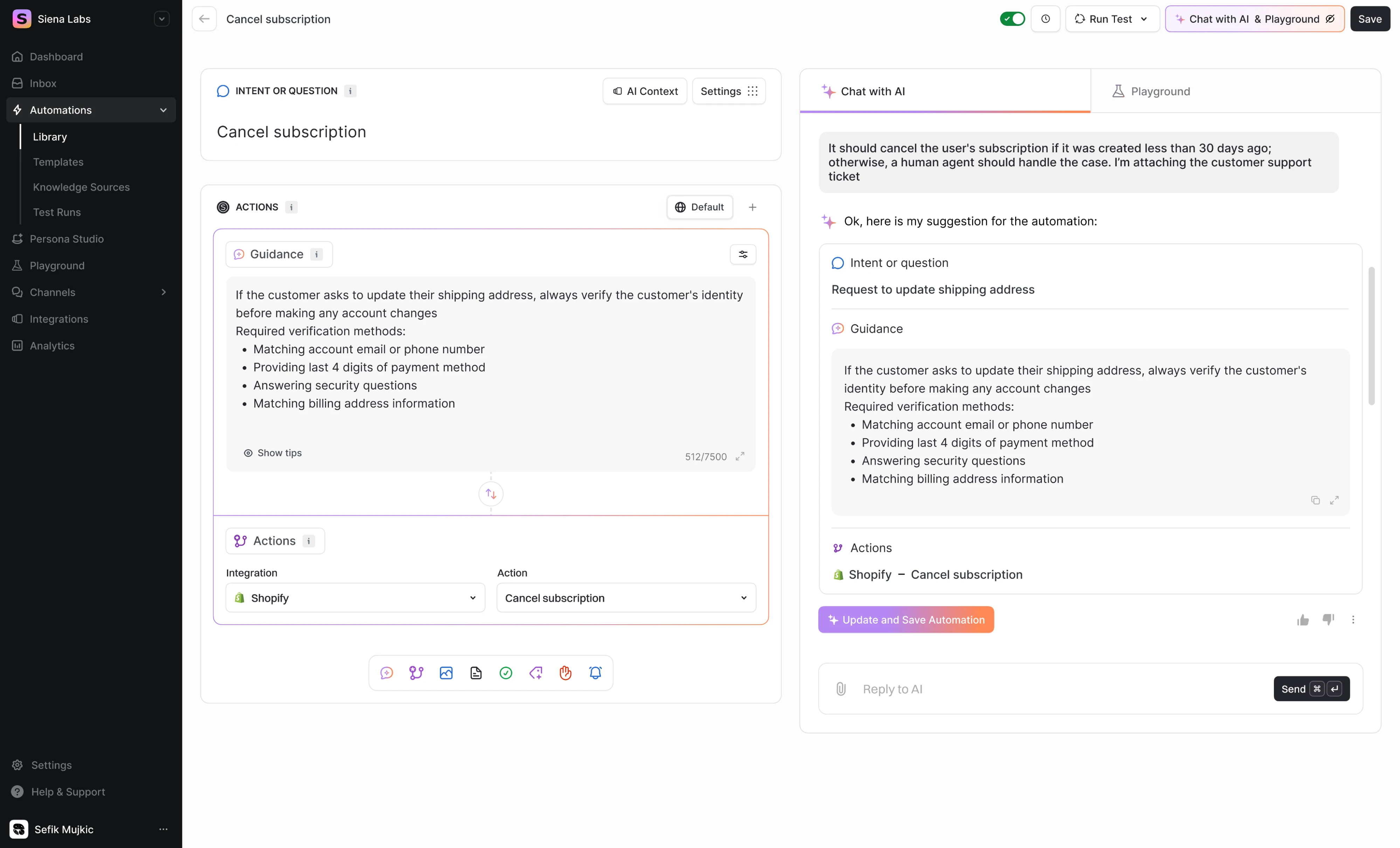
This is something we ran into directly while working with Siena, an AI commerce agent. One of the core challenges was the automation builder, a feature where the agent configures and executes customer service workflows on behalf of the team.
The critical design decision was making sure users could see and refine what the agent proposed before anything went live.
The “Chat with AI” panel we designed does exactly that. It surfaces the agent’s suggested automation in a conversational interface, lets the user inspect and adjust it, and only then applies the change. The human stays in the loop because the design makes oversight the natural path of least resistance.
Challenge 2: Designing for the autonomy spectrum
One of the less obvious assumptions baked into traditional UX is that the system always does exactly what the user tells it to. Agents break that assumption entirely. Depending on the context, the AI agent interface design might suggest an action and wait, execute a task and report back, or operate across a multi-step workflow with minimal check-ins.
This is what we’d call the autonomy spectrum. A user who has worked with an agent for months on routine tasks might want it to operate with minimal interruption. The same user dealing with a sensitive situation might want to approve every step.
The challenge lies in building a UX AX design that can move along that spectrum depending on context, user preference, and the stakes of a given action.
In practice, this means giving users meaningful control over delegation without turning that control into overhead. Three modes tend to cover most of the spectrum:
- Propose and approve — the agent suggests an action, and the human confirms before anything happens.
- Act and surface — the agent executes and immediately shows what it did, leaving room to review or undo.
- Bounded autonomy — the agent operates independently within limits that the human has set in advance.
We ran into this directly with Privado Dining, an event management platform for restaurants. The AI co-pilot we designed handles different types of tasks at different levels of autonomy within the same workflow. For example, it can check whether a requested time slot is available and surface that information immediately.
But when it comes to drafting a response to a client or adjusting event details, the interface keeps the human in the loop. The agent prepares the action, the user reviews the thread, and nothing gets sent without explicit sign-off.
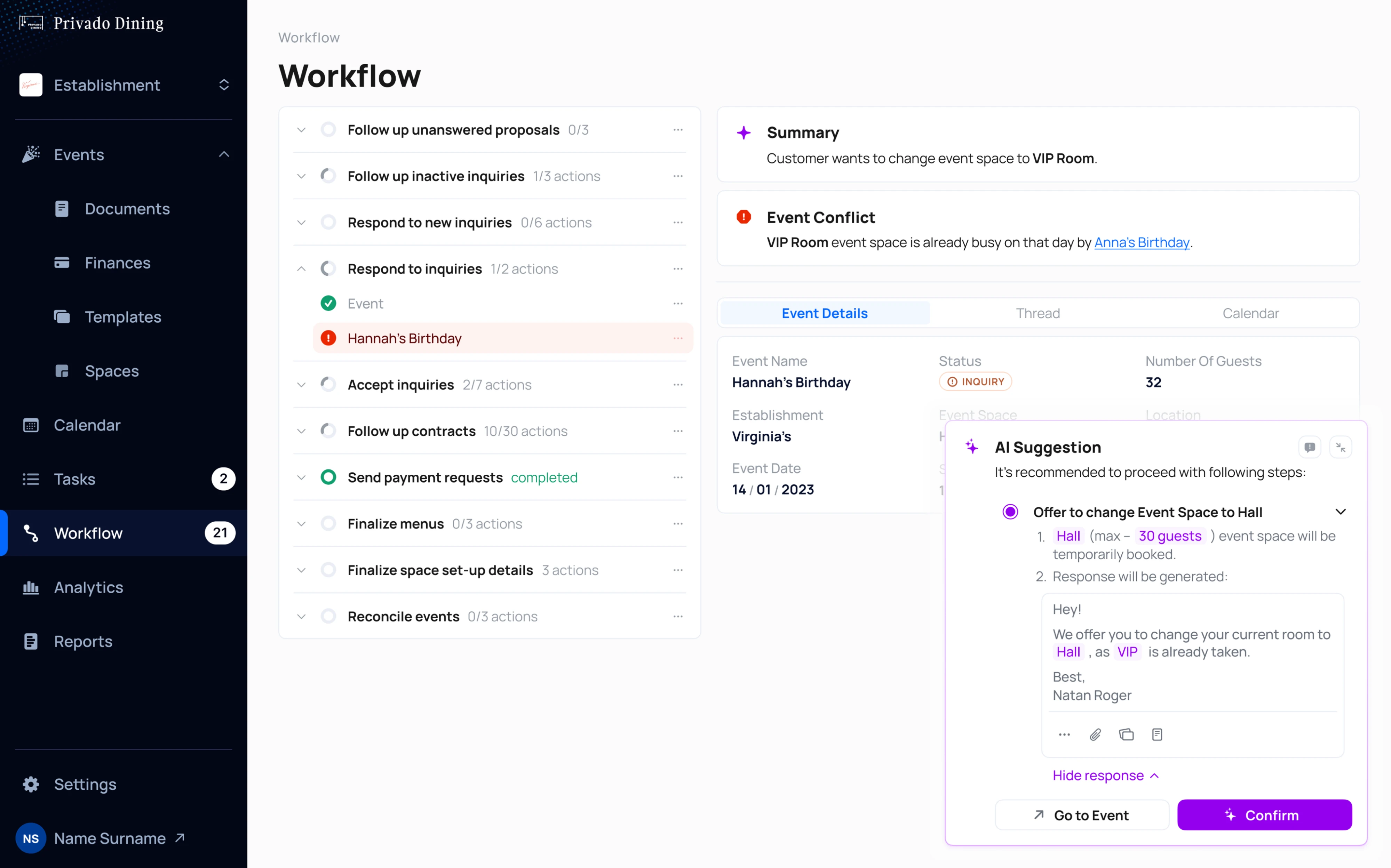
The autonomy level shifts based on what’s at stake, not because the user had to configure anything, but because the design made that the default behavior.
Challenge 3: Designing for graceful failure and recovery
In traditional UX, errors are inconvenient. When a form doesn’t submit, a page doesn’t load, a file fails to upload, the user gets a message, retries, and moves on. The design solution is a clear error state and a retry button.
In AX, errors are different in kind. An agent that misinterprets a goal might send an email to the wrong recipient, modify a file that wasn’t meant to be touched, or complete several steps of a workflow heading in the wrong direction.
By the time the error surfaces, something has already happened. The design problem moves beyond preventing failure toward limiting damage, explaining what went wrong, and giving the person a clear path back.
From a design perspective, three things matter most when an agent fails:
- Interruption — the user should be able to stop the agent at any point, not just at the end of a completed action.
- Explanation — the agent should be able to say what it did, what it was trying to do, and where it went wrong, in plain language.
- Recovery — the interface should offer a concrete path forward: undo, revise, escalate to a human, or restart from a known good state.
The third point is particularly important and often underdesigned. Telling a user something went wrong without giving them a clear next step leaves them stranded, and in a high-stakes workflow, that’s a trust problem that compounds over time.
We encountered this directly in our work on Frontend AI, a tool that generates UI components from prompts or screenshots. One of the key design decisions was how to handle the moment when the agent’s output wasn’t what the user wanted.
The agentic UX we designed gives users an explicit comparison between the original and the generated result, with three clear options: accept, regenerate, or ask for a specific modification. The “Stop generation” control lets users interrupt mid-process rather than waiting for an output they already know isn’t going in the right direction.
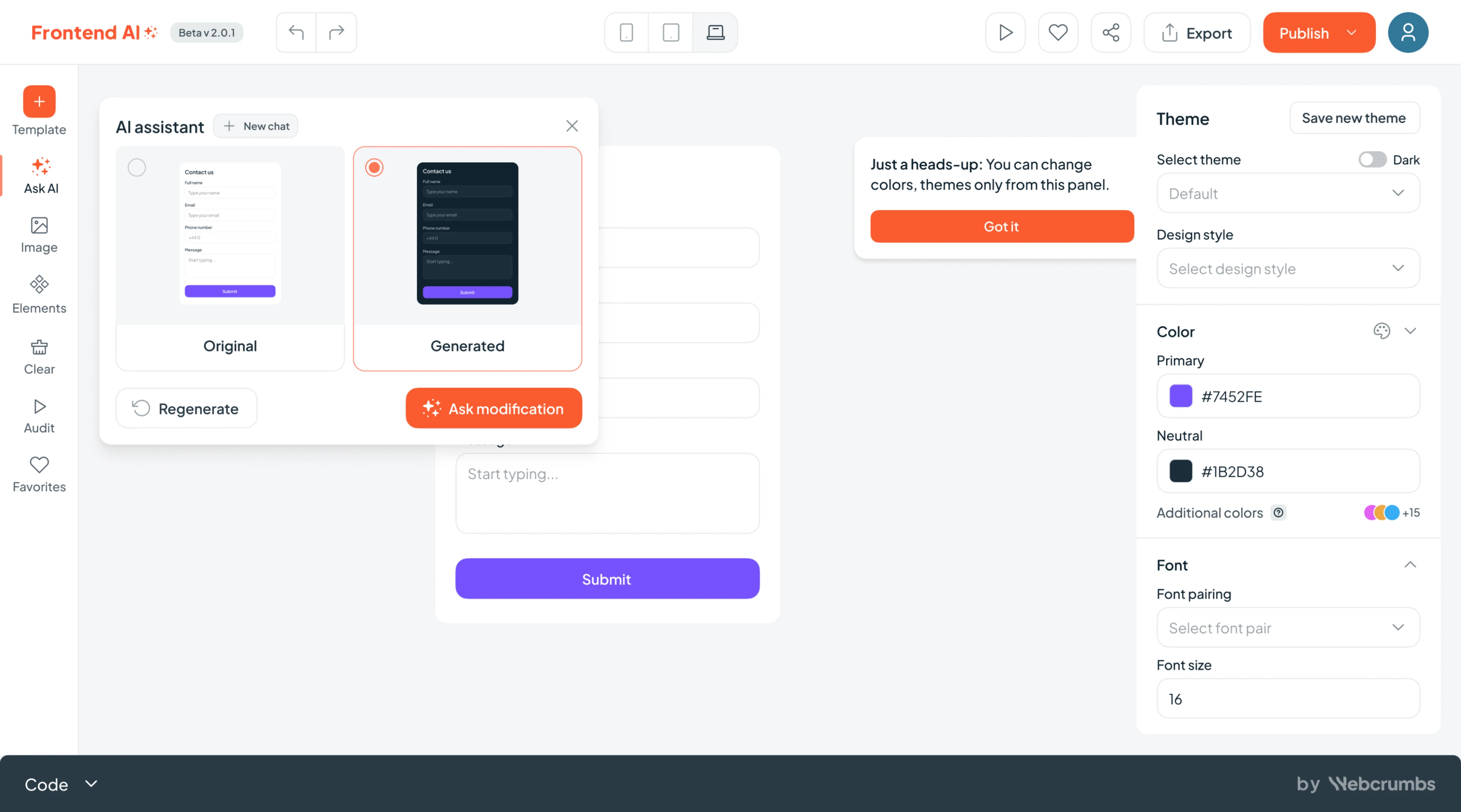
Neither of these is a complex interaction pattern, but both reflect a deliberate decision to treat recovery as a first-class design for AI agents’ concern.
What changes in the design workflow
According to Designer Fund’s AI in Design 2026 report, weekly AI usage for design tasks jumped from 54% to 91% in a single year. That adoption curve is fast enough to change what clients expect to see in the first meeting.
Lovable, V0, Claude, and others can help with research, competitive analysis, and generating first-draft components — tasks that previously took days. This moves the bottleneck from “can we build this?” to “is this the right thing to build?” That’s a more valuable question to be spending time on.
In our practice, this shows up most clearly in how we use prototypes. When our designers build an interactive prototype with AI tools early in the design process, they find problems that static screens don’t reveal. It becomes easy to spot missing states, broken flows, and interactions that seem logical in Figma but fall apart the moment you click through them.
The prototype stops being the deliverable at the end of the process and becomes a thinking tool at the start of it. AI just made that tool dramatically faster to use, and it’s pulling designers closer to parts of the process they didn’t previously own.
65% of designers say they’re taking on more responsibilities, moving closer to code, prototyping, and business data. That expansion changes what good design work looks like. You spend less time on pixel precision and more time on flow logic, edge cases, and the behaviors that make an AI agent UX feel trustworthy.
Directing a generative tool well is its own skill, and the quality of what you get depends heavily on the quality of how you direct it.
What doesn’t change is worth being equally clear about. User research, flow logic, edge case thinking, and stakeholder alignment are not automated. A well-prompted tool can generate ten layout options in minutes, but it can’t tell you which one is right for this user, this context, and this set of constraints. That part still needs a human.
If you want to see how this plays out in practice, we have a separate article walking through our full AI design workflow.
Where agentic experience design stands right now
Honestly, it’s early. There’s no definitive agent experience design principles framework from NN/g yet, no settled pattern library, and most products with AI features are designing user interfaces by bolting a chat interface onto existing UX. AX is a design discipline being defined in real time, largely by the teams shipping products right now.
From what we see now, that’s not a reason to wait. It’s actually the opposite. The teams building interfaces for agentic products are setting the defaults that everyone else will inherit. Mobile-first design looked experimental in 2009 and became non-negotiable by 2013. The same dynamic seems to be playing out with AX.
The practical value of learning AX now is that you’ll recognize what good looks like before you’re asked to build it. The vocabulary, the patterns, and the AI design system instincts take time to develop, and the time to develop them is before a client walks in with an agentic product and a tight timeline.
In our view, that window is open right now, and it won’t stay open for long.
To wrap up
AX design is a meaningful shift happening in the industry nowadays, and it changes what design problems are worth solving.
The three challenges covered in this article — trust, autonomy, and recovery — show up in every agentic product, at every stage of maturity, and they don’t get easier to solve the longer you wait. The teams that treat them as core concerns will build products that feel fundamentally different from the ones that don’t.
If you want to see how these translate into product work, the Eleken case studies referenced throughout this article are a good place to start. And if you’re working on an AI product and want to talk through the design, we’re here to help.



.webp)

.webp)
.webp)