.webp)


AI prototyping is changing how digital products get built.
At Eleken, it has become part of our design workflow—not because AI replaces designers, but because it helps us explore ideas, validate concepts, and build prototypes much faster. After using it across real SaaS projects, we've learned that AI is excellent at generating first drafts, but far less reliable at making product decisions.
That's why this isn't another roundup of AI prototyping tools. It's an honest guide to what AI prototyping actually is, which tools work best for different jobs, where they still fall short, and how we use them in practice to move from idea to clickable prototype.
What is AI product prototyping?
AI prototyping is the process of using artificial intelligence product design tools to turn ideas, requirements, or existing designs into interactive prototypes much faster than traditional workflows.

Depending on the tool, the output can range from wireframes and clickable mockups to fully functional applications with working logic, real data, and AI-powered features. The goal isn't to replace prototyping altogether—it's to shorten the path from concept to something users can see, click, and test.
One of the biggest sources of confusion is that AI prototyping actually refers to two different workflows.
AI-assisted UI prototyping
These tools focus on generating visual interfaces and interactive prototypes. They are primarily design-first and their outputs are visual prototypes. Popular tools include:


They're designed for designers who want to quickly visualize ideas, build layouts, or add interactions without building a real application.The result is usually a design prototype that's ideal for reviews, stakeholder presentations, and early usability testing.
AI-assisted code prototyping
AA second category generates working web apps instead of static designs. AI prototyping tools like Claude Code, Lovable, v0, Bolt, and Replit can create functional prototypes with:
- navigation,
- forms,
- databases,
- authentication,
- and even AI-powered features.
These prototypes behave much closer to a real product, making them useful for validating complex workflows or demonstrating technical concepts.
Why does the decision matter?
It does because it changes what you should expect:
1) If you need to test interactions or communicate a design direction, a UI prototype may be enough.
2) If you need users to interact with real data or experience product logic, you'll likely need a code-based prototype.
Why not just use Figma?
Many teams ask why rapid AI prototyping is necessary when Figma already supports interactive prototypes.
The answer is fidelity.
Traditional Figma prototypes are excellent for demonstrating navigation and screen flows, but they remain fundamentally static. They can't realistically simulate things like form validation, dynamic filtering, user-generated content, or complex application states without significant manual work.
As Eleken's Design Director, Maksym, puts it: "It made something, but it wasn't the level we wanted."

AI-powered prototyping fills that gap by making it possible to test behaviors—not just screens. In some cases, the result behaves more like a working app than a traditional clickable prototype, allowing teams to test actual product logic.
What AI prototyping is not
AI can dramatically speed up execution, but it doesn't replace product thinking.

It won't tell you whether you're solving the right problem, validate your assumptions, or make difficult UX tradeoffs. In many ways, AI lowers the barrier to creating prototypes while raising the importance of human judgment. That makes prototyping more accessible to non-designers, but generating an interface and making strong product decisions are still two very different skills.
Ironically, while AI models are often seen as a way to overcome skill gaps, they perform best when guided by people with deep design and technical expertise.
Recent research from Nielsen Norman Group reinforces this point. In an evaluation of multiple AI prototyping tools, researchers asked AI to redesign a real product page using prompts with varying levels of detail — from broad design goals to detailed specifications and even Figma files.

The results showed that while AI could quickly generate polished, high-fidelity interfaces, it consistently struggled with the subtleties that make UX effective, including visual hierarchy, grouping, spacing, and context-specific design decisions — areas where experienced designers still provide the greatest value.
Thereby, the strongest product teams use AI to accelerate exploration—not to replace research, strategy, or design expertise.
AI prototyping tools matched to purpose
Most AI prototyping tools are usually compared by audience: "best for designers," "best for developers," or "best for AI product managers." In practice, that's rarely how teams choose a tool.
A better question is: What are you trying to build right now?
The right AI app prototyping tool depends less on your job title and more on the stage of your product. Some platforms specialize in fast UI generation, while other platforms are designed to produce code and functional applications.
Exploring an idea, adding interactions to an existing design, and building a functional MVP are three very different tasks—and they require different tools.
Scenario A: Exploring ideas from scratch
If you're starting with a blank page, speed matters more than precision. With minimal setup, these tools can turn a rough idea into something stakeholders can click within minutes.

Tools like Claude Code, Lovable, v0, Bolt, and Base44 function as an AI prototype generator, creating clickable interfaces from natural language prompts and making them ideal for brainstorming, validating concepts, or showing stakeholders an idea without spending days designing it.
Their biggest advantage is reducing the cost of exploring new ideas. Instead of debating whether an idea might work, you can put something in front of people and gather customer feedback quickly.
Honest limitations:
- Generative prototyping often follows common UI patterns resulting in generic visual output by default
- Design system consistency breaks down as complexity grows
- Prompt regression problem — first prompt gets 70%, next accidentally breaks something
These tools are best viewed as idea generators, not production-ready design systems.
Scenario B: Turning an existing design into an interactive prototype
When you already have an initial design and know what the product should look like, the goal shifts from exploration to execution.

This is where AI mockup generators like Claude Code, Figma Make and UX Pilot perform best.
Here you're not exploring — you're executing. These tools handle interaction fidelity better than visual generators.
Instead of inventing an interface, they help bring an existing design to life with realistic interactions, navigation, and dynamic behavior.
At Eleken, our workflow typically starts with the design context rather than a blank prompt. We provide the AI with:
- the PRD,
- Figma screens,
- reference examples,
- and any supporting documentation.
From there, we iterate through targeted prompts instead of regenerating the prototype from scratch each time.
Honest limitations:
- Figma Make doesn't support design system import yet
- Claude Code has a learning curve for non-technical designers
This approach produces far more reliable results than asking AI to design everything on its own.
Scenario C: Building a functional MVP prototype
Sometimes a clickable mockup isn't enough. If you need users to: sign in, submit data, generate AI content, or interact with realistic workflows — you'll need a functional prototype.

Tools like Lovable, v0, Claude Code, and Replit can generate functional apps that support authentication, databases, APIs, and AI-powered functionality.
They're ideal for proof-of-concepts, investor demos, and validating technically complex ideas before committing to full development.
Just remember that a functional prototype isn't the same as production software. While these tools can generate surprisingly capable applications, scalability, maintainability, and UX consistency still require human oversight—especially as products grow.
Honest limitations:
- This is still a prototype, not production code — set expectations explicitly
- Lovable has a consistency problem at scale
Ultimately, no single AI prototyping tool is best at everything. Some tools excel at visual exploration, while other tools are better suited to interactions, code, or functional MVPs.
When should you use AI-assisted prototyping?
The biggest question isn't which AI prototyping tool to choose. It's whether AI prototyping is the right approach in the first place.
Like any design method, it works best when matched to the problem you're trying to solve.
Use AI UX prototyping for early idea exploration

During early ideation, when you're still figuring out what to build, speed matters more than polish.
AI makes it possible to turn rough ideas and early concepts into something tangible within hours, making conversations much more productive. Instead of debating abstract concepts, teams can react to a clickable prototype and identify what works—or doesn't.
This makes AI especially valuable during product discovery, where uncertainty is high and assumptions change quickly.
Use it to align stakeholders

A prototype often communicates an idea better than a specification ever could.
Instead of explaining how a new feature should behave, product teams can demonstrate it through a prototype.
We've found this especially useful for complex SaaS workflows, where interactions are difficult to visualize through documentation alone. A working prototype creates faster feedback and reduces misunderstandings before development begins.
Use it to test interactions Figma can't simulate

Traditional prototypes are excellent for validating navigation and screen flows.
But some experiences require behavior that static prototypes can't realistically reproduce:
- dynamic filters,
- form validation,
- AI-generated content,
- data persistence,
- or multi-step workflows.
This is where functional AI prototypes become particularly valuable. They let users experience real workflows and see how a feature behaves—not just what it looks like.
Use it for proof-of-concepts

Some product ideas carry technical uncertainty.
Can an AI assistant generate useful responses? Will this workflow feel fast enough? Can users complete the task without guidance?
Rather than debating these questions, teams can build a functional proof-of-concept and validate assumptions early.
The goal isn't shipping the prototype—it's reducing risk before investing in full development.
When AI prototyping isn’t a go-to choice
AI prototyping isn't always the right answer. It becomes less effective when:
- your product already relies on a mature design system,
- consistency across hundreds of screens is essential,
- sensitive or regulated data can't be shared with AI tools,
- stakeholders mistake a polished prototype for a finished product.
Another common mistake is using AI to solve the wrong bottleneck.
If your team is stuck because requirements are unclear or stakeholders can't make decisions, generating prototypes faster won't fix the underlying problem.
Early uncertainty calls for quick, lightweight exploration. High-fidelity functional prototypes make the most sense once you know exactly what you're trying to validate.
Ultimately, AI prototyping is most powerful when it accelerates learning—not when it accelerates building for its own sake.
What does Eleken AI prototype workflow look like
Every team develops its own AI workflow over time.
Ours wasn't designed in theory—it evolved through real client projects, trial and error, and plenty of prototypes that didn't work the first time. Today, AI is embedded throughout our design process, not as a replacement for designers but as a tool that helps us move faster while keeping product decisions firmly in human hands.
Here's what that workflow looks like.
1. Starting with context, not prompts
The biggest mistake teams make is asking AI to generate a solution before giving it enough context.
Instead of writing the "perfect prompt," we upload everything relevant:
- product requirements,
- Figma screens,
- screenshots,
- competitor examples,
- meeting notes,
- even rough sketches.
AI performs much better when it understands the problem before it's asked to solve it.
2. Refining before building
We don't ask AI to immediately generate a prototype.
Instead, we ask it to identify the key design decisions first.
For example: Before generating anything, list the product decisions that need to be made, explain the tradeoffs, and wait for approval.
This simple step prevents AI from making assumptions that later require extensive rework.
This approach proved especially valuable during the early stages of this healthcare project. Before generating onboarding flows, we first used AI to surface product questions, identify potential edge cases, and compare alternative approaches. Resolving those decisions upfront meant the generated prototypes required far fewer structural changes later.
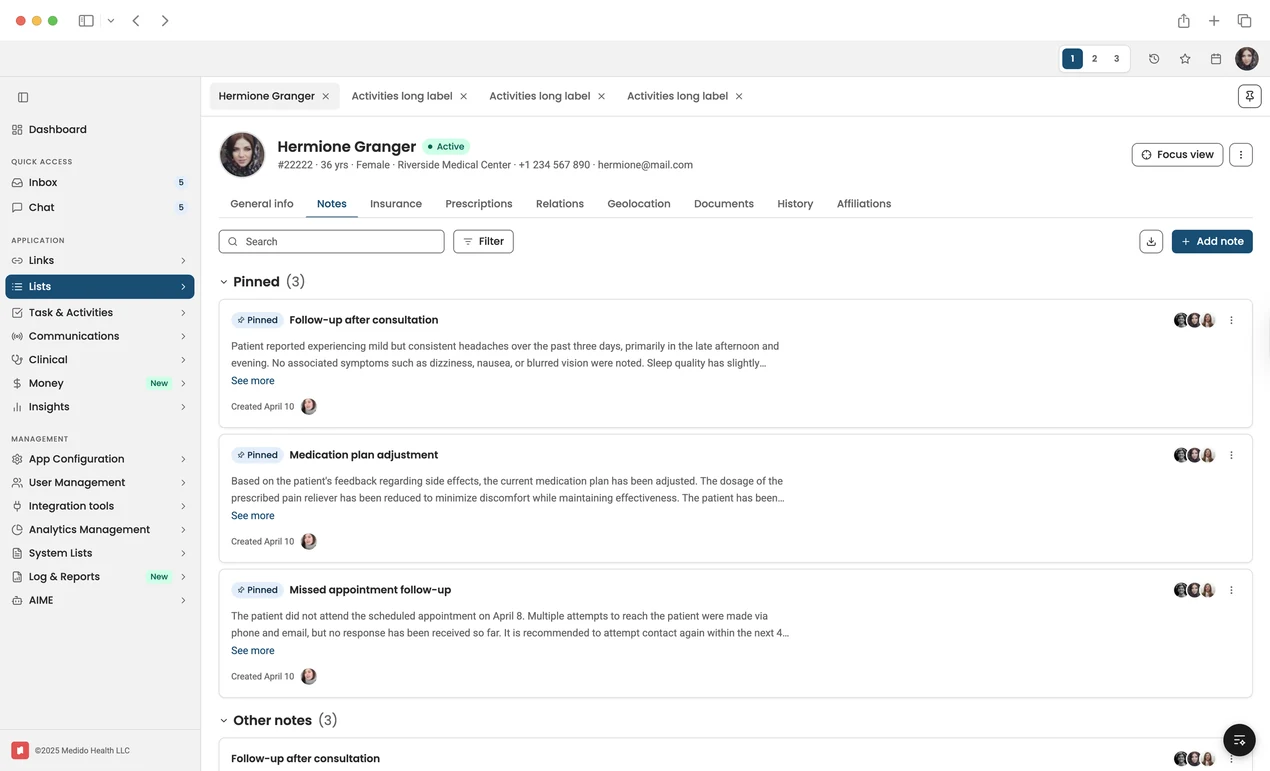
A Claude-generated healthcare interface prototype for navigating patient records, pinned clinical notes, communications, documents, insurance, prescriptions, and care-team activity from a single workspace.
3. Researching with a purpose
Generic prompts produce generic research.
Instead of asking: "What are the best practices for dashboards?", we ask: "How does Stripe handle its test and production environment switch?"
Specific competitors produce much more actionable insights than broad UX questions.
AI helps us gather examples and explore new directions quickly, but we still verify the research and decide which patterns actually fit the product.
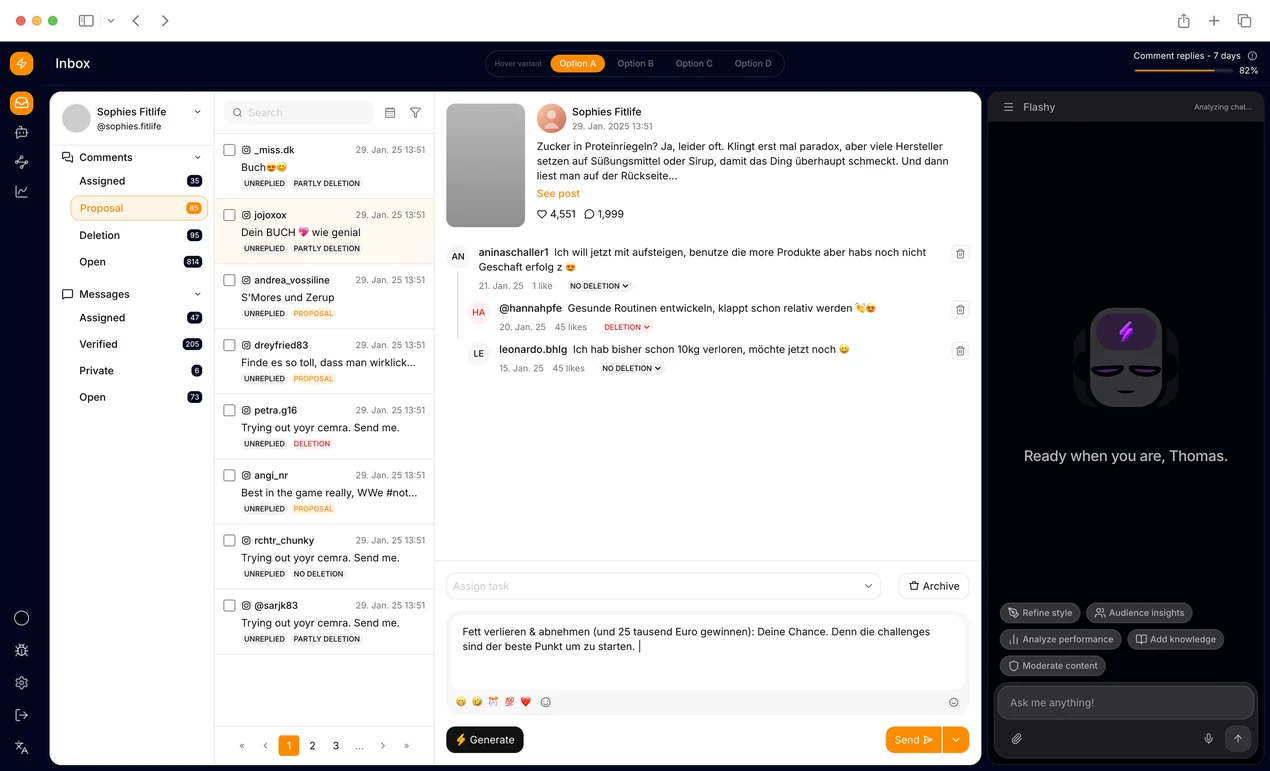
For our next project, this meant researching products with similar collaboration and workflow patterns instead of relying on generic UX advice. AI accelerated competitive research by surfacing relevant examples, while the design team evaluated which ideas actually matched the product's goals and user expectations.
4. Aligning on decisions before screens
Before we define screens, write specifications, or generate interfaces, we document the important product decisions.
Rather than presenting a solution immediately, we structure discussions around:
- the problem,
- possible approaches,
- our recommendation,
- and the reasoning behind it.
Once everyone agrees on the direction, prototyping becomes much faster because the difficult decisions have already been made.
On the project below, this decision-first approach helped keep designers, stakeholders, and engineers aligned before any interfaces were generated. By documenting assumptions and agreeing on the product direction early, AI became a faster execution tool instead of another source of conflicting ideas.
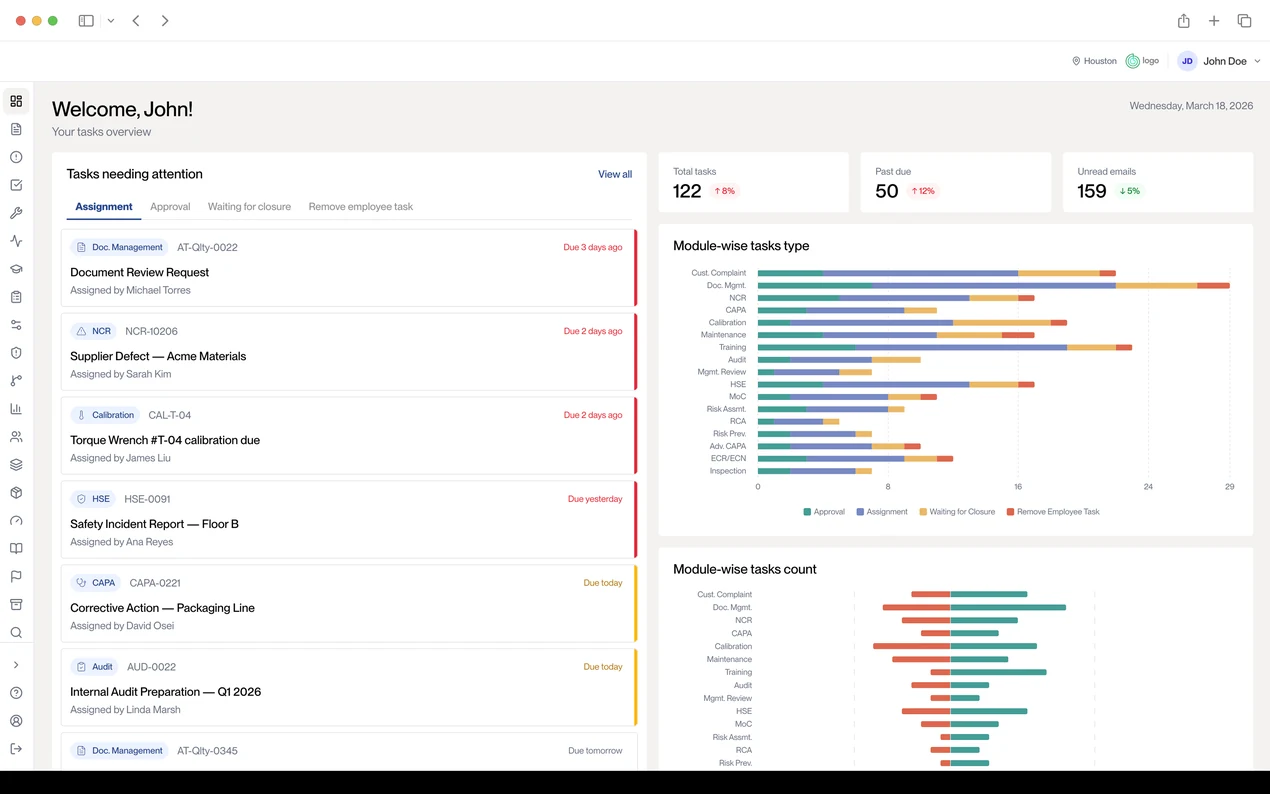
A Claude-generated quality management dashboard that turns overdue tasks, approvals, CAPAs, audits, calibration items, and module-level workload into a clear operational view for quality teams.
5. Build, test, and iterate
Only then do we generate the prototype.
Depending on the project, we may start in Figma Make before moving into Claude Code, or go directly to code when interaction fidelity is more important than visual exploration.
From there, we iterate in small steps.
Instead of regenerating an entire prototype after every change, we use focused "delta prompts" that target one issue at a time. This preserves what's already working and reduces the regressions that often appear in larger AI generations.
The biggest lesson we've learned is that AI works best as a collaborator, not an autopilot. The faster it generates interfaces, the more important it becomes to slow down the product decisions behind them.
This iterative workflow has become standard across recent projects. Rather than rebuilding prototypes from scratch after every review, we refine individual screens, interactions, layouts, or workflows incrementally. The result is a much more stable prototype and a faster feedback cycle with clients.
What AI gets wrong — and how to catch it
AI prototyping has improved dramatically, but it's still far from perfect.
After building prototypes across multiple SaaS projects, we've noticed that the same problems appear again and again. The good news is that most of them are predictable—and preventable.
Producing generic outputs

Without enough context, AI falls back on familiar or existing patterns instead of developing a solution around the specific product context.
The result is often a perfectly usable interface that also feels interchangeable. Generic layouts, common component libraries, and safe visual choices can get you to a first draft quickly, but they rarely produce a product with a distinct identity.
The fix is surprisingly simple: give AI visual references, existing designs, and clear constraints. Images, mockups, and design systems usually improve the output far more than longer prompts.
Design system drift

AI can follow a design system surprisingly well—until the product becomes more complex.
As a prototype expands across multiple screens, UI components start to diverge. Spacing changes, button styles become inconsistent, and patterns that were established early on gradually break down.
This is especially noticeable in larger SaaS products, where consistency matters just as much as speed. AI can accelerate implementation, but it still needs designers to review and maintain the system over time.
The "looks done" problem

One of AI prototyping's biggest strengths is also one of its biggest risks.
Because AI generates polished interfaces so quickly, stakeholders often assume the product is much closer to completion than it actually is.
Discussions shift toward colors and button labels when the real questions should be:
- Are we solving the right problem?
- Does this workflow make sense?
- Have we validated the assumptions?
Setting expectations early helps keep feedback focused on the purpose of the prototype rather than its visual polish.
Prompt regression

Anyone who's spent time with AI prototyping tools has experienced this:
You ask for one small change…and something else breaks.
Large regeneration prompts often introduce unintended edits in parts of the interface that were already working.
The workaround is to make changes incrementally. Smaller, targeted prompts produce more predictable results than asking AI to rebuild an entire prototype after every revision.
Hallucinated research

AI is excellent at summarizing patterns and generating ideas.
It's much less reliable when it comes to factual details.
Competitor features, pricing, documentation, and product capabilities can all be inaccurate or out of date. That's why we treat AI as a research assistant—not a source of truth.
If something influences a product decision, verify it in the actual product or documentation.
AI doesn't replace product judgment

The biggest limitation isn't visual quality or code generation.It's judgment.
AI can generate interfaces remarkably well, but it can't reliably prioritize user needs, balance competing business goals, or decide which tradeoffs are worth making.
That's why the most successful teams don't use AI to replace designers—they use it to eliminate repetitive work so designers can spend more time on the decisions that matter.
AI may get you to a convincing first draft, but turning that draft into a product people actually enjoy using still requires human experience, critical thinking, and a deep understanding of users.
Mastering prompting that actually works
The quality of an AI prototype depends as much on the prompt as the tool itself.
After hundreds of iterations, we've found that better prototypes don't come from writing longer prompts—they come from giving AI the right context and asking it to solve one problem at a time.
Here are six prompting techniques we use regularly.
1. Start with a context dump
Before asking AI to generate anything, provide as much project context as possible.
Include:
- the PRD,
- screenshots,
- Figma files,
- user flows,
- meeting notes,
- competitor examples,
- or even rough sketches.
The more AI understands the product, the fewer assumptions it has to make.
Starter prompt:
Here's everything related to this feature. Read it first. Don't generate any solutions yet—just summarize your understanding and identify any missing information.
2. Refine before you build
One of the fastest ways to improve AI output is to delay generation.
Instead of asking for screens immediately, ask AI to surface the key product decisions first.
Starter prompt:
Before producing anything, list the design decisions that need to be made. Explain the tradeoffs for each option and wait for my approval before generating the prototype.
This keeps the conversation focused on product thinking instead of jumping straight into UI.
3. Ask targeted research questions
Avoid generic prompts like:What are the best practices for onboarding?
Instead, reference products you admire.
Starter prompt:
Analyze how Stripe handles onboarding for new users. Which UX patterns are worth borrowing, and what tradeoffs do they make?
Specific questions lead to much more actionable insights.
4. Ask AI to challenge your thinking
AI shouldn't only generate ideas—it should also critique them.
Before committing to a direction, ask it to identify weaknesses, edge cases, or alternative approaches.
Starter prompt:
Argue against this solution. What assumptions are we making? Which user groups could struggle with this workflow?
This simple exercise often uncovers issues before they reach user testing.
5. Use delta prompts
Once a prototype exists, avoid regenerating it from scratch. Instead, make one focused change at a time.
Starter prompt:
Based on the attached screenshot, make only these three changes. Leave everything else unchanged.
Small iterations are more predictable and reduce the risk of breaking parts of the prototype that already work.
6. Keep AI focused
As conversations grow longer, AI in UX design can lose context or start solving problems you didn't ask about.
When that happens, reset the conversation by clearly defining the current objective.
The best AI prototyping sessions aren't long—they're structured. Each prompt should have a single goal, making it easier for both you and the model to stay aligned throughout the workflow.
Where AI prototyping leaves us
AI prototyping is changing how products are designed—but not in the way many people expected.
Its biggest advantage isn't that it replaces product designers. It's that it removes much of the friction between an idea and something users can actually click, test, and react to. That means faster feedback, quicker iteration, and better product conversations from the very beginning.
At the same time, the most successful teams know where AI reaches its limits. It can generate interfaces, write code, and accelerate execution, but it can't replace product strategy, UX judgment, or an understanding of what makes a great user experience.
At Eleken, we've made AI prototyping part of our design process because it helps us explore ideas faster—not because it eliminates the need for design expertise. By combining AI with structured product thinking, UX research, and iterative design, we're able to deliver prototypes that are not only fast to build but also meaningful to test.
If you're exploring how to integrate AI prototyping into your SaaS product development process, we'd love to help you move from ideas to validated solutions—faster, smarter, and with confidence.



.webp)


.webp)