

The gap between a Figma file and a working product costs time, money, and trust. A designer builds a file that looks right, and everyone approves it, but during implementation, some elements drift. Spacing shifts, a few states never make it in, and the live version ends up different from what the Figma showed.
We have been designing SaaS products at Eleken for eleven years, long enough to watch this handoff problem outlive every tool that promised to fix it. What changed recently is that designers can now work directly in code without becoming engineers, and the whole shape of the job moves once that happens.
We design in code on client projects, so what follows is the version we actually practice. Ahead, you’ll find a plain definition of designing in code, the exact workflow behind it, and what it changes for your B2B SaaS product.
What does “design in code” mean?
Designing in code means the designer works inside your product's repository. They clone the repo, create a branch off main, and build the interface with the components, tokens, and frontend architecture your product already uses.
Code-based design doesn't change anything else about your process.
Your developers still review the work, still own the backend, and still decide what merges into main. What disappears is the step in between, where someone reads a static specification and reconstructs it from scratch in a different medium.
Figma stays useful for early concepts, visual exploration, and holding tokens. It just stops being the thing you hand to the engineering team.

The process of designers working in figma and handing over their designs to be implemented is inherently broken.

The problems with the traditional design handoff
The drift is easy to describe and easy to underestimate. It shows up as a handful of separate problems that rarely get counted together, which is why the total stays invisible on most teams. Here are the problems we see most often.
- You are maintaining two products
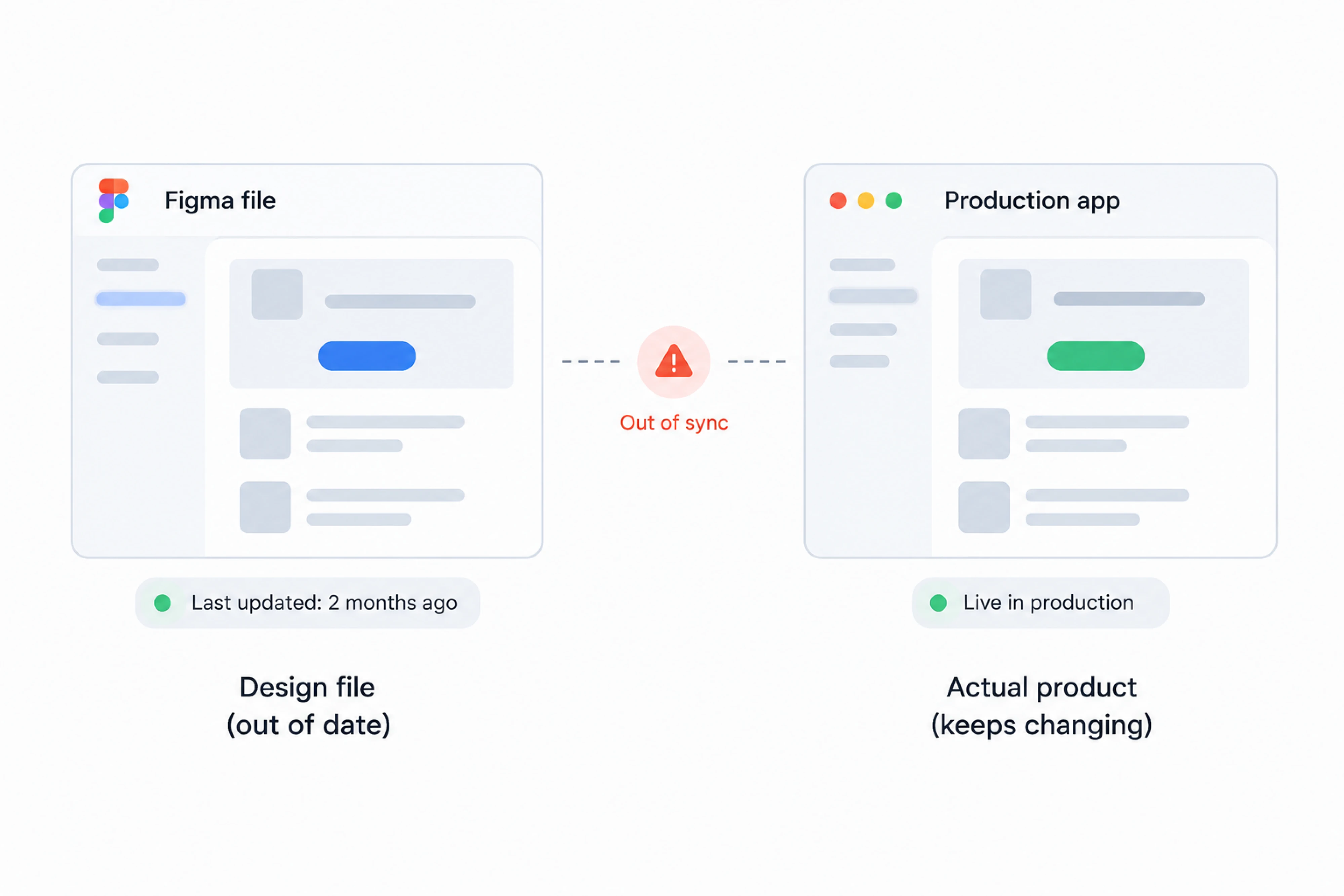
The Figma file and the production app are both representations of your product, and both need to stay current. Something changes in the codebase during a sprint, and unless someone goes back and updates the design file, it quietly becomes wrong.
Most teams stop maintaining it. The file rots, new designers inherit a source of truth that lies to them, and the answer to “how does this work” moves permanently into the heads of two or three people. The cost is not the file. It is that your documented product and your real product have stopped being the same thing.
- Approvals happen on things that do not behave
A stakeholder looking at a mockup is evaluating whether it looks right. They cannot evaluate whether it works, because there is nothing to click.
So the approval covers the surface and misses the behavior underneath. What happens on a narrow screen, how a form responds when validation fails, whether a user can tell which elements are interactive — none of it is testable in a static file. Those questions get answered later, in production, by users.
- Sprint capacity goes to reconciliation tickets
After implementation comes the review, and the review produces a list of spacing fixes, wrong button styles, and missing states.
Individually, these are trivial. Collectively, they are a recurring tax on every feature you ship, paid by engineers who could be building something else, triggered by information that already existed in a design file and simply did not survive the trip. Then each fix needs its own review cycle, and the loop runs again.
- Design debt compounds quietly
When states and edge cases are decided under a deadline by whoever is implementing them, the decisions are locally reasonable and globally inconsistent. You end up with duplicate empty states, different button sizes, and spacing with no clear system.
Nobody chose this. It accumulated. And by the time the inconsistency becomes obvious in the codebase, fixing it requires a full refactor. Catching the same problem in a coded prototype costs a conversation.
Should you use AI to code up prototypes that are interactive and rich and fast to build? Yeah.
None of these are design problems, and none of them are engineering problems. They are all symptoms of the same designer-developer workflow, where designers describe how the product should work, and developers have to recreate it from that description.
That is the step designing in code removes. The next section covers exactly how.
Design-in-code process at Eleken
Getting a designer into your repository takes about an hour of one developer's time, once. From there, the designer works on branches like any other contributor, and nothing reaches production until your engineers review and merge it.
What differs between the two paths is where the work lives and what your team receives at the end.
How the scratch-build workflow works
When there is no product yet, our designer starts with UI design in code, building an interactive prototype.
You review the working version directly in a browser, built with real components, responsive behavior, and all the states the flow requires. You can click through it and see how the product behaves. The feedback we get from you goes into the code directly, so the designer can make the change and push the next version without rebuilding the prototype from a separate design file.
When the direction is settled, we push the prototype to GitHub. Your developers check the repository, validate what is there, and build backend logic behind an interface that already works. There is no phase where someone reconstructs the frontend from a specification, because the frontend already exists.
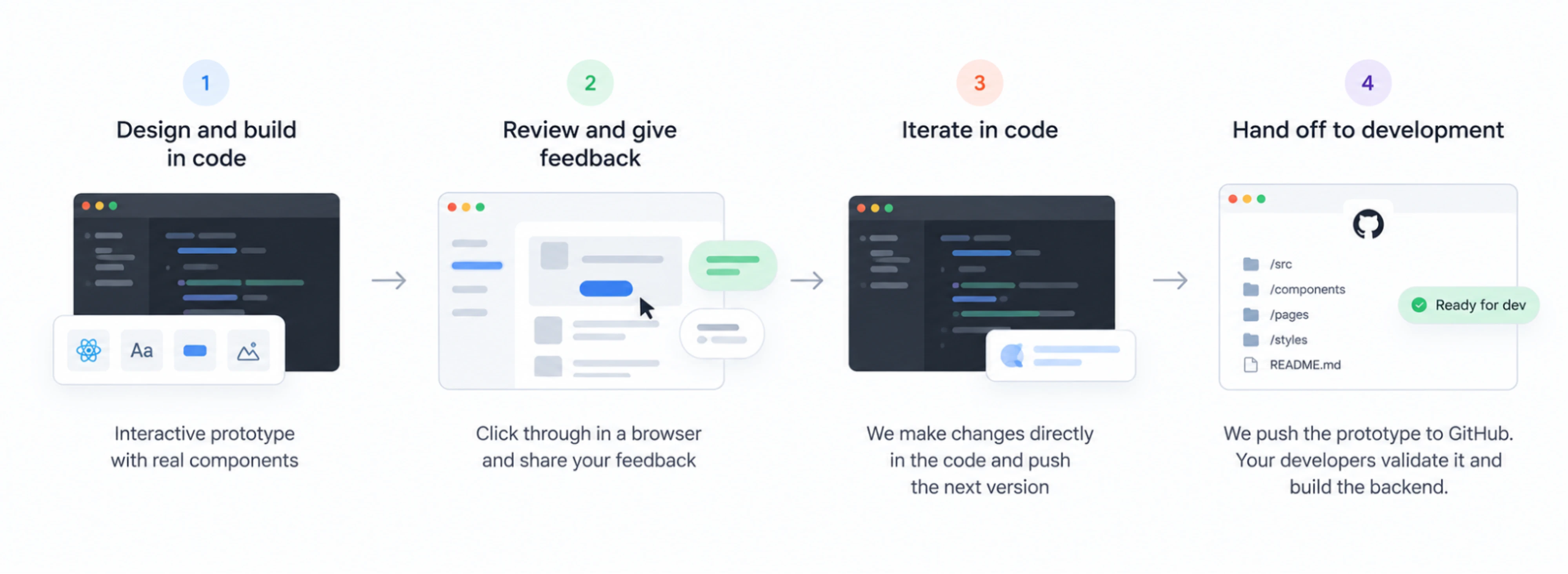
For the full step-by-step version of this process, including setup, branching, and how we run reviews, see our design-to-code workflow article.
How the redesign workflow works
When the product is live, we work on a branch off your existing repository. Production stays untouched the entire time.
Designing directly in code means our designer builds with your real components and tokens, so what you see is what your codebase can support. Developers from your side review the branch and pull what they need while continuing their own work in parallel. Version control handles the rest, so there is no moment where the redesign and your roadmap have to stop and wait for each other.
This path usually runs in three stages:
- We perform a UX audit to map the existing problems.
- We design visual directions for a few key screens.
- We build the full flow, a clean UI kit, and design system architecture.
When we see more than one plausible direction, we put each on its own branch with its own preview link. Your stakeholders open two working versions and compare them. Once you choose a direction, the other branch closes but stays available if you want to return to it.
Interactive prototypes that can convey design better to stakeholders is a valuable skill.
What tools does this workflow use?
The question most teams ask at this point is what they would have to adopt, and the answer is that the stack is mostly the one you already run. Your repository, your framework, and your review process stay where they are.
What gets added is a small set of AI tools that operate inside that environment, which is the distinction that makes the whole workflow hold together.
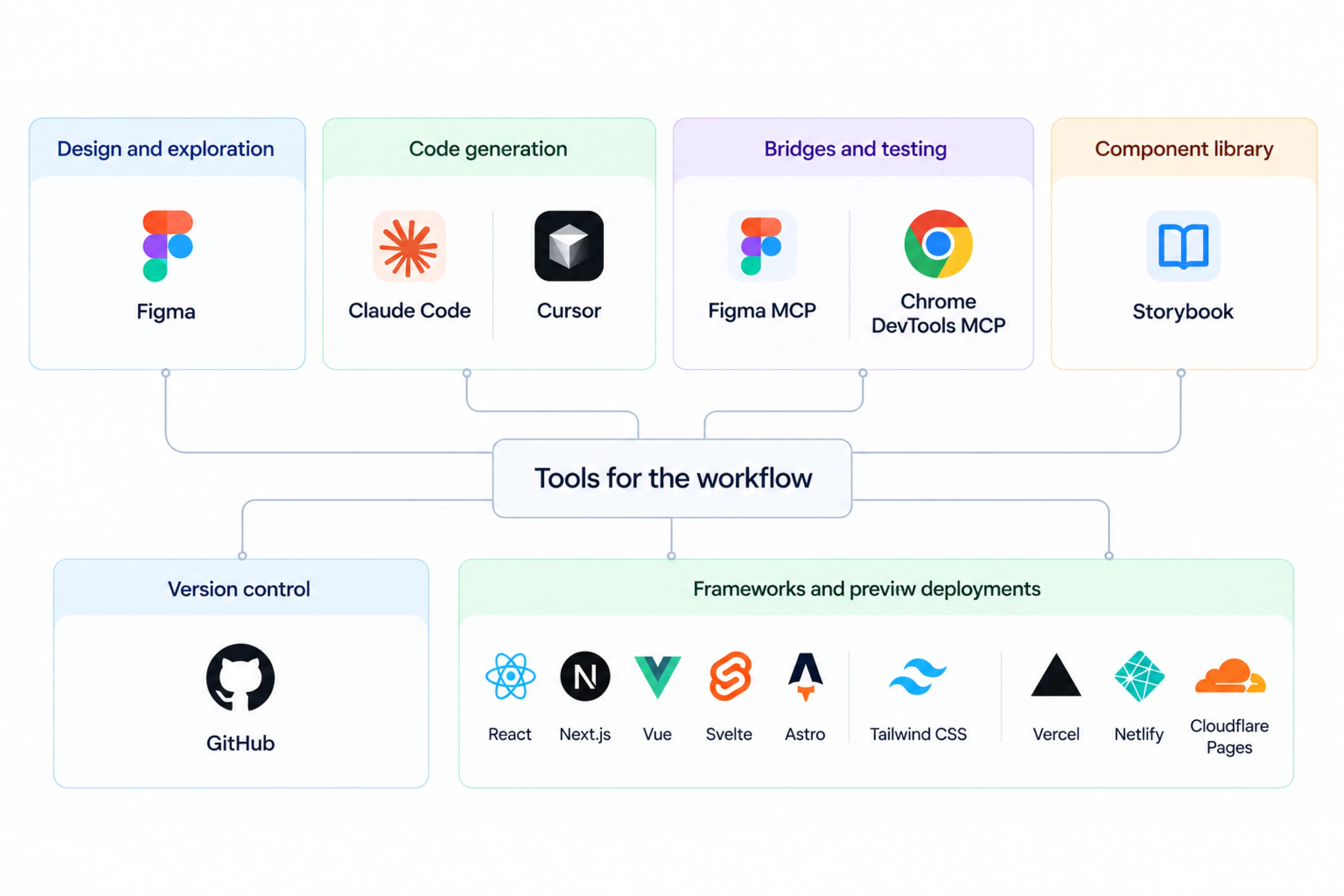
Figma remains the place for early concepts and visual exploration, the work that happens before anyone knows what the right answer is, and it holds design tokens. What it stops being is the thing you hand to engineering.
For the actual work, we use GitHub. Design moves through branches, pull requests, and reviews, which means it travels through the same pipeline as everything else your engineers build. There is no separate approval process, no design tickets living in a different system, and no ambiguity about which version is current.
Claude Code is the tool we reach for most often. It works against the repository, so when we ask it to change a page, it reads the components, tokens, and conventions that already exist. Cursor does a comparable job, and some teams prefer it.
Two connectors close the remaining gaps. Figma MCP reads a Figma file directly into the code environment, which is useful when a solution has already been visualized. Chrome DevTools MCP brings browser testing into the same loop, so checking how something behaves happens without leaving the editor.
Storybook earns its place by answering a question that comes up constantly, which is whether a component already exists. A designer who can browse every button, input, and modal along with their variants and states builds fewer duplicates, and engineers get fewer unnecessary component variations.
Frameworks are not a decision anyone makes here. Frontend design happens inside whatever architecture your product already uses:
- React and Next.js
- Vue
- Svelte
- Astro
- Tailwind CSS for styling
Preview deployments are the last piece, and they are what your stakeholders interact with. On a pull request, this happens automatically through your existing CI setup. For a standalone prototype that has no repository behind it yet, Vercel, Netlify, or Cloudflare Pages will put a working version at a URL in a few minutes.
What connects all of this is that the AI tools are useful because of the repository. A model working inside a codebase full of real components and documented conventions produces something that fits. The same model working from an empty file produces something that looks reasonable and matches nothing you own.
Designing in code starts with a solid design system
A design system in code is the set of building blocks your product is assembled from, where designers, developers, and AI tools reach for the same pieces.
Four things make it up.
- Design tokens. Colors, spacing, typography, shadows, and border radius stored as named values rather than hardcoded into individual screens.
- Reusable components. Buttons, inputs, modals, and tables that exist as actual code, used everywhere they appear.
- A component catalog. Usually Storybook, showing what already exists along with every variant and state.
- Project conventions. Naming, folder structure, and rules about when to extend a component rather than build a new one.
If you are starting from nothing, the fundamentals of a design system are worth understanding first, because the most common mistake here is building too much of it. Teams get ambitious with token architecture and end up with hundreds of semantic layers nested several levels deep, until nobody knows which value to use.
Why this matters
A design system used to be documentation, which meant its worst-case outcome was that people ignored it and built things inconsistently. That cost was real but slow.
Once AI tools are writing interface code for new features, the system becomes the constraint that determines output quality. Ask a model to add a settings page in a repository with clear tokens, a populated component library, and stated conventions, and it will assemble the page from what exists. Ask the same model in a repository without those things, and it will invent a button. Both requests take the same amount of time, and only one produces something you would ship.
This is why the phrase worth remembering is that no code means no design system. Tokens sitting in a Figma library are a reference that someone has to consult and manually apply. Tokens in the repository are enforced by the code that uses them. If you want both, storing them centrally in code and syncing them out to Figma keeps the repository as the single source of truth.
For teams designing in code, this is the difference between a workflow that scales and one that produces fast inconsistency. A production design workflow assumes there is something solid to build on top of, and when there is not, the first real piece of work is usually putting that foundation in place.
The real benefits for B2B SaaS teams
The obvious benefit is speed, and it is real. For B2B SaaS teams, that changes the distance between deciding something and finding out whether the decision was right.
- Review cycles get shorter. When stakeholders open a working page, questions that used to take a round of clarification answer themselves, and the feedback that remains tends to be about the product.
- What gets designed is what ships. There is no interpretation layer between the branch and production, so the version your team approved is the version your users see.
- Edge cases surface early. Responsive behavior, empty states, permission variations, and error handling all get decided in a browser while a designer is still the one deciding them.
- Your developers start from something that works. Instead of a specification to rebuild, they receive a reviewed branch they can extend, so design implementation starts from working code.
The bigger change is in what you can measure, and it is the reason we at Eleken structure engagements around it.
When design work lands in a branch and ships through your normal pipeline, it becomes traceable to product outcomes. The question stops being how many screens were produced and becomes whether the changes did what you expected.
Depending on the problem, that is usually one of:
- Activation and onboarding completion.
- Trial-to-paid conversion.
- Feature adoption.
- Task completion and time to value.
- Retention and support volume.
Zaplify is a useful example of what that looks like in practice. The problem was that users needed manual help to reach the point where the product proved its value. After the redesign, activation moved from 20 to 25 percent up to roughly 40 percent, and users were reaching that moment on their own.
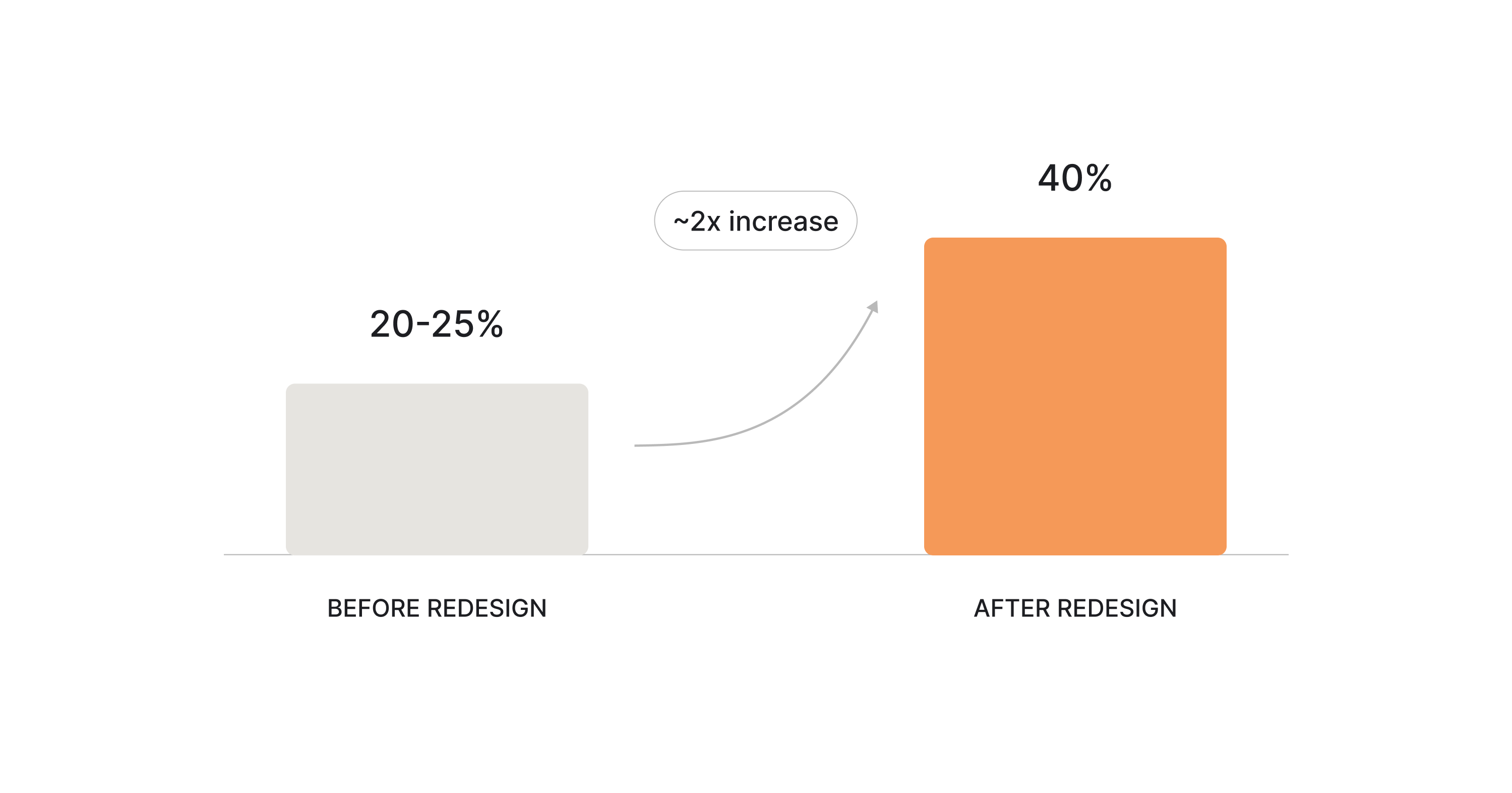
The number matters, but so does knowing it. A design engagement that ends at handoff has no clean way to attribute what happened next. When the same team takes a problem from evidence through implementation, the result is measurable, and a measurable result tells you where to look next.
That is the actual payoff. Not screens delivered faster, but a shorter loop between a product decision and evidence about whether it worked.
Should designers learn to code?
The honest answer is no, at least not in the way the question usually implies.
A designer working in your codebase is not writing application logic, making architectural decisions, or reviewing anyone else's pull requests. They are assembling interfaces from components that already exist, which is a different job from engineering even though it happens in the same place.
What changes is the quality of the decisions they make. A designer who understands how HTML and CSS behave makes decisions with real technical constraints in mind. Those constraints used to arrive as feedback from an engineer weeks after the fact. Now they arrive while the work is being made.
Understanding code and being able to make changes in code helps a lot.
AI has moved the barrier considerably, and coding for product designers no longer means years spent learning syntax. Claude Code, Cursor, and the Figma connectors handle most of that part. The scarce skill is knowing what to build and recognizing when the result is wrong, and no tool has made that easier.
That is worth keeping in mind if you are hiring designers who code. Teams that have been burned by the old model usually want a designer who can think through the problem, understand users, and make strong product decisions. The coding part can be taught in months. The judgment part is why you were hiring in the first place.
It also explains why our Eleken team works as an embedded partner. Our designer joins your standups and sprints, sees the same tickets and constraints, and takes a product problem from evidence through to a tested solution your engineers can ship.
Designer-developer collaboration stops being a process to manage when both people are working in the same repository.
The bottom line
Designing in code is not the right move everywhere. If your frontend has no component layer to build on, or your team has no capacity to review the work that comes back, the honest first step is fixing that. The same goes for brand work and early visual exploration, where a design file is still faster than a branch.
Where product design in code does fit, the way in is smaller than most teams expect. You do not need to restructure your process or commit to a redesign. Pick one thing that is not working, a flow users abandon, a metric that has been flat, an interface that has aged badly, or an idea nobody has been able to validate cheaply.
Bring us that. We will find out what is going wrong, build the fix inside your product, and help you determine whether it did what you hoped.


.webp)

.webp)

.webp)
.webp)
