In 2016, the HubSpot team made the decision to optimize their website. Although HubSpot was performing well at that time, its user experience wasn't as good as it could have been.
Initially, the team thought that to change the situation for the better, they would have to refactor or redesign around 70 of the website's critical pages. But the UX design audit they conducted prior showed that they can reduce this number down to 39, which was already a bit less stressful.
What's more, the UX audit allowed HubSpot to identify trends and spot major areas for improvement, such as adding videos to the product overview pages and getting rid of the illustrations completely. The redesign made after this research turned out to be successful and doubled HubSpot conversion rates
That's the power of a good UX audit. If you’re new to the concept, this guide will walk you through the different types you can use and the practical approach we follow at Eleken.

What types of audits are there?
As a design agency, we at Eleken can say that there’s no such thing as a universal UX audit. The audit always depends on specific goals and therefore comes with a different approach.
In general, we can split the main types into usability audit, accessibility audit, visual design audit, and content audit. Below you can find more details about each of them and ways to conduct them.
Usability audit
The goal of a usability audit is to spot any issues that make a product's user experience confusing and unsatisfactory. For this type of audit, you need to collect all the valuable data that could aid you in the process, such as the app's statistics, user interviews, usability testing, user personas, and feedback. Additionally, you can observe how users interact with your product and apply UX research methods to deepen your understanding.
Analyze this data to discover areas of improvement and update the product accordingly. We recommend doing it in several iterations: once an update is ready, show it to the target audience, collect their feedback, and implement it. Repeat, until you’re satisfied with the feedback.
Accessibility audit
Accessibility audit helps ensure that people with disabilities will be able to use your product without experiencing major difficulties and discomfort. This process often involves evaluating compliance with accessibility standards and using tools or assistive technologies to test usability.
Unfortunately, at the moment it’s immensely difficult if not impossible to make interfaces 100% accessible, so such reviews should become a routine task rather than a one-time project. However, it’s definitely worth the effort. Even the smallest improvements and minor fixed problems will open new doors for more users.

There is no one-fits-all approach on how to conduct an accessibility audit. The perfect option would be asking people with disabilities to test your product, but not all have the resources to do that. The less perfect yet efficient option is using special UX audit tools to test the accessibility of a product. like screen readers, browser developer tools, automated testing tools, and color contrast checkers.
Visual design audit
As its name suggests, visual design audit is the review of all design elements that a brand or a company uses. This is done to ensure that the visual communication is consistent throughout all channels or to revise visual branding (for instance, when you’re planning a rebranding) by uncovering things that have to be changed or improved.
If you decide to do a complete visual design audit, you'll have to analyze all the elements your company uses for branding and visual communication, including layout structure and information architecture consistency across channels. Evaluate if design elements are easy to work with, consistent, up-to-date, and have a single source explaining how to use them (be it a brandbook, a style guide, or a design system). Make a report containing what is good and what has to be improved. Discuss it with your team and update if necessary before you start implementing the changes.
Content audit
Just like visual design audit evaluates the visuals, content audit reviews the content for consistency, relevance, SEO performance and other important things. While we all know that content is the king of marketing, we still need to access it from time to time and look for ways to improve it. That’s why 61% of companies that succeed the most in content marketing run content audits at least 2 times a year.
To run a content audit for a website, start by defining your target goal, whether it's improving SEO or increasing the conversion rate. Gather all the data and analyze it to see what performs better than expected, what underperforms, and what has to be updated with relevant information — while also identifying key trends that shape your content strategy. Adjust your content strategy according to the valuable insights you discovered during the analysis process.
These are the general recommendations on how to conduct different types of audits. However, being a design agency that has been creating high-quality SaaS design solutions for years, Eleken has its own approach to the audit process, and we want to share this with you.
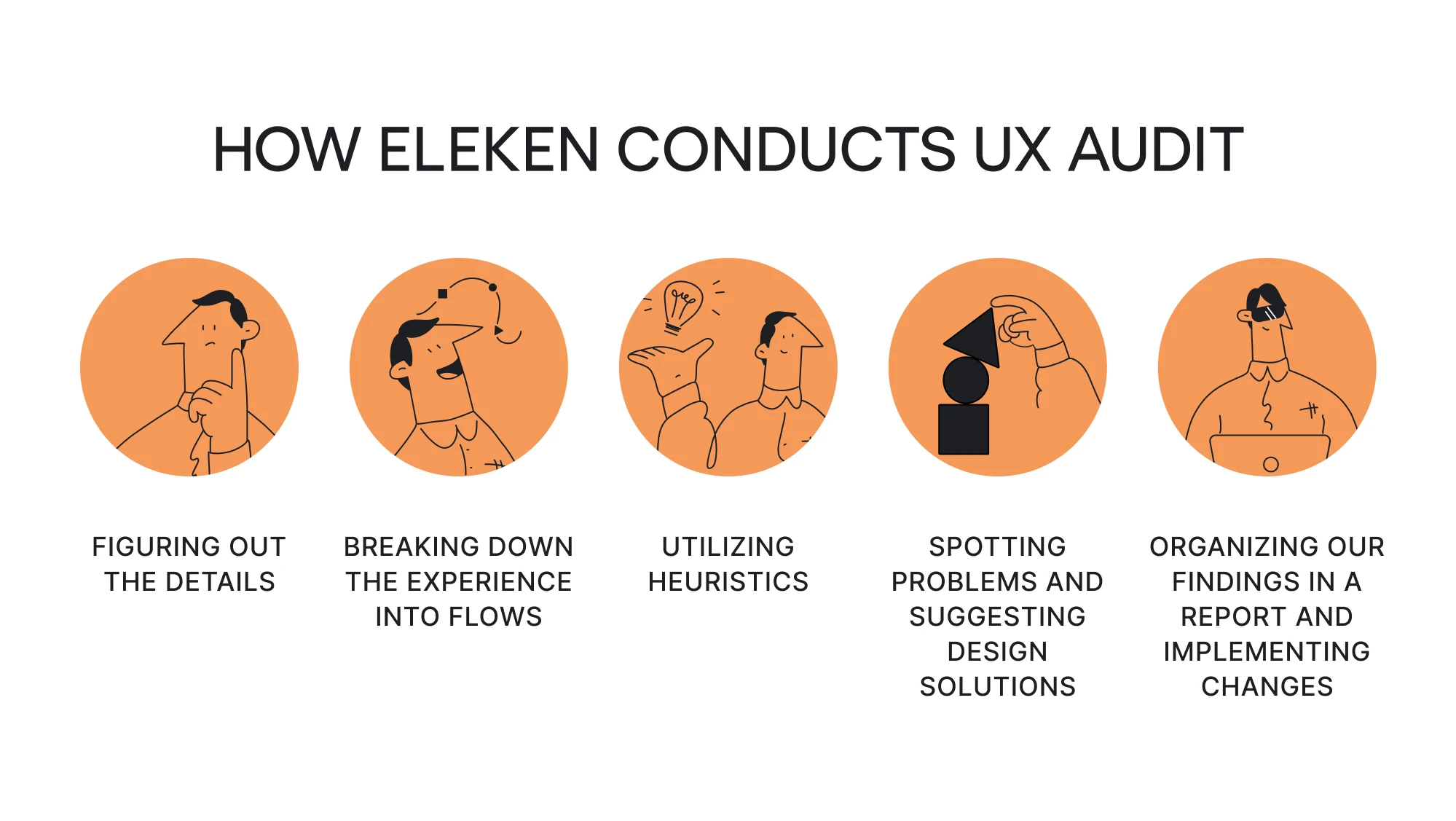
5 steps for a successful UX audit (based on Eleken's approach)
A thorough UI/UX audit is the starting point for redesign at Eleken. Our UX audit team sticks to a pragmatic design approach and uses audits to uncover user pain points and identify opportunities for improvement.
For better understanding, we break down the five steps of our UX audit process using an example from our work on Datawisp. This is a no-code data analysis platform that came to us to design its MVP.
Step 1. Get to know the product and its goals
To enhance a product’s user interface and overall user experience, the first thing you need to do is understand how the product works today and what goals it aims to achieve. This includes reviewing the business objectives, user needs, technical constraints, and any existing quantitative data from analytics tools such as Google Analytics or more advanced analytics tools.
At Eleken, even if we already have some information from stakeholders, we always go the extra mile and gather additional data on our own. The more context you have, the better your audit will be.
At this stage, your goal is to build a complete picture of the product’s environment before you start analyzing individual screens. That means looking into how people currently use the product, which problems they report, what the success metrics are, and where the business wants to grow.
You can also create user personas and run surveys to better understand user expectations. This early UX research helps build a deep understanding of both business and user needs and ensures you properly understand business objectives before moving forward to avoid misaligned decisions later.
If something is unclear, conduct quick stakeholder interviews, review customer support tickets, or explore user recordings to fill the gaps. In some cases, you might need to plan further research to capture data that’s missing.
Step 2. Break down the experience into flows
Once you understand the product’s goals and context, the next step is to break the experience down into clear user journeys. Instead of evaluating isolated screens, you want to analyze how users actually move through the product and what steps they take to complete key tasks.
Start by identifying the main scenarios users perform like signing up, creating a project, uploading data, managing settings, or anything else that reflects the core value of your product. Then, map each customer journey step by step, noting where the flow is smooth, where it becomes confusing, and where users might get stuck or drop off. This helps uncover friction points and understand how different user perspectives shape the overall experience.
And besides approach helps you see the product as a sequence of interactions that should guide users toward their goals with minimal friction.
In our work with Datawisp, for example, we also deconstruct the existing app into clear user flows. Once done, we broke those flows down into individual elements, such as data blocks, cards, tables, and interactions. We had to understand the role and meaning behind every single design element to figure out what could stay as it is, and what could be improved.

Step 3. Conduct a heuristic evaluation
After mapping the key user flows, the next step is to evaluate the interface through the lens of established principles. One of the most effective methods is Jakob Nielsen’s 10 usability heuristics, a time-tested framework often used in UX review processes that helps uncover common UX issues related to clarity, feedback, consistency, and user control.
Though these heuristics were introduced more than 30 years ago, they remain highly relevant because they are grounded in fundamental human behavior. When you conduct a UX audit using this checklist, you can quickly identify UX issues like unclear labels, inconsistent navigation, missing feedback, or interactions that require unnecessary effort.

During this stage, UX designers examine every part of the interface and assess how well it aligns with each heuristic. It’s helpful to take notes, capture screenshots, and annotate problematic areas. All of this makes it easier to communicate issues later and ensures nothing gets overlooked. Comprehensive UX audit services often involve mapping these findings directly onto the user journey to see which specific steps cause the most friction.
In addition to heuristic analysis, performing an accessibility evaluation helps ensure your product is usable by people of all abilities. Such checks often reveal structural issues that traditional heuristics may miss.
In the Datawisp project, we evaluated each screen against Nielsen’s principles and documented every inconsistency or friction point. This helped us build a comprehensive picture of where users might struggle and why.

Step 4. Spot problems and suggest design solutions
After identifying all usability issues during the heuristic evaluation, it's time to analyze each problem and explore potential design solutions. This means pointing out what’s wrong, explaining why the issue matters, and how it can be improved.
Start by grouping the problems by theme or affected parts of the user flow. This helps you see whether issues are isolated or part of a larger pattern. Then evaluate each problem by severity:
- Critical: blocks users or causes major friction.
- Major: slows users down or creates confusion.
- Minor: doesn’t break the experience, but can be refined.
For every issue, outline a clear and actionable recommendation. This could be simplifying a flow, improving visual hierarchy, rewriting unclear copy, or adjusting interaction patterns to match user expectations. If you are specifically focusing on a UX content audit, your recommendations might focus on tone consistency, terminology clarity, and ensuring call-to-action (CTA) text aligns with user intent.
You can also gain valuable insights from user research, usability testing, or analytics when making these decisions. The goal is to propose solutions that not only fix current issues but also create a foundation for future improvements while supporting the product’s business and user goals defined earlier in the audit.
Reviewing diverse UX audit report examples can help you determine whether to present these findings as a detailed document or a more visual, annotated slide deck. This stage helped us reveal several patterns of complexity in the Datawisp interface. By proposing targeted UX improvements, we were able to address the root causes of user friction and transform the platform into a truly user-centered experience.


The redesigned product has all the functions the client wanted to implement and has significantly improved user satisfaction. A new design created by Eleken helped Datawisp raise a $3.6 million seed round.
Step 5. Present the audit report
The final step is to organize all your findings into a structured UX audit report and review it with stakeholders. A well-prepared report should bring together all the qualitative data collected during the audit:
- the list of discovered problems;
- their severity and impact;
- suggested design solutions;
- supporting screenshots or annotations;
- recommendations for next steps.
Presenting findings clearly is just as important as creating it, especially when collaborating with an external team or stakeholders. Walking the team through each section ensures everyone has the same understanding of the issues and the reasoning behind the proposed improvements. It also helps prioritize changes and define the scope for the upcoming redesign.
At Eleken, we always create a detailed UX audit report for our clients. It includes every identified issue, suggested solutions, and additional insights we uncovered during the analysis. We show this to the client, discuss it with them, decide what needs to be done, and only then move to the design phase.
This collaborative approach ensures the redesign is aligned with the client’s goals from the very beginning and supports better customer retention and customer satisfaction.
When to conduct a UX audit
Knowing when to run a user experience audit is just as important as knowing how. A well-timed audit can uncover hidden problems before they become costly, support strategic decisions, and ensure the product remains aligned with actual user needs and business goals.
Adhering to UX audit report best practices means not only documenting what is broken but also identifying the right moment to intervene. Here are some practical scenarios where a comprehensive UX audit makes sense:
- Planning a redesign or major update
If you’re redesigning your website or app, or adding significant new features, an audit helps you ground decisions in real user data. - Declining metrics or increased user friction
When key performance indicators (KPIs) like conversion rate, retention, engagement, or time-on-task start to drop, audits help reveal UX degradation points across web platforms and mobile apps. - Surge in user complaints or support tickets
If users are repeatedly expressing frustration, confusion, or difficulty using your product, this is a strong cue for auditing the experience. - Rapid feature growth or product complexity
When many features have been added over time without strategic design coordination, the interface often becomes fragmented or inconsistent. It’s time for a UX health check. - Ageing design or outdated UX patterns
Digital products evolve fast. If your design is several years old, user expectations, devices, or industry benchmarks may have changed, and an audit ensures you stay relevant. - Preparation for a rebrand, expansion, or new market
When you’re rebranding, entering a new market, or scaling to higher traffic volumes, you want your UX to be solid. An audit can mitigate risks.
When in doubt, a simple way to assess whether you need a UX audit is to walk through your product as if you were a first-time user. If you stumble, hesitate, or find yourself guessing what to do next, your users are probably struggling too.
That’s often the clearest sign that it’s time to pause, review, and fix the experience before adding anything new.
Bottom line
There are different types of UX audit, depending on what you want to evaluate. But none of these types will bring effective results unless you understand their UX audit limitations and know how to act on findings.
While some companies rely on in-house efforts, others turn to external agencies to bring fresh perspective and structured expertise.
And that's what we at Eleken do — we can not only conduct high-quality SaaS UX audits, but also offer efficient, modern solutions to problems we find. While realizing the number of issues a product has isn't always a pleasant experience, we won't leave you in the dark with these findings, but will help you fix them quickly and professionally within the discussed timeframe.
If it sounds like a good deal, reach out to us for a free consultation.