

For years, the design-to-developer handoff has been the point where a designer’s work ends, and a developer’s work begins. It’s also where many teams lose time, details, and part of the original design intent. Designers have been questioning this model for a while.
As one expert put it on Reddit:

The term “handoff” is actually part of the problem. What you really want is continuous collaboration throughout the build process, not a “here’s the design, good luck!” moment.

Design engineering is the answer gaining ground, especially now that AI tools make it realistic to work much closer to code. The two approaches differ in many ways, but the core difference comes down to where the designer’s responsibility ends.
At Eleken, we’ve designed SaaS products for 11+ years and have worked both ways. Since our designers started delivering working frontend, time to delivery on our projects has dropped by 2x. Below, we compare the two approaches, show who owns what in each, and help you decide which one fits your team.
Design handoff vs design engineering: what’s the difference?
Design handoff is the process of passing finished designs to developers so they can build them. The designer prepares Figma files with specs, annotations, and assets, and developers turn that description into code.
Design engineering is an approach where the designer builds the interface in the product’s codebase. Working in a separate branch, they assemble the UI from the product’s existing components. The backend, the data, and the decision about what gets merged stay with the engineering team.
In both approaches, someone researches the problem, maps flows, and decides how the interface should look and behave. Things change after approval.
Put simply, the two design-to-development workflows look like this:
- Design handoff: Design → Figma file → handoff → developers rebuild the UI → design QA → fixes
- Design engineering: Design → working UI → pull request → engineering review → production
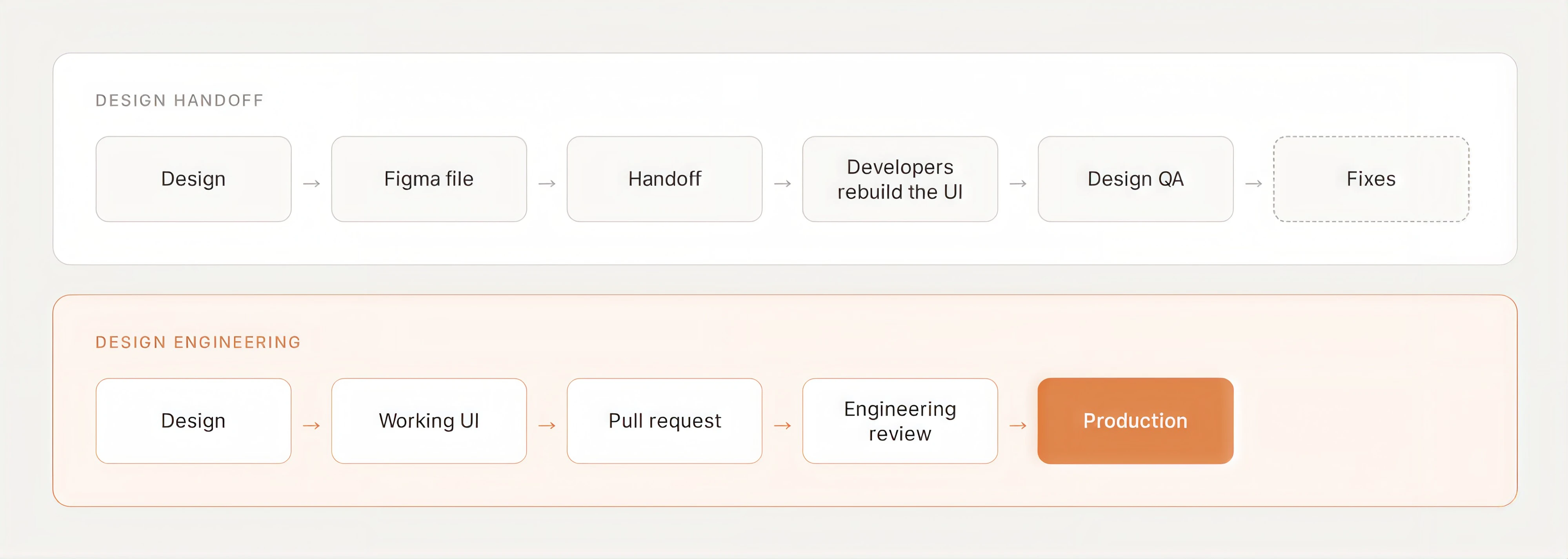
The last row of the table is the same for both models, and that’s intentional. Design engineering doesn’t take control away from developers. Engineers still own the architecture, the data, and the decision about what reaches production.
What disappears is the step where the same interface gets built twice, once in Figma and once in code. That’s also where most of the time, rework, and lost detail tend to pile up, as the next section shows.
What design handoff really costs your team
Most teams don’t run a careless developer handoff. Designers annotate their files, record walkthroughs, and set up regular syncs with developers. Still, 91% of developers and 92% of designers believe the design handoff process could be improved, while 84% of designers say they already collaborate with developers at least weekly.
So even with good designer-developer collaboration, the problem remains. The handoff turns the design into a description that someone else has to turn back into a product. That translation has a price, and different people on the team pay it.
The designer pays in time spent describing. A design file shows how the interface looks, but not everything about how it works. So designers add specs, annotations, prototypes, and video walkthroughs to cover the gaps.
There’s also no single format that works for every team. One designer on Reddit listed multiple formats they’d used over the years, and summed up the result:
Sadly, which method was most favored was different for each developer/company. I worked with one that found Figma Dev tools confusing. Some never bothered to read the documentation we wrote and just used the source file.
The developer pays by making design decisions. No file covers everything. Whatever it leaves open gets decided during the design implementation process by the developer, who often has the least context about why the design looks the way it does.
Their time also goes into rebuilding layouts, spacing, and component states, instead of into architecture, data, and the problems only engineers can solve.
The product pays in quality. All those small decisions and approximations add up. In a survey of 500 designers, 52% said developers’ implementations of their designs are just “good enough,” 26% said they get there eventually after too much back and forth, and only 21% called them pixel-perfect.
We see the same pattern on our own projects. Band24, an asset-tracking platform, went through fast releases, a full rebrand, and a growing amount of AI-generated code.
Our designer took on design QA and has found more than 600 issues across the app and its component library since the rebrand. Every one of them was fixable, but each had to be found, documented, and sent back for another round.
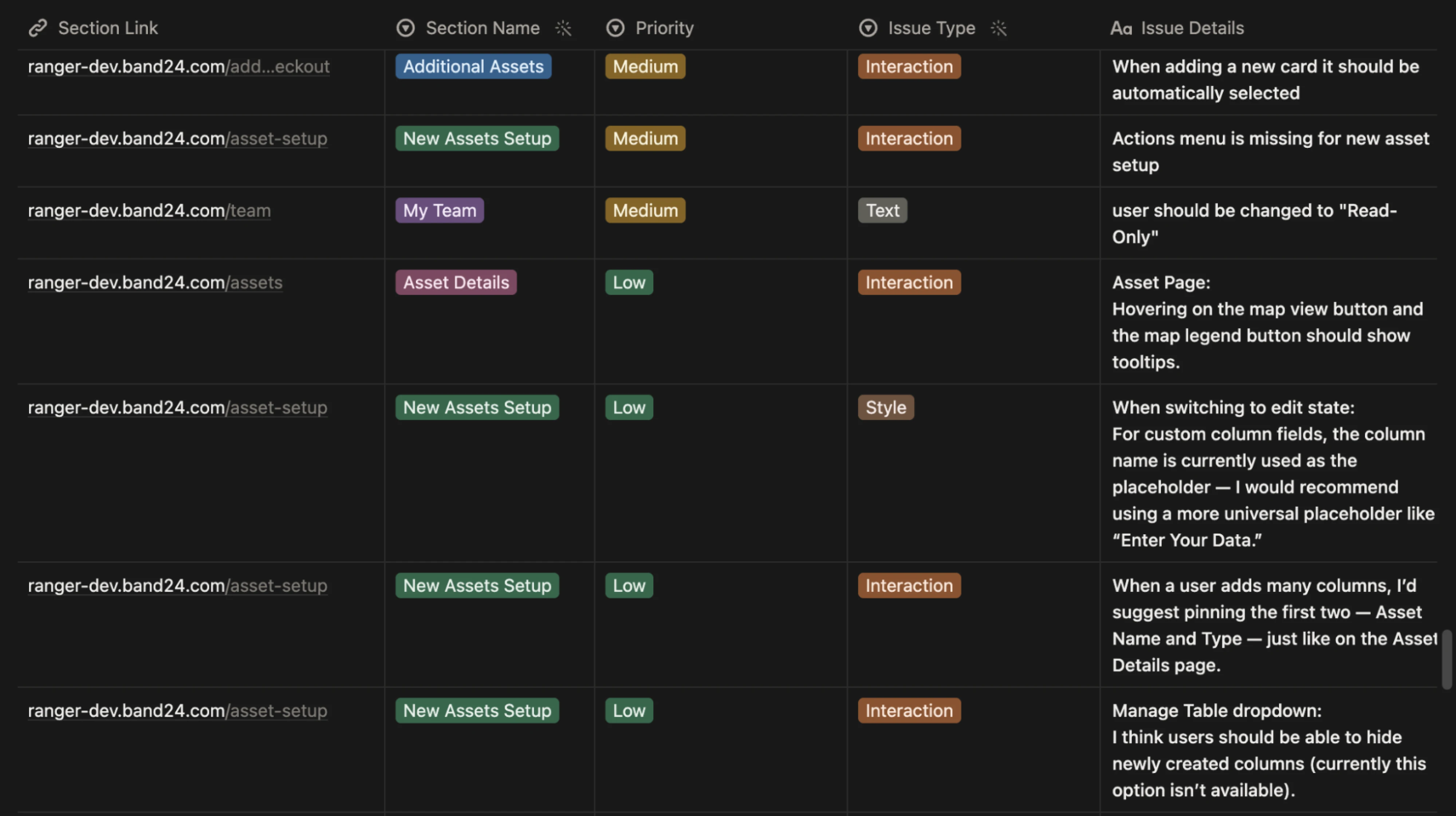
These costs don’t show up as a single budget line. They’re spread across sprints, which is why teams try to reduce them with more meetings, documentation, and stricter design QA. Those measures help, and we’ll cover them later in the article.
But they make the translation cheaper. They don’t remove it.
How design engineering removes the translation step
As we’ve already said, design engineering doesn’t make that translation faster. It removes the need for it by changing what the designer delivers.
In practice, the designer works in a separate branch of the product’s repository. They build the UI from the components and tokens the product already uses, and they work out states, edge cases, and responsive behavior in the running interface.
The result goes to engineering as a pull request, where developers review the code, connect the backend, and decide what gets merged. We break down the setup and each step in our design-to-code workflow guide.
This changes where each of the costs from the previous section lands:
- Designers spend their time building and testing the interface.
- Developers review decisions that have already been made.
- The product gets reviewed in the same form it will ship in, so there’s much less left to catch in design QA.
Designers have shipped code before, but for most of them it required too much frontend skill to be practical. AI coding tools changed that. In UX Tools’ State of Prototyping survey, design engineers at 80.9% and IC designers at 35.0% spend more than half their time vibe coding, the widest split in the data.
Some product teams have already built this into how they work. At Eleken, designers run the product locally and use AI coding agents like Claude Code or Codex to build interface changes directly in the client’s codebase, assembled from the components the product already has.
For designers, the change is often about which problems finally get solved. As one put it on Reddit:
I’ve been able to fix several issues that would never otherwise get prioritized even though they account for the majority of the support requests.
However, don’t think the value comes from designers writing code. With AI, much of the code gets generated anyway. The value is that the interface gets built once, by the person who understands why it should look and work that way.
That raises the question most teams ask first: if the designer builds the UI, who is responsible for what?
Who owns what when there’s no handoff
Removing the handoff changes where design responsibilities end and engineering begins.
With a design-to-engineering handoff, that line sits at the file. Everything in Figma belongs to the designer, and everything in code belongs to the developer. In design engineering, the line runs through the frontend itself, between how the interface looks and behaves and how the system behind it works.
In practice, ownership divides like this:
- The designer owns the experience: UX logic, layout, the components a screen uses, interface states, interactions, copy, and responsive behavior.
- The developer owns technical integrity: architecture, business logic, data, APIs, security, performance, and the decision about what gets merged.
- Some decisions stay shared: complex interactions, new component behavior, and anything that affects performance or feasibility.
Frontend engineers own the logic and the data layer, design engineers own the gap between figma and production.
This split holds up only if both sides build from the same pieces. When the designer and developers work with different components, ownership turns into negotiation again. That’s why the design engineering workflow depends so heavily on the design system.
Why design engineering runs on a design system
In a traditional handoff, a design system mostly makes the translation easier. Designers and developers share component names, tokens show up in Figma’s Dev Mode, and fewer values get guessed.
In design engineering, the design system plays a bigger role. It becomes the material the designer builds with. Every screen is assembled from components that already exist in code, so the pieces developers maintain are the same pieces design decisions are made with. There’s nothing to translate between them.
That’s also what keeps ownership clear. A designer who needs a pattern the system doesn’t have doesn’t invent a one-off version inside a feature. The new component goes through its own review, so engineering sees it as a change to the system rather than something hidden in a pull request.
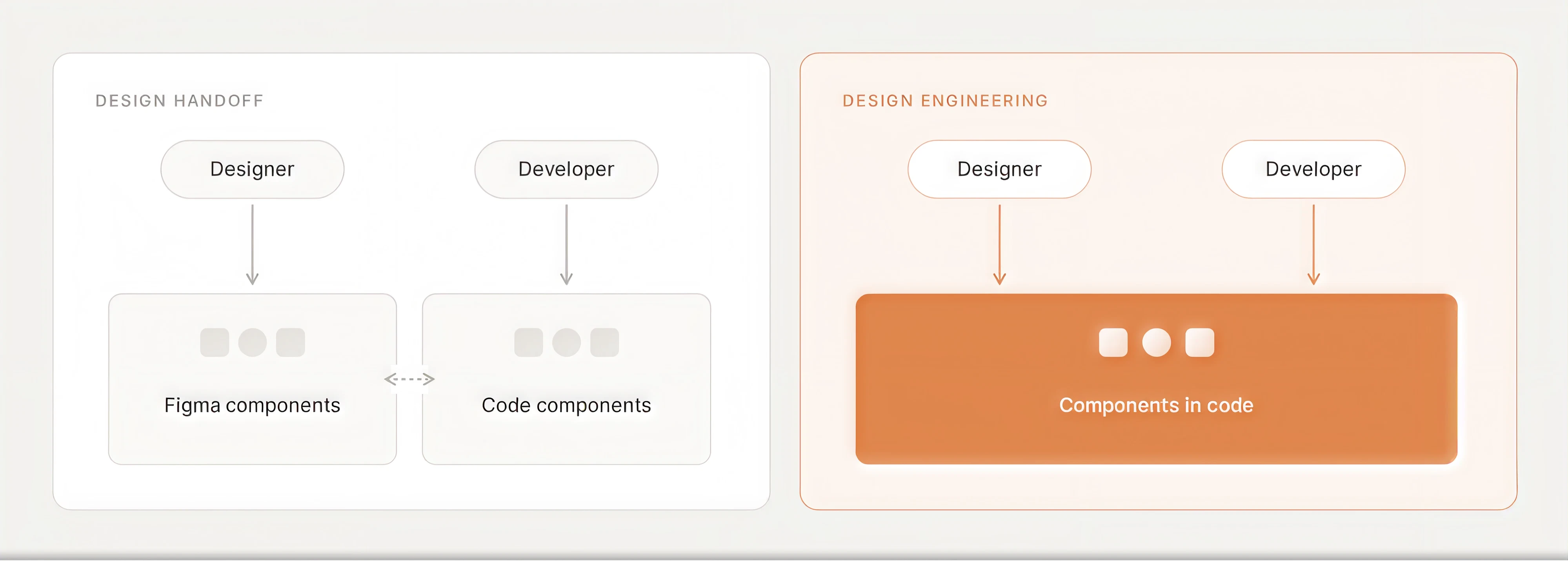
AI tools make this foundation even more important, because they build with whatever they find. If the components in Figma and in code have drifted apart, AI-generated work drifts with them.
We saw how much a system needs to carry when we worked with Onit, a legal operations platform with 80+ engineers and only 2 designers. With that ratio, designers couldn’t answer every implementation question by hand. So we rebuilt the system to answer those questions itself.
We documented 40+ components with their states, usage rules, and accessibility requirements, and we added plain-text rules for the AI tools Onit’s engineers were already using to turn components into code.
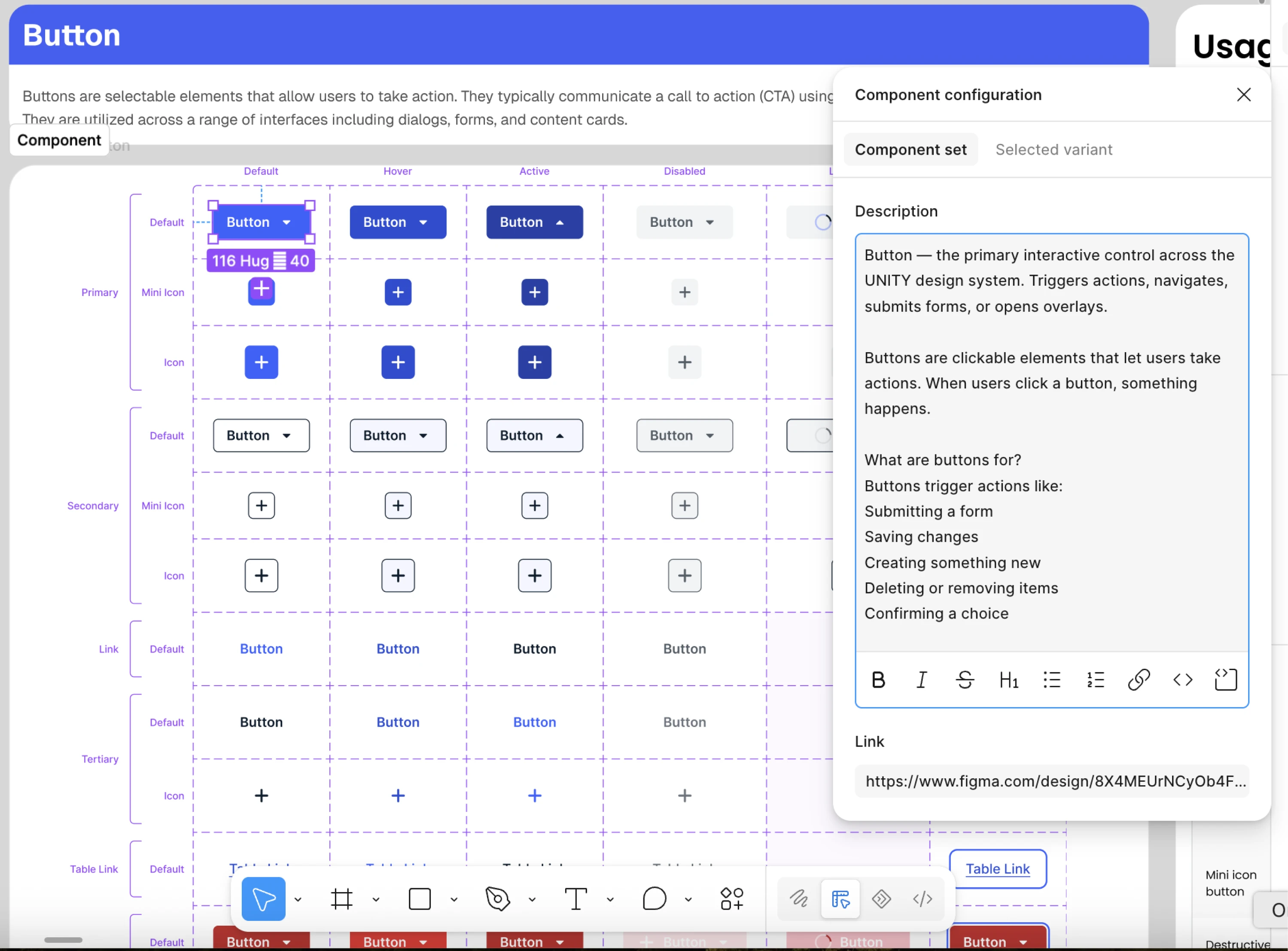
Not every team needs a system that size to start. But design engineering needs at least tokens and core components that exist in code. If your product doesn’t have that layer yet, building it is usually the first step.
You can see how we approach it in our guide to Figma design systems or visit our design system services page if you need help with yours.
When to use design handoff vs design engineering
Neither model is better by default. The right choice depends on where your team loses time, and often it varies from one piece of work to another.
Here’s how common situations map to each approach:
There’s one condition no table can replace: someone has to review the code. Design engineering moves UI work to the designer, but it doesn’t make engineering review optional. Because most designers lack the technical foundation to audit the code AI gives them, they can end up shipping large amounts of “quality debt.”
That’s why the model works only when developers have time to review pull requests, and when the designer treats their judgment as part of the process.
You also don’t have to switch everything at once. Many teams mix the two approaches. They use design engineering for UI-heavy work like redesigns, onboarding flows, and design debt, and they keep the handoff for features where most of the complexity sits in the backend. A good way to test the model is to try it on one flow that keeps coming back from development with fixes.
And for the work that stays with a handoff, the process can still become much less costly.
How to make design handoff less costly
If you’re keeping the handoff, the goal is to leave less for the developer to interpret. Each of these practices targets one of the costs above:
- Involve developers before the file is final. Short check-ins during design bring up technical constraints while the decision is still open, so fewer of them turn into compromises during the build.
Your designs should not come as a surprise to your Eng team.
- Design every state, not just the main flow. Empty, loading, error, and permission states are exactly where developers end up making design decisions. If the file covers them, there’s less left to guess.
- Annotate behavior along with visuals. Figma’s Dev Mode already shows spacing and colors. Use notes to explain what the file can’t show: interaction rules, validation logic, and why a pattern was chosen.
- Use the same components and names as the code. When a button in Figma maps to the button in your codebase, with the same tokens and variants, developers reuse it instead of rebuilding it.
- Review the build before formal QA. A quick check during design implementation catches issues while they’re still small. A structured design QA checklist helps make sure nothing gets skipped.
For a step-by-step breakdown, see our guide to Figma developer handoff and our tips on designer-developer collaboration.
These practices make the translation smoother. Teams that want to remove it entirely usually need outside help to get started, because building a working frontend takes a designer who can work in code, and most teams don’t have one in-house.
How Eleken approaches design engineering
At Eleken, design engineering is part of our product design engineering service. Our designers take a product problem from research to a working frontend, built from the client’s own components and reviewed by their developers.
Ship Angel, an AI-powered logistics platform, is a good example. We started with a traditional Figma handoff, and it worked, but every feature went through extra iterations. Today, our designer works directly in Ship Angel’s codebase with Claude Code, and Kevin Cowan, Head of Engineering, described the result:
The design arrived already built, in code, exactly as she intended. I picked it up, connected it to the backend, and made a handful of functional adjustments. I didn’t spend a minute on divs, pixel sizes or borders.

That single redesign saved 11–12 hours of engineering time, and across the project, design time has dropped by half. For a team where one engineer works full-time on the AI data pipeline, every hour not spent on margins and borders goes back to the product’s core.
If you’d like to try this on your product, you can start with a three-day trial. We agree on the scope together, and after the kick-off call, the designer builds a clickable prototype in Claude Code that covers the trial task end to end. By the final call, you get it as a live link, so you can see how it behaves before committing to anything.
Conclusion
When someone on Reddit asked what a design engineer actually is, one of the replies was a short history lesson:
Web designer, then split and “specialise” (UX vs Frontend). Now seems is merging back.
There’s some truth to that. Early websites were often designed and built by the same person. As products grew, the work got divided between designers and frontend developers, and the handoff appeared to connect the two. Now AI coding tools are bringing them closer again.
It won’t bring back the one-person web designer, though. SaaS products are far more complex than early websites, and they still need engineers to look after the architecture, the data, and everything that ships. Designers, in turn, get to stay with their work longer, until it’s a working part of the product.
For most teams, this comes down to a practical choice. You can keep explaining designs to developers, or designers can take them far enough that developers only need to review them. Plenty of teams will do both for a while, and that’s fine.