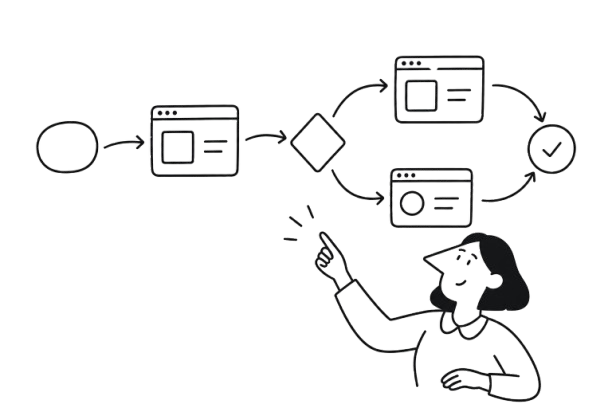


Your SaaS product can look great, offer powerful features, and still leave users wondering what to do next. The problem isn't always a confusing screen or a missing button. Sometimes, it's the entire path users have to navigate to get things done.
That's where user flows come in. They help designers look beyond individual screens, uncover the moments where users hesitate or get stuck, and turn complicated journeys into clear, intuitive experiences.
In this article, we'll break down practical user flow diagram examples from SaaS products, explore what makes them work (or fail), and show how to design smoother paths that help users reach their goals without unnecessary detours.
What are user flows, and why should you care?
A user flow is a visual representation of the steps someone takes to complete a specific task within a product. It shows where users start, what actions they take, which decisions they face, and how they reach their goal.
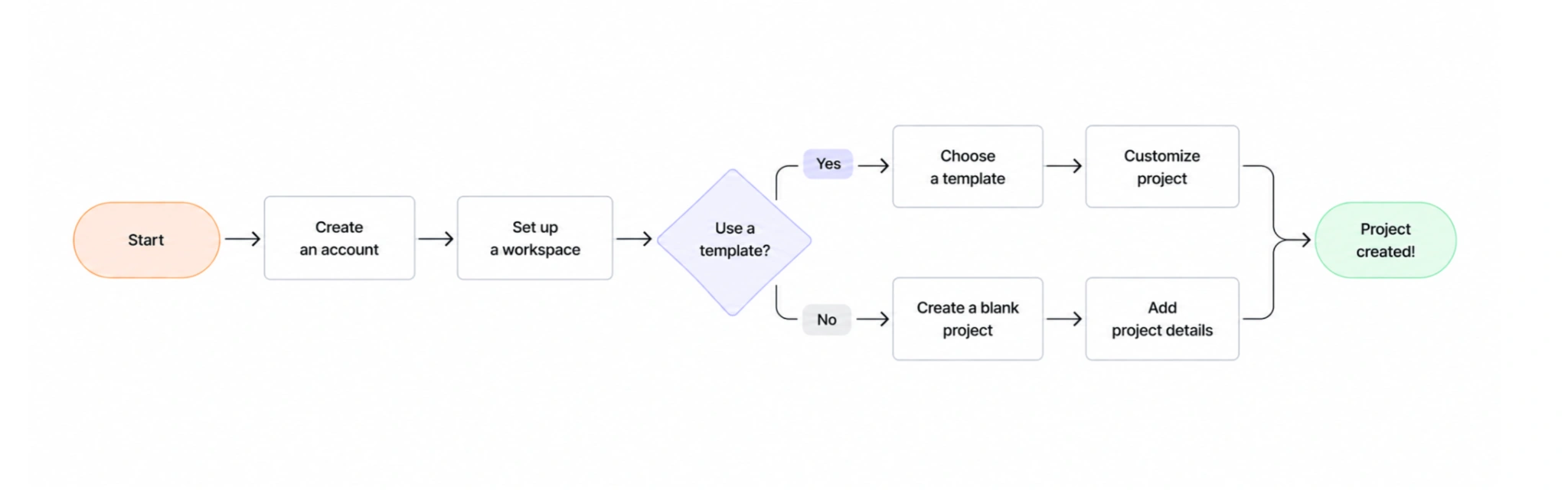
Think of a project management SaaS app. A new user wants to create their first project, but before getting there, they might need to set up a workspace, choose a template, or invite teammates. A user flow maps this sequence and helps designers see whether every step is necessary.
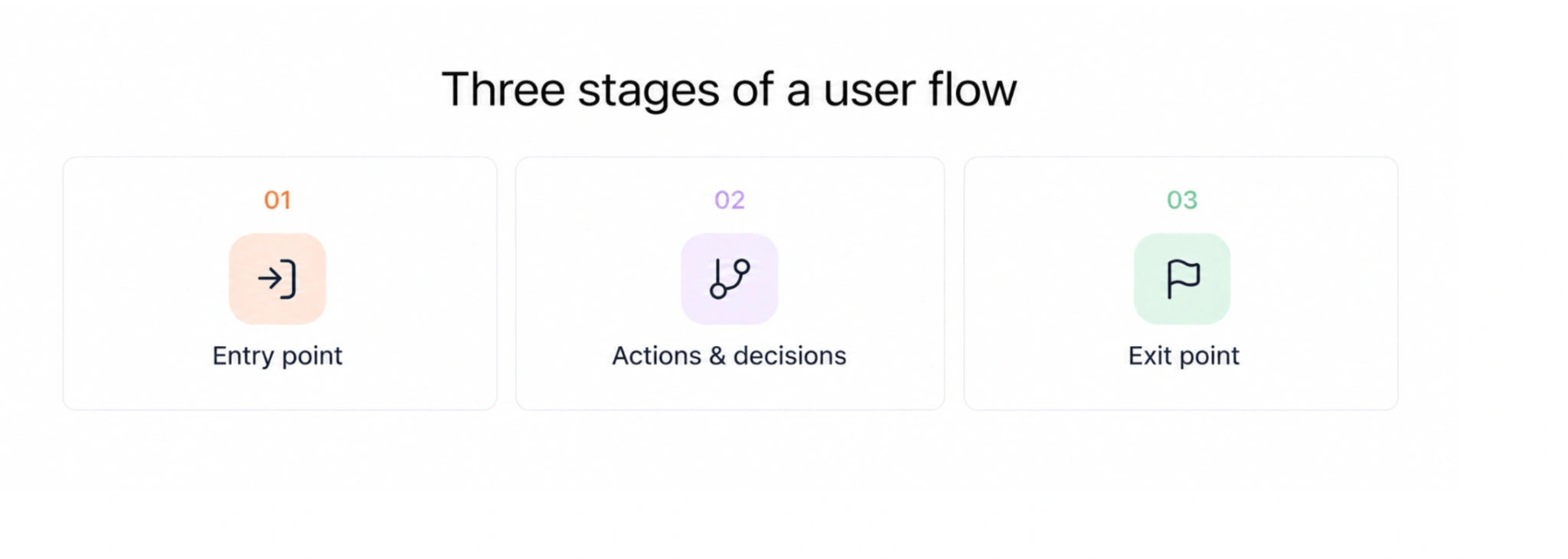
Most user flows follow three basic stages:
- Entry point: Where the user begins, such as a dashboard, welcome screen, or invitation link.
- Actions and decisions: The steps they take and the choices that lead them down different paths.
- Exit point: Where the flow ends, ideally with the user successfully completing their task.
Mapping these paths helps designers look at the experience as a whole rather than a collection of separate screens.
It reveals where users face unnecessary steps, confusing choices, or dead ends that prevent them from reaching their goals. These friction points can be difficult to notice when evaluating each screen individually.
A clear user flow also gives designers, product managers, and developers a shared understanding of how the experience should work.
The goal isn't simply to document how users move through a product. It's to understand where that journey becomes unnecessarily difficult and how to make it easier.
Breaking down the anatomy of a user flow
A user flow diagram breaks down the journey into individual steps, showing not only what users do but also how the product responds to their actions.
Most user flows contain seven key elements:
- Entry points: Where users begin, such as a login page, dashboard, or invitation link.
- User goals: What they want to accomplish, whether that's creating a project, finding a report, or upgrading a subscription.
- User interactions: Actions like clicking a button, filling out a form, or selecting an option.
- Decision points: Moments when users choose between different paths, such as starting from a template or creating something from scratch.
- System responses: What happens after an action, including confirmation messages, loading states, and errors.
- Paths and branches: Connections between steps that show how the journey changes depending on user choices or system behavior.
- End points: Where the flow finishes, whether the user completes the task, abandons it, or encounters a dead end.
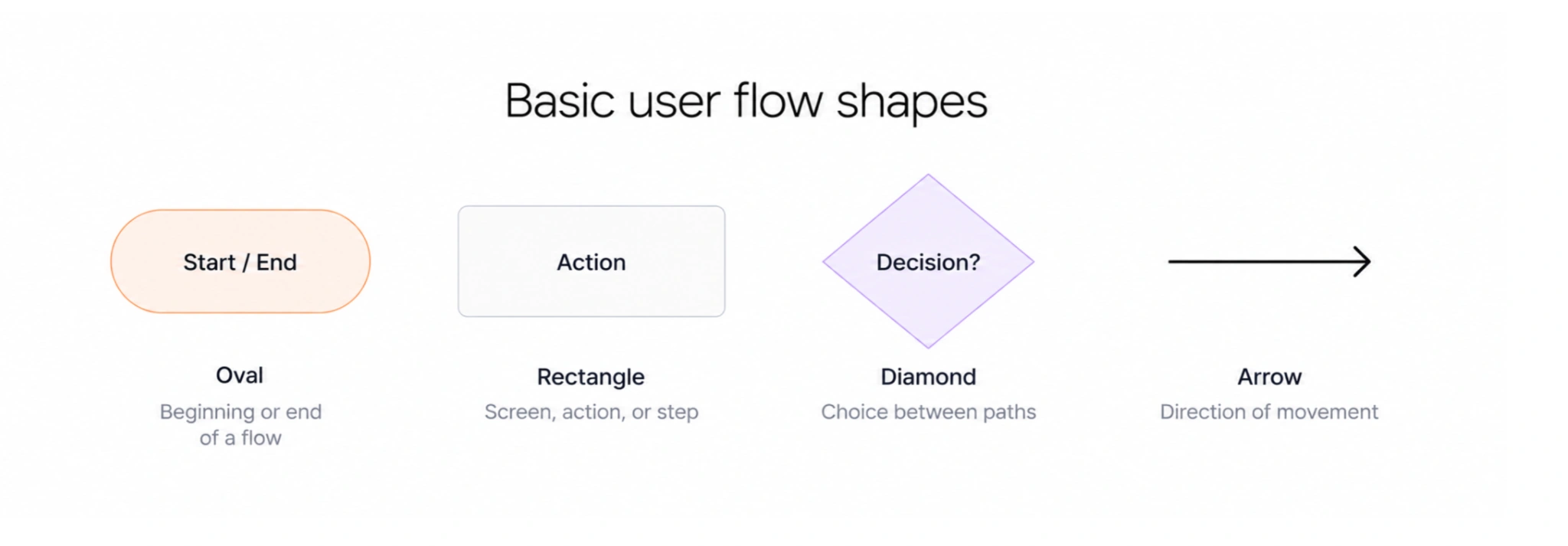
To make these journeys easy to follow, designers typically use a few standard flowchart shapes:
- Ovals or rounded shapes indicate the beginning and end of a flow.
- Rectangles represent screens, actions, or individual steps.
- Diamonds highlight decisions that lead to different paths.
- Arrows show how users move from one step to another.
It's also worth distinguishing user flows from other UX artifacts. A user journey map captures the broader experience, including touchpoints and emotions, while a wireframe shows the structure of an individual screen. A user flow connects the steps between screens to explain how someone accomplishes a task.
Together, these elements help designers see the complete path, including the decisions and alternative routes that might otherwise be overlooked.
7 user flow chart examples from SaaS products
Understanding how user flows work is one thing. Seeing how they help solve real UX problems is another.
Let's explore seven common SaaS user flow map examples, looking at the ideal path users take, what happens when things don't go as planned, and how designers can make each experience smoother.
1. SaaS user onboarding flow examples
Onboarding is one of the most important user flows in a SaaS product. It's where new users form their first impression and decide whether the product is worth their time.
The challenge is getting them to experience its value without overwhelming them with setup tasks, feature tours, or decisions they aren't ready to make.
Typical onboarding user flow examples might look like this:
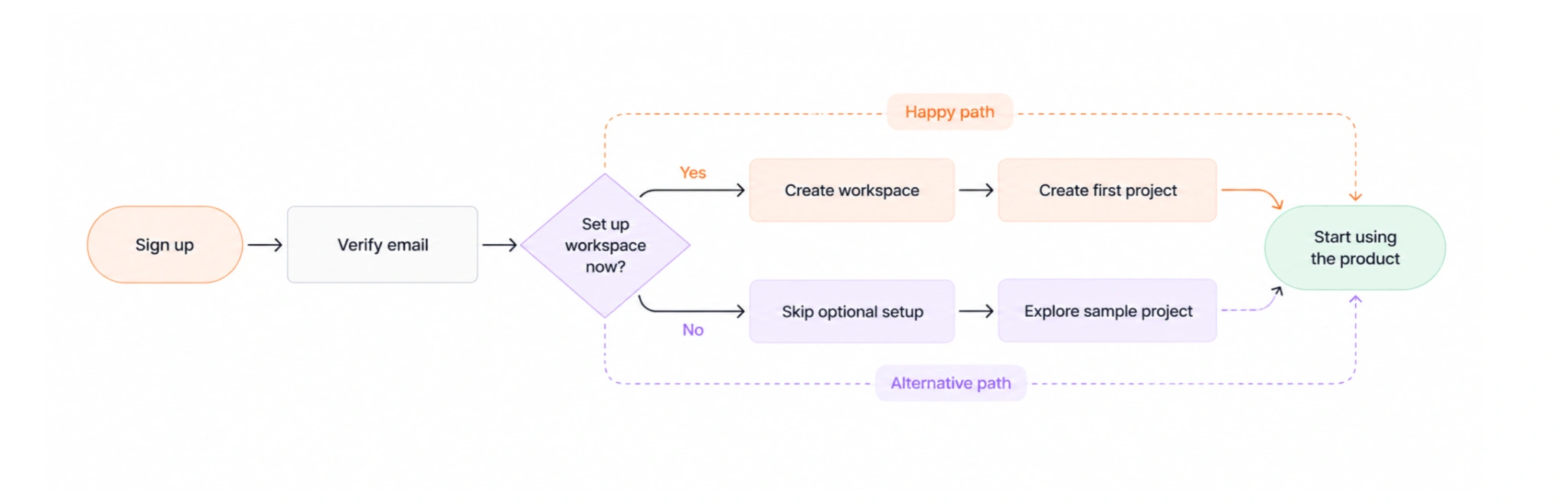
Happy path:
Sign up → Verify email → Create workspace → Create first project → Start using the product
But not everyone follows that exact sequence. Some users might want to explore the product before configuring their workspace or inviting teammates.
Alternative path:
Sign up → Verify email → Skip optional setup → Explore sample project → Create own project later
This is where progressive disclosure becomes useful. Instead of asking users to complete every setup task upfront, designers can introduce features and configuration options when they become relevant.
For example, reducing onboarding from five to seven steps down to three or four might mean postponing role selection, optional profile fields, and feature tours. Users can complete these tasks later, once they understand the product and have a reason to use those features.
To make the first-run experience easier, designers can also use:
- Onboarding checklists to show essential tasks and help users track their progress.
- Empty states with sample data to demonstrate what the product can do before users create their own content.
- Contextual tooltips to explain features when users encounter them, rather than forcing them through a lengthy tour.
A real example comes from Eleken's with Zaplify, an AI-powered sales prospecting platform. Its rigid campaign-building process made it difficult for users to get started.
Eleken simplified its rigid campaign-building process by introducing AI-powered Actions (individual outreach tasks) and Playbooks (ready-made outreach workflows). This helped users get started faster and increased activation from approximately 20–25% to around 40%.
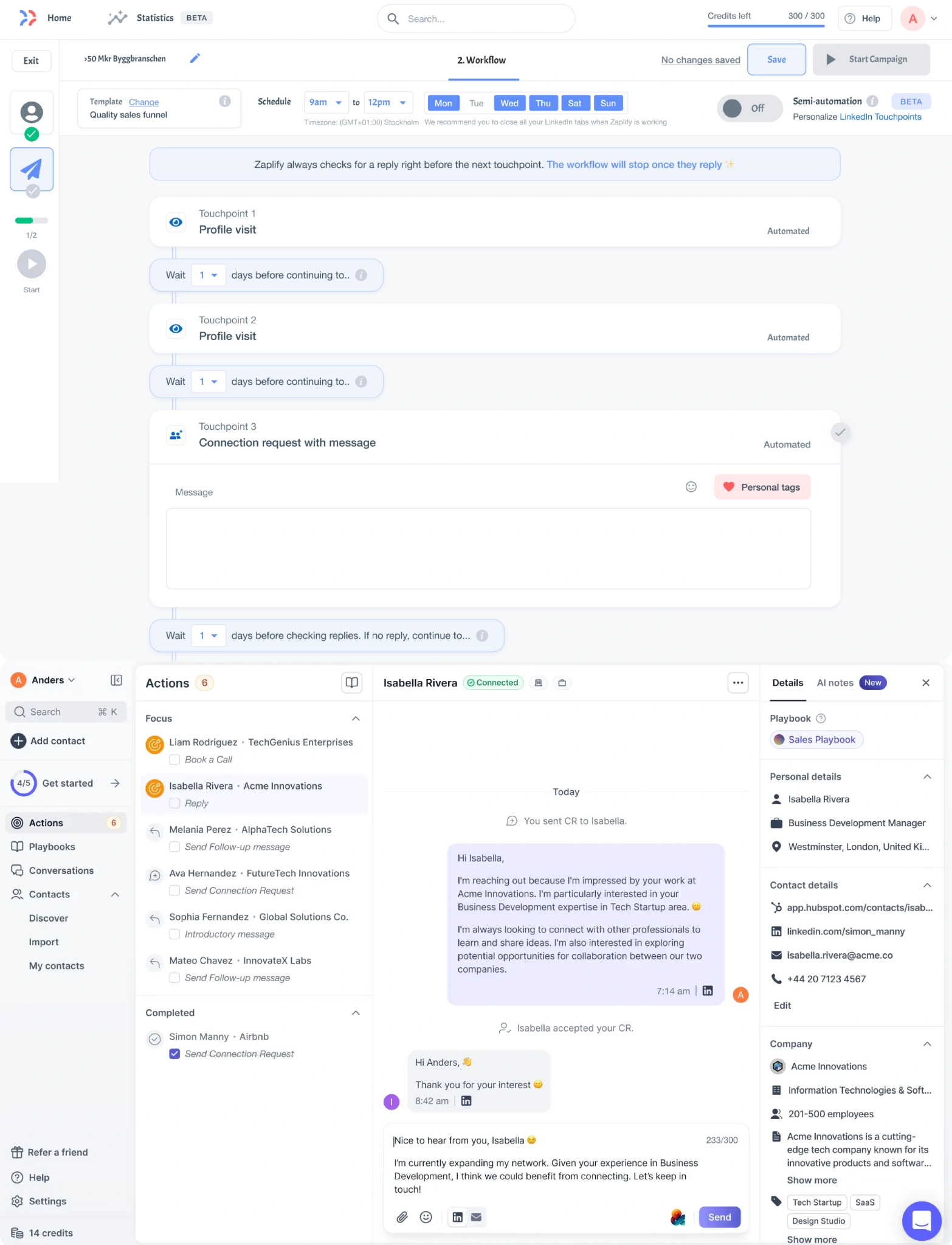
A good onboarding flow doesn't try to teach users everything. It helps them reach their first meaningful result as quickly as possible, while keeping additional guidance available when they need it.
2. Login, registration, and authentication flow
Logging in should be one of the simplest tasks in a SaaS product. Yet confusing sign-in options, unnecessary verification steps, and poorly handled errors can turn a routine action into a frustrating experience.
A good authentication flow starts with choosing the right sign-in method for your users:
- Email and password: A familiar option that works for most SaaS products.
- Single sign-on (SSO): Particularly useful for enterprise teams that access multiple tools through one account.
- Magic links: Convenient for products users access occasionally, since there's no password to remember.
Clear labeling matters here, especially when internal tools expand to external customers who may be less familiar with SSO or other authentication methods.
Once users choose how to sign in, the ideal path should be short and predictable.
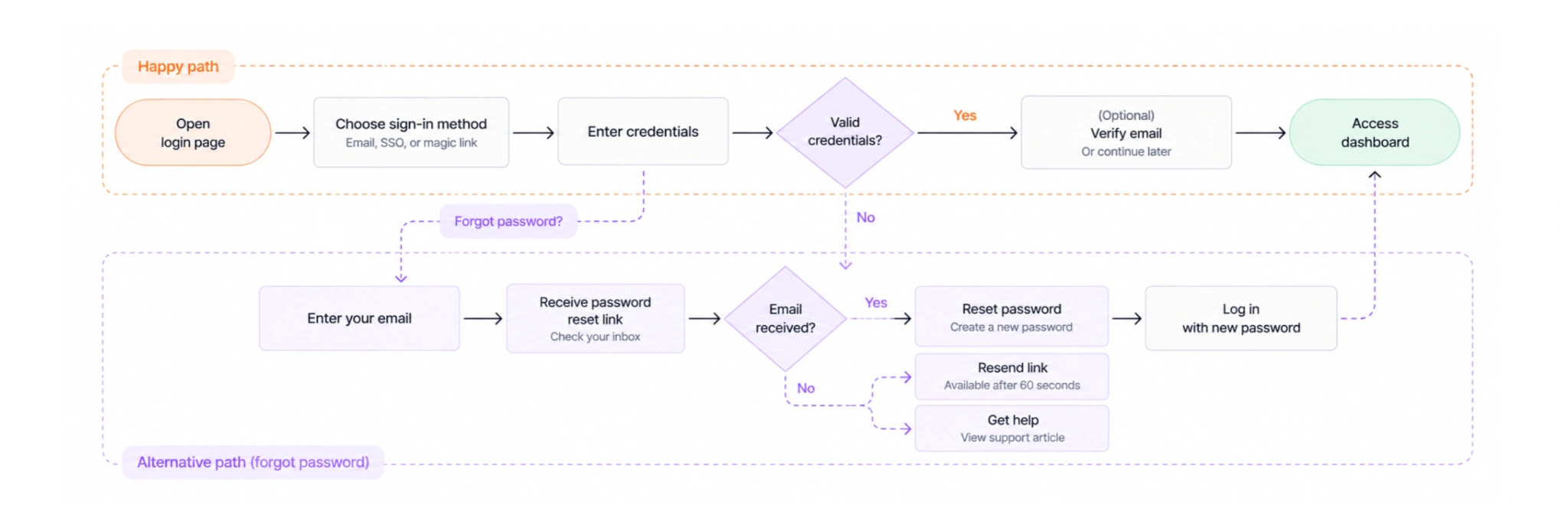
Happy path:
Open login page → Choose sign-in method → Enter credentials → Access dashboard
Alternative path (forgotten password):
Enter email → Receive password reset link → Reset password → Log in
But a good flow also accounts for what happens when the reset email doesn't arrive, or verification can't be completed immediately.
Here are four details worth designing carefully:
- Allow delayed email verification where appropriate. For low-risk entry points, users can explore the product before verifying their address. A notification banner can remind them to confirm their email without interrupting their work.
- Build a complete password recovery flow. After users enter their email, confirm that the reset link has been sent. If it doesn't arrive, allow another request after 60 seconds and provide a link to a help article as a fallback.
- Validate fields on blur, not just on submission. Show errors when users leave a field so they can correct mistakes before submitting the form. Messages should be specific, explaining what needs attention rather than simply saying "Something went wrong."
- Make authentication choices understandable. Clearly distinguish password login, SSO, and magic links. This is especially important when a tool originally designed for internal teams becomes available to external customers who may not recognize technical authentication terminology.
A well-designed authentication flow doesn't just make successful login easy. It also anticipates verification delays, forgotten passwords, and user mistakes, providing a clear next step in each situation.
3. Search and discovery flow
As SaaS products grow, finding the right feature, document, or report becomes harder. A clear search flow helps users find what they need without digging through navigation menus.
The typical flow follows five steps:
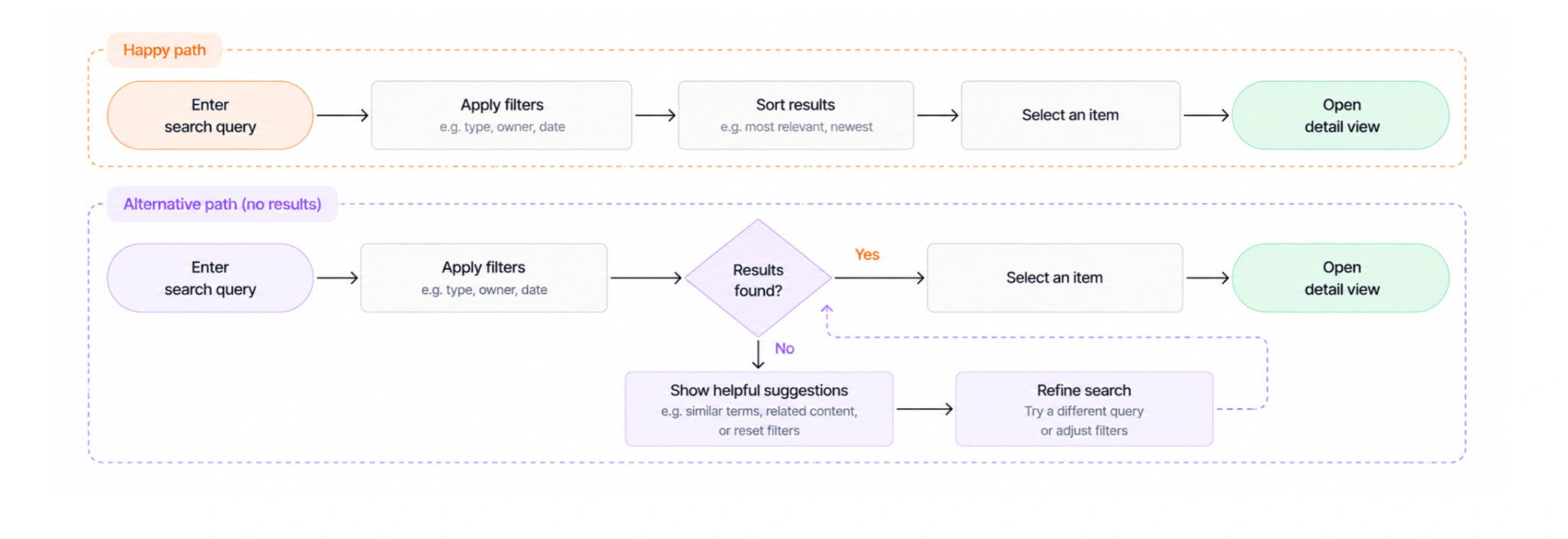
Happy path:
Enter search query → Apply filters → Sort results → Select an item → Open detail view
But what happens when the search returns nothing? A blank results page can leave users wondering whether the information doesn't exist or they've simply searched incorrectly.
Alternative path (no results):
Enter search query → Apply filters → No results found → See suggestions or reset filters → Refine search → View results
To make these flows more useful, designers should focus on four areas:
- Make search easy to find. Place it where users expect it and use clear labels that explain what they can search for, whether that's projects, reports, or team members.
- Keep filtering and sorting intuitive. Use relevant filters and make active selections visible so users understand why they're seeing certain results.
- Design helpful empty states. Instead of simply displaying "No results found," suggest alternative keywords, show related content, or offer a quick way to clear filters.
- Preserve search context. When users open an item and return to the results, keep their query, filters, and sorting preferences intact. Otherwise, they may have to repeat the same actions.
It's also worth analyzing how people actually search. Useful signals include:
- Low search-to-result rate: Users frequently search without finding relevant information.
- High zero-results rate: Queries or filter combinations often return nothing.
- Repeated backtracking: Users repeatedly return to search results, which may indicate that the results aren't meeting their expectations.
As SaaS products grow, new features often outpace navigation updates, making them harder to discover. This can lead to low engagement even in products with large user bases. To prevent this, regularly analyze how your users navigate the product, identify where they get stuck, and adjust navigation to make key features easier to discover.
A good search flow doesn't just return results. It helps users recover from unsuccessful searches, refine their choices, and find what they need without starting over.
4. Upgrade and pricing flow
An upgrade flow has two jobs: show users why a paid plan is worth it and make upgrading easy.
The first challenge is timing. Upgrade prompts work best when users have a clear reason to consider paying, such as:
- Reaching a usage limit on their current plan.
- Trying to access a premium feature they need.
- Repeatedly using a related feature that suggests they'd benefit from an upgrade.
Once users decide to explore paid plans, the flow should help them compare options, understand the costs, and complete payment without unnecessary steps.
Here's what typical SaaS upgrade UX user flow examples look like:
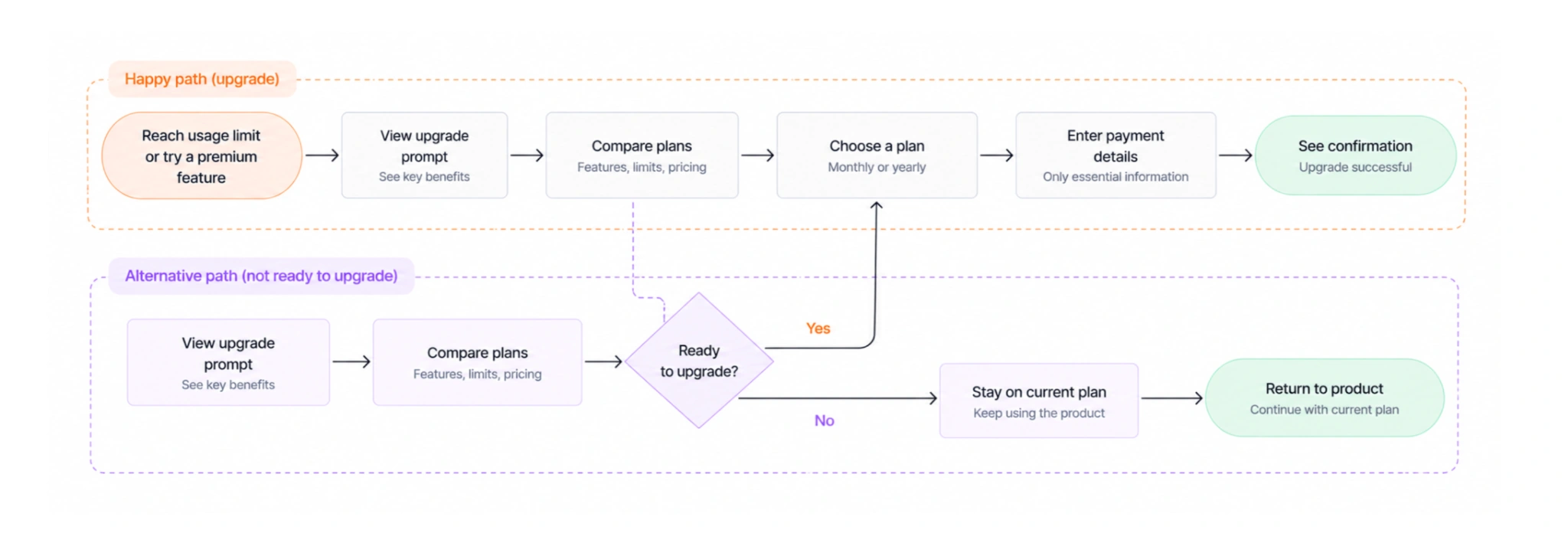
Happy path:
Reach usage limit → View upgrade prompt → Compare plans → Choose plan → Enter payment details → See confirmation
Alternative path (not ready to upgrade):
View upgrade prompt → Compare plans → Stay on current plan → Return to product
Common drop-off points and how to prevent them
Even interested users may abandon an upgrade if they encounter friction along the way. Here are four common reasons users drop off and what designers can do about them:
- Users don't see enough value to pay. When users encounter a paywall before understanding what they're paying for, they're less likely to upgrade. To prevent this, demonstrate what premium features can help them accomplish. For trial users, explain which features they'll lose when the trial ends.
- Plan differences are confusing. If users struggle to understand what each plan offers, they may postpone their decision or abandon the upgrade altogether. Make comparisons easier by clearly highlighting differences in features, usage limits, and pricing on a single page.
- The checkout form asks for too much information. Long billing forms add unnecessary friction and can discourage users from completing their purchase. Keep checkout short by requesting only essential payment and billing details, leaving optional company information for account settings.
- Users hesitate at the payment step. Unclear billing terms or concerns about payment security can make users reluctant to proceed. Build confidence by displaying transparent pricing, recognizable security indicators, and applicable refund or cancellation policies near the payment button.
To identify which problems affect your product, track where users abandon the upgrade process. For example, a high drop-off rate during plan comparison may indicate unclear pricing, while checkout abandonment could point to excessive form fields or unexpected charges.
A good upgrade flow connects the payment decision to value users already recognize, then removes obstacles that might prevent them from completing the purchase.
5. Engagement and retention flow
Getting users to sign up is only the beginning. SaaS products also need to help them discover useful features, build habits, and find reasons to return.
Engagement flows guide users toward relevant actions after onboarding. They can be triggered by specific behaviors or milestones, such as:
- Repeated feature use: Suggest an advanced feature or workflow that helps users accomplish more.
- Successful task completion: Introduce a related feature once users have finished their primary task.
- Consistent product activity: Ask for feedback or a review after users have had enough time to experience the product.
- New feature release: Show a contextual announcement with an option to explore the feature.
Here's what basic user flow UX examples for an engagement scenario look like when introducing a new feature:
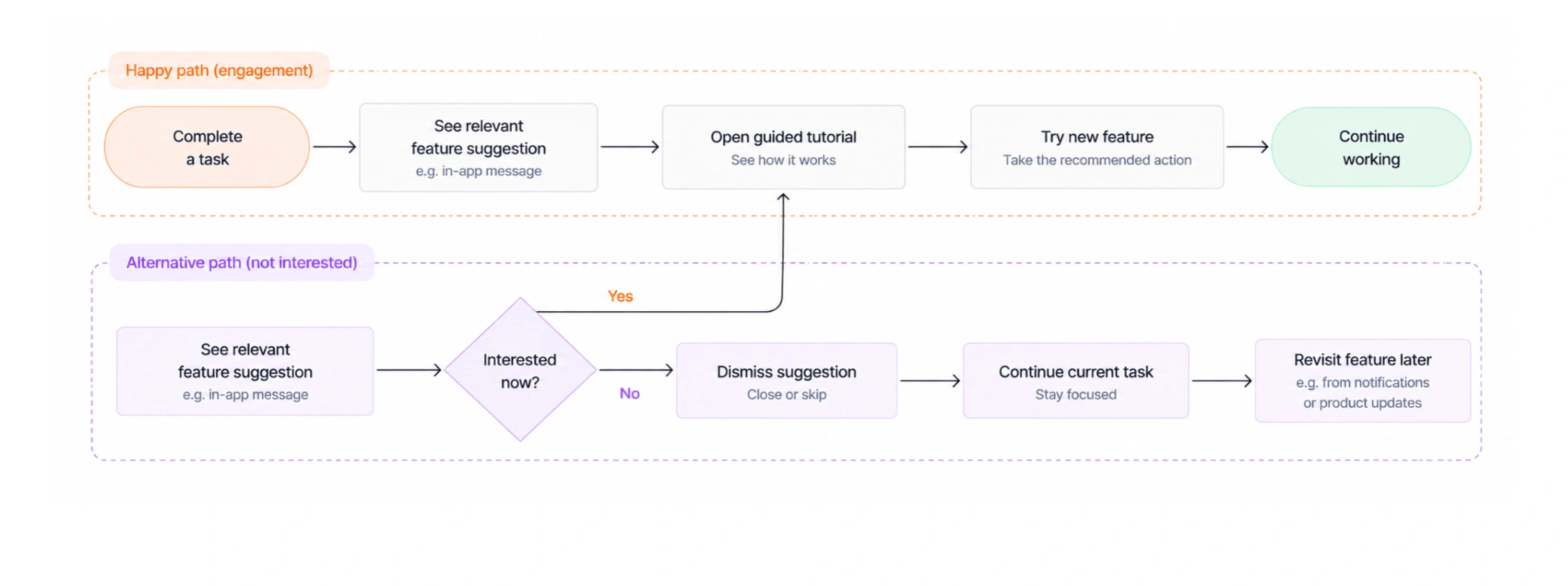
Happy path:
Complete a task → See relevant feature suggestion → Open guided tutorial → Try new feature → Continue working
Alternative path (not interested):
See feature suggestion → Dismiss it → Continue current task → Revisit feature later
Common engagement mistakes and how to avoid them
Even helpful suggestions can become distractions if they appear at the wrong moment. Here are four issues designers should watch for:
- Interrupting users mid-task. A feature suggestion that appears while someone is concentrating can disrupt their workflow. To avoid this, show prompts after users complete an action, when they're more likely to welcome additional guidance.
- Promoting irrelevant features. Generic recommendations are easy to ignore because they don't reflect what users are trying to accomplish. Instead, tailor suggestions to their roles, activity, and feature usage.
- Making prompts difficult to dismiss. When users can't easily close a tutorial or announcement, helpful guidance starts to feel like an obstacle. Give them a clear way to skip it and return when they're ready.
- Requesting feedback too early. Users who have barely explored the product may not have enough experience to provide meaningful feedback. Wait until they've used it consistently, such as after two weeks of active use, before showing an NPS survey. Users who respond positively can then be invited to leave a review on G2 or Capterra.
To evaluate these flows, look beyond how often users click a prompt. Track whether they actually try the suggested feature, use it again, and continue engaging with the product.
Effective engagement flows encourage users to discover more value without disrupting what they came to do. The best prompts feel like timely assistance, not another task competing for attention.
6. Support and help flow
When users encounter problems, they shouldn't have to leave the product or contact support to find answers.
A good support flow helps users resolve simple issues independently and connects them with a real person when needed.
SaaS products typically offer several types of assistance:
- Contextual tooltips: Explain unfamiliar features within the interface.
- Checklists and guided tours: Help users complete unfamiliar tasks.
- Help center articles: Answer common questions with step-by-step instructions.
- Live chat and support tickets: Provide human assistance when self-service isn't enough.
These options should form a clear path from quick guidance to more advanced support.
Here is what basic user flow UX examples for a support request look like:
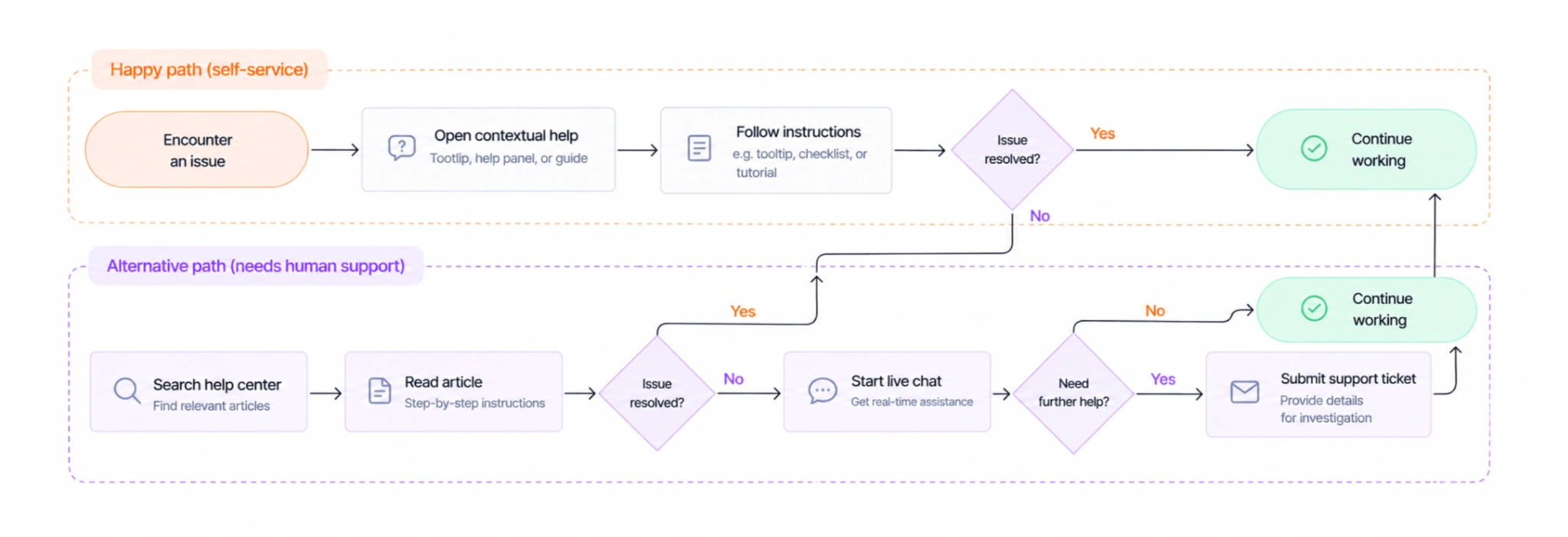
Happy path (self-service):
Encounter problem → Open contextual help → Follow instructions → Resolve issue → Continue working
Alternative path (unresolved issue):
Encounter problem → Search help center → Read article → Issue persists → Start live chat → Submit ticket if further investigation is needed
Common support flow problems and how to prevent them
Even with multiple support options, users can struggle to get the help they need. Here are four common problems and their solutions:
- Help is difficult to find. When support is buried in menus, users may give up before finding an answer. Keep the help center accessible and place contextual guidance near complex features.
- Guidance appears too late. If users receive instructions only after making mistakes, frustration has already built up. Use tooltips and inline explanations to clarify unfamiliar actions early.
- Self-service leads to dead ends. An unhelpful article shouldn't leave users stuck. Provide a clear escalation path to live chat or a support ticket when suggested solutions fail.
- Every issue follows the same path. Different problems require different responses. Offer chat for quick questions, tickets for complex issues, and phone support for critical situations when available.
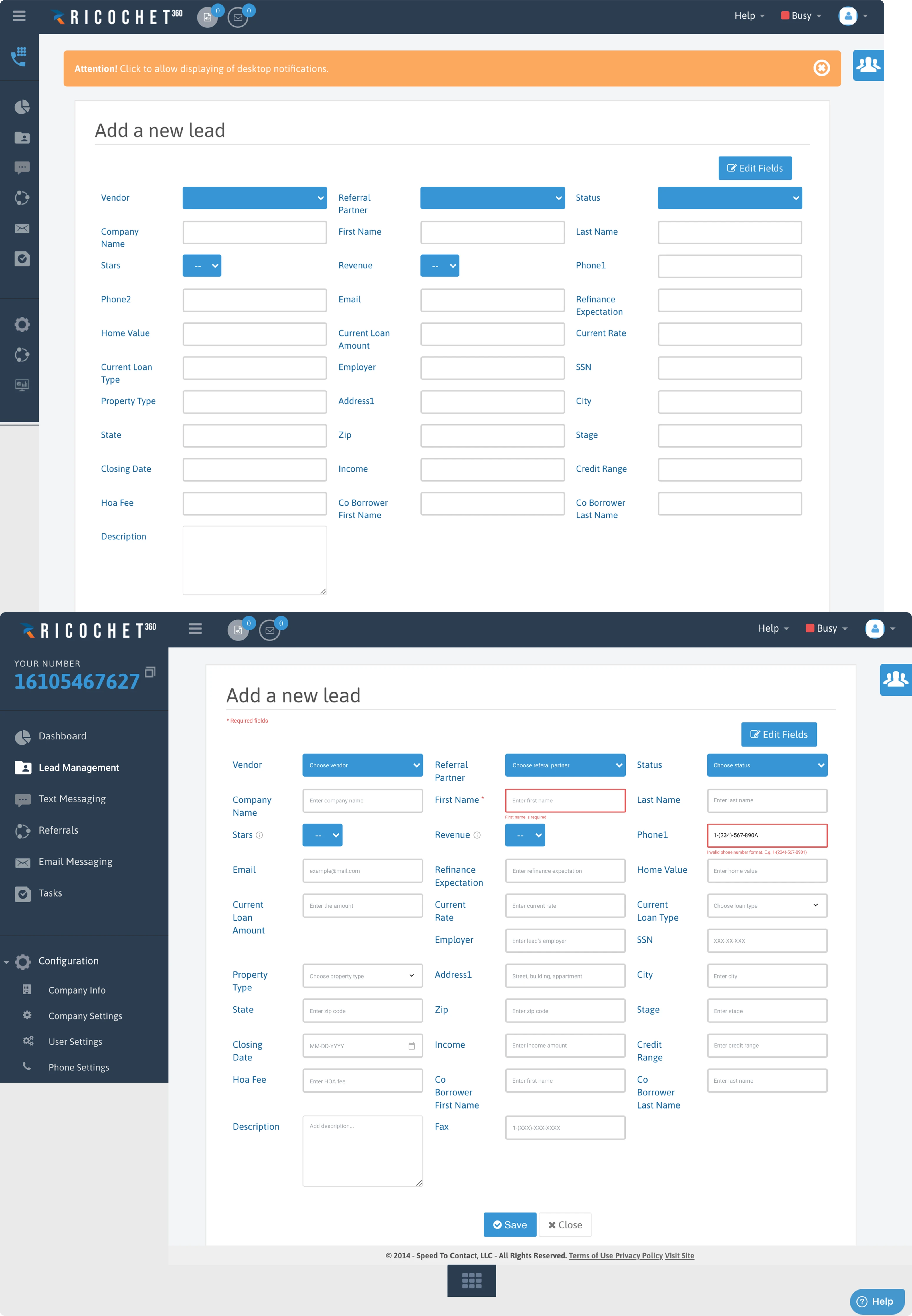
A real example is Ricochet360, a sales engagement and CRM platform. Its interface supports multiple sales activities, making clear guidance especially important when users navigate unfamiliar workflows.
In Eleken's redesign, the team introduced contextual tooltips and reprioritized actions to make the interface easier to understand. These changes helped users complete routine tasks independently, reducing the need to contact support managers for guidance.
To measure effectiveness, track self-service resolution rates, support escalations, and where users abandon the help process.
Effective support flows help users solve problems quickly while providing a clear route to human assistance when needed.
7. Cancellation and offboarding flow
A good cancellation flow lets users leave without frustration while helping SaaS teams understand why they're leaving. The goal is to offer useful alternatives without making cancellation harder.
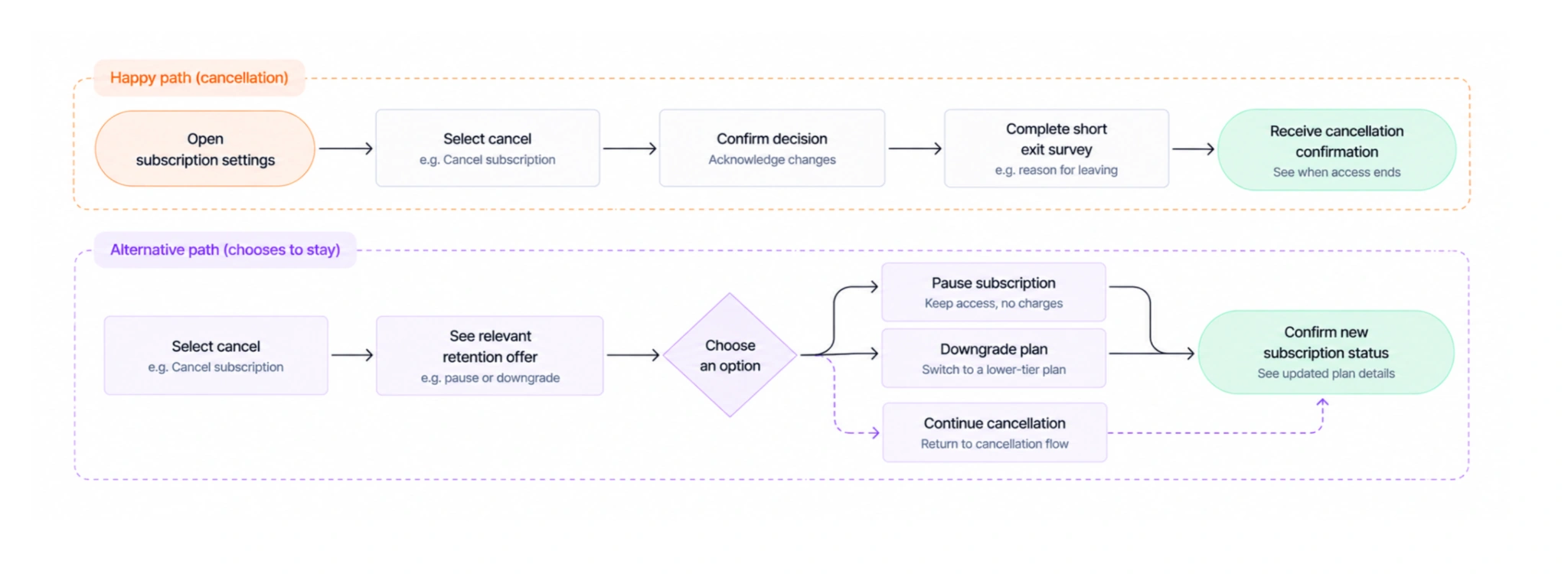
Happy path (straightforward cancellation):
Open subscription settings → Select cancel → Confirm decision → Complete short exit survey → Receive cancellation confirmation
Alternative path (user chooses to stay):
Select cancel → See relevant retention offer → Choose to pause or downgrade → Confirm new subscription status
Common cancellation flow problems and how to prevent them
Poorly designed cancellation flows can damage trust and leave users with a negative final impression. Here are four problems to watch for:
- The cancellation option is hard to find. When users have to search through multiple menus or contact support to cancel, they may feel trapped. Keep the cancellation button visible in subscription settings and make the process self-service.
- Retention offers block the exit. Repeated discount pop-ups can make cancellation frustrating. Instead, present one relevant alternative, such as pausing the subscription or switching to a cheaper plan, while keeping the option to continue canceling clear.
- Exit surveys demand too much effort. Long questionnaires can feel like another barrier. Ask one focused question about why users are leaving, with an optional field for additional feedback.
- The final subscription status is unclear. Users may worry about unexpected charges or losing access immediately. Confirm the cancellation, explain when access ends, and clarify whether any further payments are scheduled.
How to use cancellation feedback to improve UX
Cancellation feedback can reveal problems beyond pricing. To turn it into actionable improvements:
- Identify recurring reasons for leaving. Look for patterns such as confusing features, difficult onboarding, or inadequate support.
- Segment feedback by user type. Compare cancellation reasons across roles and subscription plans to see which groups experience particular problems.
- Connect findings to specific user flows. If new users struggle to get started, revisit onboarding. If customers repeatedly mention unresolved issues, examine the support flow.
A good cancellation flow respects the user's decision, offers useful alternatives without pressure, and turns exit feedback into opportunities to improve the product.
How to design and analyze user flows
Creating a useful user flow takes more than connecting screens with arrows. You need to understand users' goals, map their paths, and test whether those paths work.
Here's a five-step process.
1. Define the user and their goal
Start with one task, such as creating a project or upgrading a subscription. Then clarify:
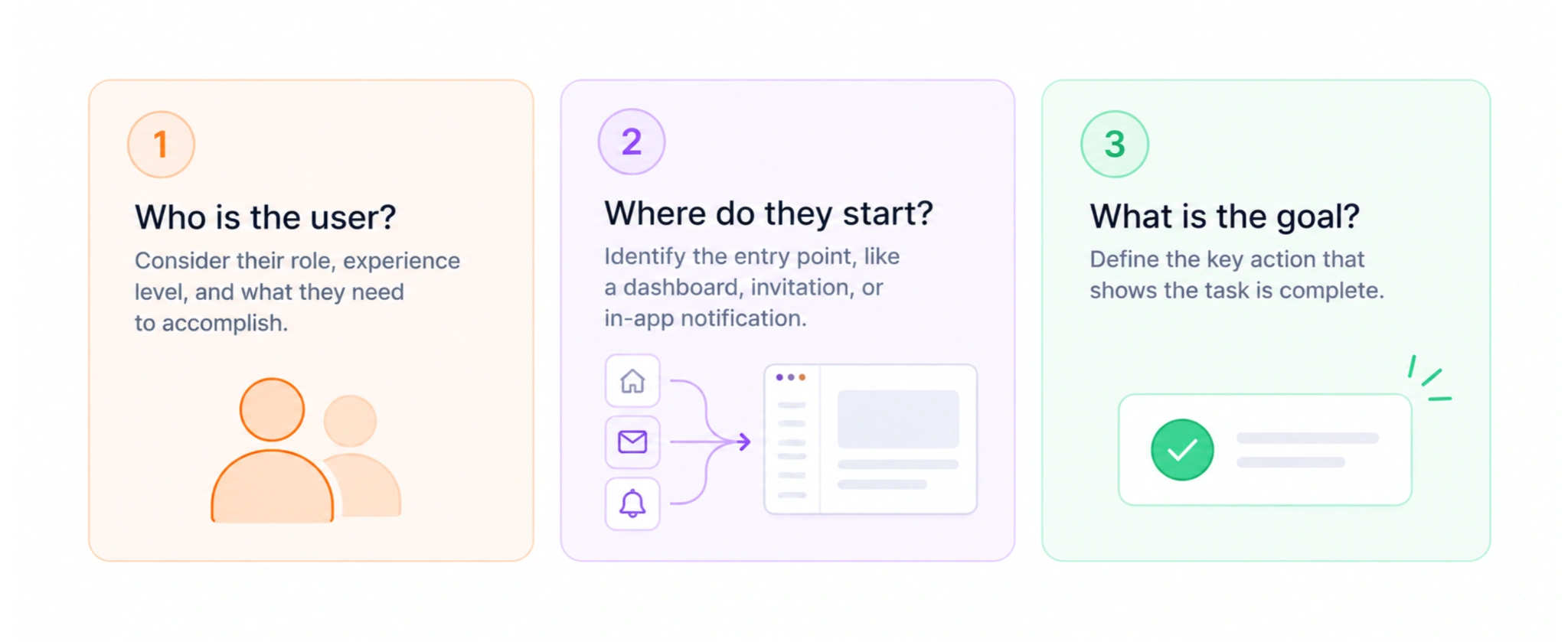
- Who is completing it? New users and experienced administrators may follow different paths.
- Where do they start? A dashboard, invitation email, or notification?
- What does success look like? Define the action that completes the task.
Keep each flow focused on one goal to avoid unnecessary complexity.
2. Map the happy path first
Outline the simplest route to the desired outcome.
For example, a project creation flow might look like this:

Dashboard → Create project → Choose template → Name project → Confirm → Open new project
Use FigJam, Miro, Figma, or Whimsical to visualize the sequence. Keep shapes consistent, label steps clearly, and focus on essential actions.
3. Add decisions and alternative paths
Next, identify where users might encounter problems or choose a different route.
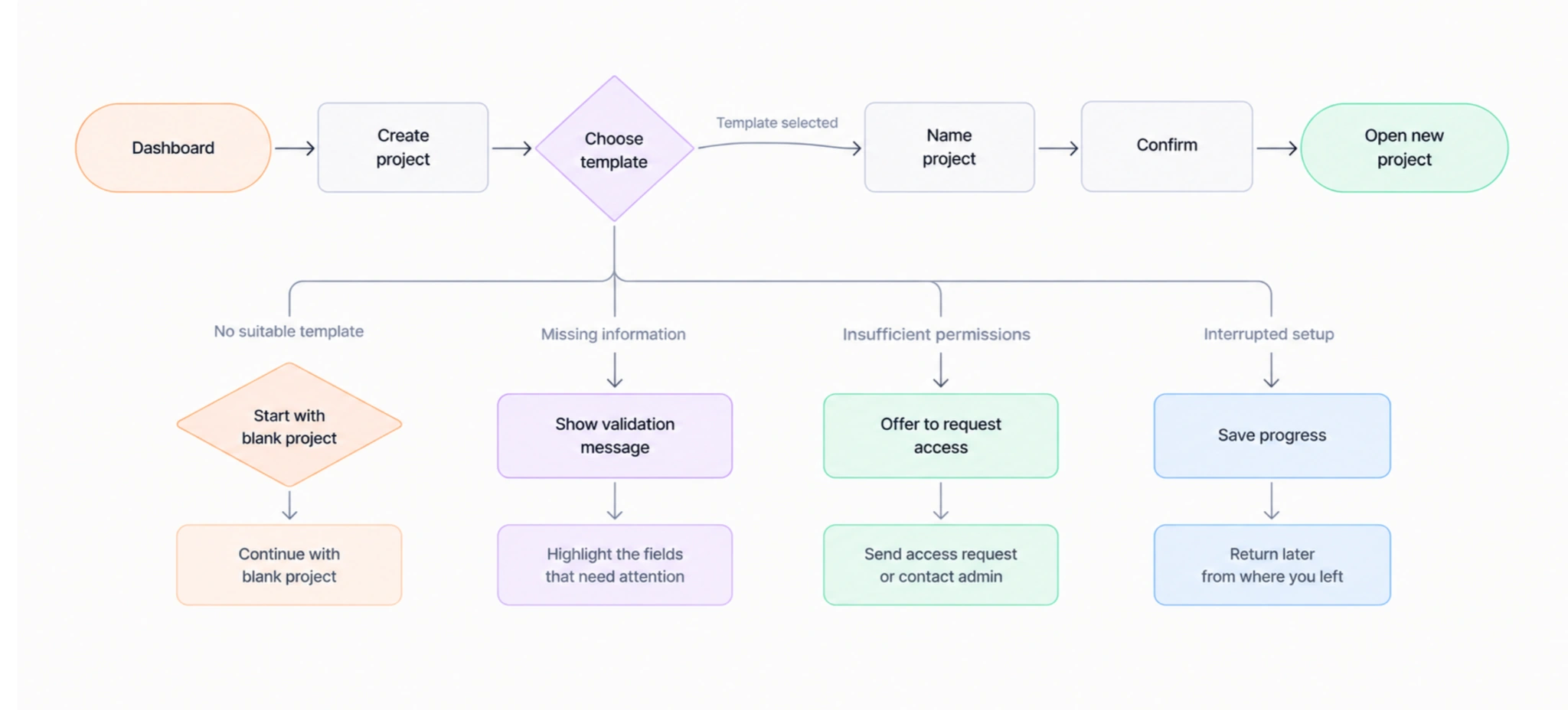
For the project creation example:
- No suitable template: Allow users to start with a blank project.
- Missing information: Explain which fields need correction.
- Insufficient permissions: Offer a way to request access.
- Interrupted setup: Let users save progress and return later.
These branches show how the product handles situations beyond the ideal path.
4. Validate the flow with user behavior
Your diagram shows how the experience should work. Analytics reveal what actually happens.
Use tools like Mixpanel, Matomo, or FullStory to track:
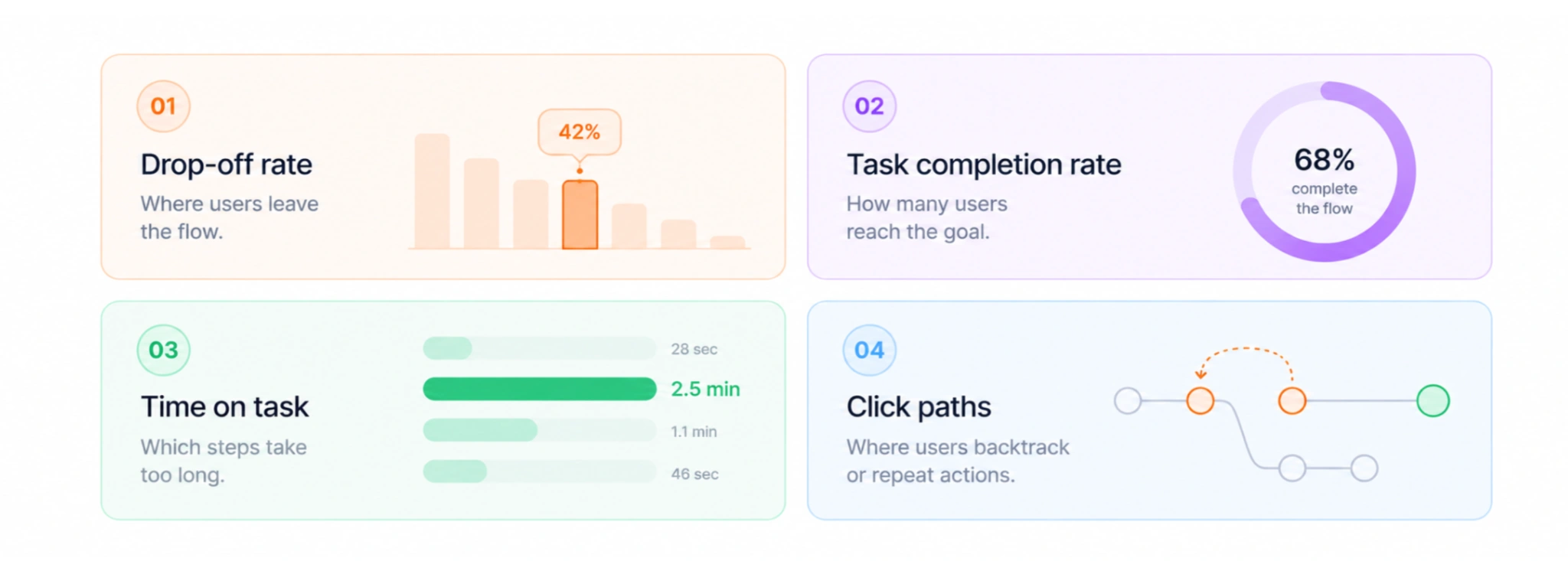
- Drop-off rates: Where users abandon tasks.
- Task completion rates: How many reach their goal.
- Time on task: Which steps take too long.
- Click paths: Where users backtrack or repeat actions.
Combine analytics with usability testing and interviews to understand not just where users struggle, but why.
5. Simplify, test, and refine
Use your findings to remove unnecessary steps and clarify confusing ones.
For example, if users abandon project creation during template selection, test making templates optional or recommending a default.
Measure whether changes improve completion rates and reduce drop-offs. Use A/B testing where appropriate, and check that flows remain accessible through keyboard navigation, clear error messages, and nonvisual cues.
Turn user flows into better SaaS experiences
Mapping user flows gives SaaS product and UX teams a shared understanding of where users succeed, where they struggle, and what needs improvement.
By removing unnecessary steps and making key actions easier to complete, well-designed flows help users reach value faster. Over time, these improvements can contribute to higher activation, stronger retention, and more revenue.
But you don't need to map the entire product at once. Start with one high-impact flow, such as onboarding or upgrading to a paid plan.
The best place to begin isn't necessarily the most complex flow. It's usually the one with the highest drop-off rate, where even a small improvement can make a meaningful difference.
Not sure where users are getting stuck? Contact Eleken to identify friction in your SaaS product's key user flows and turn those insights into a smoother experience.