

Every SaaS business eventually faces the question: How should we price our product? The three fundamental pricing strategies are cost-based, competitor-based, and value-based, each with a different logic and outcome.
However, most companies never really choose. They copy a competitor, slap on a margin, and call it a day. No wonder fewer than 40% use value-based pricing, the one most aligned with actual growth.
And the ones that do experiment? Two in five see a 25% jump in ARR. That’s not pocket change.

We at Eleken built this calculator to help you do better. It walks you through all three models, shows you what each would look like for your product, and helps you make smarter pricing decisions.
SaaS pricing calculator
Here is an interactive SaaS pricing calculator that lets you compare cost-based, competitor-based, and value-based models, all in one place, accessible via its own tab. It’s a product pricing calculator (free) to use, built to help you stop guessing and start pricing with confidence.
1. Competitor-based
Start by entering the prices of competing SaaS products like Stripe, Asana, or Trello, and how your product compares in terms of value. Then adjust the perceived value slider to reflect whether you're offering something better, worse, or on par.
You’ll get suggested prices for Standard, Advanced, and Business tiers based on what the market currently charges.
2. Cost-based
This tab is all about unit economics. Input your cost per user, the number of expected users, and your revenue goal. The calculator uses this data to suggest a price that covers your costs and hits your target profit margin.
Perfect for SaaS founders looking to run a quick SaaS cost analysis without a spreadsheet.
3. Value-based
Enter the estimated dollar value your product provides per user (e.g., time saved or revenue unlocked), and select your Baseline, Balanced, or Maximized pricing mindset.
The calculator then suggests a fair price based on how much of that value you want to capture. It's a simple way to apply value-based pricing without overcomplicating it.
Understanding SaaS pricing models
Before you start crunching numbers, you need to understand the logic behind them. SaaS pricing strategies aren’t just financial formulas; they reflect your business priorities and how you position your product in the market.
To make this practical, let’s follow a fictional SaaS company: TaskMaster, a project management tool for teams. We’ll run TaskMaster through each of the three SaaS pricing models to see how the logic plays out and what the outcomes could mean for the business.
Cost-based pricing
Cost-based pricing is the “cover your bases” approach. You add up all your costs, including development, infrastructure, and support, and tack on a markup. It guarantees you don’t lose money per customer. But that’s about it.
The big flaw? It ignores what customers are willing to pay and what your competitors are doing. You might end up too cheap or too expensive, and you won’t even know why.
Let’s run the numbers for our fictional SaaS, TaskMaster. The team adds up all monthly operating costs per user, such as cloud hosting, customer support, and ongoing development, and lands on $50. They decide on a 25% profit margin, giving them a price of $62.50 per user ($50 + 25%). Easy math. Every new user brings in $12.50 in profit.
Here’s how to calculate your own:
- List all costs per user, including both fixed costs (like salaries) allocated across your user base and variable costs (like cloud usage and support load).
- Pick your desired margin. Depending on your goals, this could be 20%, 30%, or more. TaskMaster chose 25% to balance growth and SaaS profitability.
- Apply the formula: Price = Total cost per user × (1 + markup%)
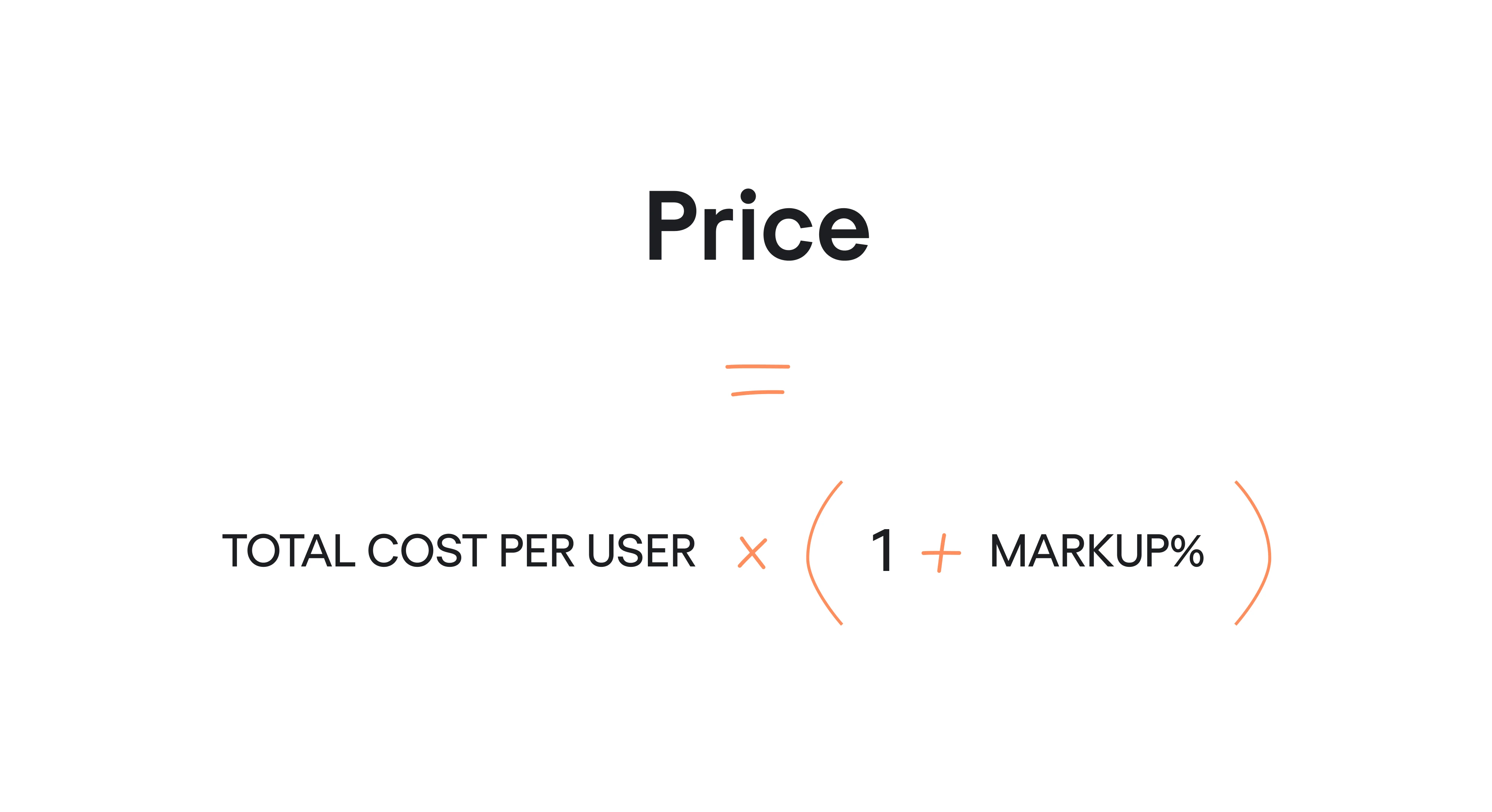
If your cost is $50 and you want a 25% profit, that’s $50 × 1.25 = $62.50.
So, what margin is “good”? In SaaS, gross margins typically hover between 75% and 90% because adding new users doesn’t cost much.
If you’re below 70%, investors might raise eyebrows. However, early-stage products often have higher costs, so expect tighter margins at first.
Cost-based pricing works well if you’re just starting out and want clarity around unit economics. It’s also the easiest model to build into a calculator. But be careful. If you rely only on this model, you might price yourself out of the market. TaskMaster’s $62.50 price tag only works if customers actually see that kind of value.
Next, we’ll see how TaskMaster’s price holds up against competitors.
Competitor-based pricing
This model asks: “What’s everyone else charging?”
You look at competing products, note their pricing tiers, and slot yourself somewhere in the mix. This strategy is quick and feels safe, but it’s also reactive. You’re basing your value on someone else’s decisions, not your product’s actual worth.
Let’s say TaskMaster checks out key competitors like Trello, Asana, and Jira. Most charge around $30/user/month for their mid-tier plans. That becomes the pricing “neighborhood.”
If TaskMaster goes too far above that without a clear differentiator, it risks looking overpriced. Too far below, and it might signal low quality or trigger a race to the bottom.
Here’s how to approach it:
- Identify competitors with similar features and user segments.
- Collect pricing data across comparable tiers, say $10–$25/user for basic plans, $30–$40 for premium.
- Map features: Does TaskMaster offer anything unique, like AI-powered scheduling or better reporting? That affects whether it can charge more or needs to charge less.
- Choose a position:
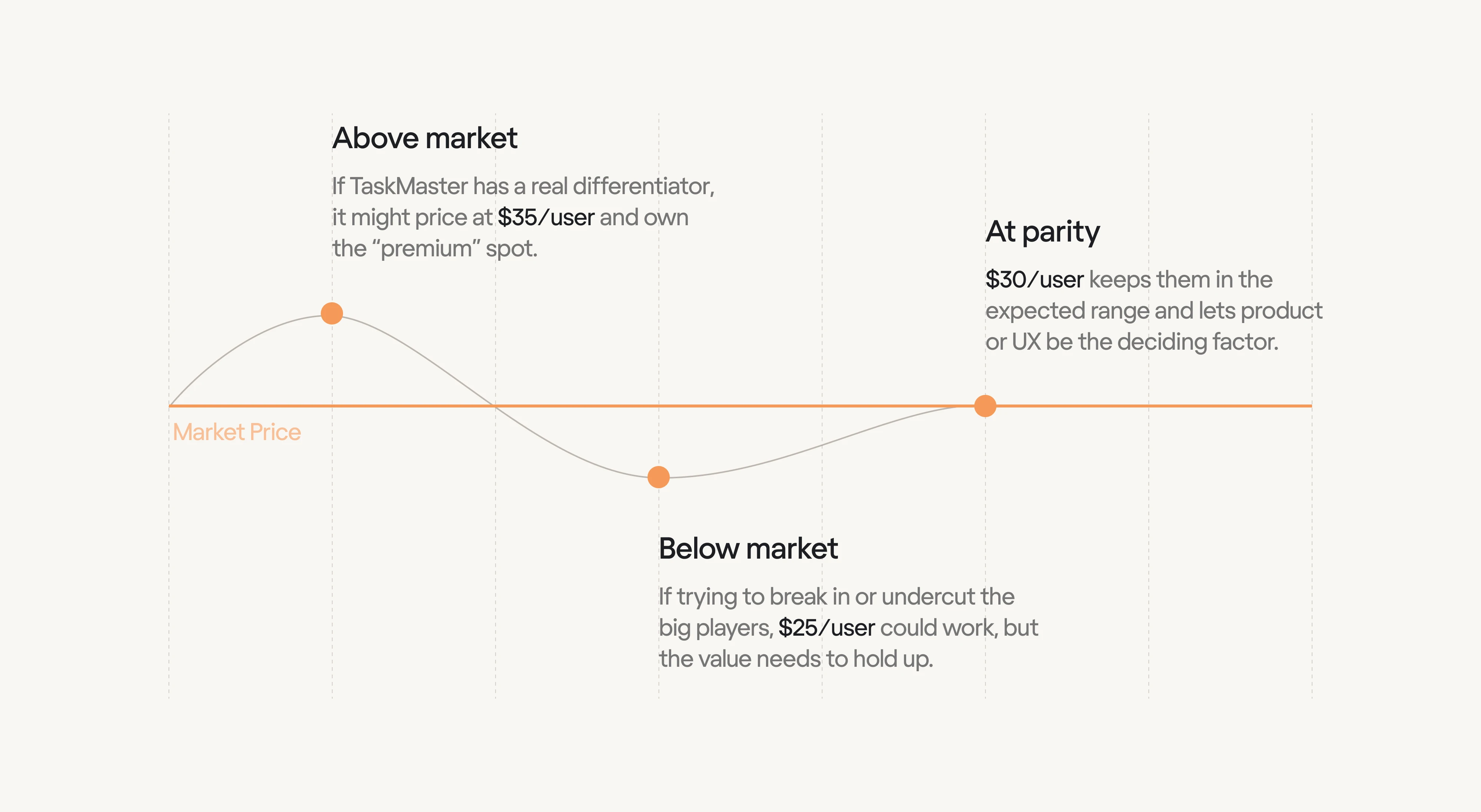
- Above market: If TaskMaster has a real differentiator, it might price at $35/user and own the “premium” spot.
- Below market: If trying to break in or undercut the big players, $25/user could work, but the value needs to hold up.
- At parity: $30/user keeps them in the expected range and lets product or UX be the deciding factor.
- Above market: If TaskMaster has a real differentiator, it might price at $35/user and own the “premium” spot.
So, what’s a “good” rate? That depends on your play. In mature markets, matching competitors is often the safest bet.
If you’ve got standout features, a premium price can reinforce that. If you’re new and need traction, a slightly lower price can help, just don’t go so low that it hurts your brand or margins.
The key is not to treat this strategy in isolation. Competitor SaaS product pricing is useful context, but if everyone’s guessing, copying them just spreads the guesswork.
That’s why we always recommend comparing this output against cost-based and value-based models before setting your final price.
Next, we’ll look at the most customer-focused strategy: value-based pricing.
Value-based pricing
Value-based pricing flips the usual pricing logic. Instead of asking what it costs to build your SaaS product or what others charge, you ask: What is this worth to my customer?
This model ties your price to the outcomes your product delivers. It’s all about perceived value: how much time, money, or stress you save for your users. If your tool saves someone $1,000 a month, pricing it at $200 still feels like a win.
It’s no surprise that value-based pricing often leads to higher margins, because it captures a slice of the customer’s gain.
But it’s also the hardest to get right. You need real insight into your users: their problems, their expected results, and how much they’re willing to pay.
Let’s go back to TaskMaster. Say their AI scheduling feature saves project managers 10 hours per month. If that manager’s time is worth $50/hour, that’s a $500/month productivity gain. TaskMaster could price the product at $50–$100/user and still deliver obvious ROI.
Here’s how they approach it:
- Map the value: What does the product save or earn for the customer? TaskMaster estimates hours saved and translates that into dollars.
- Collect feedback: Through surveys or interviews, they ask what customers would pay. Some small teams say $25, larger ones say $50+.
- Segment and tier: Based on this feedback, they might offer a $30 plan for smaller users and a $60 plan with AI features for bigger accounts.
So, what’s a “good” rate here? That depends on the segment. Startups might get $200 of monthly value and pay $20.
Enterprise pricing models might save $1,000 and happily pay $50–$100. Value-based pricing works best when paired with tiered plans that match the value different users receive.
This model aligns incentives: customers pay more when they get more, and you grow alongside them. Just be ready to keep learning.
Curious how to deepen your understanding of financial SaaS metrics? Check out this video:
Analyzing and interpreting results
So, you’ve plugged your numbers into the SaaS calculator. You now have three suggested prices, one from each model. What do you do with them?
This is where strategy starts.
Each model gives you a different lens:
- Cost-based shows what you need to charge to stay profitable.
- Competitor-based shows what the market expects.
- Value-based shows what customers might gladly pay.
Let’s use TaskMaster as an example. The SaaS valuation calculator spits out:
- Cost-based: $62.50/user/month
- Competitor-based: $30/user/month
- Value-based: $50–$60/user/month
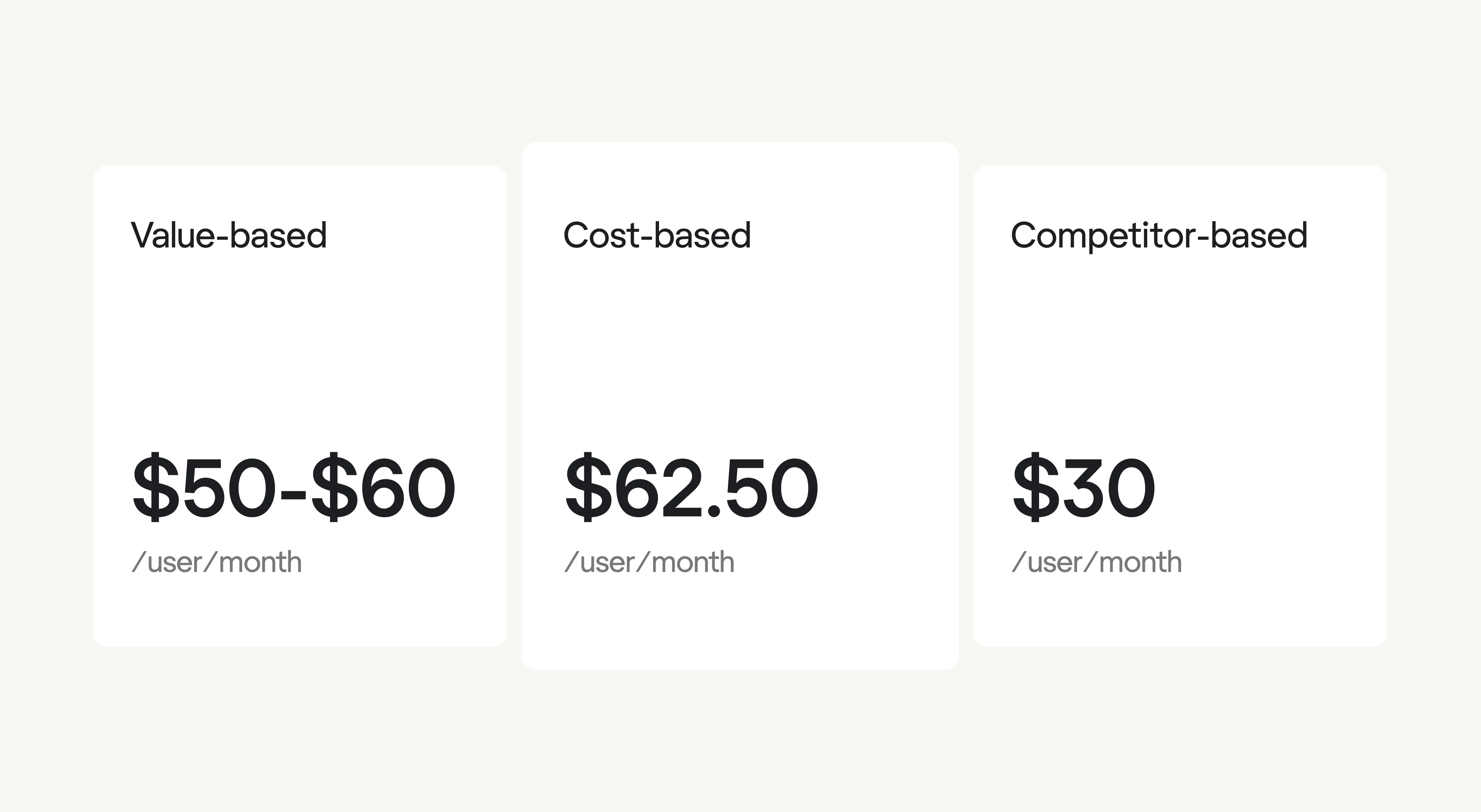
Not exactly aligned, and that’s the point. These gaps are where insights live.
If value-based is highest, like here, that’s your upside. You’re likely underpricing or not doing enough to communicate value.
If cost-based is the highest, you have an efficiency problem; either your costs are too high, or you’re aiming for unrealistic margins.
And if competitor-based is lowest, ask whether the market’s undercharging, or if you’re overestimating your value.
These aren’t mutually exclusive models. They're strategic inputs. For TaskMaster, $62.50 is too steep for a market anchored around $30. However, value-based analysis shows that some customers would pay $50 if the AI features saved enough time. That’s promising.
A smart response? Use tiers.
TaskMaster launches with:
- Standard at $30/user, competitively priced to attract budget-conscious users.
- Premium at $50/user, for teams that deeply benefit from the AI features.
This hybrid approach respects cost floors, aligns with the market, and captures value from those who see it.
A real-world example? Look at Slack. It entered a crowded market of team chat tools, but with a smoother experience and powerful integrations.
Instead of pricing aggressively out of the gate, it used a freemium model and per-active-user billing, a clever value-based twist. This let Slack prove its worth while staying within market expectations. As it became essential to teams, it gained the leverage to firm up its pricing over time.
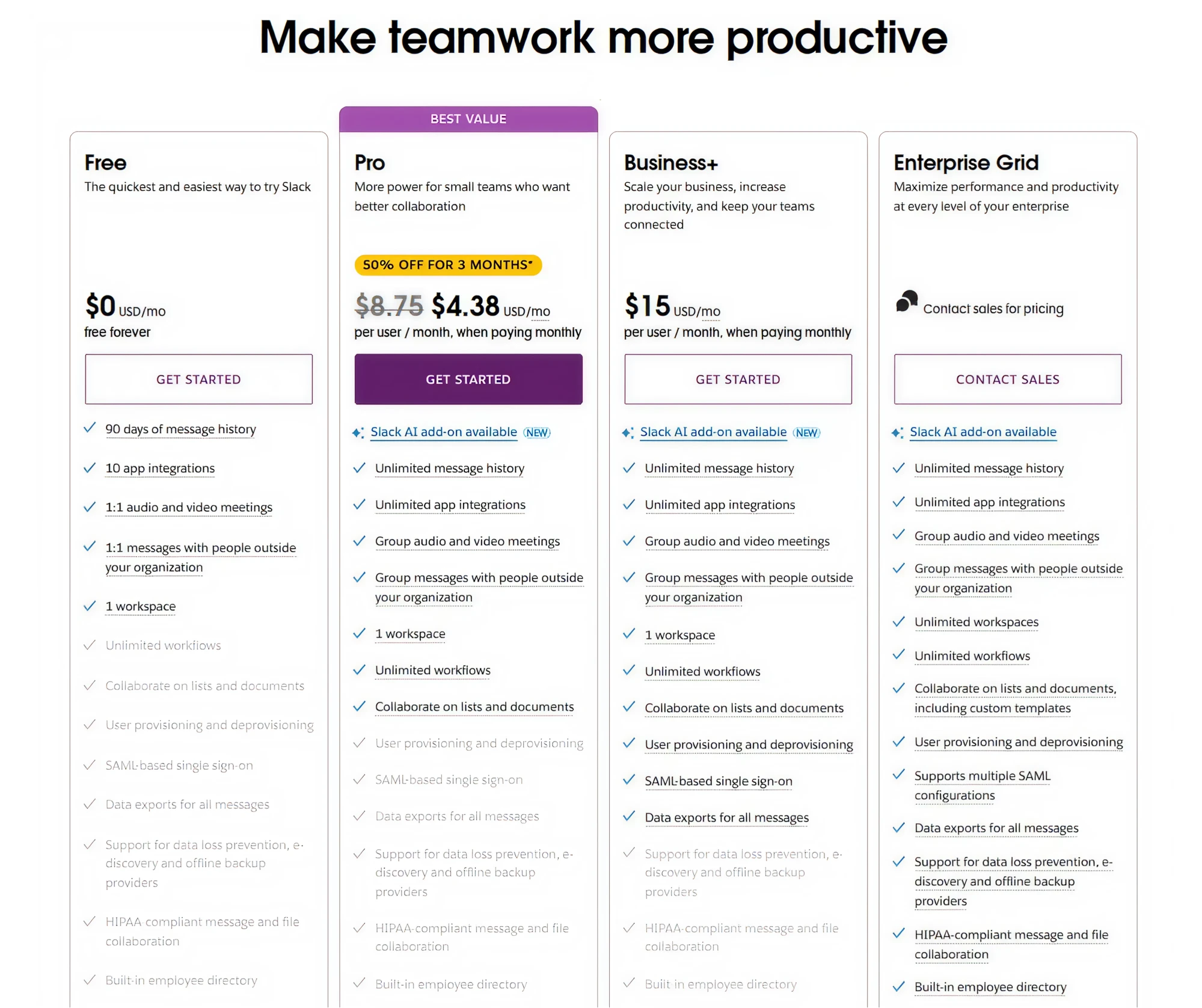
That mirrors our TaskMaster scenario: start with competitor-based pricing to get in the door, then shift toward value-based pricing as your product’s impact becomes clear.
The key lesson here is that discrepancies between pricing models tell a story:
- If value-based is highest, you’ll likely have pricing power if you can effectively communicate value.
- If cost-based is highest, it’s a signal to reduce costs or settle for a leaner margin, at least early on.
- If competitor-based is highest (rare, but possible), the market might be overpriced, giving you a chance to undercut.
Next up, we’ll talk about how to refine your pricing through experimentation and iteration.
Improving pricing outcomes
Pricing isn’t one-and-done. It’s about testing, learning, and adjusting over time. Even the most innovative pricing strategy will underperform if you put it and forget it.
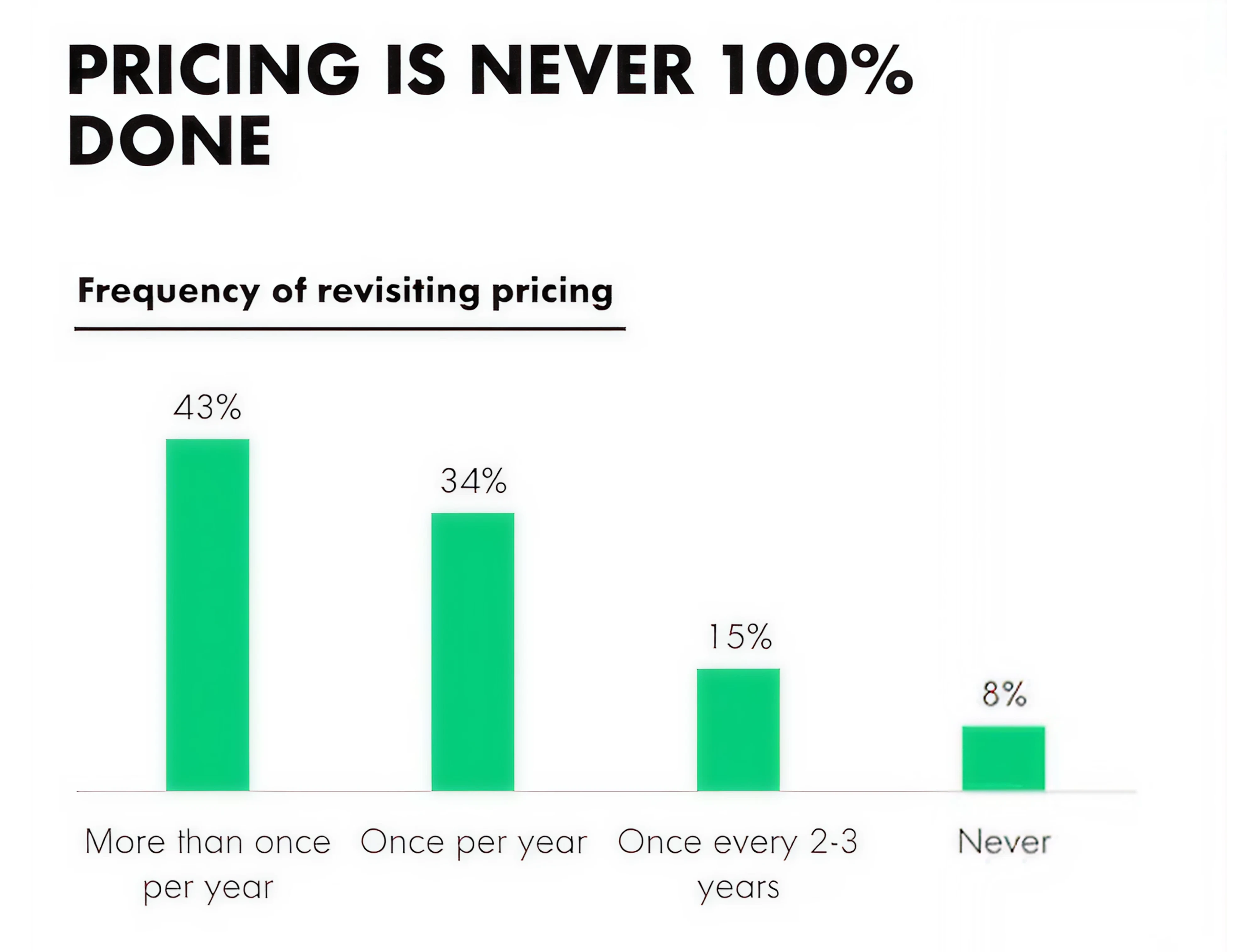
Nearly 80% of SaaS companies update their pricing at least once a year. Many tweak it more often. While early-stage startups tend to adjust frequently as they search for fit, even mature companies revisit pricing annually to stay aligned with market shifts and evolving value.
Here are a few ways to improve your pricing over time:
1. A/B test price points and packages
You don’t have to guess, test. Try different price points, feature bundles, or even plan names. See what converts better.
For example, TaskMaster might test $30 vs. $35 for its Standard plan, or trial a “Productivity Plus” package that includes AI features.
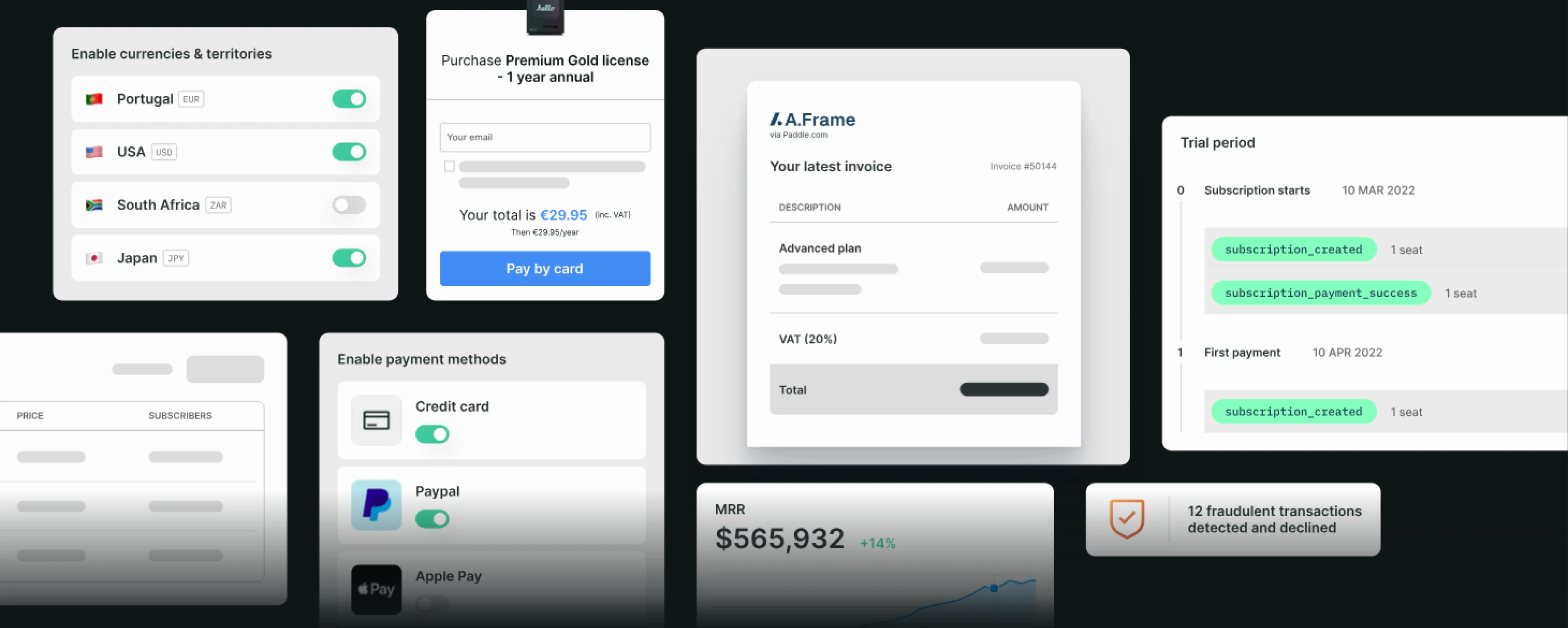
Modern product pricing tools like Paddle and Baremetrics, or even simple manual experiments, can facilitate this. Some companies also test bundles vs. à la carte add-ons, or monthly vs. annual pricing emphasis. The goal is to use real market responses to fine-tune prices.
2. Talking to your customers
Your analytics can tell you what’s happening, but only customers can tell you why. So ask them:
- How do they feel about your pricing?
- Does it seem fair? Confusing? A stretch?
- What would make this feel like a no-brainer at this price?”
You’ll uncover more in a five-minute conversation than in hours of spreadsheet SaaS cost analysis.
Also, look at the signals:
- Are trial users bouncing? Ask why in exit surveys. Poor SaaS user onboarding might be part of the problem. It’s hard to assess value if users don’t fully understand the product.
- Is no one buying your premium plan? Maybe it’s overpriced, or the value isn’t clear.
- Did churn rise after a price bump? Time to reassess.
- Are most users choosing your cheapest plan and ignoring the premium one? Maybe the upgrade isn’t worth it to them, or maybe you haven’t made the value obvious enough.
- Seeing a spike in churn after a price bump? That’s feedback, too.
3. Right SaaS metrics
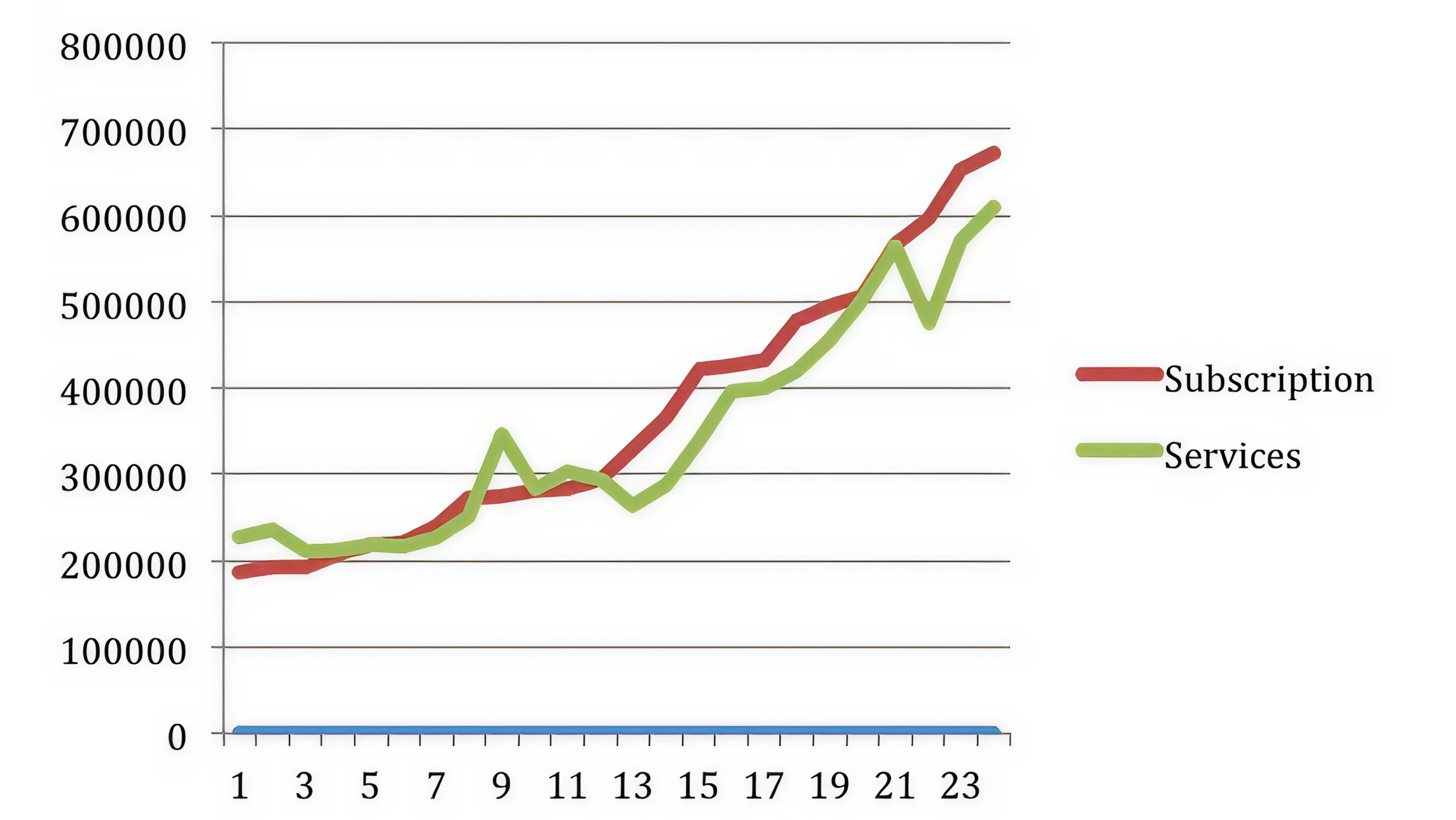
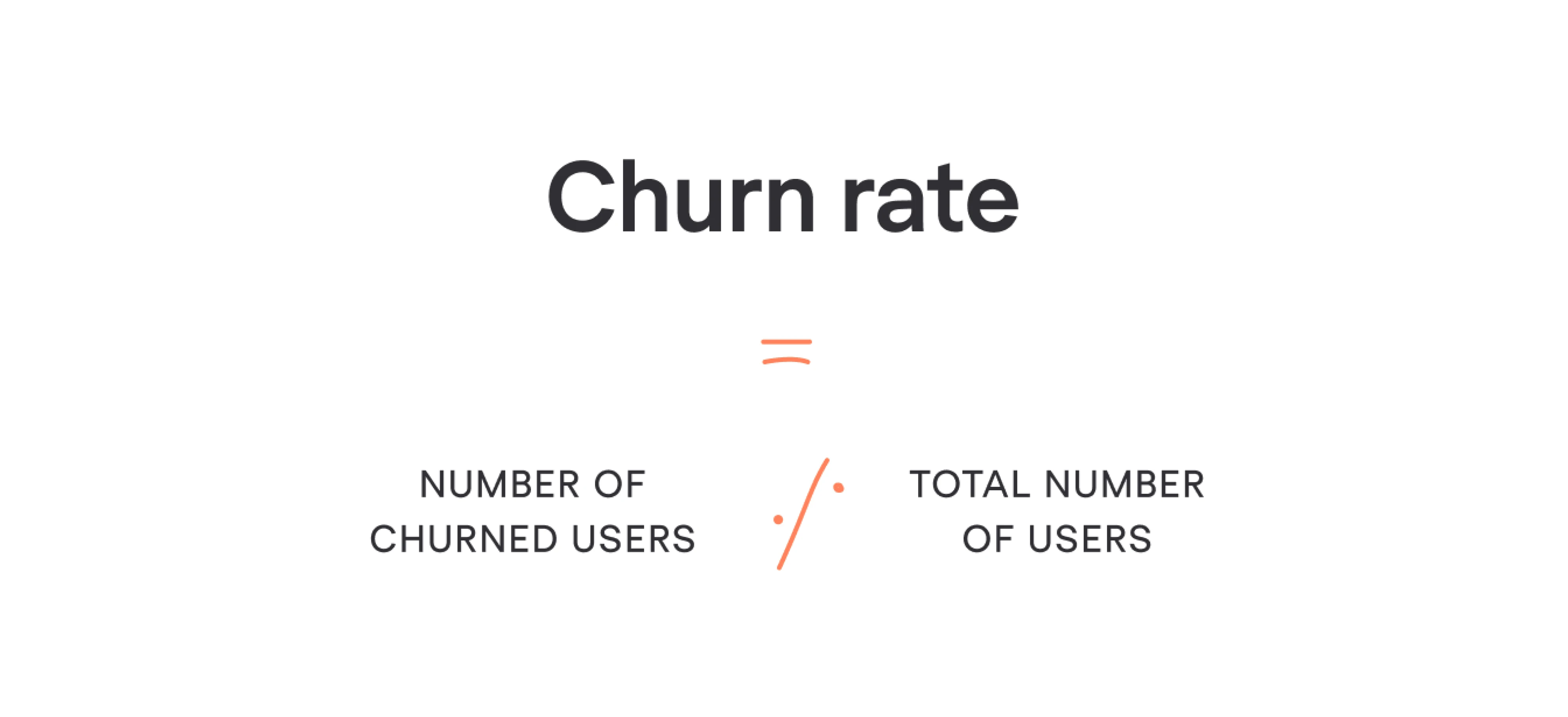
Monitor key metrics, such as CAC SaaS, conversion rates, SaaS churn rate, and upgrade rates, before and after pricing changes.
A higher price isn’t a win if it tanks activation. But sometimes a price increase boosts perceived value and doesn’t hurt conversion at all.
TaskMaster might notice churn drops among users on the higher-tier plan, likely because they’re more committed or perceive greater value. That’s a strong signal that the premium plan is doing its job. And yes, churn rate is a key SaaS metric worth watching closely.
4. Customer interviews and surveys
Beyond passive feedback, actively reach out, especially after someone has used your product for a while, ask if they feel it’s worth the cost, and how they’d feel if the price were higher or lower.
You can glean if you’re underpricing (customers saying “Honestly, we’d pay more, it saves us so much”) or overpricing (“We like it, but it’s a bit expensive for what it does”).
TaskMaster might discover, for example, that users aren’t utilizing the AI feature enough to justify the premium price, which could mean either repricing the premium tier or increasing the feature’s value.

5. Market research and trend analysis
Keep an eye on the competitive landscape and broader market trends. SaaS software pricing can be dynamic: what was an acceptable price a year ago might creep upward if, say, inflation rises or if your category of software demonstrably delivers more ROI now.
If you’re tracking these with a SaaS dashboard, you’ll spot trends faster and identify where pricing may be creating friction.
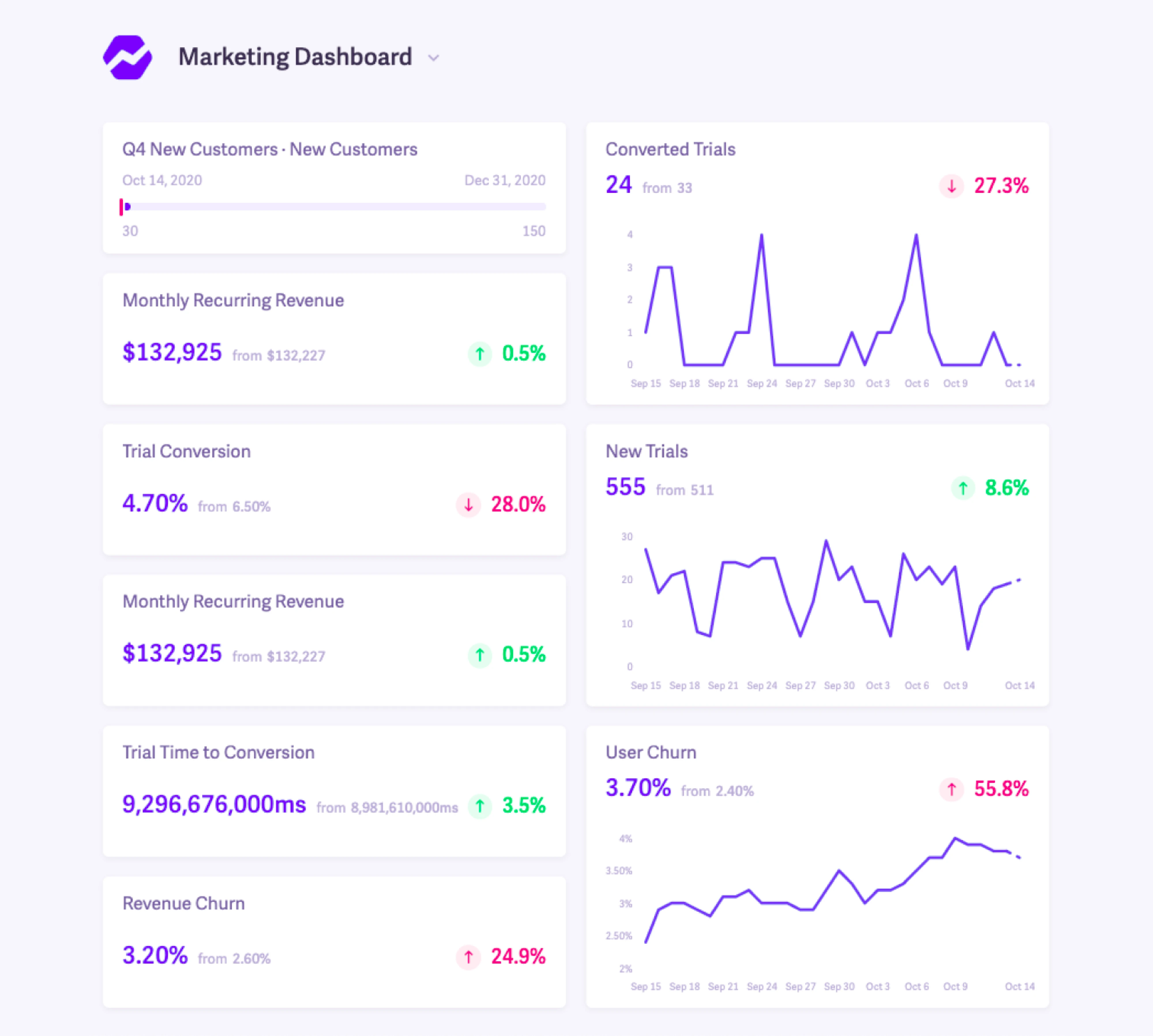
Also, watch for new entrants or competitors changing their pricing. If a competitor dramatically lowers their price or offers an aggressive discount, you don’t necessarily need to match it, but you should understand why.
Perhaps they’re targeting a different segment, or their product is less robust. Use that info to double down on your differentiation.
Conversely, if competitors are all raising SaaS prices and you have room to do so, it might be a chance to adjust yours as well.
6. Refining segmentation and packaging
Smart segmentation boosts customer retention by ensuring users feel they’re getting the right value at the right price.
But it’s not always about the price tag itself. Sometimes, the problem is how your features are packaged. Maybe users aren’t upgrading because key value drivers are locked behind the wrong tier.
As shown below, SaaS companies use various packaging strategies, from all-in plans to build-your-own modular pricing.
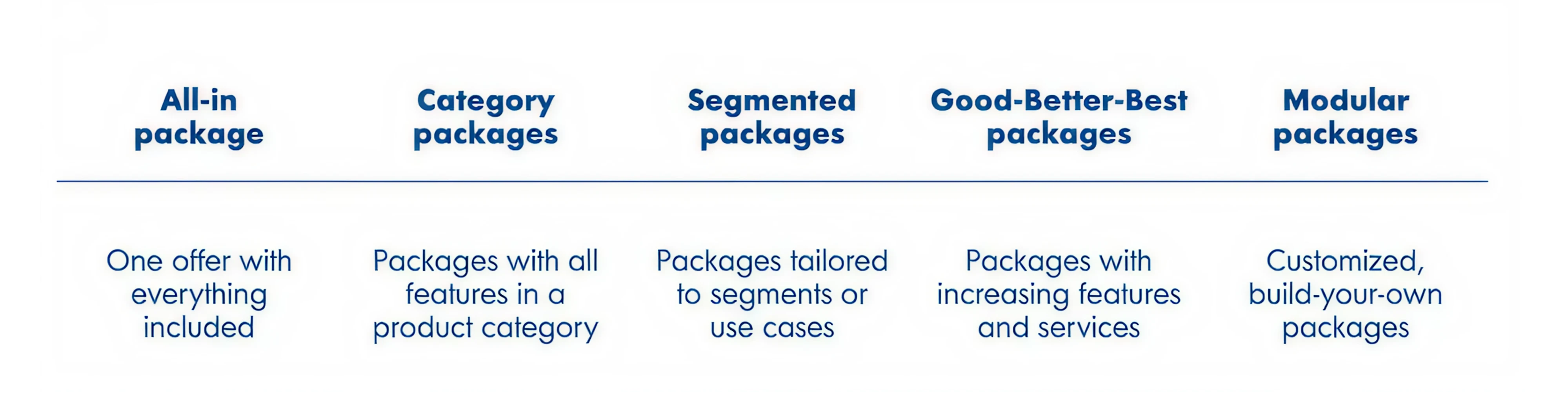
Use this framework offered by OpenViewPartners to explore what might work best for your audience, and don’t be afraid to test variations over time.
You might find that by moving a key feature from the premium plan down into the standard plan, you dramatically increase conversions at that tier, and then you can upsell those customers on other value later.
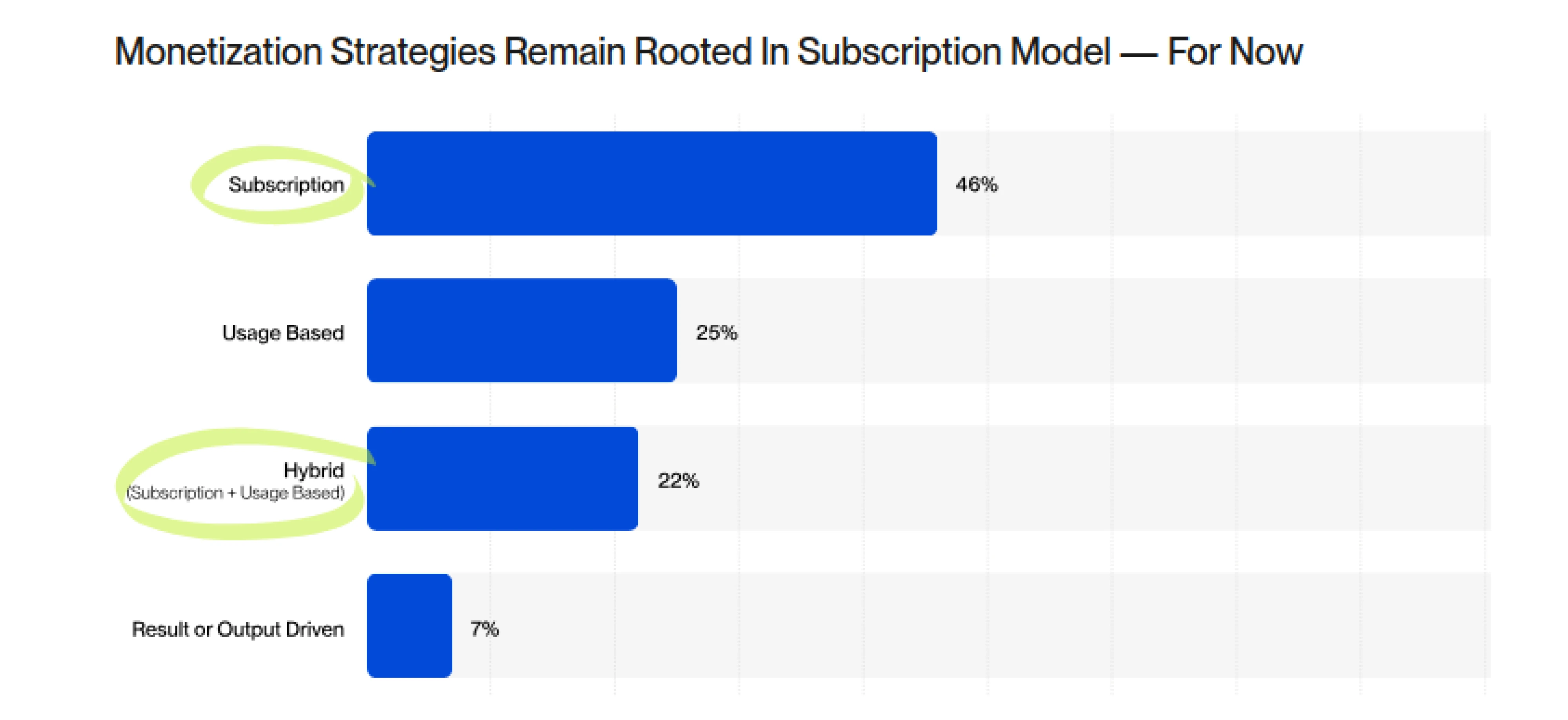
Continually ask if your pricing model (flat per-user, tiered, usage-based, etc.) is the best for your SaaS customers’ success and your revenue. Optimization could mean a model change, not just a price change.
Value-based pricing is iterative by nature. As your product evolves, customer needs shift, and your brand matures, your pricing should evolve too. Treat it like a product in itself, something you’re constantly improving.
A few tools and resources to go deeper into SaaS pricing strategy are coming up.
7. Additional resources
Pricing is tricky, but you don’t have to figure it all out on your own. Here are a few tools, frameworks, and reads that can help you dig deeper or experiment smarter:
- SaaS Benchmarks Report by High Alpha: Great for comparing pricing strategies, ARPU, and churn across SaaS companies.
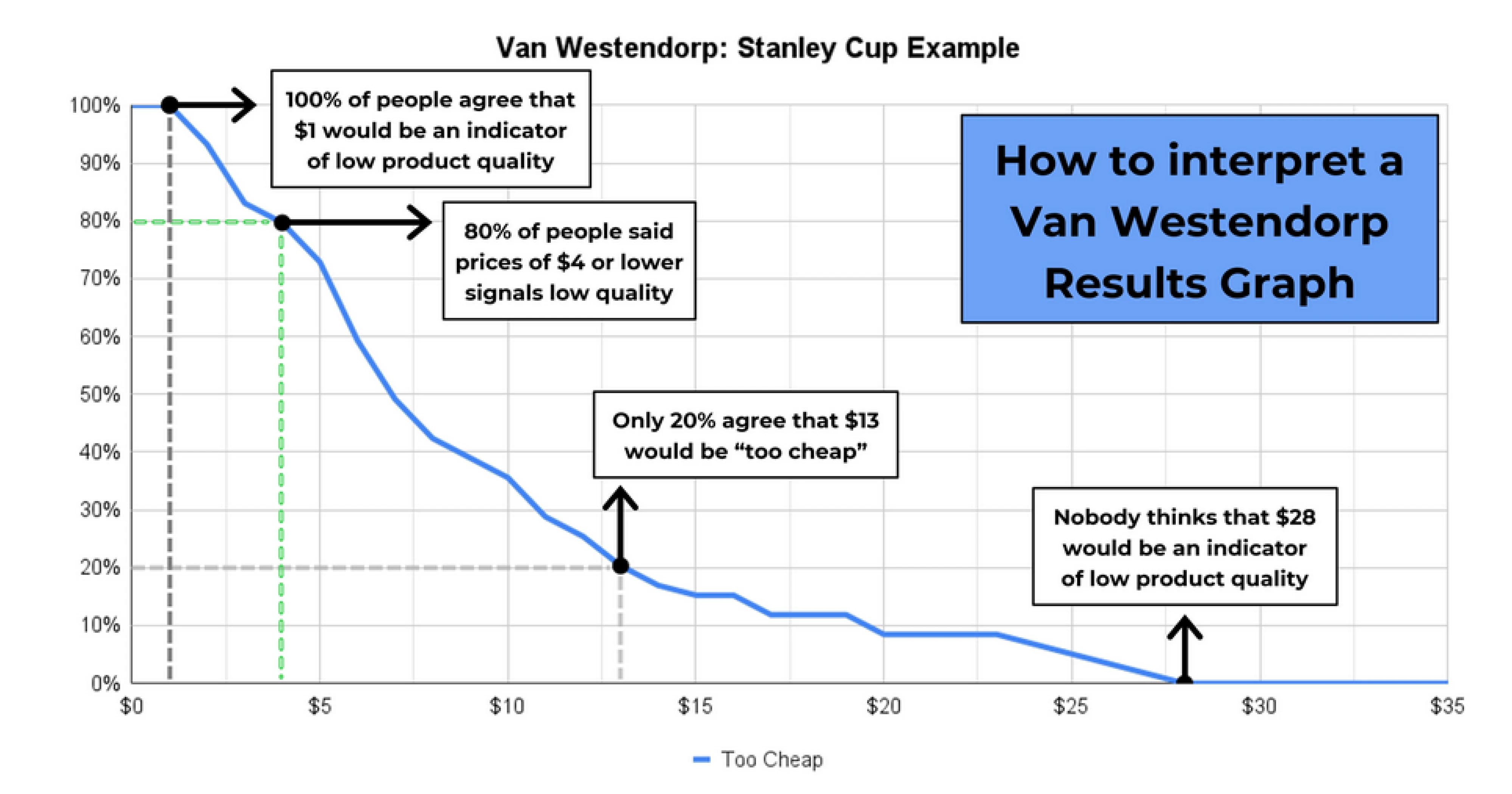
- Van Westendorp pricing model: A survey-based approach for identifying perceived value ranges. Handy if you want to get scientific about willingness to pay.
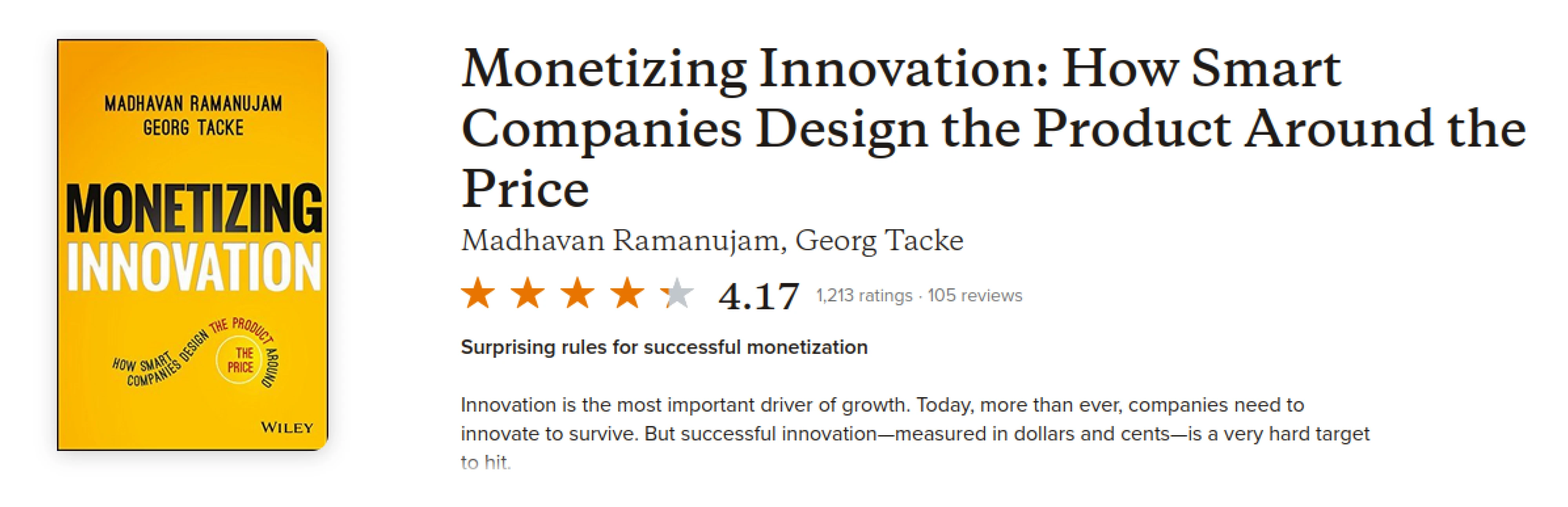
- “Monetizing Innovation” by Madhavan Ramanujam: A deeper dive into building products around what customers are willing to pay.
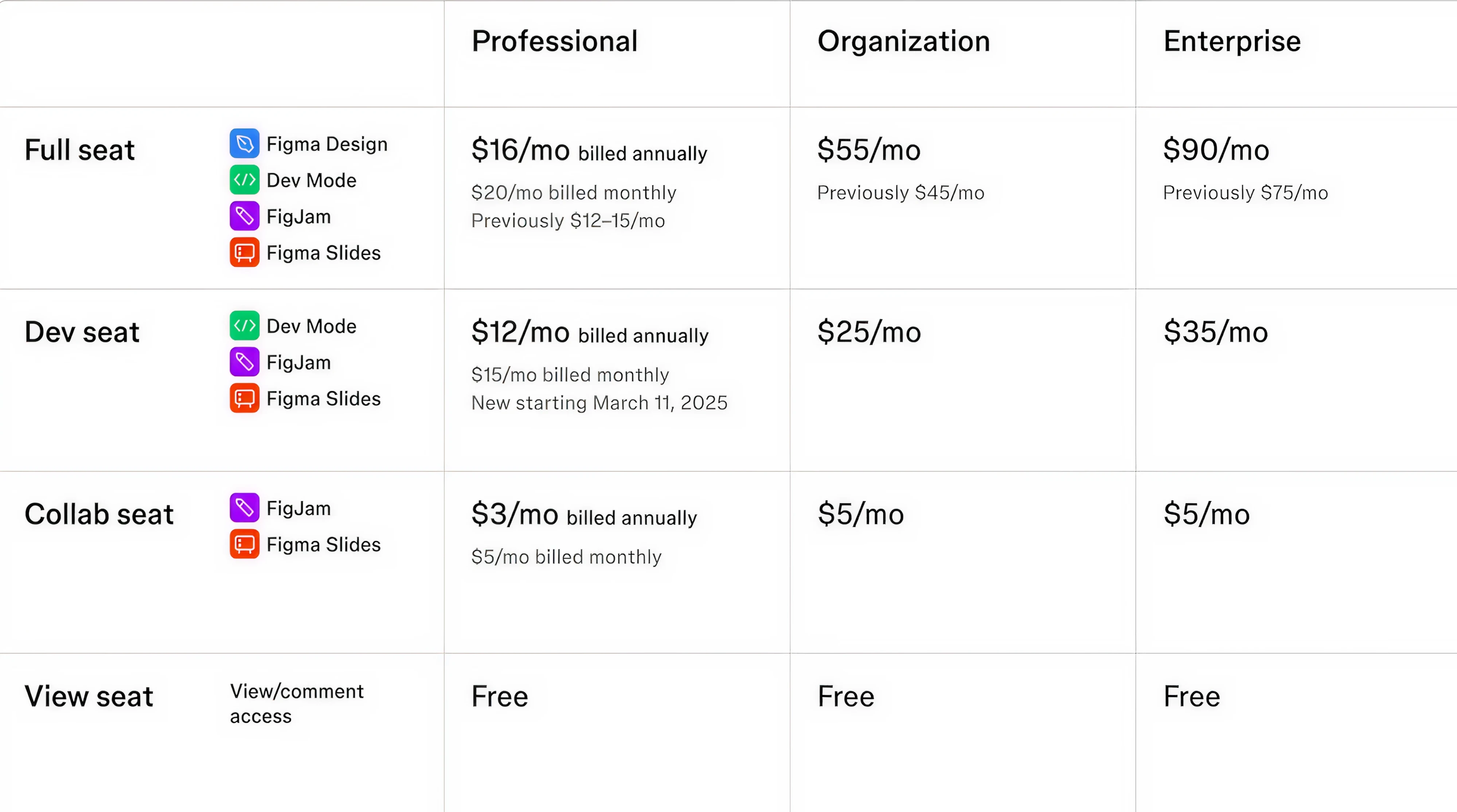
- Figma’s pricing evolution: A good example of tiering, packaging, and premium upsells done right.
- Eleken SaaS calculators: A set of simple tools, such as CAC calculator, LTV calculator, and Churn Rate calculator, designed by our team to help you make smarter pricing decisions. You can compare cost-plus, competitor-based, and value-based models side by side, or use the tiered pricing calculator to test different plan structures and see how pricing scales with user segments.
Pricing is a craft, not a checklist. The more you learn, test, and adjust, the better it gets.
From insights to action
The SaaS pricing calculator gives you a starting point. It shows you where you stand through three different lenses:
- Cost-based grounds you in sustainability.
- Competitor-based keeps you market-aware.
- Value-based pushes you toward long-term upside.
But the real magic happens when you take these insights and act. So, use Eleken’s SaaS pricing calculator, test, talk to customers, adjust, and iterate.
Run the numbers, then turn them into smarter decisions.
And if you need a partner to help design a pricing experience that’s not just functional, but actually converts, Eleken’s here to help.